Apple shows off iMovie, GarageBand for iPad 2
 AppleInsider Staff
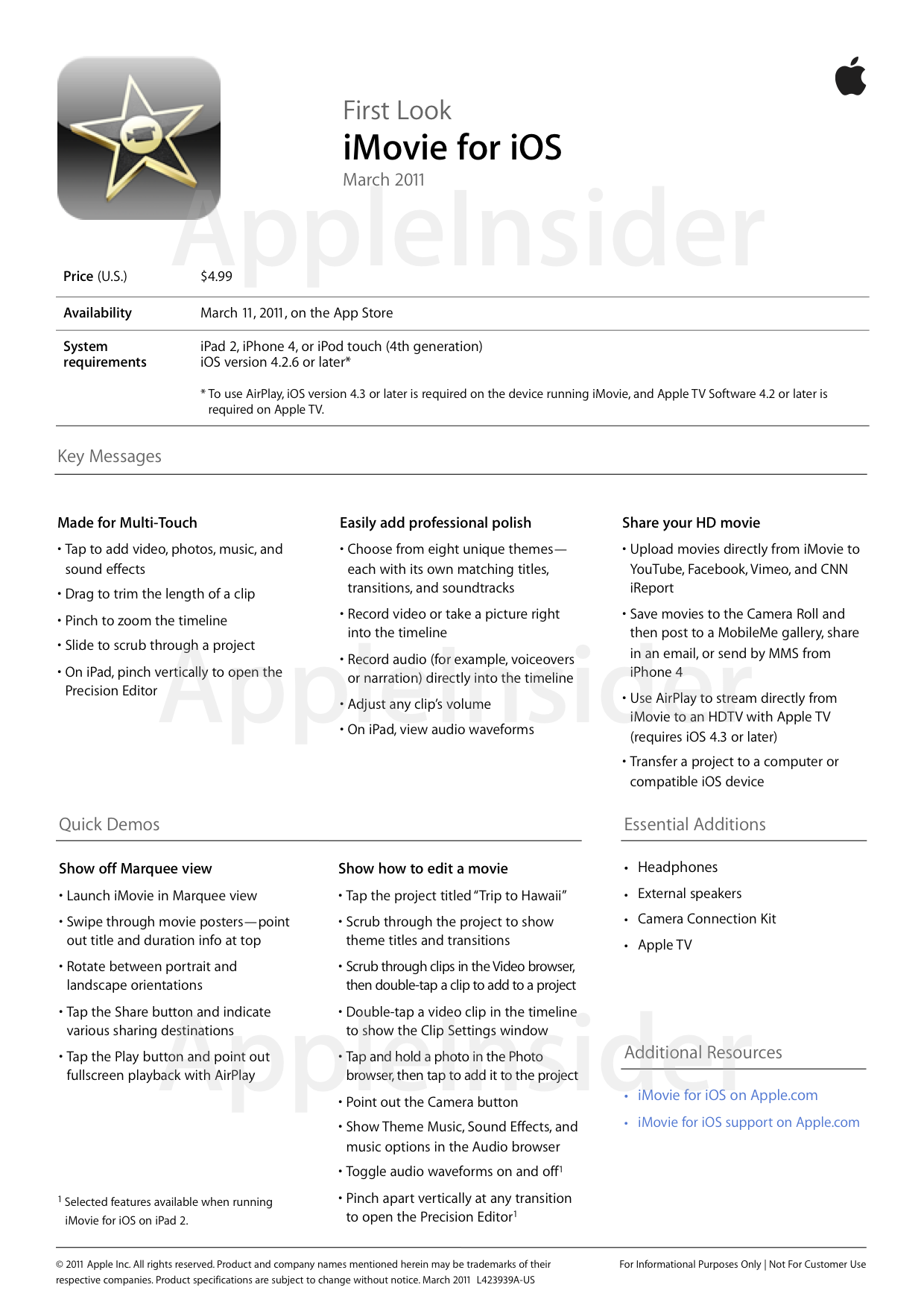
iMovie
Apple demonstrated a new version of iMovie for iPad, allowing users to edit videos on the go. The updated software will take advantage of the larger display on the iPad, versus its iPhone counterpart.
iMovie for iPad will also utilize the dual cameras found on the new device, which can be used to record 720p video at 30 frames per second. Users can also share their videos from within the application with sites like YouTube, or even publish on iTunes.
Features of iMovie, according to Apple, include:
Add a touch of Hollywood: Make your movie look like a mini-blockbuster with one of eight unique themes that give your video an unforgettable look. Three new themes — Neon, Simple, and CNN iReport — provide more ways to enhance your project. And each theme includes great titles, transitions, and an accompanying soundtrack.
Give it your best shots: Choose the best photos taken with the built-in camera in your iOS device and drop them into your project. Or add photos you synced to your device. iMovie customizes each shot with a Ken Burns-style panning effect that uses face detection to keep faces in the frame. And now you can enhance your snaps with graphics and text by selecting from a variety of title styles in each theme.
Let your fingers do the fine-tuning: If you’re using iMovie on iPad, just pinch open any transition to reveal the Precision Editor — right in the timeline. It’s easy to to see where one clip ends and another begins, so you can tap and drag to make advanced edits with pinpoint accuracy.
Create the perfect soundtrack: iMovie gives you lots of ways to add a little ear candy to your projects, from soundtracks and sound effects to direct audio recording from the microphone in your iOS device.
Add some sound to your sights: Cue the laughter or the tears with background music and a collection of fun sound effects. Choose from eight soundtracks that match the look and feel of iMovie themes, or browse and select a tune from your own music library. With over 50 sound effects, iMovie lets you dial up the drama in every parting or pratfall.
Cover all your tracks: Hit all the right notes with visual editing of your soundtrack. Drag to add, delete, and rearrange audio clips. Easily adjust the volume of any audio track. Add multiple background songs or loop a musical selection to fill out your project. iMovie automatically fades out the music at the end of your movie for maximum effect. And iMovie on iPad even lets you see audio waveforms for every clip in your project, so you can edit with more precision.
Tell your story your way: Narrate the action or create your own soundtrack by recording audio directly into your movie’s timeline using the microphone in your iPad, iPhone, or iPod touch. The live level meter lets you monitor your recording volume. It’s easy to review, discard, re-record, or accept each take.
Share the drama: What’s a great movie without an audience to enjoy it? iMovie makes getting your project to an adoring public (or to another iOS device) simple.
Share on the web: When it’s time for your big premiere, publish right from iMovie to YouTube, Facebook, Vimeo, or CNN iReport for your friends and family to see. Add descriptions and keywords — even set viewing access for exclusive screenings — all within the app. Or send your movie to the Camera Roll and publish it in your MobileMe gallery, attach it to an email, or send it via MMS on iPhone 4.
Share in your home: Use AirPlay to enjoy your creations on your HDTV by streaming directly to Apple TV.* Or export movies to the Camera Roll and sync them back to your Mac or PC. iPad 2 also supports mirroring, so you can use the Apple Digital AV Adapter (sold separately) to play your movie on your HDTV or a bigger projection screen.
Share among devices: Want to shoot with an iPhone and edit on an iPad? No problem. You can transfer your iMovie projects between compatible iOS devices via iTunes.
The universal application will also be updated for the iPhone and iPod touch, and it will be available on March 11 for $4.99.
GarageBand
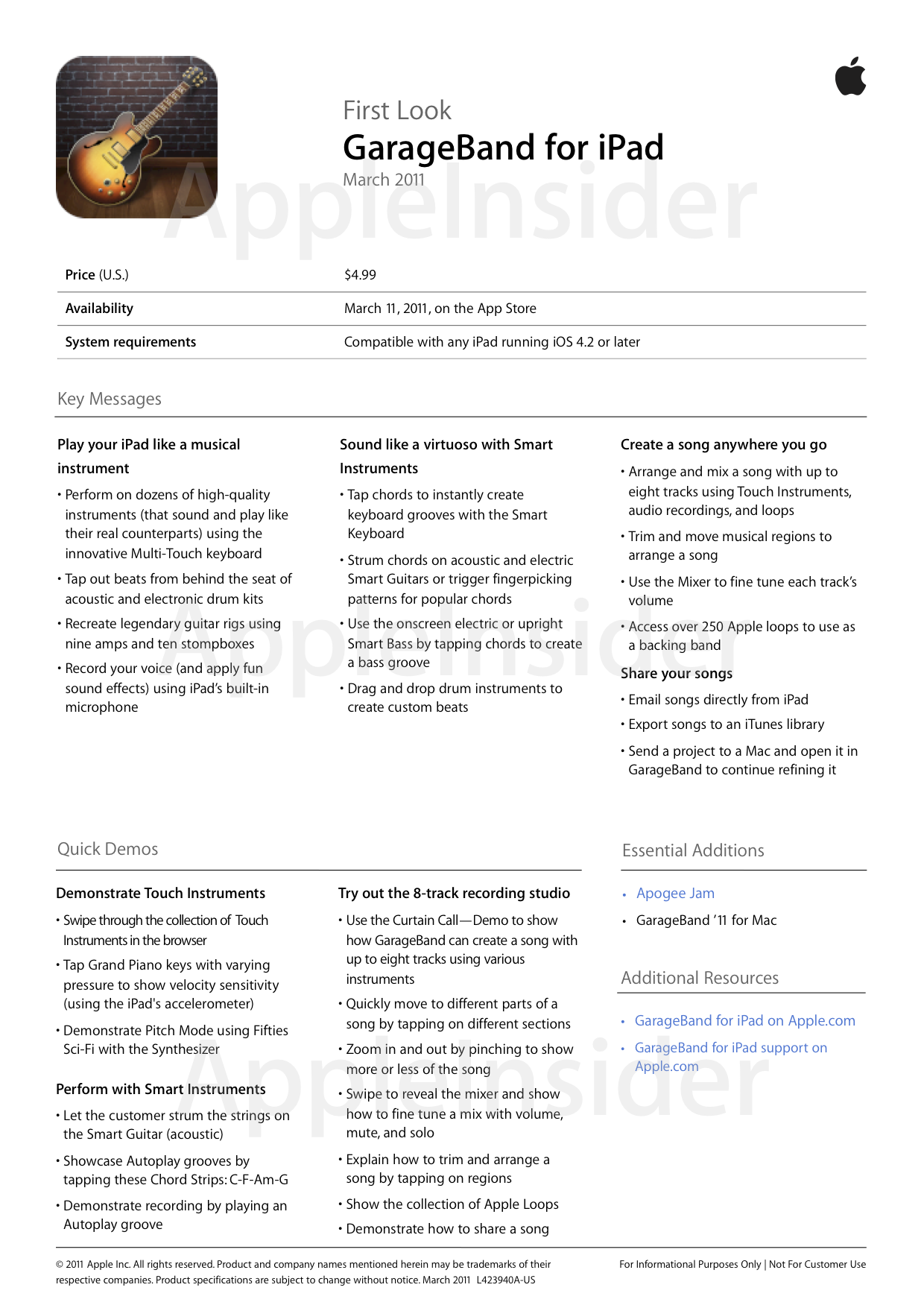
GarageBand for iPad comes complete with touch instruments that emulate a grand piano, organ, guitars, drums and bass. Users can also take advantage of guitar amps and effects in the mobile multi-touch software. Smart instruments will also allow users who do not know how to play an instrument to learn or make music.
GarageBand also offers 8 track recording and mixing, and will feature more than 250 loops. It will have shared compatibility with the Mac version, and users can e-mail their creations as an AAC file from directly within the software.
Features of GarageBand for iPad, according to Apple, include:
Touch Instruments: Play a collection of highly expressive musical instruments designed for Multi-Touch that sound and play just like their real counterparts, but let you do things you could never do on a real instrument.


Smart Instruments: Enjoy a full range of Smart Instruments that make you sound like an expert musician. Even if you’ve never played a note before.
Recording studio: Make tracks anywhere you go. Arrange and mix your songs anywhere inspiration strikes using a powerful eight-track recording studio that can handle any combination of audio recordings, Touch Instruments, and loops.

Sharing: GarageBand for iPad makes it easy to email your song from your iPad, or export and add your song to your iTunes library. You can even send a project to your Mac and open it in GarageBand to keep refining your song.










 Mike Wuerthele

 Malcolm Owen
 Chip Loder

 William Gallagher
 Christine McKee
 Michael Stroup






19 Comments
GarageBand looks very cool, but is it being released for iPhone?
Looks great.
So I guess the "velocity-sensitive" keyboard is precisely calibrated to how much the device would actually move when suspended from the cover? Nice.
The apps are very nice, but their importance goes beyond the fact that Apple produced them. jobs's challenge to third party developers to do better indicates that this new model will have capabilities that will allow much more powerful apps than the first version.
I was a bit disappointed though that Apple didn't come out with a version of Aperture. I know Adobe is working on something like Lightroom, but they won't announce publicly.
I'm confused as to whether these apps work for iPad 2 only or the original iPad as well.
I'm pretty sure iMovie would be just for iPad 2 because of the computing power it needs, but GarageBand?
The new web site for these apps seems to be ambiguous - no hardware requirements are mentioned.
I think GB would be really fun to play with and I'd really like to try it without having to buy another iPad ...
D