Inside Apple's new multitouch Magic Mouse
 Prince McLean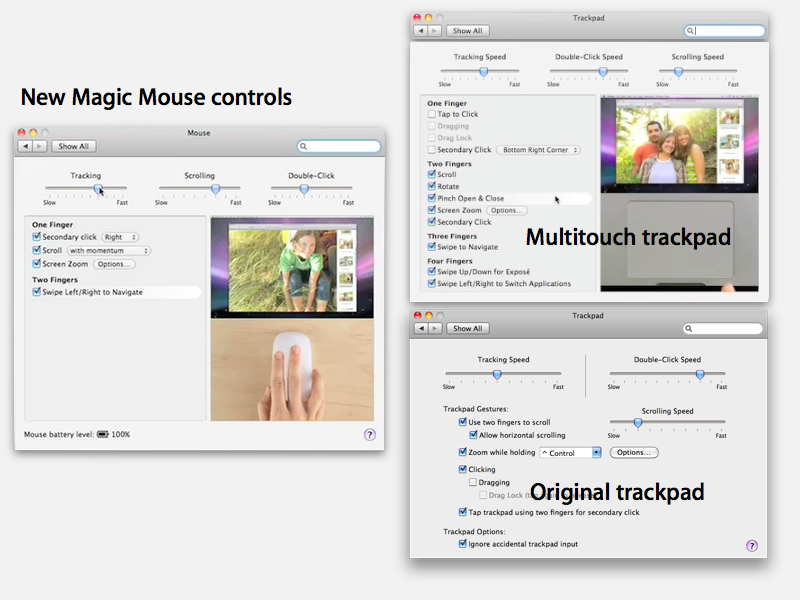
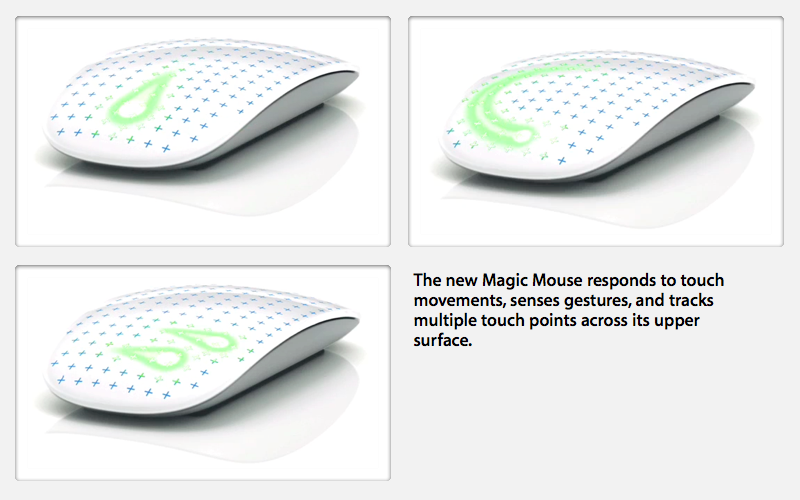
The new design presents a solid acrylic surface on a low-profile body, lacking any physical buttons or the scroll ball of Apple's previous Mighty Mouse.
More significantly, it shifts the use of the mouse from sensing movement of the device itself over a surface, to one where the user's fingers are sensed as they move across the surface of the device. The new mouse still uses laser optical tracking to find its relative coordinates, but the new multitouch surface turns it into a closer cousin of the trackpad.
The multitouch features of the new Magic Mouse are more closely related to those on the MacBook trackpad than the iPhone. For example, both are designed to accommodate secondary clicks ("right clicking"), something that has no analog on the iPhone. Because finger position is sensed in software, the user can configure secondary clicking for contextual menus to respond to either right or left handed contentions. Like the earlier Mighty Mouse, users can also disable secondary clicking entirely.
The feature differences between the new Magic Mouse, the multitouch trackpads on the latest MacBooks, and the conventional trackpad on earlier notebook models are evident from the preferences presented for each (below).
Scrolling
The new Magic Mouse points and scrolls slightly differently than a MacBook trackpad: it points like a conventional mouse by begin moved over a surface, and can scroll within windows by using one finger on its top surface. The immobile trackpad interprets one finger as pointing, and two fingers as scrolling.
In contrast, the iPhone responds to touch directly as pointing, and scrolls with a single-fingered flick. This momentum-based flick scroll speed feature is adopted by the new Magic Mouse, allowing the user to scroll faster than real time. Trackpads currently don't support this; their existing behavior ties scrolling speed directly to finger speed. Momentum-based scrolling can be disabled as a preference.
Like both trackpads and the iPhone, the new Magic Mouse also supports "360 degree scrolling," allowing smooth up/down and left/right scrolling within a window at the same time.
Zooming
Zooming into the screen (blowing up the display on Mac OS X) works just like existing MacBook trackpad controls; it requires holding down a user selectable key while scrolling. This makes sense because zooming into the screen is not as natural on the Mac desktop as it is on the iPhone, where the small screen and lack of desktop controls or menu bar makes the iPhone's double tap or pinch to zoom features more of a necessary and common request. Zooming on the desktop is more of a fluff novelty feature for most users.
Differences from multitouch trackpads
The trackpad also differs from the Magic Mouse in providing clicking, dragging, drag lock, and two finger secondary clicking options. Performing these actions with a mouse involves moving the mouse itself; the trackpad can only respond to finger touches.
The Magic Mouse does respond to two-fingered swipe gestures for navigating back and forth through webpages or photos or Cover Flow items, similar to the multitouch trackpads (which use three fingers for this). It does not however currently support four-fingered Expose (up/down) or app switching (left/right) shortcuts, and pinch rotation or pinch zooming.
These differences in scrolling behavior are likely based on the limited surface area available on the new mouse. It's also possible that Apple will expand upon the gestures supported by the device's software.
To boldly go where other vendors wouldn't dare
In typical Apple fashion, the new Magic Mouse now only comes in one form: a wireless Bluetooth version. If you want a USB-attached version, the only option is the old Mighty Mouse, which has been renamed Apple Mouse to avoid conflict with another vendor's trademark claim on the former name.
The new wireless Magic Mouse is $69, while the old wired model is $49, which makes it perhaps the most ridiculously priced product in Apple's store. Clearly, Apple doesn't want to monopolize the Mac mouse business, but only wants to provide a differentiated high-end offering. That should appease the third party market for mice and mouse alternatives.
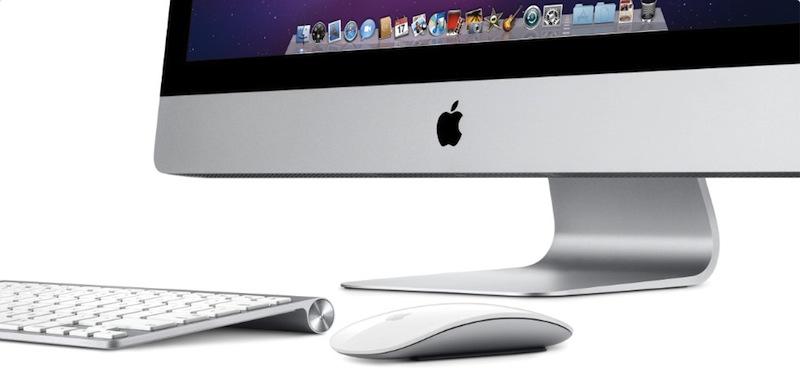
Buyers of new iMac computers will find that the new Magic Mouse wireless keyboard and are now standard equipment; users can still opt for the USB-attached keyboard (which supplies a full numeric keypad) and (separately) a conventional wired Apple Mouse with the old scroll ball design, but this option doesn't make the package any cheaper as it formerly did. Or more precisely, the Bluetooth keyboard and mouse option is no longer a premium-priced extra.
The Mac mini and all notebook models ship without a keyboard or mouse, so adding either version costs extra. Mac Pro systems continue to ship with the standard Apple Mouse and keyboard with numeric keypad, so upgrading to the Magic Mouse costs $20 extra, and opting for the Bluetooth keyboard costs another $20.
Interestingly, Apple now also offers a new USB compact keyboard without the numeric keypad as a no-cost alternative to the regular USB keyboard on all of its systems.










 Mike Wuerthele
 Malcolm Owen
 Chip Loder

 William Gallagher
 Christine McKee
 Michael Stroup
 William Gallagher and Mike Wuerthele