Review: WiFi-enabled Eye-Fi Geo SD card tags Places for iPhoto
 Prince McLean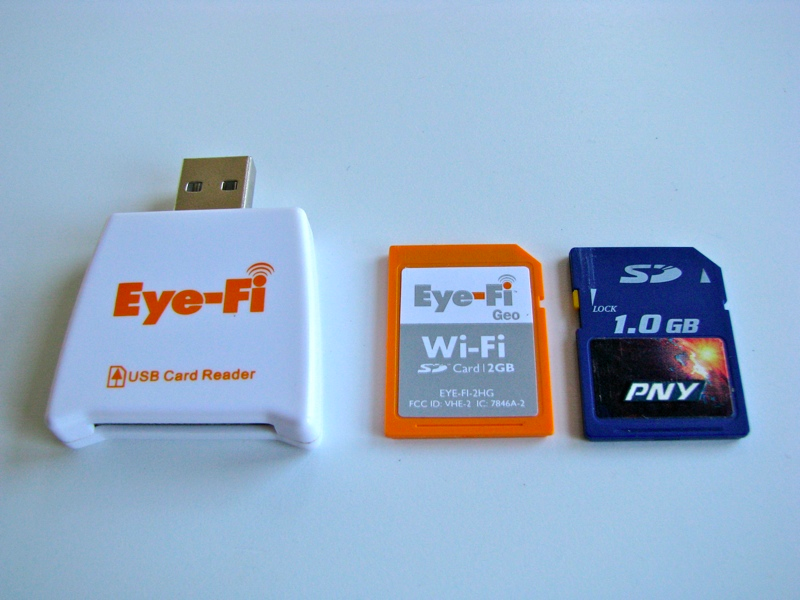
Eye-Fi Geo
3.0 / 5The Eye-Fi Card family
Eye-Fi sells a variety of WiFi-enabled SD cards, but the Geo is a new package designed for exclusive sale within Apple's retail stores. There seems to be too many options in Eye-Fi's offerings, with too little reason for all the differentiation. Essentially, the Geo card bundles the features Mac users will probably find most valuable: wireless delivery of pics from your camera to your computer, and iPod touch-style geotagging; Eye-Fi's other subscription features can be purchased separately.
For example, the Geo card is a step above the Eye-Fi Home model ($50/2GB), which only supports wireless photo transfer to your PC from your camera (but not geotagging). Geo is also offered as an alternative to the similarly-priced Share versions ($60/2GB or $80/4GB), which include the Home's wireless camera downloads and add WebShare, a direct-to-web feature that uploads photos you take to your Flickr, Facebook or MobileMe account right from your camera (but again, Share models don't offer geotagging).
Unlike the Share cards or the pricier Explore models ($80/2GB or $100/4GB), the Geo card doesn't include WebShare, as Mac users are likely to want to publish their pictures from within iPhoto after editing them. You can still subscribe to WebShare for a $10/year fee that adds the direct sharing features to the Geo card. The Geo also lacks the Explorer card's bundled HotSpot Access plan, a year long subscription to WayPort's 10,000 WiFi hot spots that allow you to automatically join any of its available WiFi public access points to either send your photos back to your computer or upload them to the web via WebShare. This option can be purchased separately for $15/year.
Wireless SD photo delivery
The first Eye-Fi Geo card feature promises to save you the effort of having to pop the SD card out of your computer and plug it into your Mac (or alternatively connect a USB cable) every time you want to upload pics to iPhoto. This is both handy and quick once you set it up. It involves installing Eye-Fi Manager, an app that listens for your Geo card-equipped camera and downloads any photos you've taken. The app is included on your SD card, so you only need to plug it in (using the bundled USB-SD card reader, below, next to the Geo card and a generic SD memory card) and launch its installer.
During the installation, you configure a folder on your local computer to serve as a photo destination location for the card to send your photos. The card will subsequently deliver pictures to that folder wirelessly as you take them, as long as the card is within WiFi range. Of course, for the to login to your WiFi network, you also need to provide your network(s) login details during the installation. The card (just like an iPhone) only supports 802.11b/g networks, so if you are running a faster 802.11n-only network, it won't be able to see it.
You can add additional WiFi network logins for other locations you might be shooting pictures in, but you must set these up with the software and then sync them to the card when it is physically connected via the USB adapter. You can't upload new WiFi configurations directly to the card. If you've snapped some pics outside of WiFi coverage, the next time you take a photo from the camera it will push all your queued up photos to the local folder on your computer automatically.
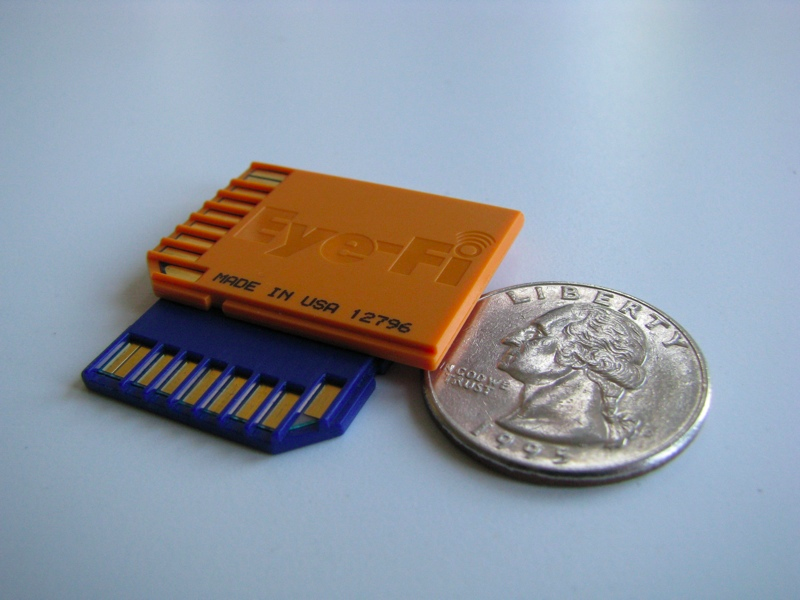
In order for the card to successfully upload the photos taken by your camera, you may need to turn off its power saving feature, so it doesn't go to sleep and power down the Geo card before it has a chance to send out the selected photos. Eye-Fi also lists a variety of cameras that aren't compatible with the cards, although most SD card-equipped cameras are. The company says when using Eye-Fi cards, "battery life will not be noticeably shorter than when using a standard SD memory card." It seems remarkable that the card can pack a WiFi transmitter into a thin SD card (below).
Eye-Fi Manager software
The Eye-Fi Manager software is a combination of menu bar icon (drawn in an unnecessarily distracting Day-Glo orange) and a web-based online service launched from the menu bar icon. The software isn't impossible to figure out, but it feels clumsy compared to what could have been either an iPhoto plugin or a standard standalone Mac app.
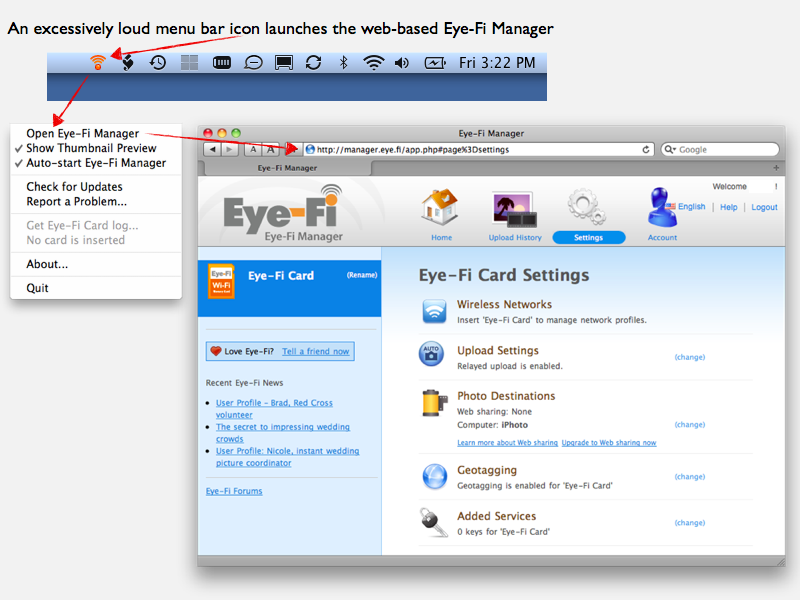
The upside to being web-based is that you can login and access your camera's pictures and the card's configuration from the web. You have to create an account with Eye-Fi during the install process for this reason; subsequently, all the pictures your camera uploads are then sent to your Eye-Fi account on the company's servers. The downside to being an online app is that it doesn't work if you don't have Internet access.
Because the Eye-Fi cards actually upload your pictures to their server, Eye-Fi can then sell you the option to deliver them to your computer (an option bundled with the Geo card at no additional cost) or upload them to one of several web services (that $10/year extra WebSharing feature). The service also unlocks geotagging, which again is included with the Geo card out of the box. This system allows Eye-Fi to also offer other subscription options you can purchase later (including that $15/year HotSpot Access service).
In other words, the Geo card doesn't talk directly to your Mac via WiFi; it uploads photos from your camera to the company's website and then back down to your local computer. Once delivered, the photos don't stick around on Eye-Fi's website, but do remain in a history catalog of thumbnails you can reference (or delete). Delivered photos are not automatically deleted from the SD card itself, so there's no worry that you might lose any pictures due to a failed wireless upload.
You can set the card to either deliver all photos to your desired location (the default setting), or set it to only upload pictures you mark using your camera's "select" option. The desired location can be either a given folder on your system or iPhoto directly. You can also enable a "relayed uploads" feature, which as the software says "your camera and your computer don't have to be on at the same time for your media to transfer. If your computer is off (or inaccessible), the media will be whisked to the Eye-Fi servers. Next time you turn your computer on, the media will be delivered right away."
Once you've run through the installation's configuration setup, you don't really have to deal with the software again. Photos you take using an Eye-Fi-equipped camera almost instantly appear as thumbnails that drop down from the upper right corner of your menu bar in a nonstandard mini-window that then disappears as the upload process finishes. This thumbnail preview can be disabled if you choose.
You can then manually import your photos into iPhoto (or whatever other app you want to use) from the destination folder you selected, or enjoy automatic photo imports into your iPhoto library directly. After changing the configured destination from a folder to iPhoto, the software acted like it wasn't working for a bit and reported a problem, then started working again. The software later crashed unexpectedly in the background while doing nothing, but again worked after restarting it.
The primary downside to the provided software (apart from the occasional glitch) is that it always has to be listening in the background, which requires the bright orange icon in your menu bar at all times. This really needs to be toned down, particularly because the standard convention for all menu bar items is to use an unobtrusive grey scale icon. Eye-Fi isn't the first third party developer to scream for attention from the menu bar, but it shouldn't nonetheless.
On page 2 of 2: Geotagging for iPhoto 09; Eye-Fi Geo Card Product Review Rundown; and Rating.
In addition to the wireless upload feature, the Geo card adds WiFi-based geotagging, which uses the card's WiFi to triangulate its position just like the iPhone and iPod touch do (and as Snow Leopard now does), using the same data from Skyhook Wireless that Apple uses. WiFi location finding isn't nearly as accurate as GPS, but it's a lot more affordable.
Only a few high-end cameras offer built-in GPS tagging. The iPhone 3G and 3GS have GPS onboard, so they can offer more accurate geotagging on the pictures they take. GPS can map your location within several feet, while WiFi triangulation only places you within a few blocks of your actual location. Still, the Geo card's WiFi geotagging is much better than nothing. Using the Geo card in your standalone camera, you can have fairly accurate location data automatically attached on your photos, allowing iPhoto 8 (of iLife 09) to include the pictures in its Places database, just like the pictures you take with your iPhone or other GPS-enabled smartphone.
Skyhook's WiFi location service doesn't require to you login to any WiFi base stations to get a location fix; it simply looks for nearby base stations it knows the location of, and estimates where you are. This means it works pretty well in urban areas but is of no use anywhere there are no known WiFi base stations. Skyhook says it has data for about 70% of the population in the US, Canada, UK, France and Germany, and covers most of the larger metro areas in Europe, with service expanding into urban areas of Asia.
If the Geo card can't determine your location, Eye-Fi says it will either leave the photo untagged or will add the last known location to it. The accuracy of tagged photos will be very similar to the location information offered by the iPhone Maps app (without GPS). However, rather than providing a general circle depicting your location based on how accurate the estimate is calculated to be, the Geo card tags a precise location on your photos that may be off by several blocks, without any indication of how accurate the estimated location is.
You can also add any base stations you know the location of to Skyhook's database, which will improve the accuracy of WiFi locations for your Geo card, iPhone, and everyone else who uses the service.
Correcting the accuracy of a photo's location in iPhoto 8 isn't entirely intuitive; you can't just drag the photo's pin on its Places map. Instead, you have to select the photo or photos you want to correct, pull up the information map panel for the selected pictures, and either type in a known location by name (such as "Union Square" San Francisco), or select the "Find on Map" option, which allow you to "Drop Pin," name the new location, and assign it to your selected photos. This might initially require referencing help.
Eye-Fi Geo Card Product Review Rundown
For users who want to take full advantage of iPhoto 09's Places feature, the Eye-Fi Geo card offers a cheap alternative to replacing your camera with one that offers built-in GPS or WiFi location features. At 2GB, it's not a huge capacity card, and comparable storage-only SD cards can be found for as little as $10. However, with the capacity to automatically upload photos from any known WiFi hotspot, the 2GB storage capacity acts like a ladle rather than a bucket; conceptually, you could shoot, upload, delete, and keep shooting.
Of course, that requires that you pre-program the card to associate itself with your WiFi hotspots. If you're out and about shooting pictures, you'll need a $15/year HotSpot Access subscription to take full advantage of this "upload, empty, and reuse" capacity. Those 10,000 hotspots only work in the vicinity of places like McDonald's and various airport lobbies (but not Starbucks).
Note that you can't simply plugin your laptop's ad hoc WiFi login details for remote shooting and direct wireless sync, as the card won't connect and sync without actual Internet access; it uploads its pictures through Eye-Fi's service, not directly to your computer. That means the card won't deliver your photos to your computer until both your computer and the camera happen upon Internet access (with "relayed uploads" turned on, the camera can upload photos at its first opportunity for later delivery to your computer). The Eye-Fi software also requires Internet access in order to present your latest upload history as recorded on Eye-Fi's servers (of course).
All things considered, the Geo model Eye-Fi is now selling through Apple offers a great bundle of the company's impossibly small WiFi technology, an SD card sufficiently-sided to accommodate plenty of photos (but probably not too many videos), and Eye-Fi's more useful service features: wireless upload and geotagging. Other options are available on an annual subscription basis. Compared to the excessive and somewhat confusing array of product options Eye-Fi offers, the Geo version seems like the best package for most Mac users.
The Geo card itself seems like a reasonably priced upgrade for your existing camera, but the software Eye-Fi provides needs some refinement. The overall software experience seems a bit thrown together, and the garish orange icon is an irritating fixture in the menu bar. While you can turn it off when you're not using it, the point of having a background listener waiting to grab pics as they're available on your camera is a key feature of the Eye-Fi product, so it should be able to do the job unobtrusively.
Rating: 3 of 5

Pros
Wireless photo transfer is quick and handy
Geotagging features work great with iPhoto
Broadly compatible with almost all SD cameras
Hardware works well, no real downsides (such as battery life)
Cons
Somewhat limited card capacity (particularly for video)
Web-based software glitchy and a little confusing
Day-Glo Orange menu bar icon needs to go











 Malcolm Owen
 William Gallagher
 Christine McKee
 Michael Stroup
 William Gallagher and Mike Wuerthele

 Chip Loder