Review: Apple's new iPhone 3G S and iPhone Software 3.0
 Prince McLean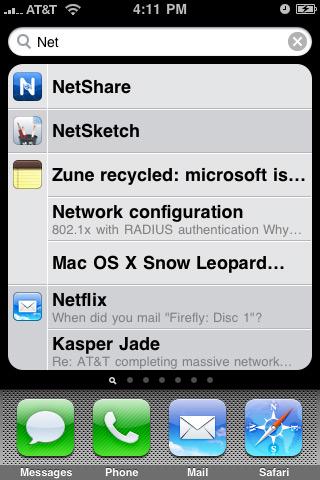
Apple iPhone 3G S
4.0 / 5Jump to a different section
If you're already using an iPhone or iPod touch, you've had several days to try resisting the urge to upgrade. Fortunately, iPhone 3.0 seems to have none of the standout problems that plagued the ambitious iPhone 2.0 release last year. If you own the original iPhone or picked up an iPhone 3G over the past year, the new software is a free upgrade. If you have either model of the iPod touch, the new software is a nominal $9.95.
If you're an iPod touch user and thinking of complaining about that upgrade price, keep in mind that there aren't any apps in iTunes that offer the major upgrade in features of the new iPhone 3.0 software. Also, remember that if you had a music player made by anyone else, there'd be no 3.0 major upgrade to obtain, let alone for just $10.
AppleInsider has previously covered new features in the iPhone 3.0 software, but here's a brief refresher:
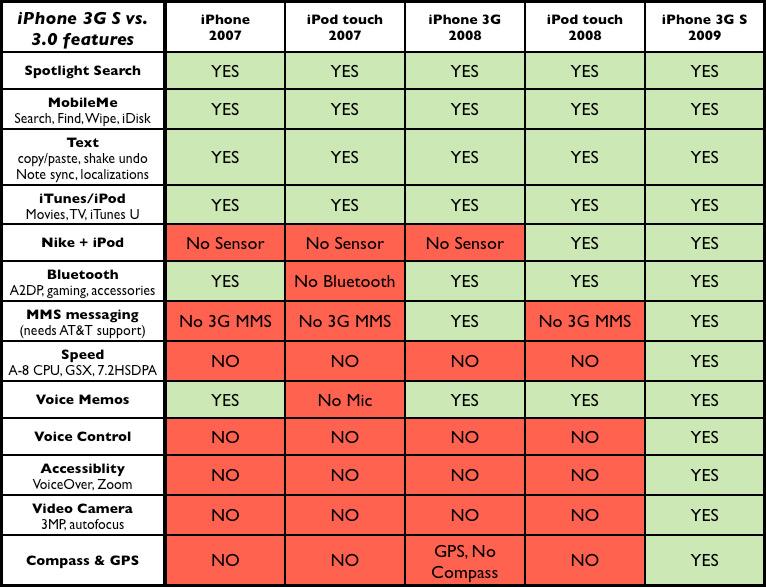
Spotlight Search gives you a global search for quickly finding apps, notes, emails, calendar events, contacts, music and other media files (below). You can selectively enable what items you want show up in your search results from the General / Home / Search Result page in Settings. The Spotlight page is fast, smart and easy to pull up; just hit the home button once to get to the main page, then hit it again to slide over to the search page. Boom. It's also fun and clever that the home page icons slowly dim and fade to black as you enter the Spotlight page.
Spotlight searching is also available within apps, such as Contacts, where its previous omission was a cloying annoyance. Now you don't even need to use Contacts - just pop up the Spotlight page and find who you're looking for. It performs searches on first, last and company names of your contacts, but it doesn't search the middle of words. That means RO would pull up Robert and Dr. Roy, but searching for OB wouldn't find either Robert or Bob.
You also can't search by phone number or email, which is a bummer, although you can draft an email and pull up a quick list of mail matches as you begin entering the address. You can't do the same when dialing a number using the Phone app, however.
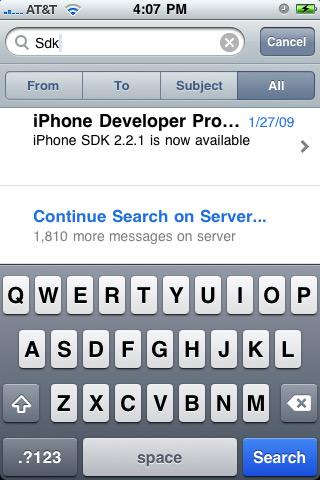
MobileMe features: Mail now supports new server-side search when using a MobleMe mail account (below), allowing you to very quickly pull up any messages from the thousands of mails on your mailbox rather than painstakingly loading new pages of 25 messages at a time to find what you're looking for. You can search emails' to, from, or subject field or everything, which searches the body as well. Server-side search in itself makes a MobileMe mail account a thousand times more valuable to mobile users.
Last year's push messaging features have also been built upon with Find My iPhone and the ability to push your phone a message along with a signal ping helpful if you lost it in the couch. The ability to Remote Wipe a lost or stolen phone might also come in handy for users who have suffered a lost phone and are worried about the thief gaining access to their private data. These features work across multiple devices you configure for push messaging.
Announced but not yet available are new iDisk features for accessing your files stored on the MobileMe cloud from your phone from anywhere. You'll also be able to share file access to other iPhone or iPod touch users by sending a link to files in your public iDisk folder, or open access so that anyone who has your email address can look up and browse the documents you publish publicly.
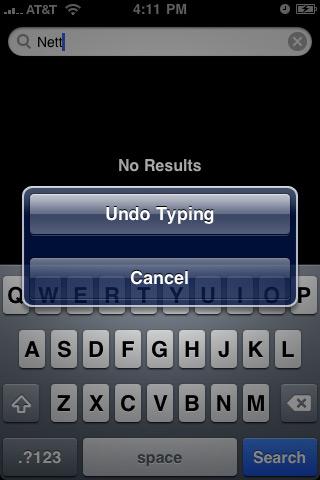
New Text features: Cut, Copy, and Paste and the new Landscape Keyboard make it easy to enter and move around blocks of text as you like. If you make a mistake, shake to undo and a clever button slides in from the side to enable a backtrack (below). There's also new support for 23 languages and 40 keyboard layouts, and new sync support for Notes. There's also those clever Voice Memos if you'd rather say it than type it.
Notes syncing is another one of those "why wasn't it here sooner" things, but I can't think of any major features of iPhone 1.0 or 2.0 that I would have delayed just to sync my scribbles. In any event, all those Notes you tapped into your mobile over the last two years are now synced to Mac OS X Mail via iTunes, making the Notes feature actually pretty useful. Notes also get synced to MobileMe and between your mobile devices.
iTunes and iPod features: You can now buy or rent movies, download TV episodes and audiobooks, and get free podcasts and iTunes U content from iPhone 3.0's iTunes app. It also lets you set up and edit your iTunes account and redeem gift card certificate numbers right on the device.
There's also new support for Stereo Bluetooth headphones for any iPhone or iPod touch apart from the original first generation iPod touch, which lacked bluetooth hardware. A new Shake to Shuffle playback feature works like the latest iPod nano, and can be turned off if you don't like it.
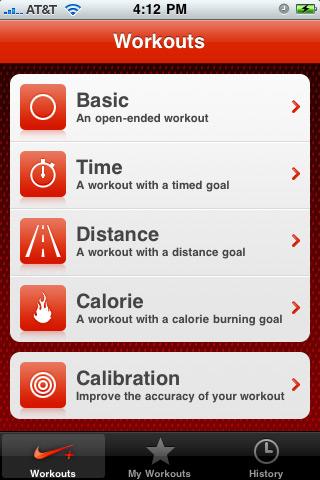
Nike+ iPod software is included for models that support the sensor hardware, which includes the iPhone 3G S and the second generation iPod touch. You just need to activate the software from Settings.
Home Button: In addition to taking you to the home screen and to the Spotlight page, the Home button can also be configured to do a few more tasks when double clicked. As before, you can jump to your Phone Favorites dialing list or launch iPod playback controls. But now you can also set it to directly to Spotlight search or launch the Camera app. When music is playing, it will continue to pull up music controls unless disabled.
This new option on the Settings / General / Home page makes it a bit easier to pull up the camera to grab a photo, or to start shooting video, a feature that's limited to the new iPhone 3G S. The new phone also has a press and hold Voice Control feature tied to the Home button, described below. How many other features can Apple pile onto the unit's only facing physical button? At some point, perhaps Morse Code input.
Application and Gaming Features: everything is slightly faster, with big boosts for Safari browsing. New applications include Voice Memos, which works on any device that can support audio input (that leaves the original iPod touch out), improved Stocks and Calendar with meeting creation features, and new MMS features for sending photos, audio clips, contacts, and videos (videos are only supported on the new iPhone 3G S) through the old phone system to other MMS phone users, if you prefer to pay per message. In the US, AT&T hasn't gotten its MMS support up and running for iPhone users yet, and once it does, you'll need a 3G phone to do MMS.
Using any iPhone or iPod touch, you can already send stuff through regular email to desktop users or other smartphones that can handle real mail with standard attachments. Using copy and paste, you can also now send multiple photos or videos in a mail message. You can also upload photos and movies to MobileMe and videos to YouTube.
iPhone 3.0 also delivers lots of new potential for developers with support for new hardware accessories, Bluetooth peer to peer networking (which again requires a device with Bluetooth), and Push Notification features. It also expands Parental Controls, which are called Restrictions under Settings. This lets you password protect access to Safari, YouTube, iTunes, installing Apps, the Camera and Location Services.
Turning off allow access makes that item unavailable in the iPhone user interface. If you have Location Services turned on and then turn off Allow access, you have effectively locked the service on (below). This offers great potential for locking in settings, but Apple hasn't yet defined a restriction for locking your email accounts or push settings, so it can't currently be used to prevent a thief from quickly disabling your device before you can locate it using the new Find My iPhone feature. In order to do that, you'll have to activate a passcode and leave it on and locked all the time. A thief can still wipe out your device using iTunes, but they won't be able to access your data or ring up calls, and you may have the opportunity to locate them first.
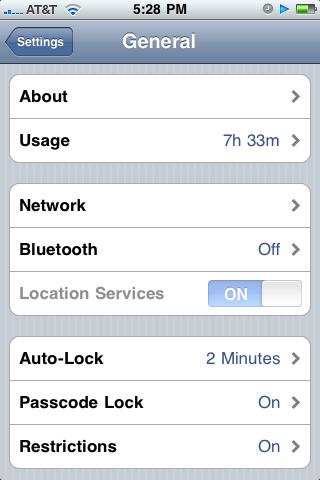
Restrictions also allow you to set a password lock on content. You can turn off support for In App Purchases and configure a threshold for ratings, turning off playback of music and podcasts marked as explicit, turning off movie playback or setting an maximum allowed rating of (when set to US ratings settings) G, PG, PG-13, R, NC-17, or anything (including unrated movies apparently); TV shows rated TV-Y, TV-Y7, TV-G, TV-PG, TV-14, TV-MA, or anything; and App Store titles rated as 4+, 9+, 12+, 17+ or anything.
This rating system not only allows parents to set appropriate ratings for their families, but opens up the potential for developers to release apps for mature audiences. Perhaps we'll see a speedy return of both the Kama Sutra reader and the Baby Shaker app.
On page 2 of 4: iPhone 3G S Hardware; S is for Speed; and Network Speeds.
Jump to a different section
With all this new software sprucing up your existing iPhone or iPhone 3G for free, do you really need to upgrade your hardware too?
If you're a current iPhone user, it'll cost you a minimum of $199 plus an extension of your contract to get the latest model. And if you missed a couple payments in the last year of your iPhone 3G service, as I did when AT&T messed up my bill while I was traveling, you might face a hefty upgrade price as much as $499 for more expensive 32GB model. You'll have to weigh the pros and cons yourself, but below we present the features that might tempt you to upgrade again.
If you're new to the iPhone, you might also be considering the new $99 price set for the existing iPhone 3G. If you think you can't scrape together another hundred bucks, you should at least try. While last year's model sounds like it costs half as much, it's really not nearly as good of a deal. That's because neither phone actually costs the price you actually pay when you get a subsidy.
The cheaper iPhone 3G is really $499 (8GB) with a $400 subsidy rebate invisibly paid for by AT&T as an advance out of the $100 per month bills you'll be paying over the next two years, which is pretty much the same as any other premium smartphone on the market. The new iPhone 3G S is only slightly more, for double or quadruple the storage: $599 (16GB) or $699 (32GB) with the same $400 subsidy rebate from AT&T. Factor in the fact that you may be paying sales tax on the retail price of the phone (as California requires, for example), and the savings in buying an iPhone 3G over the new iPhone 3G S just keeps getting smaller and smaller.
Are you really set on saving 27 cents a day this year by putting up with a slower phone with half the storage? The $99 iPhone 3G isn't really a good deal at all; it's only thrown out there to catch the attention of people who also use check cashing outlets and take out instant loans on their tax return. Don't buy it unless you're pound foolish. The only reason to get an iPhone 3G at this point is if you're an original iPhone user and your friend is upgrading to the new phone and giving you an iPhone 3G as a gift.
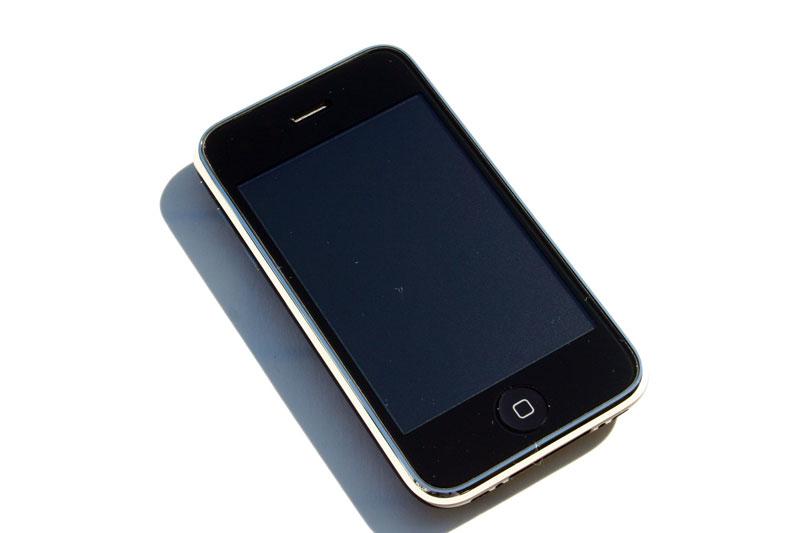
The new iPhone 3G S is a lot more than just more storage. First of all, its fast, really fast. Apple says its up to twice as fast, and that's conservative. Speed in the computing world has always been taken for granted; once you start using a new computer or software upgrade, the new speed it delivers quickly becomes your new baseline of expectation. Once you start using the new iPhone 3G S, you'll wonder how you ever coped with the previous version. It's really that much more usable.
Most of that speed is due to its fast new processor core and graphics architecture, although the latter isn't even yet fully exploited. The new Cortex-A8 ARM core is dramatically faster than the processor used in the two previous iPhones and in both models of the iPod touch. The PowerVR SGX graphics core also delivers a big jump in speed, and a new crop of applications, and in particular games, should help demonstrate its new capabilities.
Starting with the original iPhone, Apple leveraged the latent graphics power built into the off-the-shelf SoC chips that every modern smartphone has, but which few make any real use of, just as the company identified the GPU as a way to differentiate the system on its desktop Mac line well may years ahead of the industry in general. Back in 1999, Apple demonstrated Mac OS X using an advanced graphics compositing architecture that was originally used primarily to add some splashy eye candy effects such as translucency and shadows.
Since then, Mac OS X has adapted its ubiquitous use of OpenGL to enable more and more practical use of the GPU. With the iPhone, Apple similarly put to use the graphics power that every other smartphone maker had reserved for nothing more than running the occasional 3G game applet. The iPhone unleashed that capacity to power a slick, animated user interface that uses graphics effects to make the phone feel faster than it even is, making it more usable, more intuitive, and more fun.
With the much faster new processor, graphical trickery isn't as necessary. Existing iPhone apps now launch and work much faster, particularly more complex apps like games. Safari browses the web rapidly, loading pages a bit quicker but rendering them must faster. The original iPhone was pretty decent, the new iPhone 3.0 boosts performance quite a bit, but the new iPhone 3G S hardware really smokes when opening up web pages. It's the fastest phone on the market. You'll feel like you're browsing from a full sized notebook.
WiFi speeds feel a bit faster on the new model, but in testing there were no strong numbers to indicate that it gets or can maintain any better signal reception over the previous model. It appears that the much faster processor simply allows it to use the data it gets much more efficiently.
There's also some additional potential for future mobile data network speed advances with the new iPhone 3G S; it supports faster 7.2 Mbps HSPA 3G data networks, if you have have faster service available in your area. It's sometimes hard enough just to find a regular 3G signal in some areas, including parts of San Francisco that AT&T insists are well within its solid 3G coverage. However, the company reports it is busy rolling out new 7.2 service this year, so mobile speeds have nowhere to go but significantly upward. Current 3G service in most of the US is typically 3.6 Mbps.
3G was the key new feature of last year's phone, and it's clever of Apple to brand the new model as iPhone 3G S, as it associates it with the $99 entry level (bait-and-switch?) phone and carries ahead the familiar branding. Such a stark contrast from the company's competitors, who keep churning out forgettable model names and numbers as if that worked well as a strategy against the iPod. Apple is indicating a confidence that its products are well regarded and impressive enough to not require a constant rebranding effort, unlike that other software vendor out there that has to rename its products nearly every cycle to erase the memory of previous failure: Bing!
On page 3 of 4: Same on the outside; New on the inside: Voice Control; New on the inside: Accessibility features; New on the inside: Camera; and New on the inside: Compass.
Jump to a different section
In addition to being faster, the new iPhone 3G S sports some other cool new hardware features. You wouldn't know by looking at it though, as the new phone is almost exactly identical to the existing iPhone 3G.
The only exterior difference appears to be that the iPhone capacity and regulatory information on the back is silkscreened using reflective silvery letters rather than using a flat light grey.
The other significant physical difference is its new oleophobic (fat repellant) screen coating that is supposed to make it easier to wipe off oily finger smudges. This wasn't really a big problem that needed to be solved, and the difference isn't very noticeable. If you use cover sheet to protect the screen, the new coating won't matter at all for you.
The new CPU and GPU cores make the device a lot faster overall, but Apple has applied that extra speed to deliver some great new features as well. The new Voice Control app adds a feature that many other phones have delivered first: voice dialing. On many other phones, this works as a phone company feature, where what you say is interpreted by the mobile operator to dial for you. On the iPhone 3G S, the phone is fast enough to perform voice recognition on its own. That also makes this software feature unique to the new model.
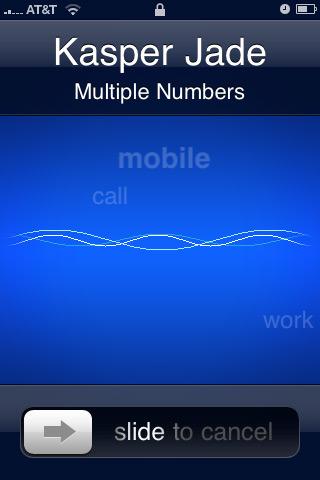
Voice Control works pretty well, although its not flawless. You simply hold down the home button for a moment and it begins listening. You can also press and hold the integrated mic button on your headphones. Saying "call Mike" will respond with "home, mobile, or other?" if the name matches a contact with multiple phone numbers; you can select which one by voice. Or, if you have several Mikes in your phone book (below), you'll get "multiple matches found for Mike. Be more specific." If you don't respond, the voice announces it is calling the first match. There's usually enough of a delay to stop the process before it starts to dial, although if you have a passcode set, it can complicate performing a Voice Command if you have to unlock the screen. You can always shout NO to dismiss it.
Using Voice Control for music control seemed a bit rougher, with matches that seemed strange until a comparison of what it picked and what was said were analyzed. "Play songs like this" got interpreted as "play songs by The Ruse." On the other hand, it managed to decipher "play mastercraft" to launch songs by MSTRKRFT. There's not even any vowels in there, good job.
For obvious reasons, it seems to work best if you give it some structure, saying "play songs by" or providing other similarly wordy responses. You also need to wait a second for the listening tone to chime; it's easy to start talking before the app even has a second to launch. Voice Control isn't perfect yet, but for being a 1.0, the new app is Star Trek impressive, even using a voice that sounds a bit like Majel Barrett-Roddenberry rather than the expected Alex of Mac OS X, which is used by the simpler voice navigation system of the iPod shuffle.
The extra speed also enables support for some new accessibility features, including the VoiceOver screen reader, which substitutes normal navigation methods by allowing users to navigate the screen without looking at it. You touch controls to select them and hear an audible label, double tap to click them, scroll using three fingers, and change settings using rapid swipes up and down. It's hard to maneuver the iPhone interface when you expect it to work intuitively, but for users with visual impairment, it makes the device independently accessible.
A Zoom feature enables users with slight visual impairment to magnify the screen up using three fingered taps and swipes, or to enable White on Black for a high contrast X-Ray inspired display. Speak Auto-text sets the device to read out suggested auto-correct substitution words and auto capitalization changes as you type.
For users with hearing impairment in one ear, Mono Audio allows games and other applications to direct both left and right audio to both earphones.
In addition to the Voice Recorder app in iPhone 3.0 that works across all models with audio input, the new iPhone 3G S sports a video recording camera that works surprisingly well and uses the same easy to use trim edit controls to cut down your video capture to just the part you want.
Like Voice Control, the new feature demands the faster processor and significantly improved camera of the new model. The new camera sensor in the iPhone 3G S captures with 3.2 megapixel resolution, producing photos with a resolution of 2048 x 1536 compared to the original iPhones' 1600 × 1200. Quality isn't all about resolution though.
The new camera can focus on the subject you tap, providing you a lot more control over the previous camera, which used a fixed-focus optimized for portraits. In addition to tapping to focus, the system also performs white balance and exposure settings for you. That lets you take a picture inside where a bright window might have otherwise cast your intended subject into shadows. Now you can click on the dark subject, or alternative click on the window and focus on the view outside.
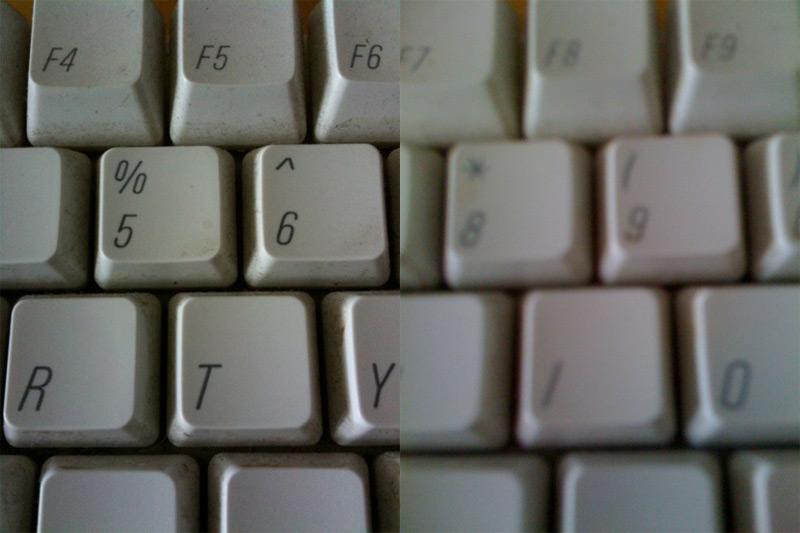
The new iPhone 3G S camera won't have you throw away your standard camera, but it is far more useful in capturing usable pictures, especially in lower light conditions. It can also macro focus on close subjects, something the previous camera was particularly worthless at doing. In the shots below, taken in parallel, the old camera could barely see the keyboard, where the new camera reveals a level of filth I didn't even previously notice was there.
The iPhone's camera has always been one of its weakest features. At the launch of the iPhone, we wished for better software, and with the iPhone 3G, the use of the same camera sensor slipped deeper into disappointment. While previous phones could manage to capture video using third party apps, the new camera in the iPhone 3G S has the ability to capture really usable VGA-resolution video at 30 FPS. It also captures very usable sound, something many smartphones that can capture video can't do. It's not really a stretch to say that the video captured by the iPhone 3G S is really spectacular for a mobile device. Critics are comparing it against HD camcorders rather than other mobiles. While there are better ways to capture production video, this camera is really ideally suited to capturing video for the web or podcasts. It might double Google's bill for YouTube.
Apple has frequently avoided delivering features that the company deemed weren't really ready for prime time. The original Mac didn't do color because computers at the time were only really capable of doing sloppy DOS-style 8-bit color. The 4G iPod hardware could be tricked into doing slideshow video, but Apple didn't introduce iPod video playback until it thought it could deliver good video playback. The company has similarly reserved video capture for a camera that can do very good quality video.
Along with video capture quality, Apple has also insisted on keeping the interface simple. There's one switch between photos and video, and one button to start and stop. No cluttered array of options. You can click to focus, but unless you have a camera mount, the autofocus is probably adequate to keep your video sharp.
Played back on the iPhone, the video quality looks really great; on a computer, it looks a bit soft, especially if you're subject and the phone are constantly moving during capture. If you can hold it still enough, it does a great job of capturing sharp detail. With movement, detail suffers but capture remains fluid. Audio recording by the camcorder function is pretty decent considering that it uses the tiny mic designed for capturing voice from a closely positioned mouth. When taking video, be careful not to handle the mic or your video will get noisy. Wearing the iPhone headphones, the integrated mic allows you to narrate videos with very good quality for capturing podcasts and other clips.
Another hardware software feature unique to the new iPhone 3G S is its electronic compass. It ships with a new Compass app that shows you which way north is, as long as you're not next to a big magnet of some kind. The Compass application lets you select between pointing toward magnetic north or true north, and provides a shortcut for launching Maps.
That's because the best use of the compass hardware is in Maps, where after clicking once for your location you can now click again to spin the map to fit your current orientation, showing you the map in the direction you are looking. If you've ever found yourself lost but knowing exactly where you were on the map, this smart new feature will have your tail wagging.

On page 4 of 4: Same on the outside; New on the inside: Voice Control; New on the inside: Accessibility features; New on the inside: Camera; and New on the inside: Compass.
Jump to a different section
Your data stored within the iPhone 3G S is now kept in an encrypted image similar to FileVault. If you keep your device locked with a passkey, thieves can't recover its data even with sophisticated tools to pull the information from Flash storage. All they'll get is a lockbox.
That also means the new phone supports instant Remote Wipe using MobileMe or the corporate tools Apple provides for business users. Previous phones can be instructed to perform a remote wipe, but it takes some time to actually purge all the data securely. Since all the data on the iPhone 3G S is already encrypted, wiping it clean only requires scrambling part of the storage.
The verdict on the iPhone 3.0 software: five stars. This is a great release, unlike last year's overly ambitious combination of iPhone 2.0, the launch of the Apps Store, and the associated MobileMe push features and upgrades which were all shipped prematurely on simply too aggressive of a schedule. There might be some niggling issues that pop up with iPhone 3.0, but it feels solid and refined, and there's no reason to not upgrade. Fortunately, it's either free or a hard to quibble with $10.
The iPhone 3.0 software update would easily be worth spending $40 to upgrade, but Apple's strategy isn't about squeezing money out of software releases. Instead, the company is working to build a solid platform for developers. It wants everyone to upgrade, and has subsequently worked with developers to make sure that all the apps in iTunes are tested to work properly with 3.0. It did a great job, leaving competing mobile platforms with a very high standard for user expectations.
The verdict on the iPhone 3G S itself: five stars. What else did the next iPhone need? Apple could have used a super high resolution camera, but that would have only eaten up storage faster while contributing very little more in terms of quality. What else, a buzzword compliant OLED screen? Built in AM/FM radio playback? It went one better by making the device (and all existing iPhone and iPod touch devices) capable of working with USB or Bluetooth radio tuners, or all manner of other stuff.
The iPhone 3G S kicks usability up a big notch with its extra speed and well applied, practical new hardware features. It answers the disappointment we raised last year, related to speed, the camera, the limited Bluetooth that was largely worthless, and the marginal battery life. It's a big improvement all around.
Despite all that, we're giving the iPhone 3G S four stars because the only way to use it in the US is via AT&T. While the company isn't really any worse than of the other equally awful mobile providers, it does impose enough restrictions to knock down the stature of the iPhone 3G S in comparison with other smartphones that are less powerful and elegant and not as much fun to use. AT&T's network isn't yet handling the MMS services that iPhone 3.0 software makes possible, but more importantly the company refuses to support data tethering, not even providing a pay-per-use plan to keep the system fair. It's not even providing any outlook on when things might change. That's just incompetent.
If you recently bought an iPhone 3G and don't yet qualify for another $400 subsidy, you can console yourself with the fact the Apple made many of the latest iPhone's new technologies available as a free update to existing users. In fact, there aren't any features that are artificially held back from existing users in the iPhone 3.0 software. Apple can do that because the new iPhone 3G S is really a huge leap that many users will want to upgrade to; there's no need to force it. However, if you're eyeing a new iPhone and are tempted by the $99 entry price, do yourself a favor and get a payday advance loan on your next paycheck so you're only ripped off once this year, rather than across the whole year using a phone that is barely any cheaper but offers so much less than the iPhone 3G S.
The warped market for mobile phones makes it that much easier for original iPhone users and anyone else who qualifies for a subsidy on the iPhone 3G S to decide to get one. Not upgrading is like leaving $400 on the table. And considering that your existing iPhone or iPhone 3G remains a functional music player/WiFi browser pocket computer of significant value, you can give it to a poor friend, sell it to somebody who has broke their screen and needs a replacement, or simply use it for a fancy WiFi remote control or an extra iPod. Remember when year old phones were simply e-waste?
At free, an awesome deal.

iPhone 3G with AT&T
Seriously don't waste your money, or your AT&T subsidy.
iPhone 3G S with AT&T
Apple has made it really hard to find fault, but AT&T's policies crushed a star.

Pros:
Huge jump in speed and overall usability
Video and network enhancements give it future potential.
Very practical, good quality video camera.
Smart, simple photo capture controls on the improved, autofocus camera.
Smart use of compass in Maps.
Smart Voice Control for dialing and media playback.
Cons:
You have to hold your nose and pay AT&T to use it.
Jump to a different section







 Andrew Orr
 Malcolm Owen
 William Gallagher
 Mike Wuerthele
 Christine McKee