SlingPlayer Mobile for iPhone: an in-depth review
 Prince McLean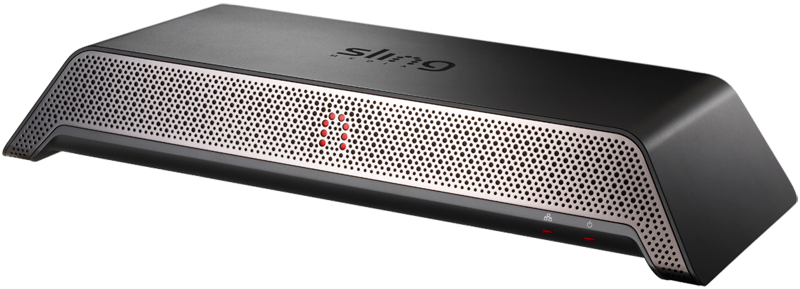
SlingPlayer Mobile for iPhone
4.0 / 5Sling specializes in video placeshifting, which takes audio and video inputs from either a cable, satellite, or antenna feed or the output from other video devices such as a DVR, DVD player, or Apple TV, and encodes the signal using a Slingbox for Internet distribution to computers or mobile devices running the SlingPlayer application.
Sending a remote video signal requires a fast Internet connection, and in particular a fast outgoing connection, as the SlingBox needs to push a compressed video feed out over the Internet to the remote location you hope to watch it from. However, most consumer broadband Internet accounts are designed around web browsing and consumption of inbound server-side content, meaning that they deliver far faster downloads than uploads.
DSL commonly offers 0.768 to 1.5 megabit downloads, but often as little as 0.128 uploads, while "fast cable Internet" may deliver as much as 8 or 16 megabit downloads to customers in developed areas of the US, but only a quarter or less than in upload bandwidth. Even customers reporting 50 megabit or greater downloads commonly report only getting ten to twenty percent of that speed for uploads.
That's the problem facing all server-type consumer applications like the one offered by Sling Media. Even customers who have fast Internet access both at home and in their vacation spot's hotel, college campus, or workplace will be hampered by the weakest link: the relatively slow upload service offered by most ISPs serving home users. Sling addresses this issue by applying proprietary compression and optimized signaling to deliver the most efficient transmission possible.
As Internet speeds slowly improve in the US, Sling's efficiency has enabled the company to branch out into mobile devices. In addition to the Windows and Mac OS X client software it includes with its SlingBox hardware, the company offers a separately priced mobile client for certain Symbian 9.1 phones, several modern BlackBerry smartphones, a variety of Windows Mobile Pocket PC and Windows Smartphone devices, and a beta PalmOS client that works on three recent models.
Conspicuously missing from its roster of supported mobile devices has been the iPhone; that is, up until an announcement in January demonstrated a new Cocoa Touch version of the SlingPlayer Mobile software for iPhone and iPod touch devices. That product is now available for the same price as other mobile phones, although at $29.99, the price of the iPhone app might shock App Store customers more accustomed to buying $2 games and $5 utilities.
Introducing the Slingbox
To test out the new iPhone app (App Store, $29.99), Sling shipped us its top of the line, $299.99 Slingbox PRO HD. Configuring a new SlingBox is quite simple, although not quite an Apple experience. It does, however, ship with pretty much all the cables you'll need, which is more than can often be said for new Apple gear.
The Slingbox PRO HD box accepts a single cable input as well as two auxiliary video inputs: one via standard composite or S-Video cables and a second supporting HD-quality video over component cables. The box then connects to your TV using either standard definition composite or HD-capable component cables, as well as passing through the cable feed. For audio, the device supports both standard stereo input as well as higher quality S/PDIF coax audio. It seems odd that the Slingbox does not support HDMI and digital optical audio connectors, and that it can only manage one antenna and two other inputs. The $179.99 Slingbox Solo model only works with a single input.
The Slingbox also provides an IR blaster cable with several outputs, which is used to allow the device to emulate a remote control. This enables a remote user to change the channel or navigate through the menus of nearly any device a user might want to plug in, although this can be an arduous process due to the delays encountered when working remotely.
The SlingPlayer software for the Mac or Windows enables users to then switch between the connected devices, change channels, fast forward through content when supported, and watch essentially anything they could watch from their living room on their laptop while traveling. The biggest limitation on the current Mac version is that it only supports viewing standard definition signals, but the Windows version also has an hour buffer that allows users to fast forward and rewind through the stream like a DVR allows, and also presents a programming guide missing from the Mac version.
By default, the player software puts your video feed in a small window and presents a virtual remote control, so the benefit of HD video isn't noticeable. However, if you want to blow up your signal to watch full screen using your notebook as a virtual TV, the SD image you get on the Mac isn't exceptional. It's also not terrible. Sling says they're working to deliver HD support for Mac users, and the latest version of the new Mac desktop software Sling Media just delivered promises to improve video playback quality.

The new iPhone app offers most of the same features to Slingbox users right from their mobile phone. To match signal quality to the bandwidth a user has available to them, both desktop and the mobile versions of the software enable standard or higher quality settings for audio and video. With an optimal connection, the iPhone app delivers pretty decent watchability and fairly good quality audio.
We tried a prerelease version of the app using AT&T's EDGE network, and discovered that despite Sling's best efforts, EDGE just isn't fast enough to support decent playback. It was impossible to get more than five to ten seconds of terrible quality video before the system fell back to a spinning cursor promising to optimize the signal quality, which typically took as long as the next five seconds of attempted video, then popped up again. Using AT&T's 3G network, which we managed to find in a few pockets here and there in San Francisco, we could actually maintain a pretty good video signal.
Slingplayer Mobile WiFi Only
End users won't be able to similarly experiment themselves, however, because Sling's iPhone app has been barred from supporting mobile networks as part of the App Store demand that developers not consume significant network resources from their apps. That means the iPhone won't be able to access Sling feeds anywhere other than the WiFi hotspots supported by the iPod touch.
That's a disappointment to iPhone users, but likely a relief to AT&T, which has been desperately scraping together the resources to support the bandwidth-heavy apps that iPhone users are already hammering its network with, primarily Mobile Safari and to a lesser extent, YouTube, Mail, and the iPhone's own iTunes and App Store. A recent report bewailing the bandwidth use of the iPhone on AT&T's mobile network recommended that all mobile service providers cut smartphone users off from iPhone-style unlimited data service entirely to protect their profits.
While that's completely farcical, it does underline why AT&T, already pressured by Apple to support the demands levied by the iPhone's bundled apps, is so adamant about limiting users from opening up new network-frying services at a time when the company is struggling to provide good call quality and, on good days in lucky neighborhoods, reliably fast data service for the iPhone customers it loves to collect revenues from.
That reality isn't going to help out users irritated by the assumption that Sling Media's original plans to support viewing over 3G would pan out; Sling hoped to support 3G (and even EDGE) right up to the end in its negotiations with Apple. Regardless, mobile users who are fans of the Slingbox will now have another reason to eye some of the phones offered by providers that do support SlingMedia's mobile app over their 3G EVDO or UMTS networks, including a couple models that are... sold by AT&T. Of course, those other phones don't have the same massive network effect as the iPhone.
At the same time, a variety of the other phones Sling supports also only work over WiFi, such as every BlackBerry model outside of the Storm offered by AT&T. All of the supported Curve, Pearl, and Flip models, whether offered by AT&T, T-Mobile, or Sprint, all only work with the SlingPlayer Mobile app over WiFi. A large number of older and newer BlackBerry phones are not supported at all, lending some relief to those wondering if living inside Apple's big tent is worth it. Navigation and basic usability on the BlackBerry (below) is also decidedly worse than the iPhone version.
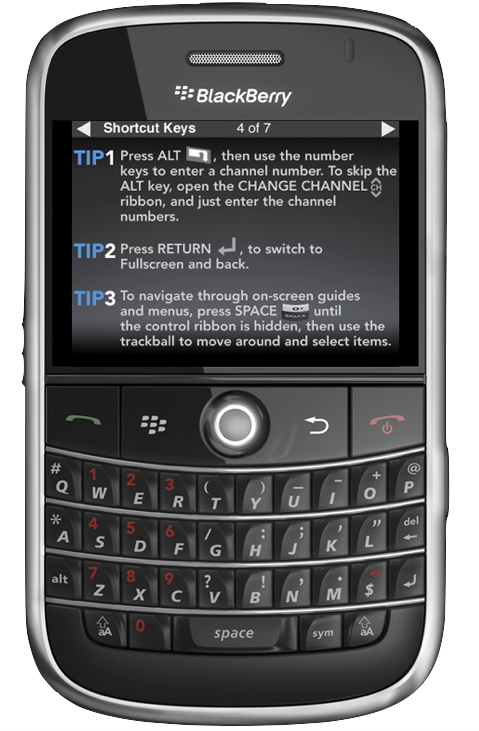
Similarly, while a couple dozen Pocket PC models officially support mobile network viewing with the appropriate SlingPlayer Mobile app, only around half of the 14 supported Windows Mobile Smartphone devices will work outside of a WiFi connection, and Sling warns about poor performance when using the Motorola Q8hxx series or Samsung BlackJack II over 3G. Sling also only recommends using its mobile app on nine different Symbian models, and more than half of those only support WiFi viewing. As with Sling's other mobile offerings, the Symbian version only presents a small video area surrounded by lots of buttons that clutter up the screen (below), while the iPhone version devotes the entire screen to video playback and menus disappear when not in use.
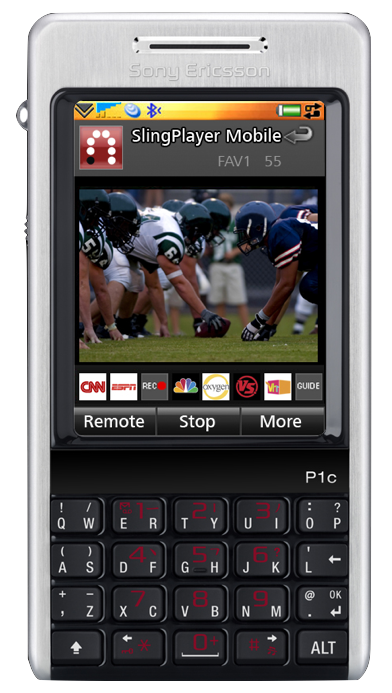
With the weird assortment of incompatible phone models and splintered platforms out there, it's no wonder why mobile developers are flocking to Apple's platform, which actually delivers a coherent platform of users who actually buy mobile apps. It's certainly no secret that other phone platforms are chaotic and dysfunctional, but Sling Media's offerings provide a case study into how difficult it actually is to support a basic video playing app across more than a handful of specific phone models on each of the existing mobile platforms in the smartphone arena.
On page 2 of 3: Using Slingplayer Mobile on the iPhone; Using Slingplayer Mobile for TV viewing; and Using Slingplayer Mobile with Apple TV.
Once your local Slingbox is configured, a process that involves cabling up your devices, positioning the included IR blasters to sit in front of any devices you want to be able to control remotely, and then downloading and configuring the Slingplayer desktop software to finish the installation, setting up the iPhone app is a matter of logging into Sling's website to establish an account, obtaining a code from your Slingbox, and then associating your phone with your account. This enables Sling to keep track of your mobile device and connect you to your Slingbox from anywhere you can obtain a decent network connection.
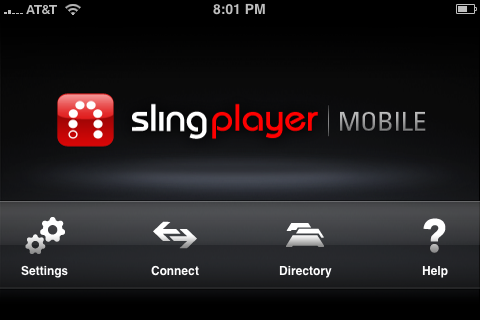
When you attempt to Connect to your home Slingbox via the main menu (below), the iPhone connects to Sling, which then looks up your box and sends it a command to begin streaming to your phone. You can set it up to connect automatically. Otherwise, you can select a Directory of Slingbox devices tied to your account (if you have multiple devices, such as Slingboxes installed in different locations) and pick the one you want to connect to for remote viewing. This conceptually allows you to work around the limited number of video inputs supported by one box.
The Slingbox can only support a single remote output device, so if you start to watch it from an iPhone, it interrupts any desktop computer that is currently connected to the box and streaming its video. While you can boot a desktop client off the Slingbox from the iPhone, if you're connected from the iPhone the desktop system simply says it can't find its Slingbox. Disconnecting from the iPhone allows a desktop client to connect again normally.
Using Slingplayer Mobile for TV viewing
Once you pick your desired Slingbox and Sling remotely commands your home box to begin sending you its signal, you can choose between your available video sources using the Options menu, reached from the wrench icon on the main menu. Your options will include the TV channels you have configured using your desktop Slingplayer software and any other auxiliary devices you have attached and configured.
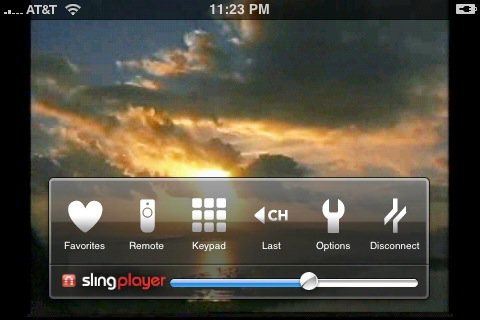
The Slingbox supplies a tuner for discovering channels on your cable, satellite or antenna coax; these channels are configured during setup using the desktop SlingPlayer software. You can set up a series of favorite channels using the desktop software, but you'll have to repeat this tedious process separately within the iPhone app. You'll probably want to bite the bullet and do this, as manually surfing through all of your available channels to find what you're looking for might in itself consume your entire lunch break. To program favorites, you select from a preset series of icons representing typical cable channels (below), then supply the channel number, and the setting is saved for you behind the Favorites icon in the TV player.
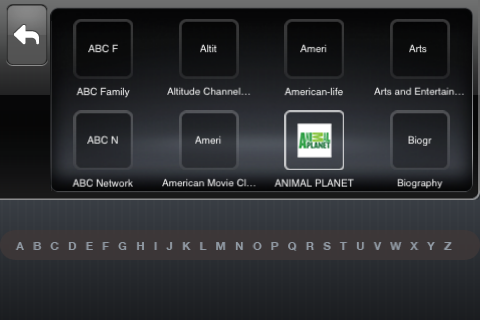
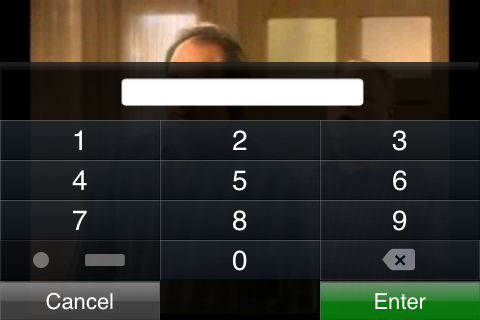
Connected to the Slingox's tuner input, the iPhone app can be used to click through channels (a rather slow process that minimally takes a good four seconds) using the online menu overlay, or by using an up or down finger swipe, a new feature unique to the iPhone. It still takes the same few seconds to send the command, for the tuner to change the channel, and for the new channel to being received. Since you probably only have a few channels you might want to watch remotely, having configured favorites will be pretty essential to retaining your sanity. Your other option is to memorize all your channels by number, and use the Keypad control (below) to jump to them directly. (That dot/dash key in the keypad is for entering a decimal in cable channel numbers than include one).
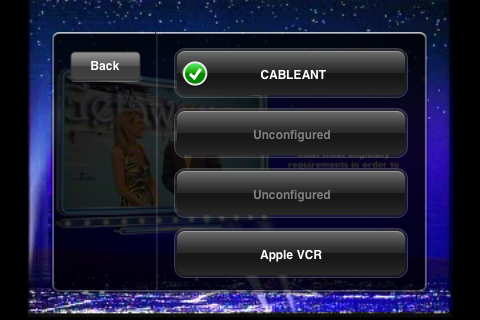
Other devices you connect to your home Slingbox, such as a DVR, DVD player, or Apple TV, must initially be configured using the desktop software, but are then available to you remote device without further configuration on your phone. They appear under the Option menu's Change Device listing (below). Sling provides customized support for a wide variety of devices, presenting a generic virtual remote and keypad that can be used to manage most of the functions on popular devices.
Using Slingplayer Mobile with Apple TV
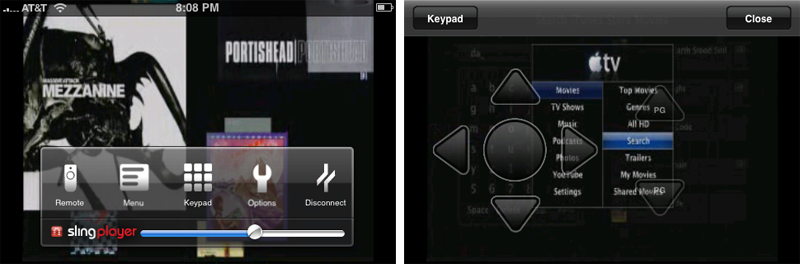
For example, after you change the remote device to a configured Apple TV, you won't see a favorites button in the video player toolbar, as the box doesn't support any idea of favorites or channels. Instead, you'll get a Menu button which supplies the generic remote control with a makeshift extra button to enable you to go back within menus (below). Sling Media has managed to devise a remote simpler than even Apple's. This makes navigating an Apple TV a bit clumsy, as you can drill down into menus from the five way remote with separate play, rewind and fast forward buttons (below right), but in order to work your way back you have to navigate back to the main menu (below left) on the phone and click Menu.
Sending a navigation command takes about as long as changing a TV channel, which is roughly 4 seconds. This makes navigation rather tedius, and something you'll want to plan out. To reach the fourth menu item, for example, hit the down key three times quickly, or you'll need to hit it three times with agonizing delays between each hit. Things really get hairy if you plan to enter text. If you plan things in a particularly clever way, you might be able to enter three letters into an Apple TV search field within half a minute.
Unfortunately, Apple's own Remote app only works when its on the same local network as your Apple TV, so it typically can't be used to navigate around the device to the desired screen before enabling the Slingplayer Mobile app to begin playback. However, if you've ever wished for Apple to deliver a media box that can make your iTunes content available when you're away from home, the combination of the Apple TV, Slingbox and the new Slingplayer Mobile is currently the closest thing to that.
There's still some progress to be made; the Slingplayer Mobile remote needs to be fixed, as the Menu button can't remain stranded on its own page. The Menu button doesn't even always work consistently, making navigation of Apple TV painful and annoying. It would be particularly delicious if Sling could deliver a touch-based remote interface for Apple TV that didn't just pick up simple channel up and down swipes and left and right swipes that bring up favorites (neither of which apply to Apple TV), but instead enabled a smart overlay of finger controls that allowed users to simply point to the menu they wanted to enter, calculate the tedious hops needed to get there from the present menu location, and then send the appropriate up, down, and select signals back to the Apple TV.
That would open the Slingbox hardware and iPhone Mobile player to a wider audience of Apple users. It might also help them justify Slingplayer Mobile's $30 price tag, which may seem reasonable to other smartphone users accustomed to paying an average of $20 for popular mobile apps, but will mark the App Store version as a target for scorn among iPhone users who largely can't fathom any mobile app that costs more than $10.
Slingplayer Mobile isn't your typical simple doodle game however. The company has spent months bringing its player to the iPhone, and despite losing its battle to use AT&T's bandwidth, the company still needs to pay for its development. The company may likely find that it can sell many more copies of its app to the now nearly 50 million installed base of iPhone and iPod touch users than it can to the fifty or so different specific models of other smartphones it officially supports, justifying a discounted price. As many iPhone developers have discovered, setting a high price and then offering a discounted special offer is one way to safely determine what people are willing to pay.
On page 3 of 3: Working with audio and video settings; Overview; and Rating.
How a video program is displayed in Slingplayer Mobile depends upon how it is broadcast or sent to the Slingbox; some cable channels nearly take up the iPhone's full display, while others are rendered as video surrounded by a large black margin of dead pixels (below). There's no option to zoom the display on the iPhone, but you can enable a letterbox mode that puts the video into a stretched format with even more black margin, which might be desirable for watching movies. All video (and all navigation and menus) of the SlingPlayer mobile app are presented in full widescreen mode, and it doesn't really make sense to expect something different.

In addition to switching the remote video device feed, the mobile video player's Options menu (below) also presents that Standard Quality mode that reduces video quality slightly to make it work better on a less than optimal network connection. If you are only passively following a program, there's also an audio only mode that blanks the screen and devotes your bandwidth consumption to providing a usable audio signal. While in audio only mode, you can even blank the screen with the top button to extend your phone's battery.
The program's volume isn't muted by the iPhone's silence switch, so expect something embarrassing and loud to be playing when you enable the app in mixed company. The only way to quiet it down is using the volume switch or online volume touch controller, which often takes long enough to reveal to your friends that you were last watching Lifetime or the Home Shopping Channel.
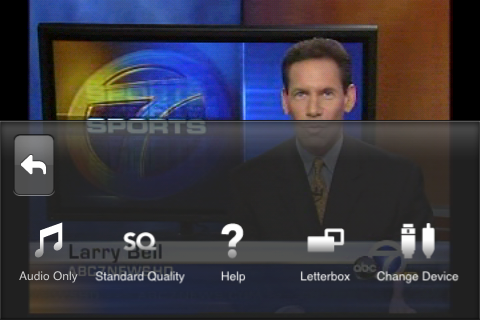
If the app is busy sending a command, like your frantic effort to change the remote channel, it might not even immediately work to push the volume switch. The application's volume slider control is also independent from the system volume set by the physical volume switch, so if the app is turned all the way down, you might end up increasing the volume with the switch without getting any audio; make sure both are set properly.
A final Options menu button offer to provide access to Help, which thankfully opens up an iPhone-optimized page of information without dumping you out of the application and into your browser, although after you close out of help you have to wait a few moments to reconnect to your remote Slingbox.
Changing other settings requires you to disconnect and enter the Settings menu from the front page. These menus let you select a home TV channel for startup to prevent potential embarrassment, and allows you to configure audio settings to use either high or standard quality audio in either stereo or mono, to suit your available bandwidth.
Overview
The early version of the Slingplayer Mobile application we have been testing seems stable and very usable, even despite the clumsiness of navigating via a remote control relayed over the Internet. Video quality is adequate for watching TV or movies and the default standard sound quality is fair. There shouldn't be any illusions that Sling Media has unlocked some special magic to tunnel HD video and pristine audio back out the slow end of your ISP's cable, but if you're accustomed to viewing YouTube videos on the iPhone, you'll be pleased with the video that comes from the Slingbox.
Unless you are already a Slingbox user, the new iPhone software might not be enough to temp you into signing up for a new Slingbox device, given that the iPhone can't access it anywhere over 3G. Of course, that's no problem to iPod touch users who aren't tethered to AT&T in the first place, nor a real issue to many iPhone users who have turned off their 3G support due to the combination of scant service and poor battery life, nor original iPhone users who couldn't realistically expect to coax video across EDGE anyway.
Sling says owners of an existing Slingplayer Mobile software license for another platform can transfer that license to the iPhone version for free, but we haven't heard exactly how that process will be handled. If you've already bought a mobile viewer, contact the company for details before snatching it from the App Store, and you could save yourself $30 (or 18 pounds, if you're in the UK).
If you'd like to access your TV channels and media boxes from work or school or anywhere else that already provides a WiFi signal, the new playback app might be right up your alley. If you're hoping to pair it with Apple TV to deliver your home iTunes content to you while you travel, you might want to keep an eye on Sling Media's progress in delivering improved support for Apple TV, which at present is still something we'd only describe as experimental.
Existing Slingbox users of earlier models will be relieved to find that while Sling Media doesn't officially support the use of the new Slingplayer Mobile app with those older models, it does not disable support. This includes the discontinued Slingbox Classic, AV, and TUNER models. The company doesn't guarantee that future updates of the iPhone app or Slingbox firmware updates will continue to work, so users of legacy Slingbox devices will definitely want to make sure subsequent updates aren't applied until they are confirmed to work by other more adventurous users.
Rating 4 out of 5

Pros
Delivers watchable video from your home to your iPhone or iPod touch from anywhere you have WiFi service
Mobile app configuration and setup is easy enough to do without a manual
Basic touch support and widescreen playback provide better navigation and video viewing than other devices
Free upgrade to existing Slingbox Mobile users
Delivers a way to stream home iTunes content from Apple TV to your iPhone
Cons
Limited to WiFi by the App Store
$30 price might induce sticker shock in iPhone users
Early version stable but needs navigation enhancements
Where to buy a Slingbox
Where to download SlingPlayer Mobile







 Andrew Orr
 Sponsored Content
 Malcolm Owen
 William Gallagher
 Mike Wuerthele
 Christine McKee