$bbtitle
Apple Stock: 199.92 ( -0.59 )
RSS RSS Twitter Twitter
Search:
AppleInsider.com Archives News Bytes Reviews Anonymous Mailer Submit Story AppleInsider Forums Mac Prices Polls Advertise on AppleInsider Contact AppleInsider
Save up to $280 on new MacBook Pros and up to $165 on brand new iMacs with special coupons: Mac Pricing Guide updated Nov 20th (Find the best prices on Macs).
Friday, April 17, 2009

New discoveries turn up in betas of Apple's iPhone 3.0 software [u]

By Sam Oliver

Published: 10:45 AM EST

Developer sources familiarizing themselves with betas of Apple's iPhone 3.0 software have uncovered a handful of additional tweaks and improvements to the system in recent weeks, including changes to Safari's window handling, new battery status indicators and notification preferences, as well as the advent of data detectors in certain apps.

Safari

With the release of iPhone 3.0, Safari will let you close out and clear all your open browser windows without having to first create a new blank page to get rid of the contents of the last active window.

For example, you can have eight open Safari windows in the existing version of the iPhone software, seven of which you can close rapidly by using the red "x" icons in the upper left-hand corners of the pages. However, there's no "x" icon to close out the last page standing. Therefore, the only way to get rid of the contents on this last remaining page is to first create a "New Page," then cycle back to the page and close it out.

With iPhone 3.0, Apple has enabled the option to close out the lone remaining page. Once the "x" icon is triggered, the page disappears and a new blank page quickly slides into view. This process is reportedly difficult to capture in a screenshot, though an example illustrating part of the process can be seen below.

iPhone 3.0


Battery indicators

Meanwhile, it appears that iPhone 3.0 will also introduce an option of showing you how much battery life you have left on your iPhone or iPod touch in a numerical percentage.

Resource files contained within the new version of the device's Springboard application include 22 new PNG files to facilitate this option. Half are numerical characters (and a "%" sign) in black typeface for representing healthy battery level percentages while the other half are in red typeface for when battery life falls bellow a certain threshold.
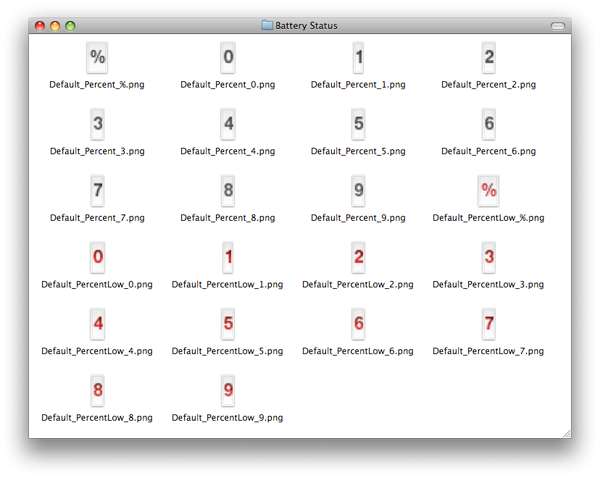
iPhone 3.0


It appears, though it's not confirmed, that users will have the option of selecting how their battery status indicator appears in the menubar -- such as an icon-only view (per current versions of the software), an icon + numerical view, or a numerical-view only. This would be similar to fast user switching menu option for Mac OS X that lets you display the accounts by "Name," "Short Name," or "Icon."

Push Notification preferences

Also visible in the latest betas of iPhone 3.0 software is a new Push Notifications preference pane that will allow you to enable or disable any of the three types of notifications that third party applications can push to your handset: Sounds, Alerts and Badges. Alternatively, notifications can be disabled as a whole. This should provide users with tighter control of their battery usage.
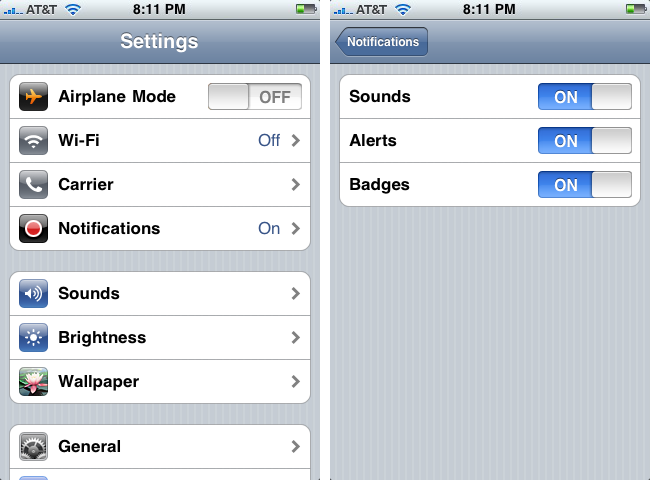
iPhone 3.0


Data Detectors

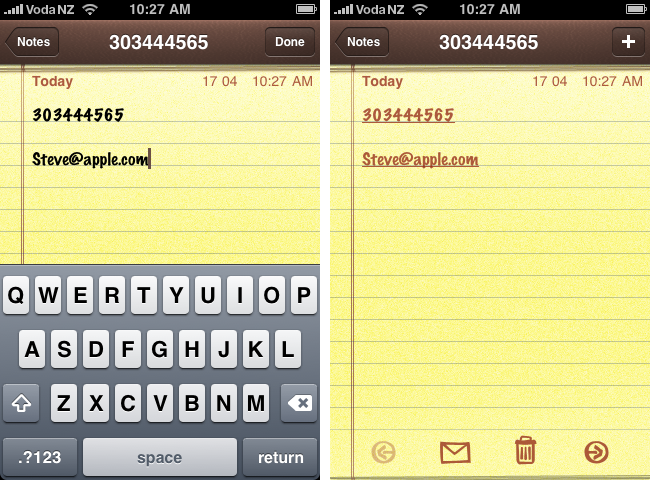
Finally, it's also noted that Apple is enabling Data Detectors in a variety of new applications. Data Detectors automatically detect text fragments like email addresses, phone numbers, and street addresses, so you can execute actions on those fragments via touch selections -- like dialing a phone number automatically by clicking on it or adding it to your address book.
iPhone 3.0


The example above shows Data Detectors in action in the new Notes application. The detectors are only visible and executable when viewing a note, not while editing one.

Variable scrubber speeds

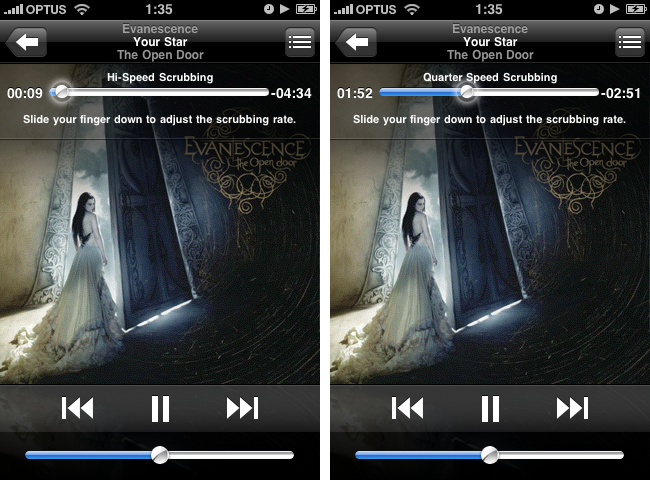
Update: These shots just came in, showing the ability to change scrubbing speeds in the iPod application.
iPhone 3.0


"You press and hold on the little dot to scrub and slide your finger down the screen to get finer scrubbing speeds," a person familiar with the software said. "There are four options: Hi-Speed Scrubbing (normal slide position), Half Speed Scrubbing, Quarter Speed Scrubbing and Fine Scrubbing (furthest down the screen)."


Filed under : iPhone 71 Comments ] 
Story topics: iPhone Software 3.0   Print ] [ Story Link ] 


Download Parallels 5.0 Today
Mac Poker players can play Full Tilt Poker for Mac and get 100% to $600 free with bonus code MP600, courtesy of Online Poker Mac
AppleInsider Features
Hot Forum Topics

Recent Articles
Apple's App Store approval process gets partially automated
TomTom to release iPod touch-specific GPS car kit
China Unicom expects 10% of 3G users on iPhone in 3 years
Steve Jobs e-mails terse response to upset Apple developer
Hack re-enables Atom processor compatibility for Mac OS X 10.6.2
Microsoft shareholders grill CEO about Apple, iPhone
Google outlines Chrome OS plans for netbooks
Sony announces iTunes competitor for music, movies, books
Apple investigates space-age fitness tracking technology
Web search statistics show Bing stagnant, Google growing
New apps said to make iPod touch more prominent in Apple stores
Piper: Apple tablet no more than $700, launch timing irrelevant
Major publisher preps for Apple tablet as delay, OLED rumors surface
AT&T faces setback in legal battle over Verizon ads [u]
TomTom app updated to support iPod touch, first-gen iPhone
Oct. estimates suggest Apple will sell 2.9M Macs this quarter
Microsoft retail store gets odd viral marketing buzz
Rumored 'Google Phone' said to be coming in 2010
Evidence suggests Apple at work on Mac OS X 10.7
iPhone approved in South Korea; China Mobile talks continue
AT&T upgrades network as wireless traffic quadruples over past year
Apple store in upscale Greenwich, Conn., to open Saturday
Needham downgrades Apple stock on technicality
Verizon rumored to embrace Palm in 2010 to combat iPhone
Apple's iPhone App Store takes off in China
Belgian heist lands thousands of stolen Apple iPhones
Verizon responds to AT&T in court: 'The truth hurts'
Apple said to release iPhone app for in-store appointments
OnLive cloud gaming service demonstrated on Apple's iPhone
Apple tablet speculation: high-end graphics, several models
Microsoft looks to combat Apple globally with Zune content
Apple met with AdMob weeks before acquisition by Google
Apple earns key legal victory against Psystar
Apple looks to hire AAA game developer for in-house iPhone team
Apple's next-gen iPhone power amp; NASA chemical sensor app
Bill Gates praises Steve Jobs for saving Apple
AT&T responds to 'false and misleading' Verizon ads
Apple unveils browser-based iTunes Preview
AT&T asks court to pull Verizon's 'misleading' iPhone ads
Conflicting reports within Qualcomm suggest Verizon-only iPhone

AppleInsider Market Place

Sell your Laptop - working or not. Free shipping.: Get an instant online quote and sell your laptop today !

Believe in Office: Save Up To 25% on Office 2004 For Mac. Visit Our Site for Details!

IBackup - SMB Online Backup: IBackup is the preferred online storage and backup service of choice for SMBs for its ease of use, security and value. Offers automated backup and restore, file selection and securiy.

Download free software - everyday updated freeware files

 
Advertisements


AppleInsider RSS Feed
AppleInsider © 1997-2008
Please review our Privacy Policy.
Written/Edited/Compiled by the AppleInsider Staff.