Apple details new Voice Over controls for iPod shuffle
 Prince McLean
The remote features the same center click button and volume up and down toggle controls (pictured below) as the most recent generation of new iPods released last fall. The new remote features also work with the latest generation of unibody MacBooks and with iPhones and the second generation iPod touch, all of which are equipped with a special four-conductor headphone jack to support the control features.
1 Volume Down button
2 Center button
3 Volume Up button
Status lights for control functions and battery level
New to the third generation iPod shuffle is an indicator light providing a visual feedback for the remote features, as the device lacks any display. Unlike previous versions of the iPod shuffle, the new version also lacks any playback controls on the unit itself, requiring the use of Apple's remote-integrated headphones.
When turned on, the iPod shuffle's status light indicate approximately how much charge is left in the battery. If iPod shuffle is already on, you can check the battery status without interrupting playback by quickly switching iPod shuffle off and on again and then observing the color of the status light. The new third generation iPod shuffle also provides VoiceOver feedback with an audible battery status stated when you quickly switch the unit off and on.
When checking the battery level, a green light indicates a greater than one quarter full to full charge. With Voice Over, the device will also announce “Battery Full†if the charge is greater than three quarters full, “Battery 75%†if the charge is greater than half full, and “Battery 50%†if the charge is at least twenty five percent to half full. An orange light indicates a charge of ten to twenty five percent, and is accompanied by an announcement of “Battery 25%.†A solid red light indicates a charge one to ten percent full, and is accompanied by an announcement of “Battery Low.†If less than one percent, the indicator light will blink red and a tri-tone signal will play. If no remaining charge is left, the device will obviously do nothing.
Voice Over features can be activated in iTunes during initial setup or at any later time from iTunes' Device Summary tab presented when the third generation iPod shuffle is attached. Once Voice Over is activated, iTunes will install Voice Over Kit software on the local computer and will generate audio VoiceOver messages to be synced to the device in the language specified.
Status lights for syncing and charging
The four conductor headphone jack on the new third generation iPod shuffle also doubles as a USB port for charging and syncing music. Apple supplies a short 45 mm USB adapter with the iPod shuffle (pictured below), and also offers an optional 1 meter long version of the cable.
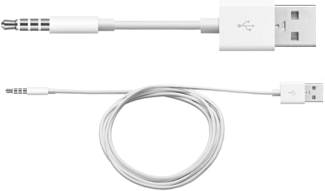
While plugged in, a solid orange status light indicates the unit is charging, while a solid green light indicates the unit is fully charged. If the light is blinking orange, it means the unit is syncing with iTunes or that disk use was enabled in iTunes. In this state, iPod shuffle may be charging or fully charged; the charge status icon next to the iPod shuffle in iTunes will indicate the charge level. Ejecting the iPod shuffle from iTunes while leaving it connected to USB will cause the indicator light to display the charge status. If there is no status light when connected, it indicates a bad connection between the unit and the computer, or that the computer is not suppling power over USB.
Remote playback controls
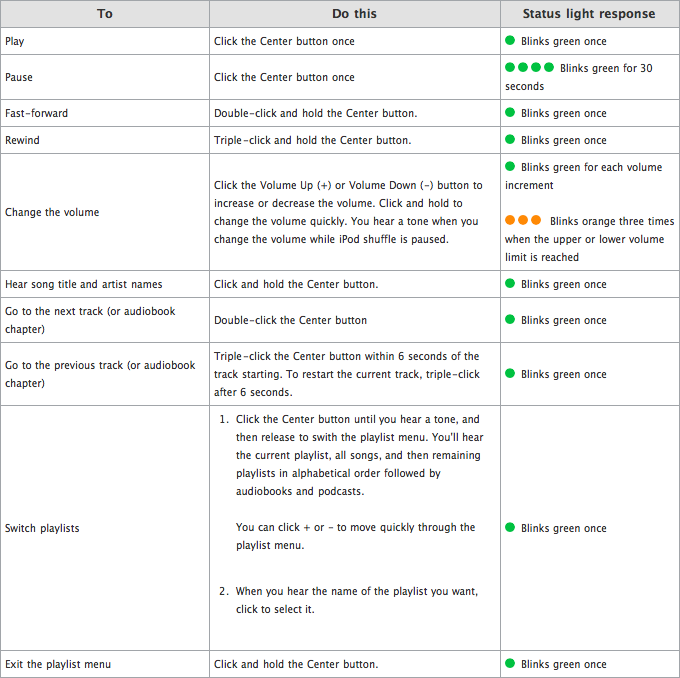
To start playback on the iPod shuffle, click the Center button once. The indicator will blink green once. To pause playback, click the Center button again. The indicator will blink green for 30 seconds while paused.
Song and audiobook chapter navigation controls
To skip to the next track (or audiobook chapter), double-click the Center button. The indicator will blink green once.
To fast-forward, double-click and hold the Center button. The indicator will blink green once.
To skip back to the previous track (or audiobook chapter), triple-click the Center button within 6 seconds of the track starting. To restart the current track from the beginning, triple-click after 6 seconds. The indicator will blink green once.
To rewind, triple-click and hold the Center button. The indicator will blink green once.
Changing the volume
Click the Volume Up (+) or Volume Down (-) buttons to increase or decrease the volume. Click and hold to change the volume quickly. A tone sounds when you change the volume while iPod shuffle is paused. The indicator will blink green for each volume increment, and will blink orange three times when the upper or lower volume limit is reached
Voice Over and Playlist controls
To hear song title and artist names, click and hold the Center button. The indicator will blink green once.
To switch playlists, click the Center button until you hear a tone, and then release to switch the playlist menu. You'll hear the current playlist, all songs, and then remaining playlists in alphabetical order followed by audiobooks and podcasts. When you hear the name of the playlist you want, click to select it. You can click + or - to move quickly through the playlist menu. The indicator will blink green once.
To exit the playlist menu, click and hold the Center button. The indicator will blink green once.










 Christine McKee
 Malcolm Owen
 Charles Martin
 Mike Wuerthele


 Chip Loder







102 Comments
What this all means is that you have to read the manual to work out how to use your new ipod, and probably carry around a bit of paper to remind you. Absolutely brilliant.
to rewind, triple-click and hold the center button. The indicator will blink green once.
lolololololololololololol

The friggen trolls are out.
To rewind, triple-click and hold the Center button. The indicator will blink green once.
Somehow reminds me of this comic and the two after it...
Voice Over features can be activated in iTunes during initial setup or at any later time from iTunes' Device Summary tab presented when the third generation iPod shuffle is attached. Once Voice Over is activated, iTunes will install Voice Over Kit software on the local computer and will generate audio VoiceOver messages to be synced to the device in the language specified.
Wait, so does this mean that it will embed the VoiceOver messages into each song in my library, regardless of whether I'll sync it or not? Or will it only embed the messages during the sync process? I don't really like the idea of iTunes messing around with each and every song in my library. (Though at least it's optional.)
Hey Deuces - Get a Life.
Use your brain - you don't have to adopt a stupid expression that just shows what an idiot you are.