Dining out with iPhone: Zagat and OpenTable hit the App Store
 AppleInsider Staff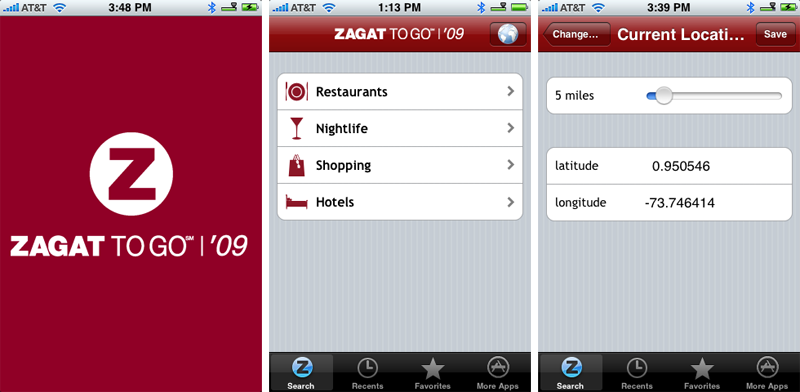
Zagat
For decades, the Zagat Survey has been amongst the most respected and relied upon resources for diners looking to make an educated decision on where to plan that special occasion or spend their hard-earned cash for an evening out on the town.
Ratings for Food, Decor, and Service are each based upon a 30-point scale, and each review is accompanied by a short description comprised of select quotations from past diners, in addition to pricing and other relevant information such as dress codes.
Though it began in the late 70's as guide covering only the New York City dining scene, Zagat now spans some 70 cities with reviews based on input from more than a quarter million diners. Its surveys have traditionally been available as paperback guides but the digital age has seen variants arrive for mobile devices and the launch of a web-based subscription service. In addition, Zagat's coverage map has grown in recent years to include hotels, shopping outlets, nightclubs and more.
With the release of Zagat To Go ($9.99, App Store) this week, iPhone and iPod touch users have the opportunity to pocket Zagat's vast ratings database for easy access on the go. The handy application bundles the 2009 version of the Restaurants, Nightlife, Shopping, and Hotels guides.
In general, the software includes most of the functionality of the subscription-based Web service (with a few notable omissions), but is streamlined in such a way that navigation can prove much faster than the Web-based version when on a WiFi connection.
When you first launch Zagat To Go, the app will request permission to use your current location. A preference lets you alter the search range from 1 to 50 miles, with the default being 5 miles. Alternatively, you can search for a restaurant by name or choose to navigate the guide manually, selecting a popular metro area, city, state, or even a handful of international locations.
After you've defined the region in which you're looking to dine — either via GPS Location Services or manually — the app presents a screen listing those Zagat guides with entries from the general area. Selecting "Restaurants" offers options to list "All" restaurants in the general area, restaurants in a specific "Neighborhood," restaurants by "Cuisine," or restaurants that rate highest in a particular category or offer certain features such as waterside views or the option to BYOB.
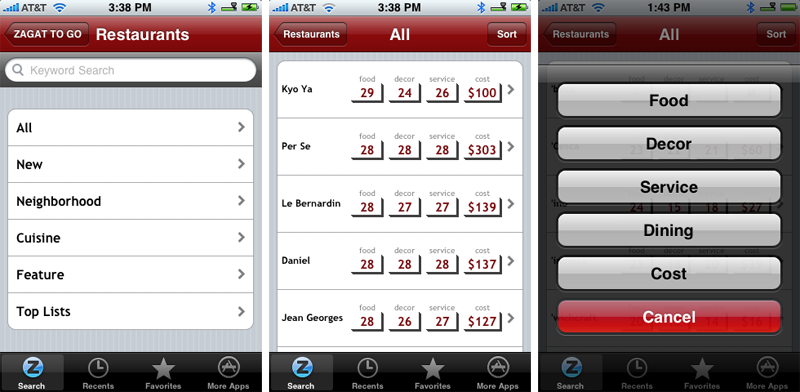
Restaurant listings are served up in alphabetical order by default, but a Sort button at the top-right of the screen unlocks the true power of the application. From there, any listing can be arranged by ratings for Food, Decor, Service, Dining, or Cost. With the exception of "Dining," which relates to the type of cuisine served, the sort functionality is straight forward. Listings update quickly and in descending order. However, the application does not identify the type of cuisine offered by each restaurant when viewed in list view (presumably due to space limitations), which essentially makes sorting by "Dining" pointless for the time being.
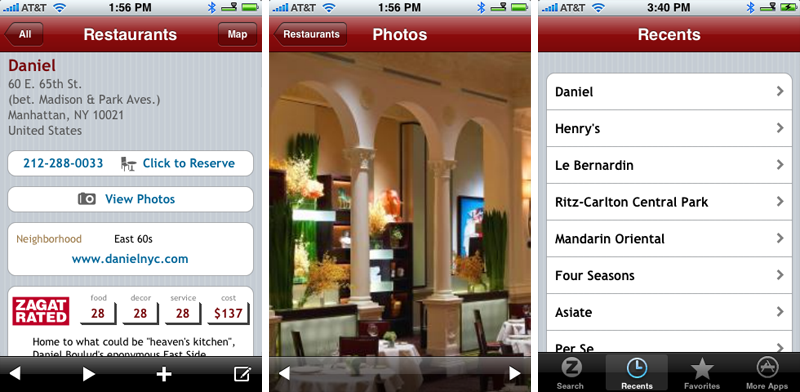
Selecting any particular restaurant will bring up that establishment's info page, which includes ratings, the cost of dining, a brief description, location info, a clickable phone number, a link to the restaurant's website, business hours, and a rundown of amenities. There's a couple of nice touches too: a built-in viewer for browsing restaurant photos and links to setup a reservation through OpenTable when available (though this feature uses the mobile version of OpenTable's website and not the dedicated iPhone app described below). There's also a customizable favorites list and history panel.
Overall, Zagat To Go is a feature-rich first effort that we'd recommend for frequent diners or anyone whose custom is to rely on Zagat's ratings. The application isn't without its some early hiccups, however.
For starters, it doesn't yet work without a connection to the Internet (though Zagat promises this capability shortly). The app will also start to act erratically, throwing up broken dialog boxes if you suddenly lose your connection. There's also some critical omissions from the restaurant info pages, such as dress code, and bugs within the photo viewer that lead you to believe there are more images to browse when there aren't.
Most critical is a design flaw in the application's maps integration. Selecting the Maps icon from any restaurant info page immediately dumps you into the iPhone's Maps application, quitting the Zagat To Go application altogether. There's no way to get back to the restaurant listing, and Zagat To Go doesn't remember where you left off, so you have to relaunch the application and begin your search all over again.
Another little annoyance is that the application throws up a dialog box asking if it's OK to use your current location every single time you launch the app, and in some cases throws the dialog box up twice.
That said, these shortcomings are each minor and are likely to be addressed quite easily in successive updates. Going forward, it would be nice to see the application integrated with the existing web-based subscription service, which would provide access to thousands of customer reviews, rather than just the Zagat-sanctioned ratings and description briefs.
OpenTable
Hitting the App Store just days before Zagat To Go was an iPhone version of OpenTable — a real-time online restaurant reservation service that covers restaurants in most U.S. states.
The service is free to end users and the company makes its bank by charging restaurants monthly service fees in addition to per-reservation fees. As such, not all restaurants use the service, though a growing number of establishments in major metropolitan cities do.
The greatest things about OpenTable is its ability save you a tremendous amount of time. Anyone who lives in urban area knows that weekend reservations for hot spots fill up faster than a port-a-john at a Dave concert.
Since OpenTable is a real-time system, it instantly informs you of which restaurants have availability, which are completely booked, and which have openings only in certain time slots. You don't have to spend time calling 15 locations before you find one willing to seat your party. (And if you eat out religiously, you can eventually accumulate enough that can be redeemed for an OpenTable gift certificate good towards your bill at participating restaurants.)
Upon launching the OpenTable iPhone app (Free, App Store), you can either select a location manually or allow the software to use your iPhone's Location Services feature to bring up a group of restaurants in your general area — just like the aforementioned Zagat app. From there, the process is fairly straight froward.
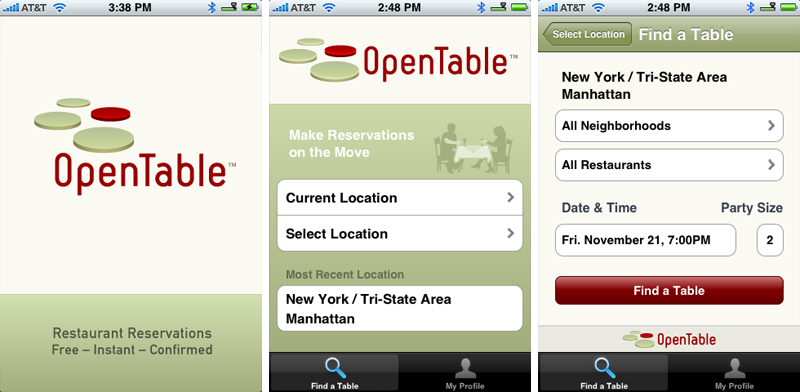
You select the date and time for which you'd like to make a reservation, along with the size of your party, and OpenTable will spit out a list of restaurants with availability. The list includes the the names of each of the restaurants, the city or neighborhood in which they are located, a general assessment of cost (in the range o one to four dollar signs), and up to 3 available reservation times within two hours of your search criteria.
After selecting a particular restaurant, you're taken to that establishment's info page, which includes a small photo, address information, a link to view the location on an integrated Google Maps dialog, and availability buttons that let you select a time for your reservation.
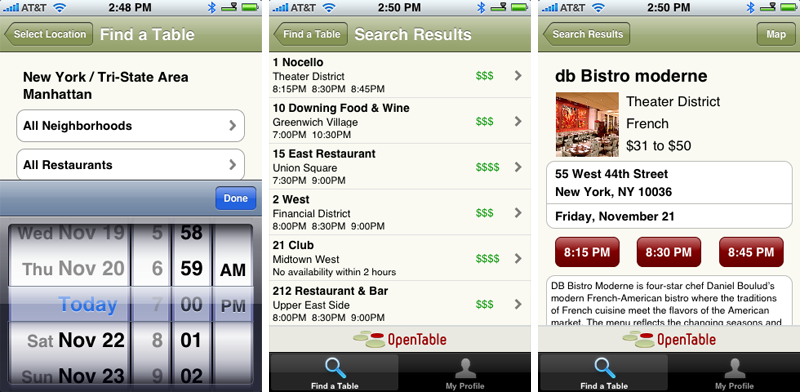
Once you select a time, you can either login to your existing OpenTable account to complete your reservation or create a new account on the spot. After confirming your reservation, OpenTable sends you a confirmation email and you're all set. You'll also gain access to your profile page once you log in, which lists the points you've accumulated to date, recent reservations and upcoming reservations.
In general, OpenTable for iPhone is a straight-forward, streamlined application that gets the job done rather quickly. However, it's slightly crippled when compared to the full-fledged web service. For instance, there's no way to sort restaurant lists by Price, Cuisine, or Neighborhood. There's also no way to manually enter the name of a restaurant or see a listing of restaurants that are already booked. Unlike the Web-based version, there's also no way to make special requests for the Maitre D'.
But as is the case with Zagat To Go, these limitations appear minor and are likely to be addressed in future updates. We'd recommend OpenTable for iPhone to anyone who dines out, as it costs you nothing and can only save you precious time.
For additional iPhone app coverage, don't forget to check out AppleInsider's iPhone blog (RSS).










 Stephen Silver
 Charles Martin
 Christine McKee
 Malcolm Owen
 Mike Wuerthele









12 Comments
Looks kind'a cool..
But why does Apple give me everything other than what I really want ??
Cut + paste Please..
Period of economic recession, won't spend on expensive cuisine !!
Its interesting now that when reviews come out they talk about whether the App is available internationally or just in the USSA. There now seems to be an acceptance that these Apps may have some relevance to an audience outside the USSA. (Making $ for the designers too!)
I like UrbanSpoon cause they have added some other countries. Even Americans must eat when they travel. Its also a bit Gonzo with reviews and ratings by the consumer / taster.
Yep and it is a shame we still can't Cut and Paste. Is that really that hard to program? :
Enough with the Cut&Paste feature people! This is not the thread to whine about it.
Besides, since this thread is dealing with eating, it is best to say "Cut&Taste"!!
Enough with the Cut&Paste feature people! This is not the thread to whine about it.
Besides, since this thread is dealing with eating, it is best to say "Cut&Taste"!!
Yea really shut up about cut and paste. Apple dont care about your cut and paste. If it means that much to you go buy a Storm.
Yea really shut up about cut and paste. Apple dont care about your cut and paste. If it means that much to you go buy a Storm.
Oh Snap. LOL