Road to Snow Leopard: twice the RAM, half the price, 64-bits
 Prince McLean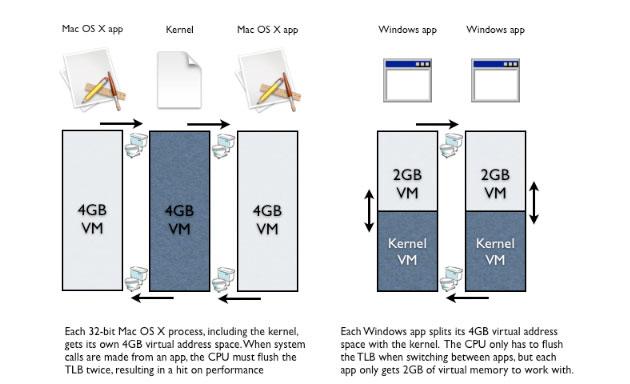
Snow Leopard's across-the-board leap to 64-bits, from the kernel to all of its bundled apps, will do more than just make more memory available. It will also have a significant positive impact on performance system wide, even more than the same jump to 64-bits in Windows Vista. Here's why.
Road to Mac OS X Snow Leopard: Twice the RAM, half the price, 64-bits
Road to Mac OS X Snow Leopard: The Future of 64-bit Apps
System RAM vs App RAM
While the 4GB limit described earlier is only just beginning to affect mainstream users, there's another problem that prevents full use of the installed memory by any specific application. In fact, the real problem for RAM-starved apps is not how much RAM can be installed in a machine, but rather the limits on the amount of memory a single application or process can address itself.Â
The 32-bit versions of Windows, Linux, and Mac OS X handled their 4GB limit differently. That means their transitions to 64-bits offer varying levels of improvement to their users. In 32-bit versions of Linux and Mac OS X, the kernel maps out a 32-bit, 4GB virtual memory space for itself and one for each app (or process). The virtual memory system shuffles memory around as needed to take best advantage of however much RAM is installed. The more RAM the better, of course.
In 32-bit Windows, every app only gets a 2GB virtual address space; the 4GB space afforded by 32-bit addresses is split with the kernel. By default, the split is right down the middle, so the app gets 2GB to work in while the kernel reserves the other 2GB. With a special setting, Windows can be adjusted to a 3GB/1GB split to give the app a bit more room, but there's no way to approach a full 4GB address space in Windows. This impacts every app on the system that wants to use a lot of RAM.Â
The reason behind Windows' split memory allocation is performance. Windows system calls can address memory locations mapped to the application and to the kernel in the same breath, because the CPU can directly address the app's RAM and the kernel's RAM at the same time using a cached lookup table called the "translation lookaside buffer" or TLB.Â
With More RAM Comes More Accountability
In contrast, while 32-bit versions of Linux and Mac OS X give each application its own full 4GB of virtual memory, those addresses share (overlap with) those used by the kernel's own 4GB space. That means the CPU's TLB can't maintain its cached addresses because there's no way distinguish between the two.
Every time the virtual memory system moves between the two address spaces, it has to flush the CPU's TLB. Every 32-bit system call flushes the TLB twice, repeatedly setting the cache back to zero and negating any of the performance it was designed to enable. On Windows, this only happens when the system switches between applications, because each application splits its virtual memory space with the kernel (above).Â
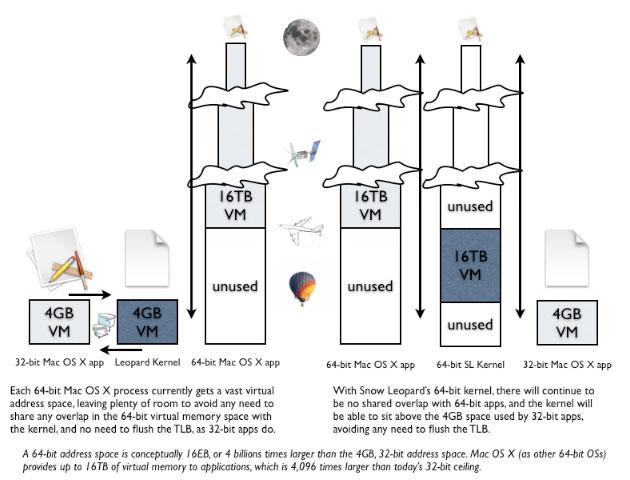
Under the 64-bit Mac OS X Leopard, 64-bit apps get a massive virtual memory allocation that breaks out of the 4GB box. This allows 64-bit apps to occupy high address spaces while the kernel uses its own low addresses. Without any shared address overlap, the TLB doesn't need to be flushed and can therefore function as intended. That potential windfall isn't yet fully realized because Leopard's kernel and most Mac apps are still 32-bit (below left).
Snow Leopard will deliver both a 64-bit kernel and a full set of 64-bit bundled apps, erasing the entire TLB flush issue because the new kernel won't have to share any address space, even when running 32-bit apps (below right). This will benefit all 64-bit Mac users with a Core 2 CPU or better, even those lacking a Santa Rosa platform-style chipset, as being able to run 64-bit code and virtual memory is not tied to the amount of addressable system RAM.Â
More, Better, Faster
Today's 32-bit Mac apps have access to more memory than 32-bit Windows apps, but incur the TLB flush performance hit every time an app places a system call, rather than only when switching between apps. With 64-bit apps, Leopard offers better performance with virtually unlimited addressing.Â
In 64-bit Windows, apps finally break out of the 2GB limit (they now split the 16TB address space in half with the kernel), but there's no significant new performance advantage related to the TLB, because Windows wasn't dealing with that problem.Â
Both platforms will benefit from being able to take advantage of the additional registers on x64 that are so desperately missing from the 32-bit x86 architecture, as noted in the first segment in this series. That factor is also why PowerPC G5 users won't see much performance benefit from general purpose apps ported to 64-bits; 32-bit PowerPC apps already have plenty of registers. In many cases, they will actually get slightly slower due to the extra addressing overhead. That's also a key reason why Snow Leopard will be Intel only.Â
The dark side of 64-bit
There is also some additional overhead with handling 64-bit addressing on Intel, of course. There's also a "chicken and egg" problem related to developing a market for 64-bit apps before there's any significant installed base of 64-bit operating systems to run them. The mainstream Windows install is still 32-bit. Many 64-bit PCs are sold with and/or end up running 32-bit Windows, because Microsoft doesn't have one OS that runs all apps seamlessly.Â
Windows 64-bit users complain about many 32-bit apps, drivers, codecs, and utilities not ready or not working properly. That includes Microsoft's own Office Document Imaging tools, Silverlight, and Windows Media Player. And because 64-bit kernels and apps won't work with 32-bit drivers or plugins, the lack of 64-bit Silverlight or Flash prevent many users from running the 64-bit Internet Explorer. Additionally, the way Microsoft delivered 64-bit Windows causes problems for app developers, as simple changes or customizations to the system can hose everything, as Adobe has warned the beta users of 64-bit Photoshop CS4.Â
In contrast, all of Apple's Macs are now 64-bit and running a 64-bit OS, as there are no problems that prevent adoption of Apple's rather seamless 64-bit deployment. Except for, of course, a paucity of popular 64-bit Mac apps from everyone from Adobe to Apple itself. Apple will also need to provide 64-bit drivers and plugins for its kernel and apps, and get third parties to all do the same. The next article will look at the market for 64-bit apps, and how quickly Apple and third parties are going to be able to take advantage of the technical 64-bit lead on the Mac platform.










 Mike Wuerthele
 Malcolm Owen
 Chip Loder

 William Gallagher
 Christine McKee
 Michael Stroup
 William Gallagher and Mike Wuerthele