Road to Mac OS X Snow Leopard: 64-bits, Santa Rosa, and more
 Prince McLean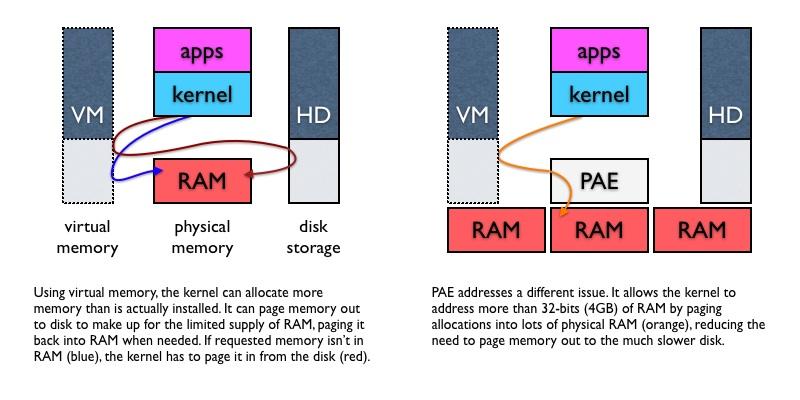
Snow Leopard's across-the-board leap to 64-bits, from the kernel to all of its bundled apps, will do more than just make more memory available. It also exposes a great PC swindle and highlights Apple's lead in 64-bit computing. Here's why.
3: Twice the RAM, half the price, 64-bits
4: The Future of 64-bit Apps
Virtual Memory, PAE, and the 4GB barrier
Right now, few mainstream users need more than 4GB of RAM, even when running a 64-bit operating system. An OS can manage a large 64-bit virtual address space and simply page memory into the limited amount of RAM available as needed, using the hard drive as overflow when required (below left). Consumers will eventually want a full 4GB however, and many power users already need even more than that right now.
Because hardware with 32-bit addressing can only work with 4GB of RAM at once, special tricks such as Intel's PAE (Physical Address Extension) are needed to take advantage of more physical RAM (below right). PAE can give the system more breathing room in the amount of RAM it has access to, an important factor in reducing the kernel's need to page memory in and out to a relatively slow hard drive.
Mac OS X running on a new Mac Pro or Xserve can handle as much as 32GB of installed RAM using PAE. Linux can also use PAE, but 32-bit Windows PCs are stuck at a maximum of 4GB of installed RAM. Windows XP initially offered support for using more than 4GB with PAE, but this caused problems related to driver bugs, so Microsoft simply disabled support for more than 4GB, starting with Windows XP SP2 and continuing into Windows Vista. Unless you're running Vista x64 or an expensive "datacenter" or "enterprise edition," you simply can't use more than 4GB of RAM on a Windows PC.
System RAM vs MMIO: the "where is my 4GB?" problem
If you're feeling cramped within 4GB, hold on tight because things are about to get worse. The first issue is a historical limitation in the Intel x86 architecture, related to "Memory Mapped I/O." Essentially, all of the device memory used by video cards or any other expansion cards is mapped on top of the 4GB addresses used by the system's RAM. This didn't used to be a problem before anyone wanted to actually use the entire 4GB address space for system RAM.
Note that this doesn't mean that MMIO "eats up" your RAM, it's just that the hardware maps that device-related memory over the top of physical memory, leaving fewer addresses available to the operating system to use for its system RAM. This problem is tied to 32-bit chipsets, which are independent from the CPU. There are 64-bit PCs with 32-bit chipsets. For example, Apple's 64-bit Core 2 Duo laptops prior to the second half of 2007 all used 32-bit addressing.
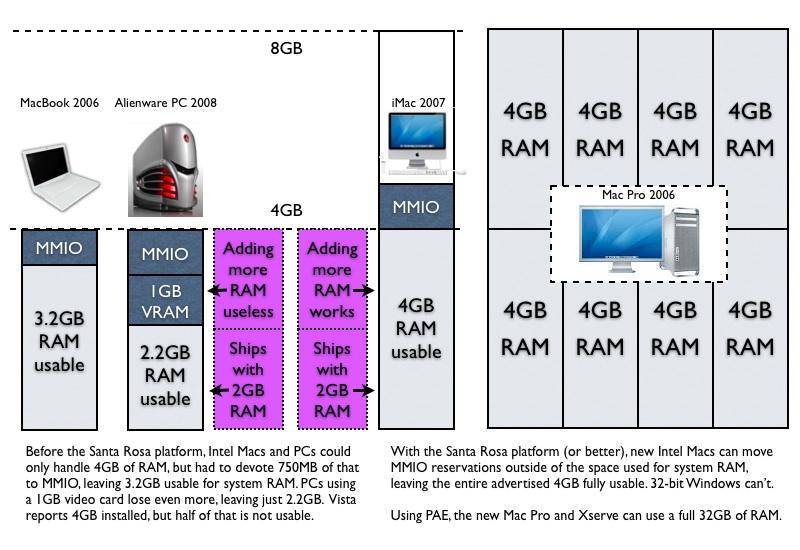
That means that while they can execute 64-bit code and handle 64-bit virtual memory, they still can't address more than 4GB of physical RAM, minus roughly 0.75 GB of MMIO, for a grant total of 3.2GB usable RAM. If you install a full 4GB, the portion in conflict with the MMIO will simply not be used. For PC users installing a high end video card with 1GB of VRAM, the additional MMIO becomes an even greater problem: their usable system RAM shrinks by down to around 2.3GB.
The great PC RAM swindle
With Intel's "Santa Rosa" platform, Apple's Core 2 Duo machines gained chipset support to internally handle 8GB of address space. This allows Santa Rosa Macs to shove MMIO up into the high end of the space and reclaim all of the addresses below the 4GB mark, making the full amount available to the system. No version of 32-bit Windows supports this, and conversely, there is no 32-bit version of Mac OS X Leopard, so the "where is my full 4GB?" issue is now a Windows-only problem going forward.
Prior to using the Santa Rosa platform, Apple sold its laptops as only supporting a maximum of 3GB RAM because of this. However, many Original Equipment Manufacturer PC assemblers represent their machines as supporting 4GB of RAM even though the operating system can't actually make any use of a big chunk of it. With hardware that only supports 32-bit addressing, no operating system can make use of the full 4GB. However, even with Santa Rosa-style hardware that can make use of the full 4GB, the mainstream 32-bit Windows Vista still won't use more than 3.2GB or less because it can't remap MMIO.
One developer we consulted about the issue noted, "consumers are being scammed by [PC] OEMs on a large scale. OEMs will encourage customers to upgrade a 2GB machine to 4GB, even though the usable RAM might be limited to 2.3GB. This is especially a problem on high-end gaming machines that have huge graphics cards as well as lots of RAM."
"Microsoft even changed the way the OS reports the amount of RAM available; rumor is, due to pressure from OEMs," the developer told us. "In Vista and prior, it reported usable RAM, while in SP1 they changed it to report installed RAM ignoring the fact that much of the RAM was unusable due to overlap with video memory." And so many PC users are installing 4GB of RAM in their PCs and thinking that it is being used by the system, when in fact it is no more beneficial than if the RAM were simply poked halfway into the CD slot.
For example, Dell's top of the line $5799 Alienware gamer PC comes standard with a 1GB video card, 2GB of RAM, and 32-bit Windows Home Premium. That means the system can only possibly use 2.3GB of RAM, but Dell "recommends" users spend $250 (or $8 per month with financing) to buy a 4GB upgrade (below) that will offer them little more than bragging rights, as the 1GB video card and the roughly 750MB of other MMIO will make the extra 2GB unusable. Dell says "Upgrading your memory allows you to take full advantage of system capabilities as well as increasing system efficiency," but that's simply not true on this page.
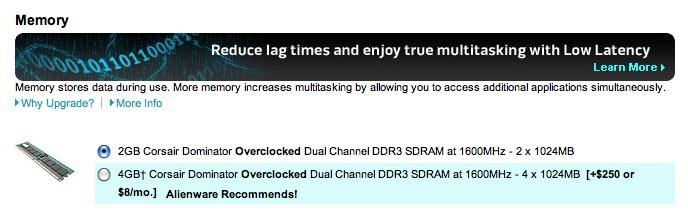
The next segment will look at another aspect of RAM use in Mac OS X that underlines why apps can use more memory than apps in Windows Vista, and how this relates to performance gains coming in Snow Leopard.











 Malcolm Owen
 William Gallagher
 Christine McKee
 Michael Stroup
 William Gallagher and Mike Wuerthele

 Chip Loder