Evernote for Mac, iPhone to make managing information overload easy
 Prince McLean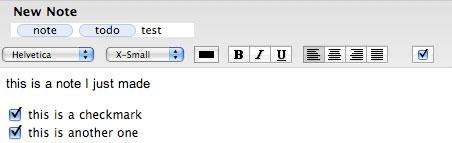
The service acts like an assistant that grabs everything you throw at it and then finds just what you're looking for when you demand it.
Capture, Tag and Catalog
Evernote started out as a Windows app, but in version 3.0, currently in private beta, it has become a web service along with a sharp looking native Mac OS X client app. A custom iPhone version is planned as well, although the web interface already provides some level of access to iPhone and iPod touch users. Using both the native client and the web interface, users can upload all kinds of data clippings into the system and retrieve items from their brain dumps with a quick search.
Users get started by setting up a private account. Items are loaded into different collections called notebooks; the client software syncs with the web service in the background. Individual notebooks are private by default, but can be made public for collaboration with other users. Items are organized by user-defined tags and are searchable by their indexed content.
What distinguishes Evernote from a simple online repository of photos (such as iPhoto or Flickr) or web bookmarks (such as Del.ici.ous) or document searching (such as Spotlight) is that the system analyzes everything that gets uploaded, scanning for recognizable text in pictures, performing handwritten recognition, and indexing all the text for later search. Evernote also provides tagging tools to allow users to associate their own labels on items, both individually and applied across multiple selections.
Entering Notes
There are a variety of ways to get content into Evernote. Using either a web browser or after installing the native Evernote client, users can create a basic new note using rich text formatting. The Evernote application also includes an easy to use checkbox tool for making to do lists. Descriptive tags can be assigned to the note by clicking in the Tag area of the note and simply typing words or phrases separated by commas. Each tag is turned into an oval object tag (below), similar to the email addressing field in Mail.
Using the Evernote client application, any Mac with an attached iSight camera can also be used to capture a snapshot note. Click the toolbar icon and a standard picture taker interface is presented. Snap a photo and picture is entered as a new note, with room for adding additional text and tags. If the picture contains any legible text, Evernote's servers will attempt to recognize it and attach the text to the snapshot entry as searchable metadata.
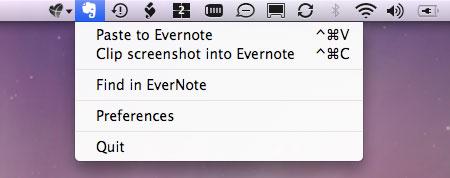
Text files, HTML, jpeg, gif, and png graphics (including photos from iPhoto or Photo Booth) can be dragged directly to Evernote's Dock icon to quickly create a new entry. The system currently doesn't import PDF files or other common documents such as Office files, but does provide tools that make it easy to grab a full or partial screen shot of those types of files. The application also installs a menu bar item (below) that makes it easy to import selected text or graphics from a document or web page, grab that screen shot as a picture, or perform a quick search.
Remembering the Web
From Safari 3, an entire web page or a selected portion of the page can be uploaded into Evernote using a bookmarklet. This uploads the graphics, links, and text into an Evernote online account directly. The Evernote client program syncs with the online account to present all of the captured items in each notebook, making the system akin to a smart multimedia mailbox.
Evernote also works via email. Any note or clipping can be emailed to another user as an attachment with a quick click on the Email Note icon in the toolbar. The contents of any email can similarly be forwarded to Evernote for later recall as well. The system creates a private email address you (or anyone you provide it to) can use to forward content into your Evernote account.
That private email address also makes it easy to freely upload photos taken with the iPhone (other phones can upload photos via fee-based MMS). Snap photos, send them to Evernote, and they are cataloged and scanned for any text automatically, making items easy to search for later. If the email address gets discovered by spammers, its easy to generate a fresh one. This simple photo workflow makes it easy to capture business cards, product labels, maps, menus, and other information with your mobile phone, and easily categorize and reference the information later, either from the phone, from the web on any public computer, or from the slick client software on a Mac.
The Interface
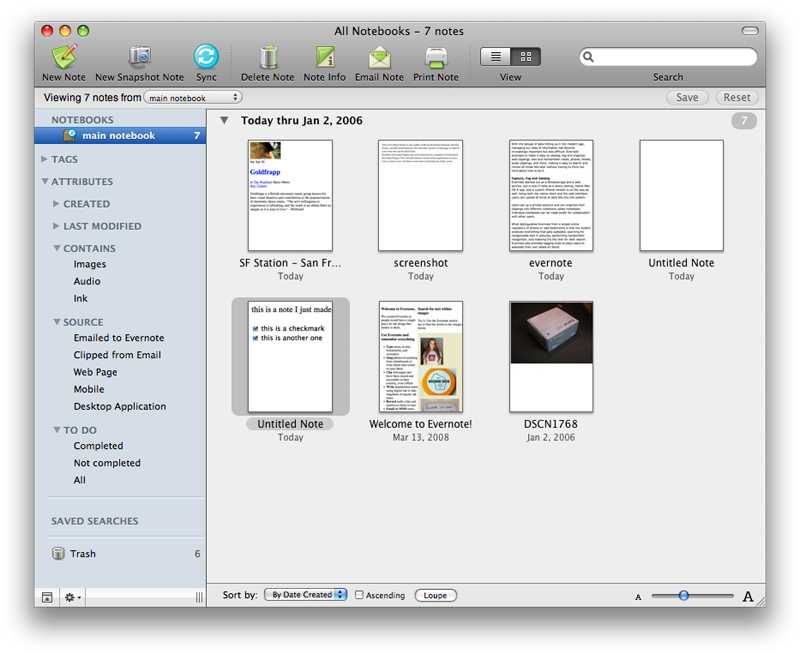
The new Mac client interface will be familiar to users of Mail. Toolbar buttons across the top make it easy to add, print, or mail notes. A view icon selects between list view (below top) and item thumbnail view (below bottom). As new items pour in, the thumbnail sorting features become useful; items can be sorted by name, date created, or date uploaded. Each sort style groups items under date or alphabetical subheadings. The easiest way to find items is using the search field, which provides instant results as you type in words. If the search matches text recognized within a graphic, the discovered text is highlighted.
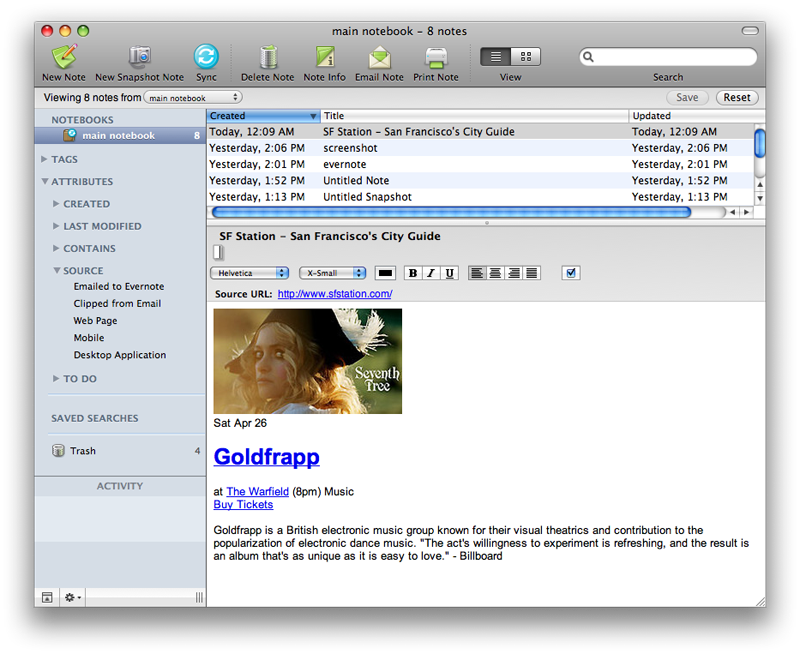
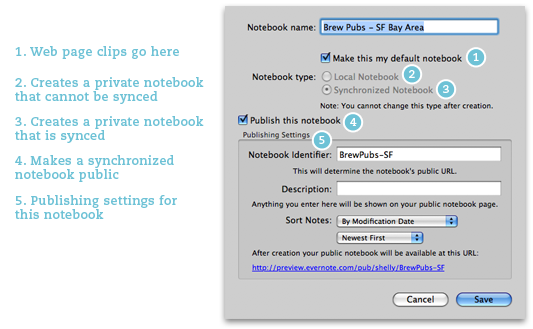
Along the left side organizer panel is a listing of notebooks, which may be set up as private to the computer, kept in sync with the online service, or published publicly as a web page others can access. That setup is done using a simple sheet (below). An example of a publicly published notebook is available at Daven's public notebook: BrewPubs-SF.
On page 2 of 2: Easy Metadata Searching; The Web Interface; and The Evernote Overview.
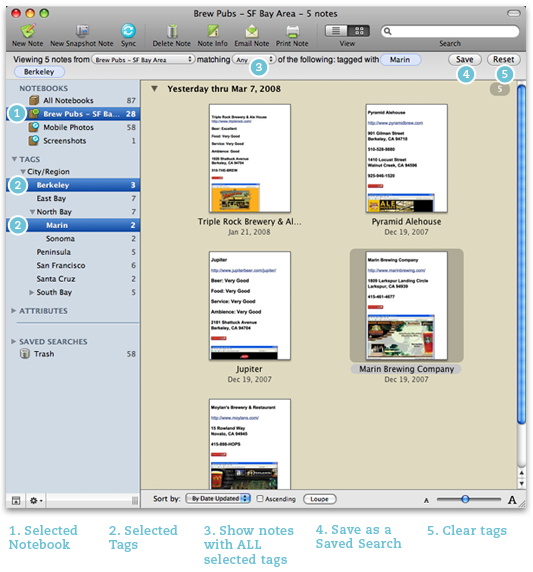
Underneath the notebook listing are sections featuring disclosure triangles that open to reveal lists of options. Tags presents a listing of all the tags assigned on all entries. Clicking a tag does an immediate search for the items matching that tag. In addition to manually adding a tag to an entry, you can also select multiple items and drag them to a tag to assign them all that tag. Attributes allows you to do a similar search based on creation or modification dates; any item that contains pictures, audio, or handwritten ink; or by the item's source (whether emailed in, clipped from email, a web page, a mobile, or the desktop application).
At the end of the attributes section is a list of to do items. Any time a checkbox is added to a note, the item is tagged as a to do. The Completed, Not Completed, and All to do tags make it easy to pull up any notes with checkboxes in a given state.
Collectively, the tag, attribute date, contains, source, and to do selections allow you to rapidly find items based on a variety of metadata matching. Multiple items can be selected at once, creating a complex query without any effort. The definition of the search is presented below the toolbar (below). Once set up, the search can be saved or dismissed. Saved searches are presented at the bottom of the organizer panel.
The Web Interface
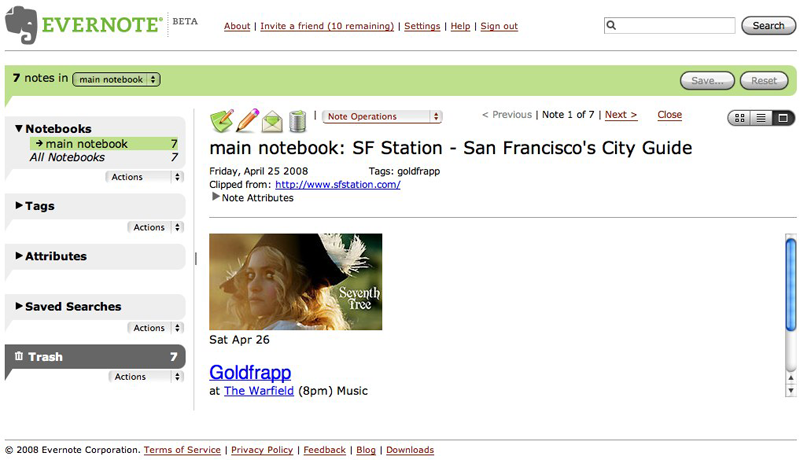
The same features are presented online in the web version (below), although the client software offers the same kind of advantages that an email client has over a web email service. The beauty of the web version is that it's available anywhere on any public computer. It's even accessible from the iPhone, although it warns users that the mobile Safari is not yet among its recommended browsers (Safari 3, Firefox 2, and Internet Explorer 7).
The Evernote Overview
Evernote for Mac is still in private beta, but is expected to make its official debut in the coming months. The application provides a useful assortment of search tools, intuitively designed in an interface consistent with other Leopard savvy apps. It also makes use of Core Animation to present attractive live sorting of item thumbnails, resulting in an "advanced note visualization" the Windows version currently lacks.
As just a standalone app, Evernote would have limited practical functionality, but tied into its web service with text recognition features, public notebook publishing options, and the ability to call up collections from any web browser, the entire package makes a really cool product that's easy to use and highly productive. Even better, the program and web service is free, with a paid premium service version planed for the future.
If you find yourself searching through bookmarks, photo albums, email, and text documents looking for the stuff you intended to remember, Evernote could be just the tool you need to organize your information overflow. The company has posted a demonstration YouTube video that covers the basics visually.











 Mike Wuerthele
 Malcolm Owen
 Chip Loder

 William Gallagher
 Christine McKee
 Michael Stroup
 William Gallagher and Mike Wuerthele