Exploring Time Capsule: feature and suitability review
 Prince McLean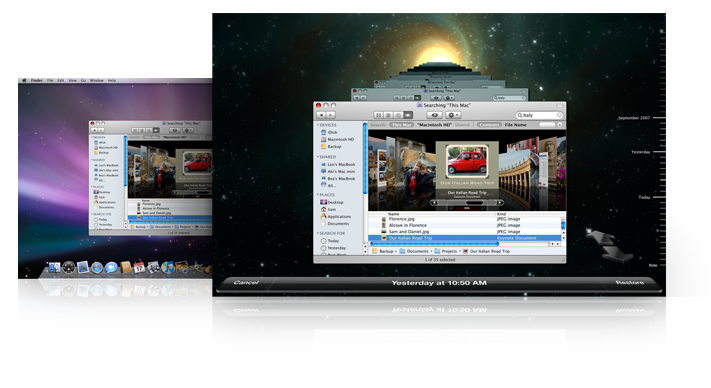
Time Capsule
4.0 / 5Previous articles from our in-depth Time Capsule review series:
The AirPort Family (Snap, Snap)
Based on our testing, Time Capsule is almost functionally identical to the AirPort Extreme in terms of disk sharing. The Time Capsule's built in SATA drive offers a slight edge in performance over an external USB disk, but users won't see a significant difference when working from wireless clients. The additional speed is really only visible to wired clients using Gigabit Ethernet.
Time Capsule offers Gigabit Ethernet as standard, while AirPort Extreme units sold prior to August 2007 only supplied 10/100 Fast Ethernet. Even so, the theoretical performance advantage of the faster wired networking isn't a clear reason to upgrade, as the file sharing features of the base stations are optimized for wireless and don't exploit the advantage of the greater throughput potential available in Gigabit Ethernet.
The actual difference in file serving from the base stations between the Fast and Gigabit Ethernet models is not very significant, although client systems connected via the faster Gigabit Ethernet switch integrated into the base station will be much faster when talking to each other, such as when sharing iTunes libraries or iPhoto albums.
To 5 GHz or Not To 5 GHz, That is the Question
All of the currently shipping AirPort base stations now support 802.11n, which includes support for the 5 GHz band. As noted in Exploring Time Capsule: WiFi 802.11n and the 5GHz band, there are both pros and cons to using this configuration. It can limit the reception area and have a harder time penetrating walls and floors, but it also supports the use of wide channels, which can dramatically boost the speed of wireless networking.
This boost can make the difference between a wireless setup that can't quite handle the demands of Time Machine backups while also streaming AirTunes and copying files, and one that takes it all in stride. Users should experiment to make sure they're getting the most out of their equipment given their own circumstances and needs.
Time Machine: Wired vs Wireless Networking vs Directly Connected Drives
Apple advertises Time Capsule as the ideal target for Time Machine backups, and for most users with casual needs, it serves as an ideal backup appliance: invisible, simple, and cost effective. While wireless networking is considerably slower than wired networks and lags far behind backing up to a directly connected USB drive, for most users, the length of time required to do regular incremental background backups won't be a big deal.
However, wireless restore operations, including the process of zooming into space to look up the missing files in Time Machine, are considerably slower over a wireless connection and incur delays that can make the process something between frustrating and irritating. Because restore operations are a foreground task requiring user interaction, and hopefully will occur less often than hourly backups, this problem can be worked around by connecting to the base station directly via Gigabit Ethernet before performing a restore.
In other words, regular background backups don't suffer from the slower nature of wireless networking nearly as much as the file intensive searching related to a Time Machine restore operation. Restoring files should be an occasional event that can handle the clumsier process of directly connecting to speed things up.
Time Capsule Wireless File Sharing vs a Standalone Gigabit NAS
Given that a PowerMac G5 can serve files over Gigabit Ethernet faster than a directly attached USB drive, it would be nice to see similar performance from Time Capsule. However, Time Capsule and the AirPort Extreme are designed to serve as wireless base stations, not as general purpose, high performance Networked Attached Storage appliances.
Being half as fast as a standalone computer over Gigabit Ethernet also allows Time Capsule to eat a fraction of the energy and dissipate far less heat than a G5 tower, and subsequently be much smaller. The performance edge of a standalone server also becomes invisible when most of the clients are using wireless networking to access it.
Once again, Apple has engineered a product that serves a specific purpose, rather than trying to do everything without doing anything very well. The result is that Time Capsule will satisfy the users it was designed for, and does not appeal to users with needs for something else. For those who do need a solution faster than the entry level base station's integrated file server can manage, there's the option of adding a standalone Gigabit NAS appliance to the network.
A terabyte standalone Gigabit Ethernet NAS device can range from about $300 to $1000, although most lower end systems use two 500 GB disks, making them considerably larger, power hungry, and likely nosier. On the other hand, they should also be significantly faster, and many models offer internal RAID features for additional protection against drive failure. Most devices are also configured over the web, making them more complex for non technical users to manage compared to the ultra simple and friendly AirPort Utility software used to set up Time Capsule and the AirPort Extreme.
On page 2 of 2: Time Capsule Wrap Up and Rating.
Home users who want the elegance and simplicity of a wireless network will appreciate the easy to configure and use nature of Time Capsule. Thanks to the firmware update adding Time Machine support, users with a 2007 AirPort Extreme likely won't feel the need to upgrade to Time Capsule, particularly if they already have a shared USB drive they're using. Time Capsule's Gigabit Ethernet feature doesn't offer much reason to upgrade, as the unit (along with newer versions of AirPort Extreme) doesn't really exploit the speed of the bigger pipe.
Anyone considering the purchase of a new base station and interested in centralized file sharing and Time Machine backups would do well to look at Time Capsule, which is priced well considering its 500 GB or 1 TB drive capacity, and the convenience of having the drive and the unit's power supply integrated into a single box. All Time Capsule and AirPort Extreme users should also evaluate using a configuration in the 5 GHz band using wide channels, as this can provide a major boost in data throughput.
Users hoping to set up a Gigabit Ethernet network with high performance file sharing should consider other options, because the wired network performance of Time Capsule (and the nearly identical AirPort Extreme) are not exceptional. They are both designed to primarily serve wireless clients.
Time Capsule earns the same rating as AirPort Express did last year, detailed in An in-depth review of Apple's 802.11n AirPort Extreme Base Station. It is similarly dinged for lacking any support for direct AirTunes playback; users will need an AirPort Express or Apple TV to distribute audio wirelessly. It seems like Apple could add a digital audio out port at relatively minimal cost and add considerable value to Time Capsule and AirPort Extreme, although the recent upgrade of the AirPort Express to support 802.11n makes this less of a glaring omission. Relatively few users will need to share a stereo, USB printer, and USB disk drive in the same location.
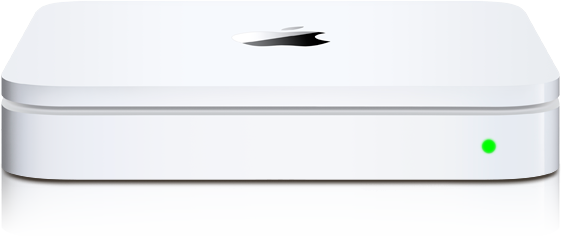
One last time, while Time Capsule delivers Gigabit Ethernet ports, it does not make full use of the extra bandwidth when serving data from the shared drives. Note that the integrated Gigabit Ethernet switch does perform at full speed for connected computers; it is the server speed of the internal base station that is lacking when compared to a dedicated file server. Apart from those factors, Time Capsule and its simplified, diskless AirPort Extreme cousin offer brilliant design and ease of use at a reasonable price.
Rating 4 out of 5

Pros:
- Competitively priced, slim, solidly designed hardware.
- Excellent AirPort Utility software.
- Simple and easy to use network disk and printer sharing features.
- Offers a big boost in wireless speed and coverage over 802.11b/g.
- Built in switch for wired Gigabit Ethernet devices.
- Reasonably priced drive options.
Cons:
- Lacks AirPort Express' AirTunes for wireless music distribution.
- Gigabit Ethernet file sharing performance is disappointing.
Where to Buy
500GB Time Capsule - $294 (MacMall)
1TB Time Capsule - $494 (MacMall)
500GB Time Capsule - $299 (Amazon)
1TB Time Capsule - $499 (Amazon)
500GB Time Capsule - $298.95 (B&H Photo)
1TB Time Capsule - $498.95 (B&H Photo)
Previous articles from our in-depth Time Capsule review series:








 Marko Zivkovic
 David Schloss

 Malcolm Owen
 William Gallagher
 Mike Wuerthele
 Christine McKee