$bbtitle
AAPL: 183.45 ( -1.61 ) AppleInsider RSS Feed
Search:
AppleInsider.com Archives Reviews Anonymous Mailer Submit Story AppleInsider Forums Polls Advertise on AppleInsider Contact AppleInsider
MacMall: $75 and $100 rebates on the new Penryn MacBooks and $150 rebates on the new Penryn MacBook Pros
Thursday, March 27, 2008

Exploring Time Capsule: how it fits into Apple's AirPort family

By Prince McLean

Published: 09:00 AM EST

Time Capsule, announced at this years' Macworld Expo, serves as a simple rebranding of the AirPort Extreme with an integrated hard drive and power supply. Apple sells the new Time Capsule next to last years AirPort Express and the compact AirPort Express. This segment, the first of six exploring Time Capsule in depth, highlights the differences between the members of Apple's AirPort family.

Time Capsule vs Airport Extreme

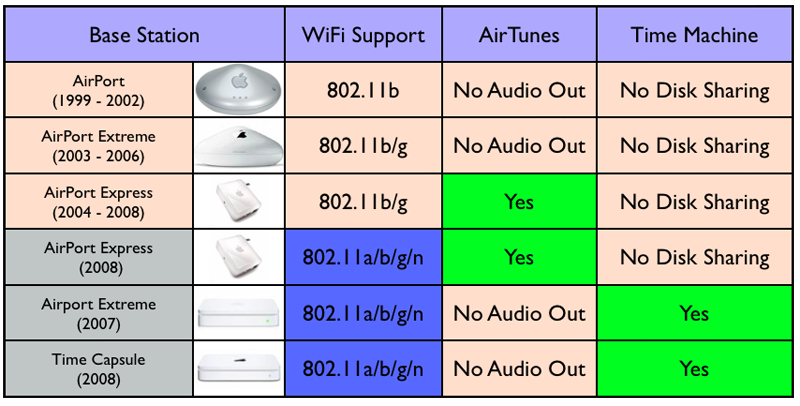
Over the last several weeks, Time Capsule held a temporary advantage over last years' AirPort Extreme in its being able to work with Mac OS X 10.5 Leopard's Time Machine feature to deliver wireless automated backups. However, Apple's recent firmware upgrade has brought the existing AirPort Extreme units up to speed with Time Machine as well. So what's the difference, and is there still any need to upgrade?

This series of segments exploring Time Capsule, to be published over the course of one week, will highlight the differences in speed between the different models, in different usage patterns, and using different interfaces, all supported by real world testing in comparison with the theoretical maximum data transfers advertised. It will also answer the question: is Time Machine practical for use over wireless networking?

Previous articles related to Time Capsule and its AirPort Extreme cousin:

An in-depth review of Apple's 802.11n AirPort Extreme Base Station
Apple Time Capsule unboxing and preview
A Look Inside Apple's New Time Capsule
Answers to Time Capsule reader questions

Sorting out the AirPorts

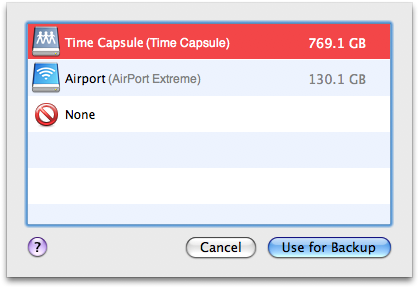
The recent AirPort software update included a new 5.3.1 revision to AirPort Utility, as well as firmware updates for both the 2008 Time Capsule and 2007 AirPort Extreme, both of which are now identified as using firmware version 7.3.1. Once updated to the latest firmware, shared USB disks attached to the AirPort Extreme show up in Time Machine next to the Time Capsule drive (below). Previously, AirPort Extreme shared drives only functioned as network file shares in the Finder, as described in Teardown: a look inside Apple's Time Capsule backup appliance.

Apple Time Capsule


Earlier "UFO" shaped models of the AirPort Extreme do not support the faster 802.11n wireless networking standard nor USB disk sharing. The compact AirPort Express model also does not support USB disk sharing. That means in order to set up network file sharing and Time Machine backups, you'll need a square AirPort Extreme purchased over the last year or so, or a new Time Capsule. Earlier AirPort base station models can be recycled by being configured to join the same network and therefore be used to expand its wireless coverage.
Apple Time Capsule


Never Mind the Bottlenecks, Here's Time Capsule

As depicted in Teardown: a look inside Apple's Time Capsule backup appliance, Time Capsule uses a direct SATA connection to its internal hard drive, suggesting the potential for faster drive access compared to an externally connected USB disk, the only disk sharing option available to AirPort Extreme base stations. However, the speed advantage of SATA over USB shouldn't matter, considering that most users will be accessing their base station wirelessly over a 802.11n connection that is much slower than USB. Our test result numbers support this idea.

Non-mobile machines can substantially improve their connection speed by plugging directly into the Time Capsule or AirPort Extreme using an Ethernet cable. Both units supply three LAN Ethernet ports, and these can be connected to an external Ethernet switch to supply a fast wired connection to additional number of wired machines. Both models now support Gigabit Ethernet, although early models of the AirPort Extreme sold before August 2007 only offered Fast Ethernet (10/100) ports.

That means users with Time Capsule or an "AirPort Extreme 802.11n (Gigabit Ethernet)" can access their shared drives over a wired network at Gigabit Ethernet speeds; earlier "AirPort Extreme 802.11n (Fast Ethernet)" models sold prior to August 2007 can only manage 100 Megabit Ethernet, which is theoretically slower than 802.11n wireless networking. In practice however, even Fast Ethernet is usually faster in practice than the fastest wireless.

That segues into Friday's segment, which will explore the difference between theoretical data throughput numbers and the practical speeds users will experience in the real world. Our testing will look at the speeds promised by Time Capsule's SATA, USB 2.0, 10/100/1000 Ethernet, and 802.11b/g/n wireless networking interfaces. That examination will set the stage for exploring what kind of speed users will actually see from Time Capsule, how it compares to the similar AirPort Extreme, as well as a standalone computer acting as a network file server.

Filed under : Current Hardware 24 Comments ] 
Story topics: Time Capsule, AirPort Extreme, AirPort Express  [ Tell a Friend ] [ Print ] [ Story Link ] 

$150 rebates on all the new
Penryn-based MacBook Pros
$75-$100 rebates on all the new
Penryn-based MacBooks
$75-$125 rebates on all the new
MacBook Air sub-notebook
$50-$100 rebates on all the most
recent iMac desktops
Mac Poker players can play Full Tilt Poker for Mac and get 100% to $600 free with bonus code MP600, courtesy of Online Poker Mac
AppleInsider Features
Hot Forum Topics

Recent Articles
iTunes France TV job; .Mac refresh rumor; NYC shortages return
Apple settlements: Canadian iPod credit, notebook adapter refunds
Job listings hint at multi-carrier iPhone in Australia, Brazil
Briefly: Mac OS X 10.5.3; AT&T iPhone hotspot access; Vista sales
Apple developing 3D gaming controller for Apple TV
O2 says Apple's iPhone "no longer available" [updated x2]
NBC prefers Zune DRM [U]; VMware beta; iMac's 10th birthday
America Movil to sell Apple's next-gen iPhone in Mexico
Briefly: Spain, Poland iPhone talk; iPhone SDK beta 5; AT&T memo
Flash Wars: Adobe Fights for AIR with the Open Screen Project [Part 3 of 3]
NBC at iTunes UK; Caris and Piper outlooks; new '3G iPhone' photo
Apple to begin selling 3G iPhone in late June?
More unofficial Mac clones up for sale on eBay
Flash Wars: The Many Enemies and Obstacles of Flash [Part 2 of 3]
Apple to offer iPhone in Italy through multiple carriers
Vodafone inks deal with Apple to sell iPhone in ten countries
Boston's flagship store set to open May 16th
RBC sees 3G, new carrier model driving iPhone sales of 14M
Apple's cash; new 10.5.3 seed; 3G iPhone photos; Boston store size
AmTech's Wu pulls 180, reinstates Buy rating on Apple shares
Handwriting recognition interface appears in iPhone Software 2.0
iPhone SDK goes international, T-Mobile on 3G iPhone in Austria
Flash Wars: Adobe in the History and Future of Flash [Part 1 of 3]
Microsoft steps back from Yahoo bid
iTunes movies sold at loss; MBP display stripes; Microsoft and Yahoo
Video speed test: 2.5G EDGE iPhone vs. mock 3G HSDPA iPhone
UK's Carphone Warehouse now completely out of iPhones
iPhone Optus rumor; Apple TV allows movie sales; Mac web share
Apple on MacBook Air, Jobs' plane, leases, R&D, NAND flash, more...
Safari for Windows market share triples following SW Update push
Piper Jaffray addresses 15 more 'unanswered Apple questions'
Apple announces same day as DVD release iTunes movie sales [u]
iPhone redesign details; washed out MBP screens; free AT&T Wi-Fi
Apple's bionic ARM to muscle advanced gaming graphics into iPhones
MacBook Pro with custom 128GB SSD upgrade benchmarked
WWDC extension; Radeon HD 3870; MacBook Air EVDO hack
10.5.3 Server details; Apple updates; iPhone exclusivity in question
Apple plans retail tweaks as Fenway teaser appears in Boston
Paper: 3G iPhone smaller, lighter than existing model [u]
BlackBerry maker in "confidential" hunt for iPhone developers

AppleInsider Market Place

Sell your Laptop - working or not. Free shipping.: Get an instant online quote and sell your laptop today !

Believe in Office: Save Up To 25% on Office 2004 For Mac. Visit Our Site for Details!

IBackup - SMB Online Backup: IBackup is the preferred online storage and backup service of choice for SMBs for its ease of use, security and value. Offers automated backup and restore, file selection and securiy.

Download free software - everyday updated freeware files

  183.45 ( -1.61 )

-->
Advertisements


AppleInsider RSS Feed
AppleInsider © 1997-2008
Please review our Privacy Policy.
Written/Edited/Compiled by the AppleInsider Staff.