In this fourth installment of our MacBook Air review series, we pit Apple's standard hard disk drive (HDD) model against the standard solid state drive (SSD) configuration in a set of battery and benchmark tests to gauge the performance and power saving capabilities of each. Videos are used to demonstrate a side-by-side simultaneous boot, as well some application launch tests.
The previous two segments looked at issues faced by early adopters. Early adopter issues: MacBook Air and Migration Assistant examined the problems related to using only its built in WIFI 802.11n wireless networking to import files and users from another computer. In initial testing, it looked like the problem was the speed limitations of WiFi, but our followup testing suggests that WiFi can be very competitive for installing software.
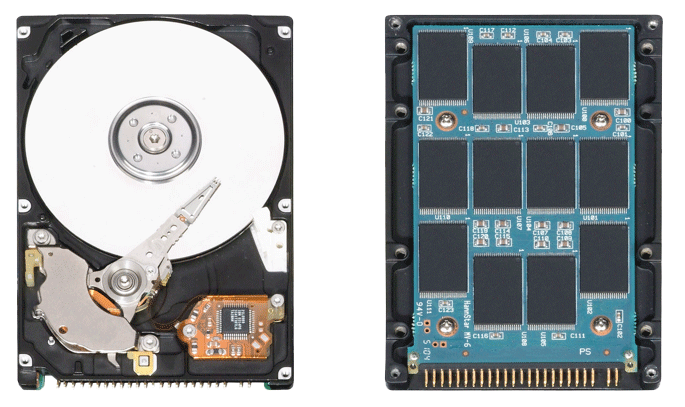
In addition to the customary features Apple pared away from the Air to make it lighter, thinner, and less expensive, the new laptop also offers a new option: a solid state drive. It's not cheap, but it is fast and promises to be more reliable than a physical hard drive mechanism. SSDs use high density Flash RAM chips to store data in place of a conventional HDD's magnetically read platters.
The New SSD: More Expensive, Less Storage
Solid state drives are expensive, but costs are coming down. Of course, there's still a long way for their price tags to go. A 1.8" 64 GB SSD costs around $1600 at retail and 128GB versions are $3000 and up. The only thing that will force these prices down is the economies of scale from widespread adoption. A number of specialized ultra mobile laptops began offering an SSD option over the last six months, but Apple's more mainstream offering in the MacBook Air presents high capacity SSDs to a wide new audience. The One Laptop Per Child XO and Asus Eee PC also use SSD, but in much smaller sizes ranging from 1GB on the XO and between 2 and 8GB SSDs on the Eee PC.
An SSD is more than just Flash RAM chips; it also includes an ATA interface so the memory chips appear to the computer just like a hard drive. The iPhone and Flash iPods use Flash RAM, but not packaged in an SSD nor using an ATA interface. The SSD is designed as a package to be functionally identical to a standard hard drive and act as a drop-in replacement. That means Air users who opt for the standard HDD will be able to upgrade themselves to an SSD in the future using an off the shelf SSD that will likely be both larger and cheaper than what is available today. The high cost of SSD effectively limits its practical use to ultra mobile laptops and other specialty devices, where its advantages in speed, power savings, and reliability can offset its current price and capacity limitations.
Upgrading from the Air's standard 80GB HDD to a 64GB SSD costs a steep $999. The biggest downside after cost is the drop in capacity. Formatted, the 64GB SSD has a capacity of 55.6GB. With the default software install, its ships with around 38 GB available. As Bare Feats notes, "If we reserve 8GB for Virtual Memory, that only leaves us 30GB for documents, tunes, movies, photos, and third party apps." Users who need more than that will have to stick with the standard conventional hard drive. In comparison, the 80GB HDD supplies 74.5GB formatted capacity, and with the pre-installed software offers roughly 55GB available to the user.
SSD Speed Advantage
Fortunately, the SSD offers some advantages as well; the most obvious is speed. Flash RAM data writing usually isn't actually faster than a conventional hard drive; in sequential write tests the SSD was only 60-80% as fast. However, in disk reading and particularly random access reads, the SSD was dramatically faster: as much as 18 times faster.
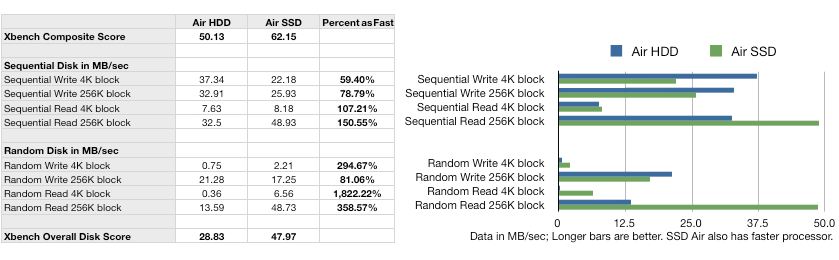
That means faster booting, faster application launching, and faster open file operations, all tasks where the user is likely be waiting for disk access to finish. Write speeds during file saving have less of an impact on usability. In general file operations and copying, the weakness of SSD to write is well overshadowed by its blazing ability to read and its special prowess at randomly reading information on disk. A mechanical HDD has to physically move its head across the disk to perform random access operations.
SSD read speeds won't make the overall system dramatically faster all the time, but they are noticeable any time a lot of data is being read. Boot times were consistently much faster. As the video (below) demonstrates, the SSD was able to finish booting and connect to a wireless network while the HDD model was still spinning its gear on the grey boot screen.
We also selected 17 applications to simultaneously launch (excluding any that obscure the display such as Front Row). The SSD was able to rapidly load all of them at once, while the HDD struggled to manage so much concurrent disk activity. By the time it had finished, the SSD model had already put the display to sleep (below).
However, the speed launch trick is only impressive at the first launch of an application after a reboot. Mac OS X aggressively caches data to allow the slower HDD launch its applications nearly as fast on a second try (below).
As Flash prices drop, the performance advantage of SSD will begin to outweigh the cost, and current capacity limitations promise to be less of a factor as well. That will allow Apple to focus its Mac OS X development efforts on optimal SSD reading and cached writing, rather than catering its optimizations to the nature of standard hard drives with longer latency and seek times.
On page 2 of 2: Power Savings; Reliability; and Worth the Grand?
The MacBook Air's fixed battery and 3-5 hours of runtime make any opportunity to save power a critical feature. Users can't expect the SSD option to make a huge impact on how long they can use the Air on a charge though. The biggest power savings impact isn't directly observed in battery use, but rather shows up again in terms of performance.
Savvy laptop users know several tricks to get the most life span from their machine: drop the display brightness, turn off unnecessary radios, allow the unit to sleep, and let the hard drive spin down when not in use. The advantage of an SSD is that it doesn't need to spin down. A conventional HDD is kept spinning at all times in order to be responsive. When the Energy Saver System Preference is set to "put hard drives to sleep when possible," the system will spin it down, reducing the power drain but making things awkwardly pause every time the disk is accessed due to the time needed to spin the drive up to speed.
The SSD is not only never spinning, it's also never needing to spin up, meaning no irritating pause when files are opened or applications are launched. This also makes a significant impact on boot times, as the HDD has to initially spin up from a cold stop while the SSD is ready to rock from the moment power hits it. It also means the SSD has all the performance of a spinning HDD without needing to scrape at performance with disk sleep.
In order to accurately test the Air's battery life, it needs to be cycled multiple times to achieve its full capacity. We pulled a full MPEG-2 DVD image over WiFi more than once over a three hour period before we could exhaust the thin strip of Lithium Polymer that powers the Air. In more conventional use involving web browsing and writing, using WiFi with power management settings on Better Energy Savings and the screen dimmed to half brightness, we managed to pull a full five hours and ten minutes of use from the HDD Air, and fifteen minutes less time from SSD Air doing similar but not identical work.
The SSD we tested also had a faster processor, which may have ate into its battery life slightly faster, but it was also a week newer, so it didn't have time to cycle through as many battery recharges. Charging the battery took longer than depleting it, as long as 8 hours with the included power adapter or 5 hours using a MacBook Pro adapter. Other reviewers were unable to get the full rating from the Air's battery because in many cases, they purposely defeated the battery saving technology used to coax time from the battery and ran looping MP3 playback rather than actually using the laptop as a laptop.
The MacBook Air certainly makes a poor $1799 iPod and shouldn't be recommended for that purpose. Our mix of using Safari, iChat, TextEdit, and Dictionary to do actual work regularly accessed the wireless networking and disk, as TextEdit auto-saved the documents we worked on and spun up the drive at regular intervals in order to do this. Bluetooth was turned off.
Reliability
SSD is also able to withstand extreme shock, high altitude, vibration, and temperature extremes better than a conventional hard drive. This impacts overall reliability, expected life span, and the general fragility of the system. One of the first components of a laptop to die is its hard drive, due to the complex moving parts, intense heat, and mechanical wear that it has to withstand. An SSD has none of these reasons to wear out or fail, making it as reliable as the logic board or any other solid state components. Another side effect of being solid state is that the SSD is also completely silent.
How much more reliable is the SSD over a conventional HDD? That would be pretty impossibly difficult to benchmark accurately. In defense of the Air's HDD, reader Rick Hyman noted that our review of the MacBook Air "seems to infer the 1.8 inch HD used in the MBA has the same failure modes as the 1.8 in HDs used in iPods. This is not true. The MBA appears to use a new 1.8 in HD announced by Toshiba in December. This new HD is more rugged and can handle more robust use than the older HDs. Certainly, this new 1.8 in HD was a necessity for Apple, since no laptop could be reasonable expected to use the type of HDs used in iPods. The slower speeds of the 1.8 in HD remain as an issue."
The first batch of Airs are using Samsung HS0822HB 1.8" HDD components. On its website, Samsung lists the target applications of this model as "camcorders, MP3 players, navigators, personal media players, UMPC," but not laptops. That's likely because no PC maker has built a full size 13.3" laptop that is ultra thin like the Air, and therefore most laptops use 2.5" mechanisms instead. The Air's SSD is listed as MCCOE64GEMPP, and is also made by Samsung. That company has long been the supplier of lots of Apple's Flash RAM, SDRAM, and hard drives, although not an exclusive source for any of those components. New batches of Airs will likely use other parts.
Worth the Grand?
While new 1.8" HDD used in the Air would certainly seem to need to be in a higher duty class than those used in the iPods, it's still a tiny mechanism and hasn't been proven in long term use. This newness may push more users to consider the expensive but faster and more reliable SSD option despite its much higher cost and limited storage capacity. SSD is new too, but there's nothing unknown about how memory chips wear out.
For users to whom cost is not a big deal, the SSD option paired with the processor upgrade delivers the fastest possible experience, with significantly faster booting, application launching, and shutdown, and with no spin up lag even when working from the battery in power saving mode. Everyone else will need to weigh their needs for delicious luxury with more practical considerations such as storage capacity and budget.
Users buying the Air because it looks great probably won't see any reason to spring for the more expensive version, but business users attracted to its full sized mobility will find a lot to like about the SSD, which makes it both that much more-full sized in terms of speed and more mobile in terms of spin-free reliability.
AppleInsider's MacBook Air review series
For more on AppleInsider's ongoing in-depth look at the MacBook Air, check out these earlier installments:
MacBook Air (HDD model): an in-depth review
Early adopter issues: MacBook Air and Migration Assistant
Early adopter issues: MacBook Air, SuperDrive, Remote Disc and Install
MacBook Air spawns new software solutions for missing hardware
How the MacBook Air stacks up against other ultra-light notebooks