Road to Mac Office 2008: Entourage '08 vs Mail 3.0 and iCal 3.0
 Prince McLean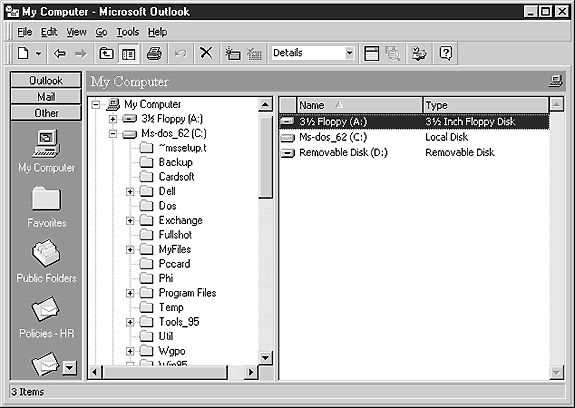
One of the most anticipated applications in Office 2008 is the new Entourage. While some users can use alternatives to Word, Excel, and PowerPoint, most of the users of Entourage are required to use it to access an Exchange Server for their mail and calendar. The reason for that has a lot to do with Exchange itself. Here's a look at the new Entourage in comparison to using Apple's built-in Mail, Address Book, and iCal.
The Birth of Entourage: Exchange Server
In 1996, Microsoft released the first version of its new email server as Exchange 4.0, numbered to suggest itself as a replacement for the former, unrelated Microsoft Mail 3.x and to associate it with Windows NT 4.0. Exchange was designed around the ill-fated OSI X.400 email and X.500 directory server standards. However, just as Microsoft was preparing to introduce Exchange, those standards were steamrolled by Internet standards: POP and IMAP email and LDAP directory services, as described in Road to Mac OS X Leopard: Parental Controls and Directory Services.
Caught blindsided by the Internet, Microsoft dramatically changed course in 1996. It licensed the SpyGlass browser and released it as Internet Explorer, and paired the browser with a hastily written "Internet Mail and News," which served as the Windows client for Internet email.
At the same time, Microsoft sold Exchange as a proprietary email system that could optionally also be connected to the Internet via an email gateway. Client machines had to use a specialized mail program to talk to Exchange Server called Exchange Client. Rather than using standard email protocols between the server and client, Exchange Client used a mix of undocumented RPC calls, generally referred to as MAPI, the Messaging Application Programming Interface proprietary to Windows.
That left Microsoft in 1997 with two email programs: Internet Mail and News for standards-based email, and Exchange Client for use with its own server product. Exchange also provided a webmail portal as part of Exchange Server called Exchange Web Access. To obfuscate the confusion, Microsoft renamed all of its client products under the Outlook brand:
- Exchange Web Access became Outlook Web Access (webmail)
- Internet Mail and News became Outlook Express (Internet email)
- Exchange Client and the Schedule+ calendar were replaced with Outlook (MAPI email, calendar, contacts, tasks, notes)
Microsoft bundled the new Outlook with Office 97 (below), and gave it an 8.0 version number to match Word. That same year, Exchange Server 5.5 shipped with rebranded Outlook client software for Mac, DOS, and 16-bit versions of Windows.
Microsoft and the Internet
Outlook could only be used with Exchange Server, while Outlook Express could only be used with Internet mail. The next year, Microsoft changed Outlook on Windows so that the user could choose between installing the application as a MAPI-only Exchange client, or alternatively install POP/IMAP support instead. That option basically installed Outlook Express underneath, which worked entirely differently, but appeared to be "Outlook."
The groups inside Microsoft working on Mac versions of Internet Explorer and Outlook Express were combined in early 1997 to form the Macintosh Business Unit. That group was charged with developing competitive versions of Internet applications for the Mac with the goal of destroying Netscape's cross platform advantage as detailed in Microsoft's Plot to Kill QuickTime. The Mac version of Office was also growing very old and sales were beginning to sag, so Microsoft additionally assigned the MacBU to release a new version of Mac Office.
That year Steve Jobs also regained control of Apple and began working to prioritize worthwhile projects and kill hopeless ones. Without strong leadership, Apple had also allowed Microsoft to coast on a variety of patent infringements related to operating system technologies and QuickTime. Apple's San Francisco Canyon case against Microsoft, described in Mac Office, $150 Million, and the Story Nobody Covered, was also still waiting to be resolved.
The MacBU
To resolve all those issues, Apple and Microsoft partnered in an agreement that included Microsoft making a good faith gesture of investing in Apple and publicly committing to deliver five years of updates for Office. That resulted in Mac Office 98, which shipped alongside the free Mac Outlook Express email client and Internet Explorer browser, which Apple agreed to bundle and present in front of Netscape's existing browser.
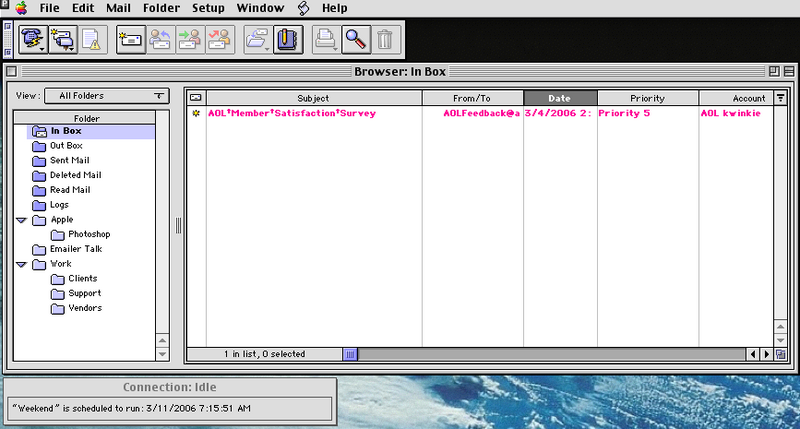
It also played into Apple's dismantling of its Claris subsidiary in 1998; it sold the Claris Organizer calendar to Palm for recycling as the Mac Palm Desktop software and dropped the highly regarded Emailer (below) entirely, as described in Office Wars 1 - Claris and the Origins of Apple iWork. Apple also closed down its own OpenDoc and CyberDog efforts related to building parts for web and email services. That resulted in a deluge of Apple software refugees ending up at Microsoft, including Claris Emailer developers Jud Spencer and Dan Crevier.
In 1999, Microsoft put new hire Omar Shahine and his roommate Jimmy Grewal in charge of the Mac Outlook Express and Internet Explorer projects, respectively. Shahine described their experience at Microsoft in Entourage: A journey to becoming an Office application, writing, "Two 22 year old punks who never shipped anything in their lives shipping what became the most popular browser and mail client on the Macintosh. I remember going over to Apple for meetings some times and they would be like, are you kidding? Where are your parents?"
Outlook Express subsequently inherited many of the features of the former Claris Emailer and was developed entirely separate from the Windows version of the same product name. The product also morphed into an app more tightly integrated with Office, in order to serve as a complement to Outlook in the Windows Office package. There was already a Mac version of Outlook, but it was completely unrelated to Outlook Express and had been developed by the Exchange team rather than the MacBU. It also lacked Internet email support.
Entourage vs Outlook
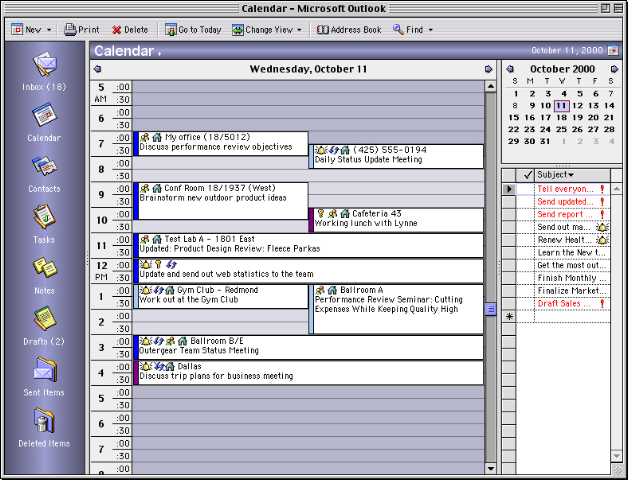
In Office 2001, Microsoft shipped the new Entourage as a Mac-centric email program and a component of Office. While it could talk to Exchange Server, it had to use standard IMAP just like any other email application rather than using the proprietary MAPI. In order to support corporate Mac users, the Exchange group also shipped Outlook for Mac 2001 (below). Microsoft eventually decided that it made no sense to continue development two entirely different products to provide Mac email services, so it focused on the more Mac-like and more modern Entourage, and dropped support for Mac Outlook as Office applications moved to Carbon in order to run on Mac OS X.
Entourage was modified to support WebDAV to enable it to communicate with Exchange Server's web interface. Starting in Exchange 2000, this also became the mechanism Microsoft used for connecting mobile devices to Exchange. Essentially, both Entourage and Palm/Windows Mobile devices act like specialized web clients. This allowed Microsoft to kill the old Outlook for Mac rather than having to retrofit it to work on Carbon.
On the Windows side, Microsoft continued to entrench into MAPI, but mixed in IMAP support so that Outlook could access both standard email and Exchange Server accounts. Outlook Express is now called Windows Mail on Windows Vista.
In Office 2004, Entourage delivered fair support for Exchange Server, but it lacks a variety of features supported in Outlook on Windows. Its performance with Exchange is poor, it lacks calendaring and email features, and it does not support the .pst email database archives of Outlook. While Outlook Express on the Mac used a more standard MBOX style mail storage based on its Outlook Express and Claris Emailer heritage, Entourage stores local email in a database somewhat similar to, but incompatible with, Windows Outlook .ost and .pst files.
On page 2 of 3: Entourage 2008; Entourage 2008 Email; Entourage 2008 Address Book; and Entourage 2008 Calendar.
Of course, none of that is going to change in Office 2008. Entourage is never going to become a MAPI Outlook for Mac, and it won't adopt cross platform compatibility with the .ost and .pst files of its Windows cousin. Microsoft does realize that plenty of Mac users in business and educational institutions need to access Exchange Server, so there are regular refinements to Entourage to improve its support. Microsoft is also reserving its Exchange support in Entourage for the $300 version of Office to make sure that schools and business can't get by using the $150 home and education version.
The upside to Microsoft using somewhat standard WebDAV for connecting Entourage with Exchange means that alternative clients can also be made to connect to Exchange. Ideally, companies will move to open email servers that don't use proprietary protocols at all. As with previous versions, Entourage 2008 supports POP, IMAP, and Hotmail accounts in addition to its WebDAV support for Exchange.
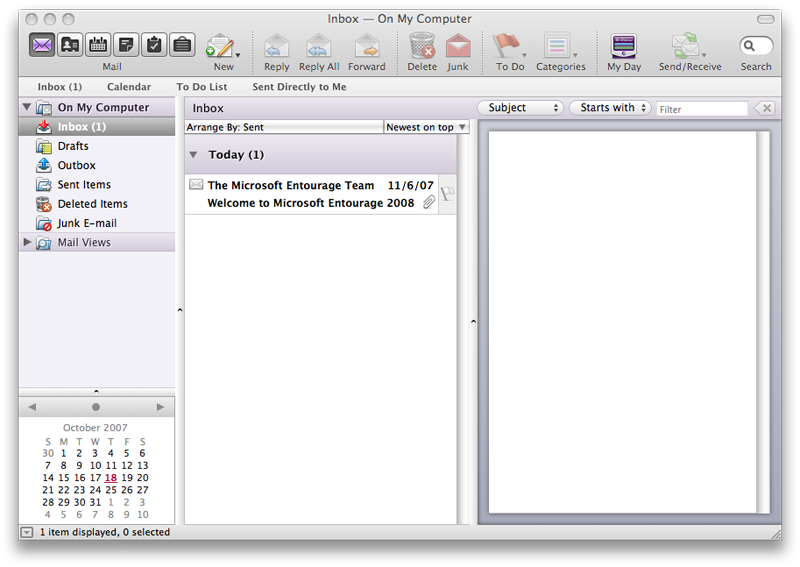
The user interface for Entourage 2008 has also modernized (above). The program adopts a standard Mac Toolbar, unlike the rest of Office. That means you can customize it using the standard drop down sheet (below). An adjustable iCal-like mini calendar appears in the bottom of the sidebar, and under the toolbar sits a strip that looks and works like Safari bookmarks, allowing you to drag in mailbox folders to create quick access links.
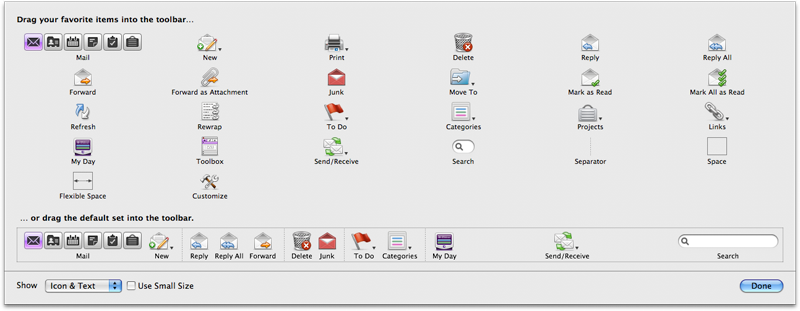
The six big icons for email, address book, calendar, notes, tasks, and the Project Center are now smaller, but still work the same way. Rather than displaying your entire Exchange folder or IMAP mailbox as a series of folders in a sidebar as Outlook does, email, contacts, calendar, notes, and tasks all sit behind different pages toggled by clicking one of the buttons. Selecting a mode also changes the toolbar items for that mode.
Conversely, Mac OS X 10.5 Leopard's Mail 3.0 (below) displays your email inbox, Notes, and To Do reminders all in the same sidebar, and also presents an RSS feed reader. Unlike Outlook, when multiple accounts are configured, Mail presents each mailbox folder grouped by section, so for example the inbox has multiple email folders underneath for each account, and the user can choose to view the mailbox individually or composited together in a unified mailbox.
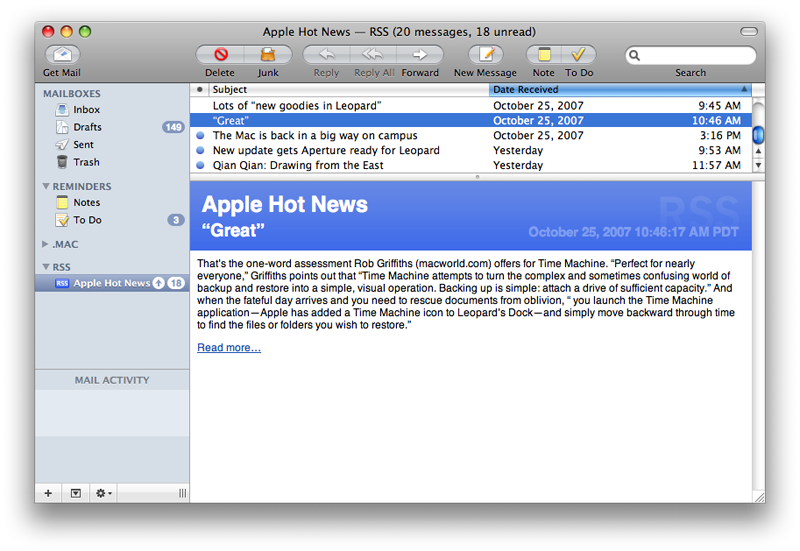
Entourage 2008 Email
Entourage sits in between Outlook and Mail; it continues to group each mailbox in a series of folders related by the server they sit on, but extracts each special folder on a separate page so there's more clicking back and forth as you work with different items.
As with previous versions, Entourage presents smart folder mail queries as Mail Views. The new version is also supposed to add improved junk mail filtering and phishing protection by flagging suspicious web links for users. Color categorizing of emails is also featured more prominently than in previous versions.
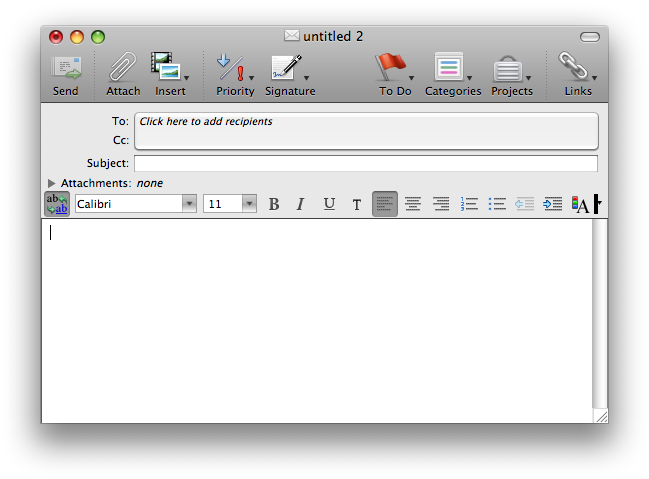
Entourage has always offered HTML mail text formatting features, but it now offers to assign a background image and color as well as an option to insert multimedia elements (below). The only alternative to HTML mail is plain text. There is no equivalent to HTML email templates offered in the new Mail however, and no easy way to create HTML mails that are more than just formatted text with a colored background and attached files. It also lacks any option like Mail to automatically resize attached photos to save space, nor does it have any option to Quick Look incoming attachments or send them to iPhoto.
Entourage does warn you that opening attached files may cause harm and panic, but it did so even on graphics attached to the welcome message, which is particularly painful because Entourage is already displaying the graphics in its inline preview. If they were likely to exploit a buffer overflow and destroy the system, it's too late to complain after dutifully opening them up and rendering them a preview.
Because Entourage stored its mail in a database, it wasn't compatible with Tiger's Spotlight search. Microsoft adjusted the mail store in Entourage to keep a copy of emails as individual files as Mail does in order to enable quick search. The main email store still lives in a database inside of an Identities folder within Microsoft User Data however.
The frustrating problem with this is that in the event of a file corruption, the entire email store is lost. With individual files, a file corruption might only affect one file. Since Entourage constantly writes to the database file, the chances of its being corrupted are high, and seemingly connected to the amount and critical nature of emails stored in it. The idea of using a database is apparently to provide better performance, but this does not seem to have the intended result in Entourage. Another drawback to its email database is that it's more difficult to back up and restore, and it isn't efficient to backup with Time Machine or any other file backup system.
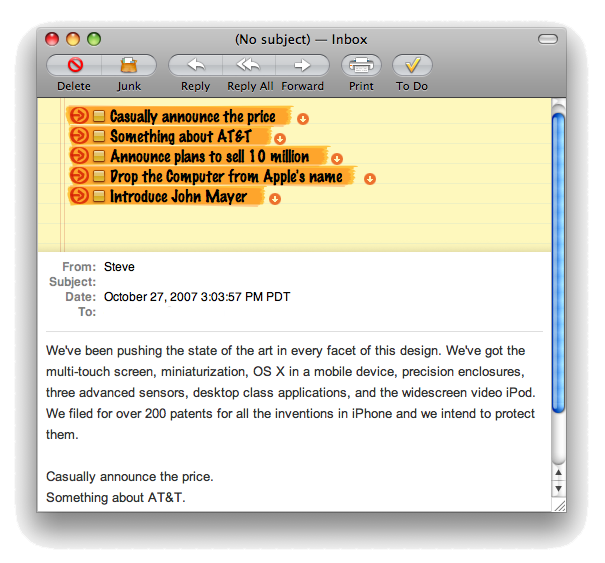
Similar to Mail, you can now attach a To Do reminder to an email. In Entourage, you use the To Do flag menu in the Toolbar to select a due date. Once flagged, the email appears in the To Do list. This is different than Mail, which allows you to create multiple, separates tasks that are linked to highlighted content within an email (below). If you receive a message outlining multiple objectives, you can make each an independently tracked task. Mail additionally allows you to add due date alarms, priority, and assign a task to a specific calendar.
Entourage 2008 Address Book
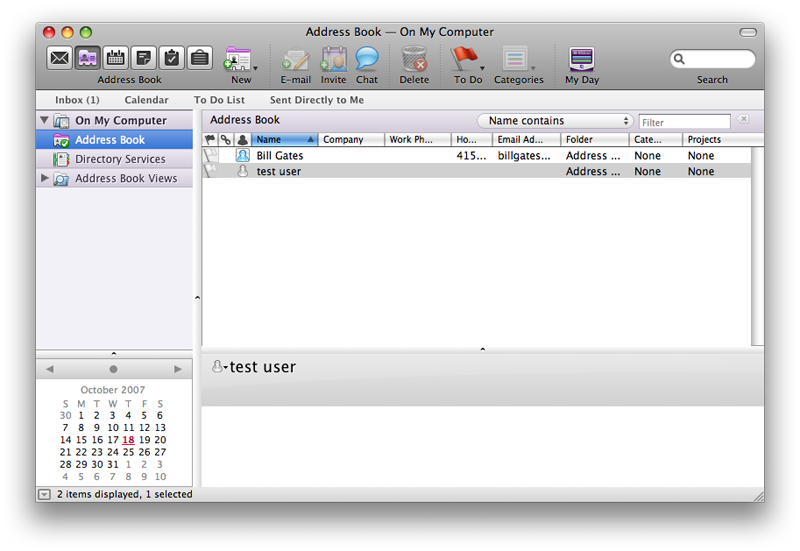
Rather than integrating with the Mac OS X Address Book, Entourage initially insisted on using a separate one. The new version still won't look up addresses in the standard Address Book, but will sync its contacts with Address Book and .Mac. Entourage makes an effort to integrate with Office apps, so if you define your own Me card, Word will use that information to populate some templates.
Maintaining its own address book is a holdover from the classic Mac OS where there was no system repository for contacts. On Windows, Office and Outlook can both have their own address books and Windows doesn't offer its own. While Entourage is designed to accommodate an Exchange Server with an organizational Global Address Book and a user's own Exchange contacts, there's little apparent reason for it to continue to use its own internal contacts.
Mac OS X's Address Book can also sync with Exchange Server, but it may be more convenient to use Entourage to perform the sync using its built in Sync Services support. If you don't use Exchange, or don't want to mix your business contacts with a local selection, you can choose to instead sync your local contacts to Address Book and .Mac.
Entourage 2008 Calendar
Prior to Leopard, iCal was so slow that Entourage served as good calendar alternative. Interestingly, the new Entourage 2008 calendar (below) copies a variety of the unique ideas from iCal. Among them is the ability to simply click and drag to create a new event time and its duration. Previously, Entourage had you double click on a date and then set the time manually.
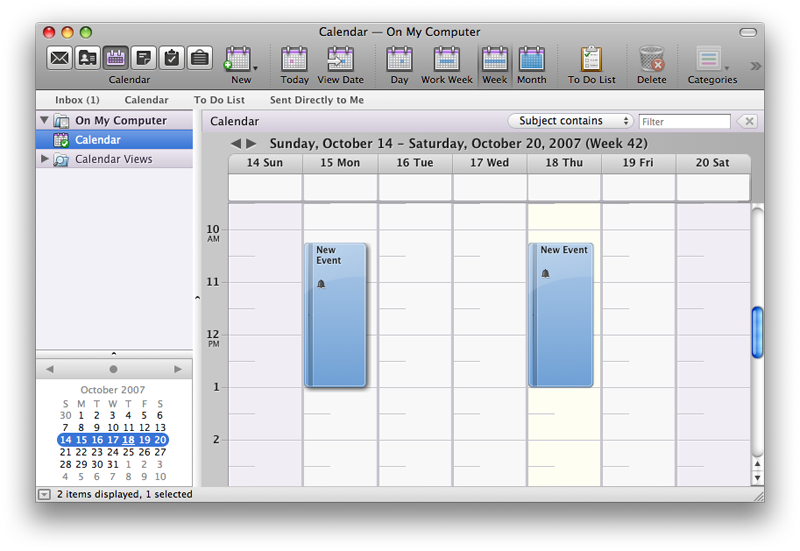
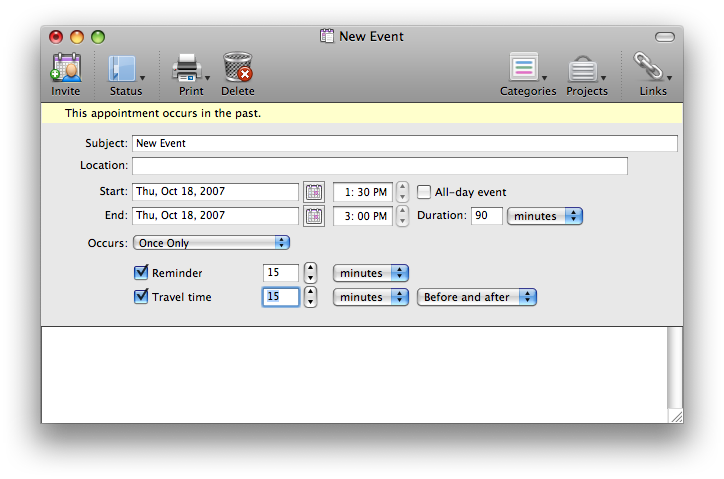
The Entourage calendar lets you color-code events by category, but it does not work with multiple calendars at once as iCal does, or subscribe to or import iCalendar files. Categories do allow some sorting and presentation features that are similar to having multiple calendars. One advantage Entourage has over iCal is that you can open settings windows (below) for multiple events at once; the new iCal only presents the details of a single item at once, as a special popup bubble window.
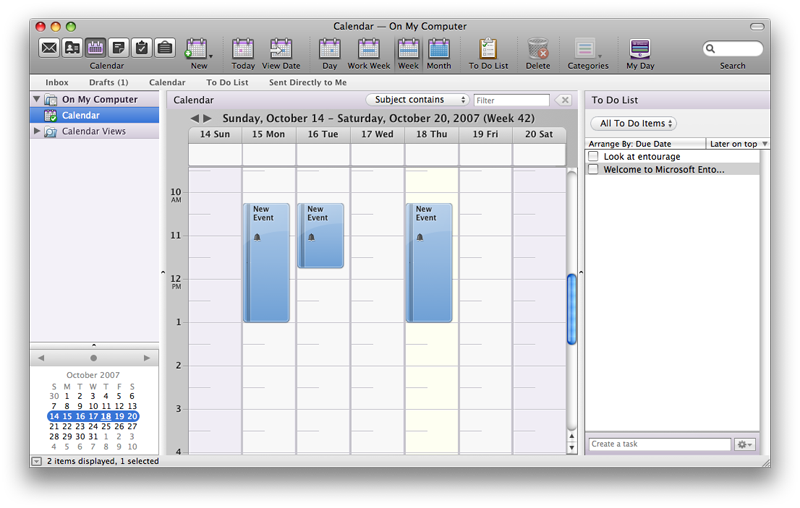
A Toolbar button allows you to view the To Do List (above), but its presentation isn't very practical, as the To Do List can't shrink down to less than about three inches wide. Similarly, the sidebar of mailbox folders can't be resized smaller than an couple inches and can't be hidden. This severely constrains how much you can customize your view to suit your needs. Beyond the Toolbar, the overall look of Entourage feels a bit unfinished, from the heavy presentation of the calendar to the plastic events with a distracting sheen, to the cramped mini calendar and the loose To Do listing that just takes up too much space. The new iCal really packs a lot of information with clarity into a smaller space.
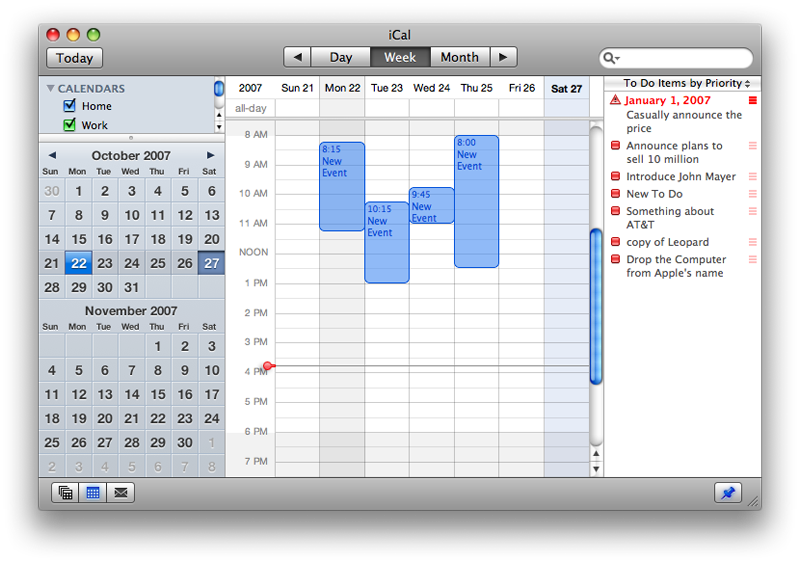
As is the case with Address Book, Entourage's calendar can sync its events and tasks with iCal and .Mac via Sync Services. Leopard's iCal is so much better than previous versions in that it now presents a serious challenge to Entourage. While Entourage 2008 offers a variety of advantages over the past version, it doesn't match the clean design of iCal. For users tied to Exchange, that won't matter, as iCal offers no direct support for Exchange without a third party plugin (noted below). With Sync Services integration however, Entourage users can use it to trade information with Exchange and push changes out to iCal and iSync devices such as phones and iPods.
With Entourage supporting Sync Services and third party tools for syncing iCal to Exchange, it's easy to see why Apple is focusing on replacing Exchange with its new open source Calendar Server offered under the Apache license and as part of Leopard, rather than trying to support the moving target of Exchange from iCal, as described in Apple's Open Calendar Server vs Microsoft Exchange.
On page 3 of 3: Entourage 2008 Notes; Entourage 2008 Tasks; Entourage 2008 Project Center; My Day, My Day; and Entourage vs Mail, Address Book, iCal.
As with email, contacts, calendar, and reminders, notes are also presented in their own mode. This seems unnecessary, as notes are just emails without an address. Why not present them alongside emails in the mailbox as Outlook does? Leopard Mail similarly presents Notes next to emails, although it sorts Notes and emails by type in the sidebar rather than by server.
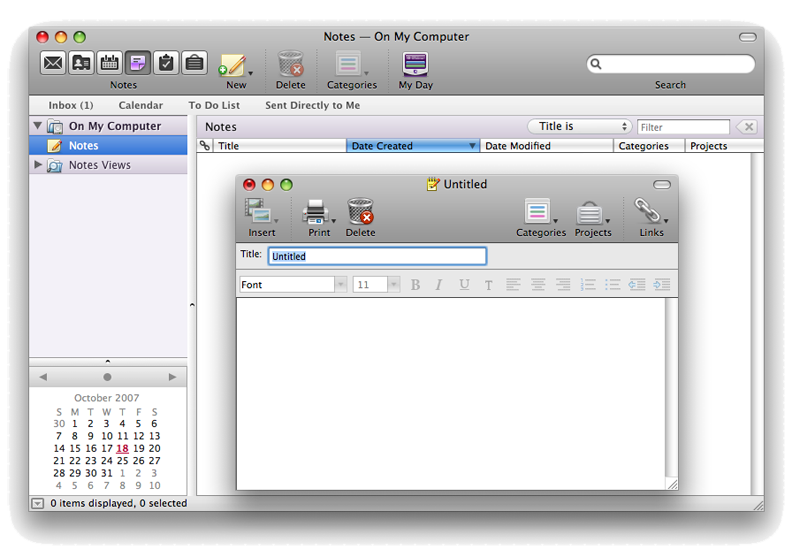
A note in Entourage can be linked to an email, event, task, contact, another note, or a file. Once linked, the links show up in a listing of links. This couldn't be tested in the current beta version because it insisted that the note be saved before linking, but provided no way to save it (above). There is also no obvious way to mail out a note, as one can do in Mail.
Links between notes should work similar to emails, contacts, and calendar events. Linked items are marked with a chain icon; clicking on it offers a listing of links, which can be used to open linked items.
To Do reminders in Mail and iCal can similarly be used to link items, although the links are more obvious and require less digging. Mail's emails and Notes can be linked to To Do reminders for later access, although again, Leopard's To Do reminders can link to specific content excerpts within an item, rather than just the entire item as a whole. The hyperlinking of reminders back to the email items in Mail they are associated with is really smart.
To Dos in iCal also have a note field; iCal should use the same more obvious mechanism for linking an event to a To Do item; instead, events in iCal are linked via drag and drop using emails, contacts, files, and other items, and the link can be opened by a hyperlink URL. This works well enough but isn't quite as slick. It is a bit easier and requires less clicking than Entourage linking though.
Entourage 2008 Tasks
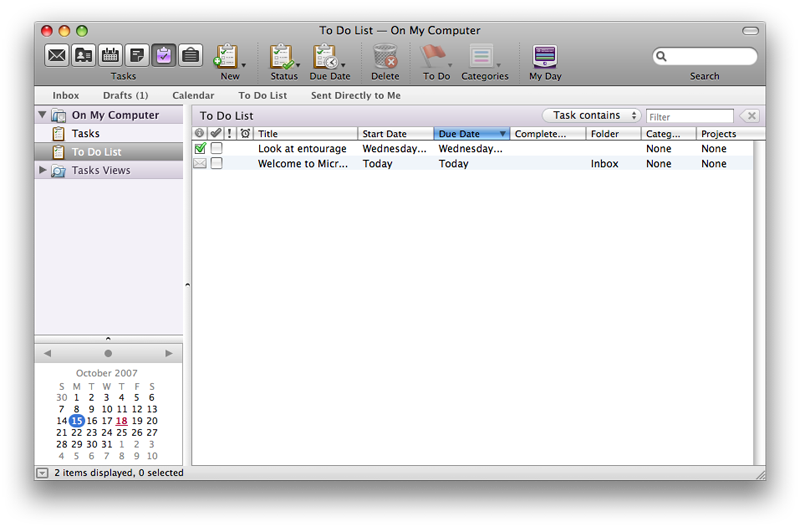
Exchange treats tasks as a special type of email, similar to notes. A task is a to do reminder, which makes it confusing that Entourage 2008 presents events and its to do list a separate items (below). What that means its that your to do list is made of events that are yet to be done. However, you can also add other items to the To Do list, and they'll never become events once marked completed. This seems counter intuitive, but perhaps it makes more sense to people who think of tasks and to dos as different things.
Marking an email as a to do does not create an event referencing the email, but rather lists the actual email within the to do list. The new To Do system in Leopard allows you to mark multiple items within an email as To Do events, which seems to make more sense, as your original email remains in the mailbox. In Entourage, you cross an entire email off your to do list when you finish everything mentioned in it, apparently. Microsoft hasn't previewed Entourage's tasks, so this odd behavior might change in the finished build.
Entourage 2008 Project Center
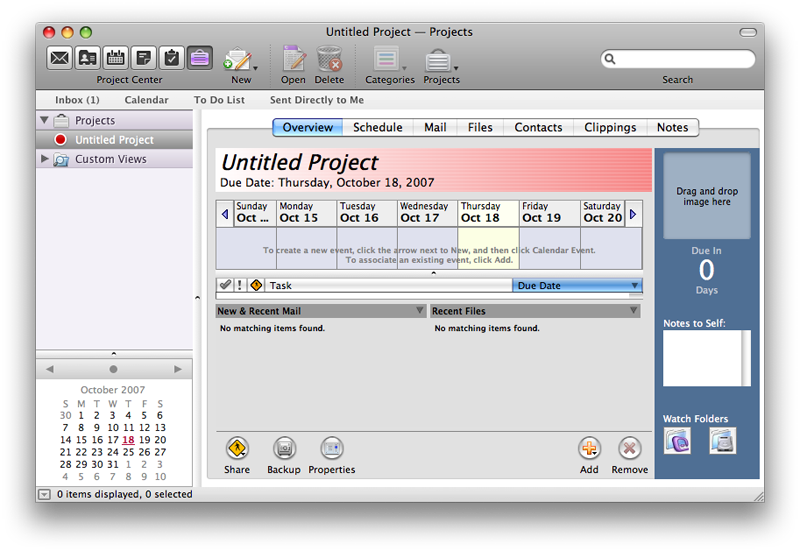
Entourage's Project Center (below) was invented in Office 2004 as a way to associate emails, contacts, scheduled events, and files together as a project. Each project shows a due date, and can be associated with a photo and watch folders both within Entourage (a mailbox subfolder) and in the file system (as a folder of files). The entire project can be rolled into a backup archive, or shared with other users by saving it on a file server share. You can click an add button to associate anything within Entourage: a calendar event, a task, a message, a file, a contact, a clipping, or a note.
Within Project Center you can view your project in an overview, or just look at your related calendar and to do events, or just related emails, files, contracts, clippings, or notes. Clippings are managed through the Office scrapbook, which in the other apps is integrated into the Formatting Palette. If you never leave Office, this would make sense.
Unfortunately, the problems with Project Center are similar to the rest of Entourage: it feels like a big commitment to use it, and once you start you're tied to having all of your items saved in a .rge file, which some users report as going corrupt once they're knee deep in a project. Ideally, Project Center would just mark items as part of a project and allow you to work with them together without spinning them off into a saved composite file subject to loss.
Because Entourage syncs with Address Book and Calendar, it can indirectly interoperate with other programs, such as Marware's Project X, ibizzi Crm4Mac, or Marketcircles' Daylite and similar tools that build upon the contact and calendar stores in Mac OS X and integrate with Mail. Before jumping into Project Center, it would be good to investigate other options that might suit your needs better than the one size fits all, monolithic approach of Project Center.
My Day, My Day
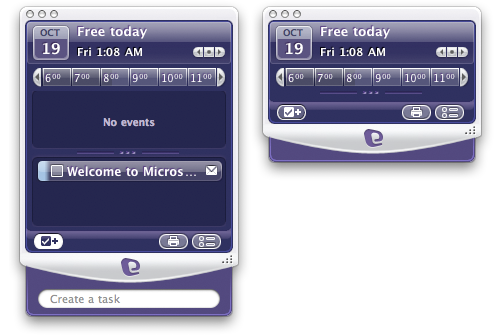
Of all of the new Office 2008 apps, Entourage seems to lay on the least amount of glitz. Countering that is the new My Day application. It seemed like Microsoft was dropping the My prefix from Windows that evokes the "I can pull them off and on" jingle, but here it is again, on the Mac. My Day is a floating window that looks like a virtual organizer sculpted from purple candy. It presents a view of the day's calendar along with a current list of To Do items. It also allows you to create new tasks or quickly print a to do list. Navigation controls allow you to page through your calendar by day, but it only shows a daily view. Created events did not show up in the My Day view as expected however, so it's a work in progress.
My Day looks a lot like a mobile phone that only has a calendar on it. It also commands attention on the desktop, floating as the top window by default. This is a horrific design, particularly since the window is roughly iPod sized (below), meaning that it blocks a significant amount of screen space. My Day offers proof of why large windows aren't supposed to stay on top. There is a zoom control that makes it slightly smaller, about the height of the 3G Nano but a bit wider. This is still too big. If it collapsed into a iTunes style window, it might make more sense.
As it is, in small mode it shows absolutely no information apart from the time and date (below), but still consumes a significant window size due to all the user interface trappings. In addition to My Day, the old Office Notification window still pops up to let you know you have old items in your calendar, and the two are not related or integrated at all. Why do I need two notification windows to present my calendar? Perhaps if Entourage launched faster I wouldn't need the gimmicky My Day at all. Given that iCal now opens instantaneously, consulting a plastic desktop organizer seems like no real advantage at all.
Entourage vs Mail, Address Book, iCal
For Mac users in a strict Exchange Server environment, Entourage might be their only option. If you can't get support from Exchange admins to use the built in Mac client software, then you have to use Entourage. The improvements to its user interface, including the new Toolbar, make it a bit nicer to work with, and Project Center might work for groups of Mac users who are invested in using Office. Configuring Entourage and then using it to relay Exchange data to Address Book and iCal via Sync Services is another option to consider.
Users who can convince their company's Exchange administrator that Internet standard protocols are not a dangerous "security hazard," as many Windows admins seem to think, can access Exchange via IMAP and gain much of the same email functionality provided by Entourage via Mail or another email client. If admins expose Exchange Public Folders via IMAP, Mail might even work better than Entourage, as Mail can recognize root level documents not in a folder; Entourage can't see them, and frequently needs to resync its view of Public Folders.
Address Book provides decent syncing with Exchange, although it does not support address books in Public Folders. Syncing Exchange with iCal requires Snerdware’s GroupCal plugin. With that installed, iCal can also sync tasks with Exchange, something Entourage doesn't yet do.
Mail feels leaner and faster than Entourage, and does full-text searching of attachments, something that Entourage can't. I've seen and experienced too many email database failures in Entourage; its design just seems too risky if you consider your emails to be important. Losing 2 GB of email is not really acceptable, and it happens too often with Entourage. Project Center raises similar concerns. However, companies with the budget to support Exchange Server should also have the manpower and resources to perform frequent backups and provide lots of IT staff to take care of such problems when they arise.
Apple's Mac OS X 10.5 Leopard operating system, which includes Mail 3.0 and iCal 3.0, is available from Amazon.com for $109.00, a 16 percent savings. Amazon is also offering instant savings on pre-orders of the various Office 2008 for Mac bundles.
Don't forget to check out our previous Road to Office 2008 installments:










 Andrew Orr
 Malcolm Owen

 William Gallagher

 Mike Wuerthele
 Christine McKee