Road to Mac Office 2008: Excel '08 vs Numbers 1.0
 Prince McLean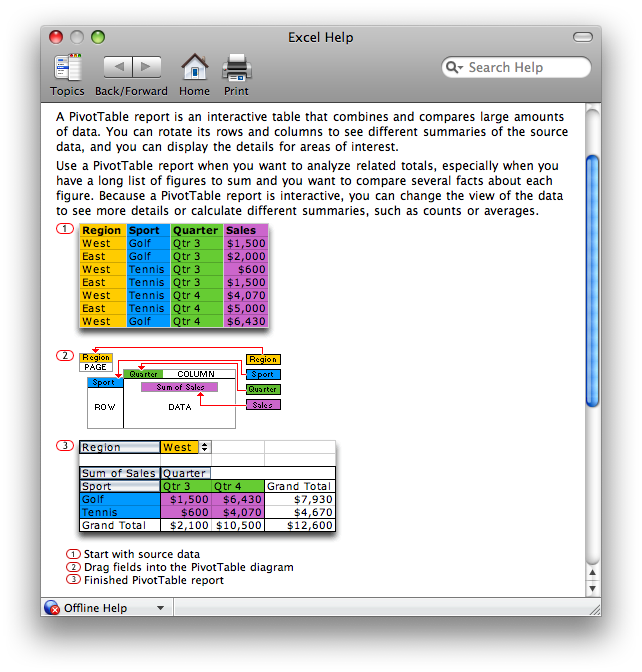
The planned mid-January release of Office 2008 offers a significant overhaul of the productivity suite's look and features. The previous segment described new features in Word 2008, with some comparisons to Apple's Pages 08. This article examines what's new in Excel 2008 and contrasts Microsoft's oldest application to Apple's newest: the Numbers 08 spreadsheet included with iWork.
Excel was Microsoft's first desktop application and is widely regarded today to be its best. As described in Road to Mac Office 2008: an introduction, Excel was originally sold under the name Multiplan for a variety of text-based computer systems in the early 80s, including the Apple II, Commodore 64, and TI-99/4A. Multiplan was largely a clone of 1979's VisiCalc, the first electronic spreadsheet.
In 1984, Apple unveiled the Macintosh with advertisements touting its unique graphical interface. Those ads highlighted Microsoft among Apple's most prominent software partners on the Mac and cited a young Bill Gates noting that the Macintosh sets a new standard that "captures people’s imaginations," as noted in Office Wars 3. While Multiplan wasn't available until 1985, it beat spreadsheet leader Lotus to the Mac platform. Lotus delivered a graphical, simplified version of its 1-2-3 spreadsheet under the name Jazz that ended up as an embarrassing failure.
Jazz never took off on the Mac in part because it was criticized for failing to properly adopt the Mac human interface guidelines. In contrast, Microsoft's Multiplan for Mac, renamed Excel shortly after its launch, delivered a familiar VisiCalc interface within a familiar Mac window, which quickly made it one of the most popular Mac software titles. Excel 2.0 migrated that familiar interface to the DOS PC world in 1987, piggybacked on top of Microsoft's new Windows 2.0 environment.Â
By 1990, Excel had almost singlehandedly established Windows as important enough for PC makers to begin pre-installing on their systems. Nearly twenty years later, Excel has become the common language of number crunchers. It has preserved alive the legacy of VisiCalc with a nearly unchanged interface that is almost identical on both the Mac and Windows.Â
While most Excel competitors have attempted to clone every aspect of the program, Apple's Numbers 1.0, released earlier this fall, takes a different approach. Like the other components of iWork, Numbers is template-oriented, providing users with a starting point for using a spreadsheet. Numbers also focuses on the needs of a specific market: home, education, and small office users who want a capable tool with easy and simple presentation features.Â
Excel: Used and Abused
The focus of Excel is much wider. That also makes it more challenging for Microsoft to deliver a version Excel tailored for the Mac; the program is more of a general purpose Erector set. Excel's wide range of users all have very different needs. Its core competency is in sorting, calculating, distilling, and presenting meaningful data from rows of information. Many of the people using for other purposes would really be better suited with more specific tools appropriate to their actual task.Â
For example, users with simple presentation needs often get sucked into using Excel to layout text and graphics because its predictable grid makes alignment easy. The result is that information that should be in a simple presentation format now depends upon Excel. Further, while Excel offers the tantalizing ability to format its grid with outlines of boxes and gradient fills, its tools are not designed for general presentation, and are clumsy and time consuming to use for that purpose.
At the other end of the spectrum are technical users who employ Excel to build complex documents that really demand the structure of a relational database. Creating and maintaining such monstrous projects are easy up to the point where it's realized that Excel is the wrong tool for the job, at which time it can be difficult to migrate the efforts invested in Excel into a more suitable application.
That leaves Microsoft stuck with supporting a wide range of users in Excel, many of whom should really be using something better suited for their task. With Numbers, Apple doesn't attempt to match Excel's feature list, but rather aims at delivering spreadsheet functions for consumers in a revamped, approachable interface. Numbers breaks out of the old VisiCalc grid to instead mix number crunching with presentation features.
Rethinking the Grid: Pivot Tables
Numbers isn't the first attempt to rethink the limitations of the old VisiCalc grid. In the mid 80s, Lotus began work that resulted in Improv, detailed in Office Wars 4. Rather than just providing a huge spreadsheet grid, Improv applied the idea of separating data, formulas, and views to add structure to spreadsheet analysis. Only the data itself lived in spreadsheet columns, organized into named categories. Formulas could act on that data by name, without requiring it to sit in specific cells of the grid. Views, whether tables, charts, or graphs, could be created independently from the grid.
Improv caught the attention of Steve Jobs at NeXT, who championed it on his own platform and got involved in providing feedback on its design. Porting Improv from NeXT to other platforms was more difficult. On the PC, Improv competed directly against Lotus 1-2-3. In addition, the newness of Improv found resistance among users already familiar with the old VisiCalc grid in 1-2-3 and Excel.
Brio Technology later created a Mac product called DataPivot inspired by Lotus Improv on NeXT. The spreadsheet was designed to identify patterns within spreadsheet grids that could be grouped and aggregated to assist in data analysis. Borland bought Brio and added the pivot table concept to its Quattro Pro for Windows, which somewhat ironically was also competing against Lotus 1-2-3.Â
Microsoft later adopted the same data pivot concept in Excel under the name pivot table. It's much easier to illustrate than to explain how pivot tables work, as Excel's Help indicates (below). Numbers does not offer support for pivot tables.
Getting Started with Excel 2008
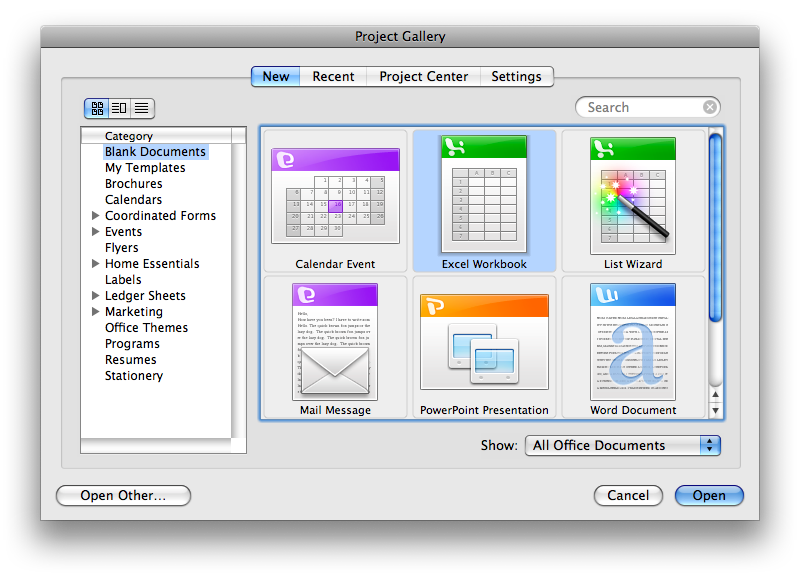
The Project Gallery that opens when Excel launches offers to create a new workbook or launch the list wizard, which is used to import data from an external file or database. A workbook is an Excel spreadsheet document that can have multiple spreadsheet pages hiding behind its tabs.Â
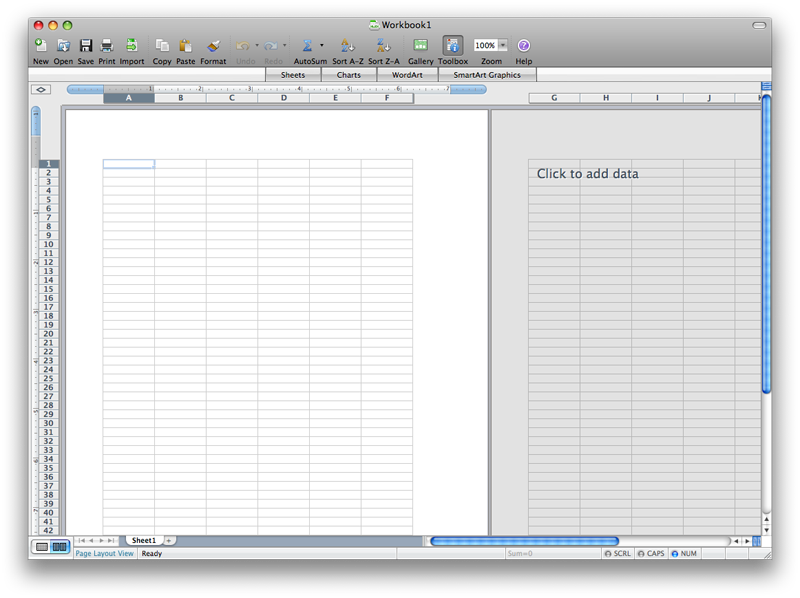
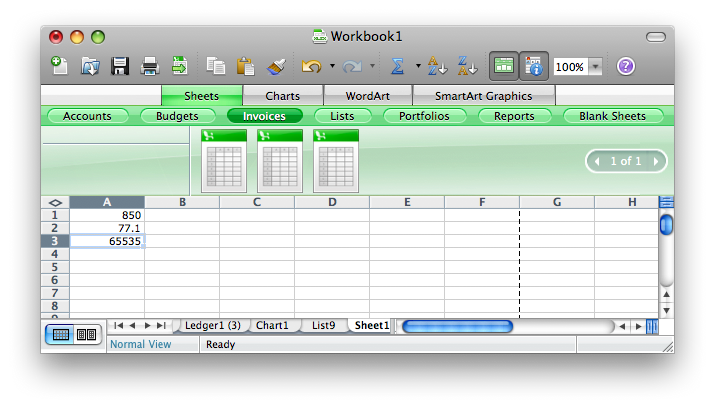
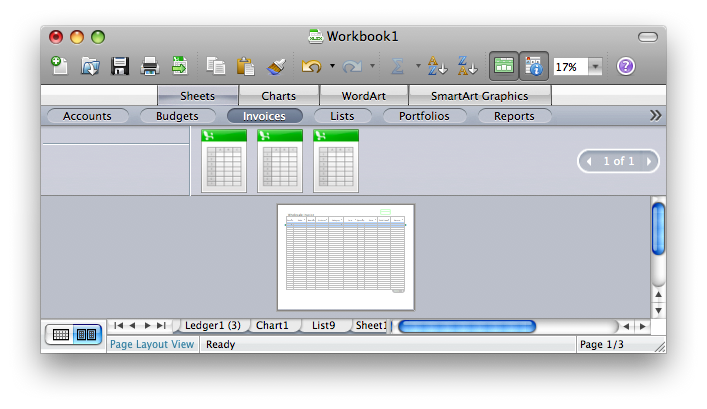
Just like the existing version, Excel 2008 presents its spreadsheet grid in two view modes: Page Layout View (above), which breaks up the grid to fit on printed pages, and Normal View (below), which presents an unbroken grid that stretches out for a page and a half, but will expand out to 65536 rows and multi lettered columns out to IV. The new Excel 2008 will also support the big grid introduced in Excel 2007 for Windows, with 1,048,576 rows and 16,384 columns. However, as spreadsheets get larger than a few printed pages wide, scanning back and forth over the huge spreadsheet can quickly become impractical.
To solve this, Excel workbooks add new sheets in a tabbed interface at the bottom of the window (above). You can open multiple new windows that display different sheets within the same workbook, or partition the window into panes that show different regions of the same sheet.Â
Within a sheet, the entire grid of each sheet is locked into the two coordinates, so if you want to float several independent calculations within the space of a page, you have to make sure they either line up correctly in columns, or fit into isolated rows and columns of the grid. This also demands some planning, because retrofitting a block of cells in between others might require shifting everything over or inserting new columns, either of which may upset existing fixed calculations based on cell assignments.
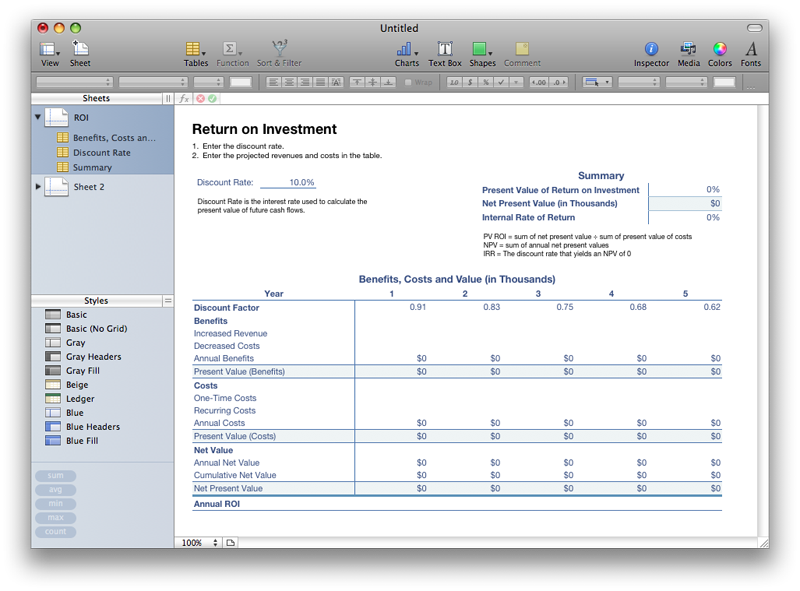
Numbers works around this limitation by stripping the grid off the sheet. Instead, Numbers allows you to drop multiple spreadsheet tables on a sheet, each with its own independent grid. A Numbers document can incorporate multiple sheets, each with multiple independent tables. The ROI sheet (below), one of the supplied templates in Numbers, incorporates three tables : Benefits, Costs and Values; Discount Rate; and Summary.Â
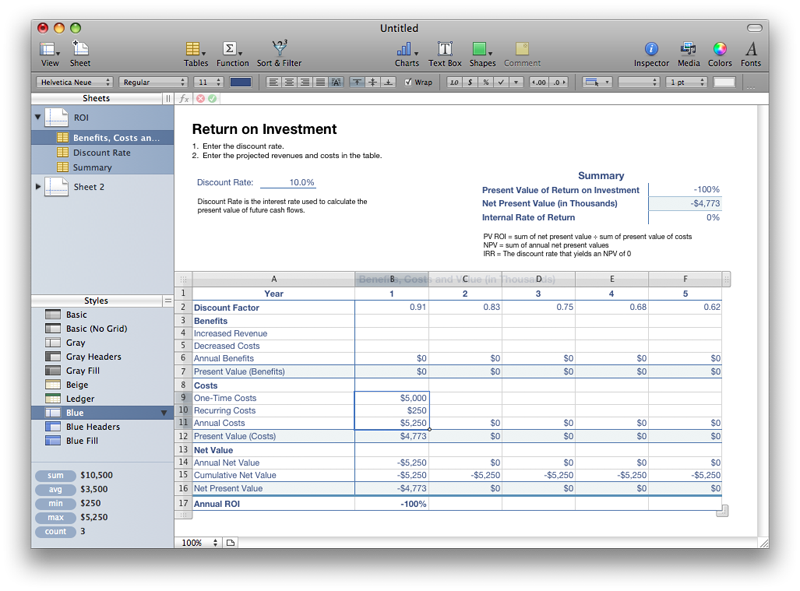
Selecting one of the tables from the sidebar (or clicking on the data within the table) activates that table for editing and draws the familiar rows and columns controls around it (below). A table can be expanded as desired, and rearranged on the sheet without breaking anything. Further, any selected cells are presented with a sum, average, and count along with the minimum and maximum values of the selection in the lower left.Â
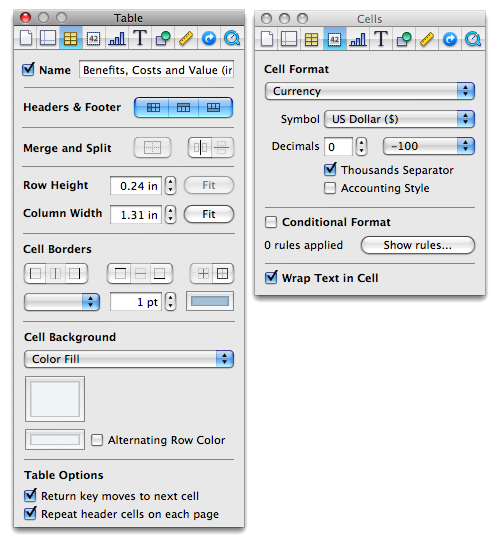
Above the auto-calculate area are styles (above), which make it easy to instantly impose a design format upon a table. Users can create and customize table styles and use them to quickly format plain data into attractive presentations without much work. Further editing of spreadsheet tables and cells is done using Inspector panels familiar to other iWork applications (below). Other related settings also appear in the contextual Format Bar, which sits just below the Toolbar (above).
On page 2 of 3: Excel 2008 User Interface; Working with Functions; and Excel 2008 Templates.
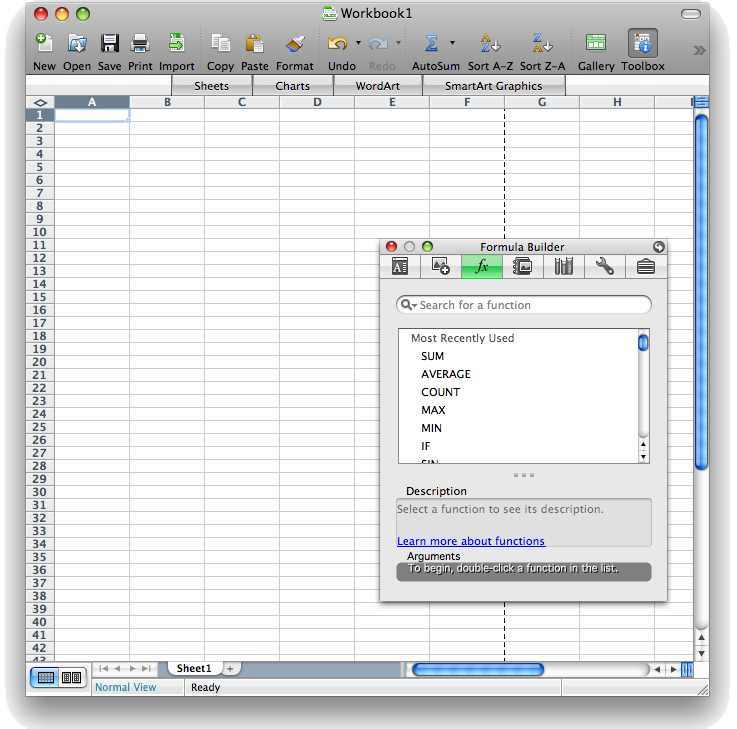
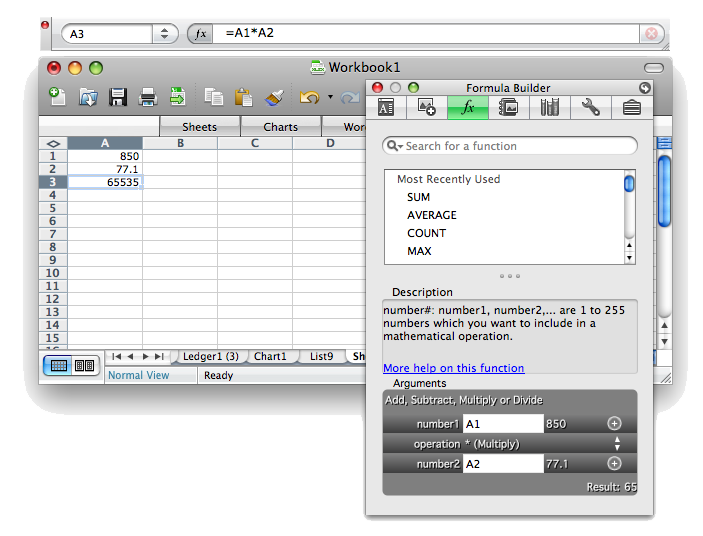
Like Word 2008, the new version of Excel rids itself of the floating standard toolbar and instead incorporates toolbars into the document window itself. However, when you open the Formula Builder (now incorporated into the Formatting Palette where Citations are in the new Word), the Excel document window moves down and a floating formula window appears (below).
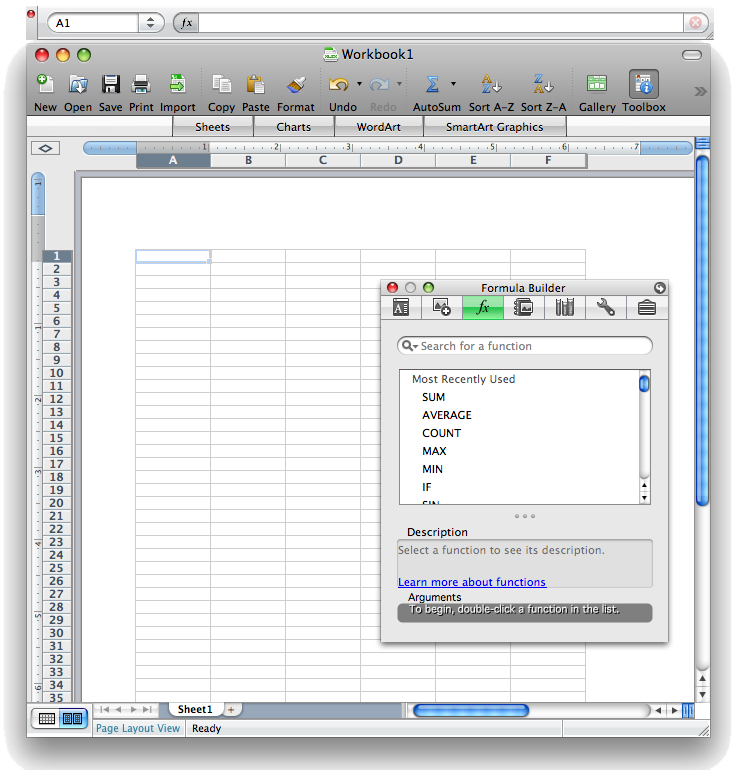
Why is the formula bar a floating window rather than being incorporated directly into the window itself? This design requires a lot of round tripping with the mouse. The formula bar is also built into the palette, although it's presented in a brushed metal looking interface (below) that doesn't seem very scalable for complex formulae. The Formula Builder lists all of its functions in a flat listing, with a short list of recently used items and a search feature for finding the function you're after. For doing what it is best at, the tools as presented by Excel 2008 seem clumsy.
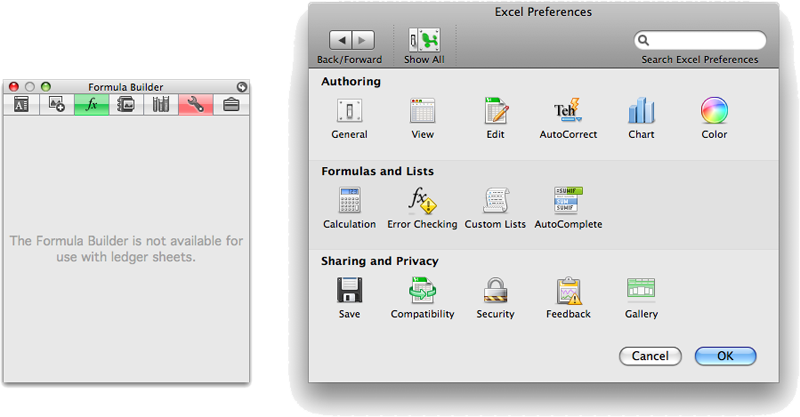
Integrated within the Formatting Palette next to the Formula Builder is the Compatibility Report tool (below left), formerly buried in behind the Toolbox icon. Anytime you enter or create anything that is not supported in previous versions of Excel, this blinks in red to notify you that there may be a compatibility problem. Fortunately, this behavior can be turned off in preferences (below right), which are presented in Office in an interface similar to System Preferences.Â
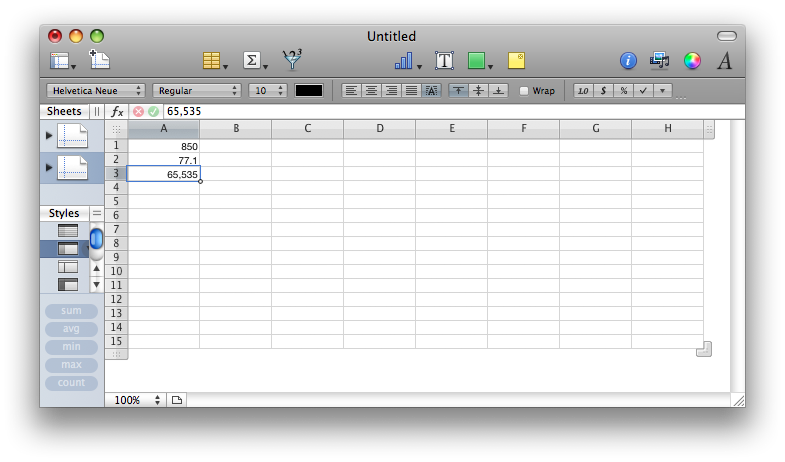
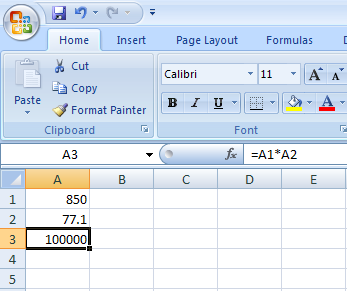
In contrast, Numbers presents a formula bar integrated in the document window itself (above), just as Excel has always appeared on Windows (below, Excel 2007 running on Vista).
Working with Functions
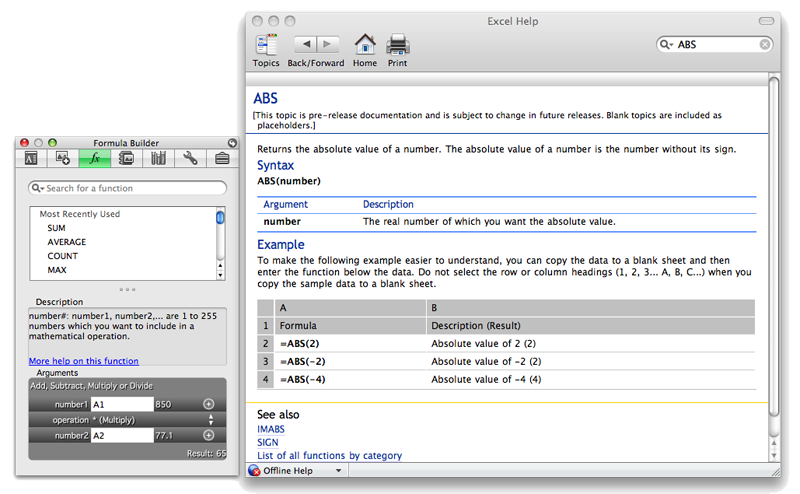
Excel's function list in the Formula Builder links to help pages that describe how each function works (below).Â
Using the fx button in its formula bar, Numbers presents a function lookup panel in a more accessible format than Excel (below). Numbers uses the standard Mac OS X help window for defining functions, and provides notes that are easier to understand. Numbers offers fewer functions overall than Excel. In his review of iWork, Walt Mossberg of the New York Times wrote "For real spreadsheet jockeys, however, Numbers is wimpier than Excel. It has only about half as many functions for making calculations and doesn’t do pivot tables."Â
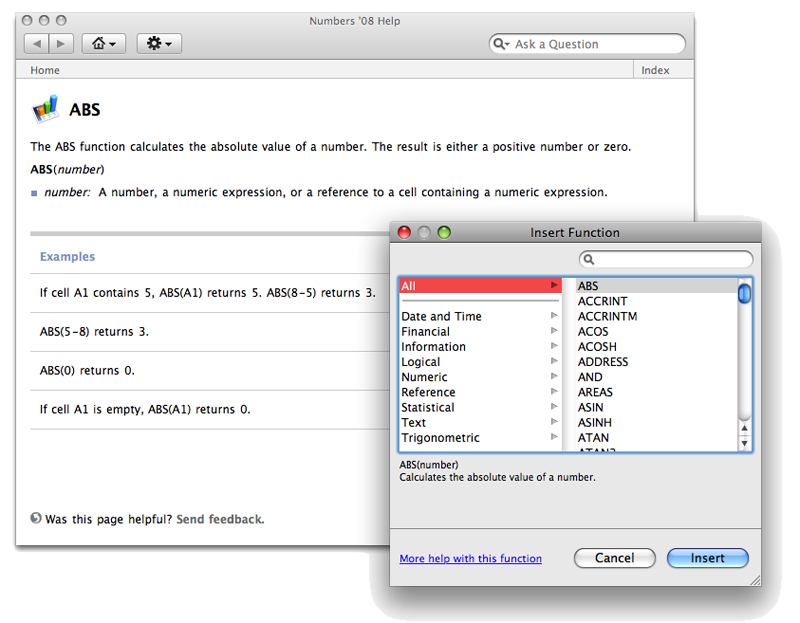
While pivot table functionality is a weak point of Numbers, counting its included functions isn't necessarily a good measure of its general capabilities. Although the 169 functions of Numbers is close to half of the 327 functions in Excel, Numbers supplies the same text, logical, date and time, and math functions as Excel, apart from functions pertaining to array and matrices. The real weaknesses in Numbers' function count come in financial and statistical functions, and Numbers 1.0 offers no engineering or database functions at all, as Curmi outlines in Functions in Excel and Numbers.
For its target audience, Numbers covers most of the functions users would encounter in opening spreadsheets from Excel users. It would be smart for Apple to open up Number's functions with a plugin architecture that allows third parties to develop their own functions in areas where the program is lacking; this would also help in enhancing compatibility between the Numbers and Excel.Â
Excel 2008 Templates
While templates are offered within the Project Gallery, users might find them easier to discover from the Elements Gallery (below top). In Excel, the Gallery is bright green, in order to distinguish it from the blue in Word. If you find the candy colors overbearing, you can set the Gallery to use graphite grey in preferences (below bottom). There are also settings to adjust the translucency of the Gallery and turn off the bouncy magnify effect of the Gallery icons.Â
Excel 2008 for Mac makes an effort to present ready to use templates similar to Numbers, but falls short of really delivering very practical templates. In Excel, the first tooth in the Gallery dentures is Sheets; it presents a variety of templates related to accounts, budgets, invoices, lists, portfolios, and reports. The templates themselves are all extremely simplistic. For example, there are six accounts ledger sheets that are nearly identical: a generic account balance ledger, one for a checking account, a business checking account, a savings account, etc. The other headings offer similar simplistic lists, and the ones I worked with seemed to be problematic in some of their calculated fields.
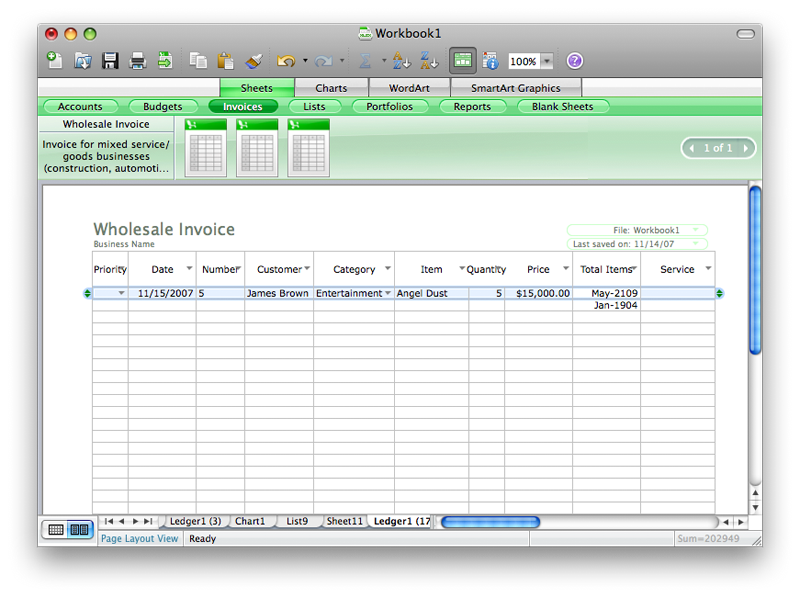
If you can figure out how to make use of these templates, you probably could have set them up yourself with minimal effort. All of the templates appear to just be various list sheets, as if somebody had a free hour and ran through the list manager repeatedly creating some placeholder templates under different names. There's nothing in them that seems to make them accessible in any particular way; instead, it seems like many of them just serve to perpetuate examples of poor ways to use Excel, such as building a standalone shopping list or an expense report. Why not either just use a notepad or something with real expense reporting features such as Quicken?
In Numbers, the user starts with a series of graphical templates (below) which present ideas for how the program can be used, and actually serve as practical starting points for typical projects. Considering that Numbers is targeted toward consumers, it would be great if Apple offered additional professionally designed templates for it or sponsored a community for developing and sharing templates.
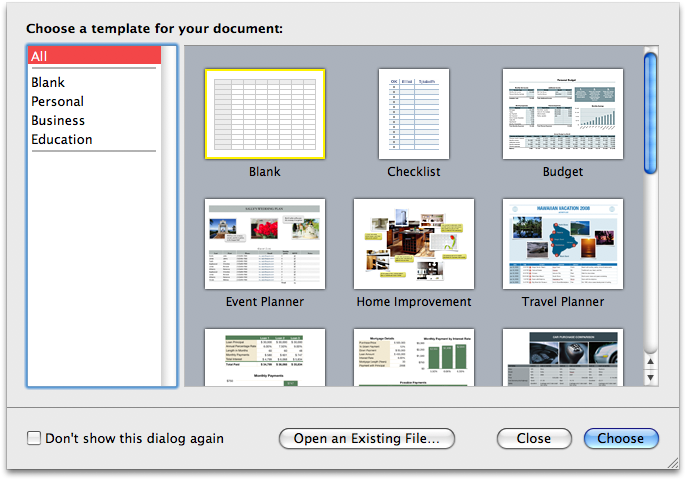
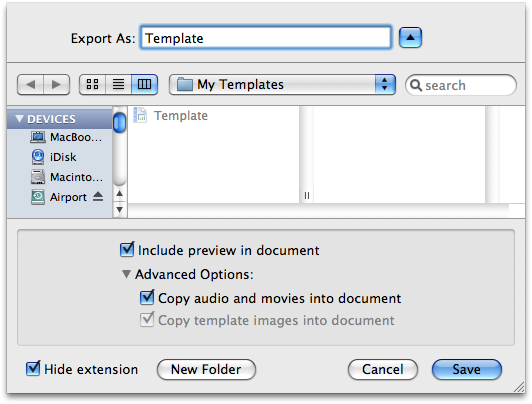
Unlike iWork or the new Mail 3.0 templates, it is easy to create Numbers templates from your own documents using the Save as Template command (below). Saved templates appear in a My Templates section in the template chooser (above).
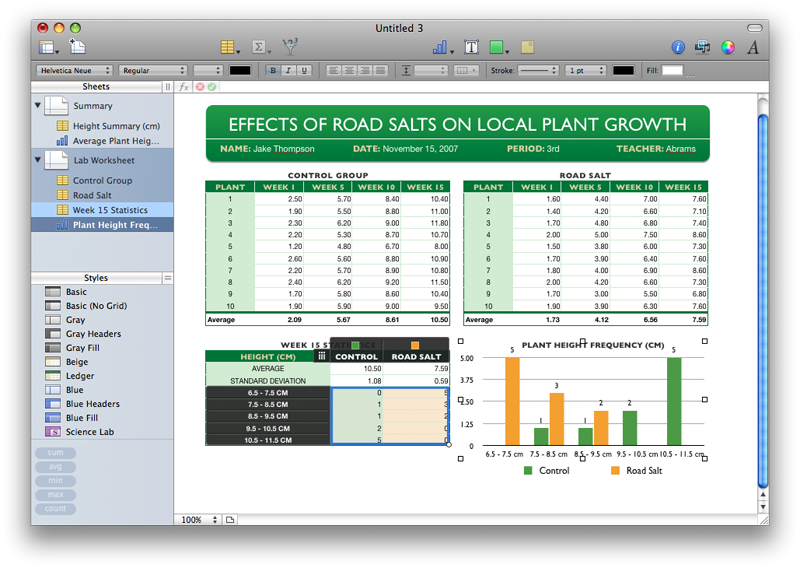
The seventeen templates included provide a good overview of how to get the most out of Numbers. For example, the Science Lab template graphically demonstrates how to built a multi-sheet document, and link together sheet of lab data with graphical presentation. The Summary sheet (below) demonstrates comments and linking to other pages, using a formula to reference data in another table on a separate sheet: =Control Group :: Week 1 AverageÂ
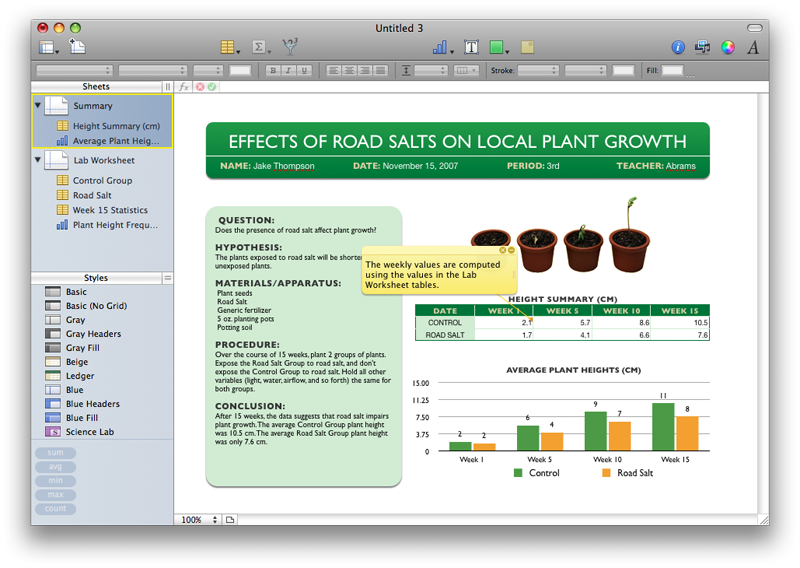
The template's Lab Worksheet (below) shows off how a chart can be created from a table, and how both can be presented attractively on a sheet ready for printing. The chart on this sheet is selected, which highlights the data it is based upon in the adjacent table of statistics.Â
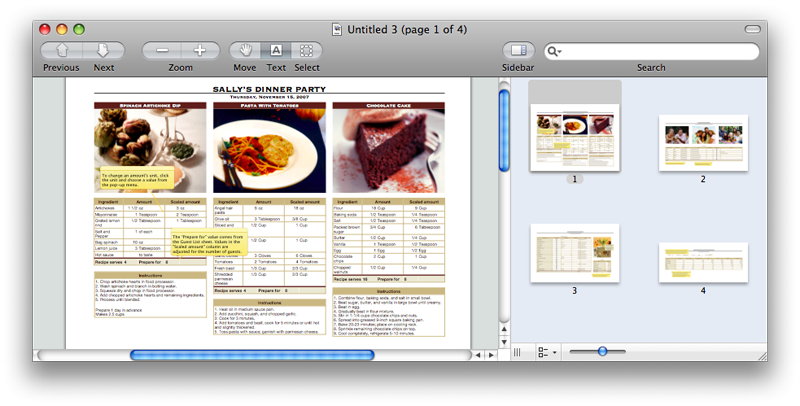
The Dinner Party template includes a sheet of recipes, a guest list that can be populated from Address Book, a shopping list checklist that ties into a simple budget, and a conversion table of cooking measurements. The sheets all connect together in that the recipes draw preparation numbers from "invitation accepted" parties in the guest list, and use that number to calculate quantities of supplies needed in the shopping list by referencing the conversion tables.
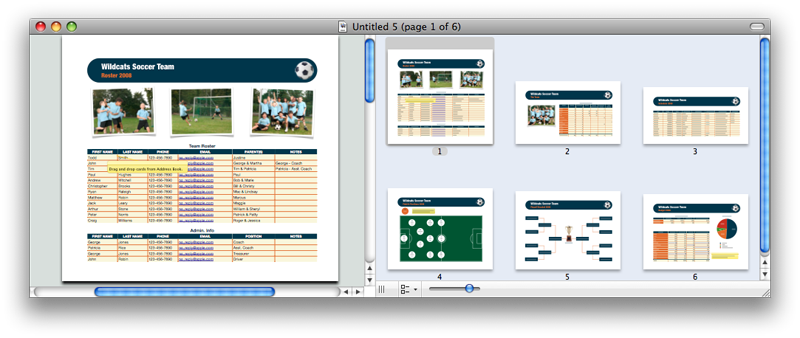
A Team Organization template includes various sheets including a team roster, player statistics, a games schedule, a graphical field positions and playoff bracket presentation, and a budget.
On page 3 of 3: Excel Charting and Excel vs Numbers.
The second tooth in the Gallery dentures is Charts. Select a chart style by icon, and then adjust the selection areas to map cell values to the chart. You can select an overall style from the Formatting Palette, but the editing and formatting tools are limited. This feature isn't really working well enough to describe in detail yet.Â
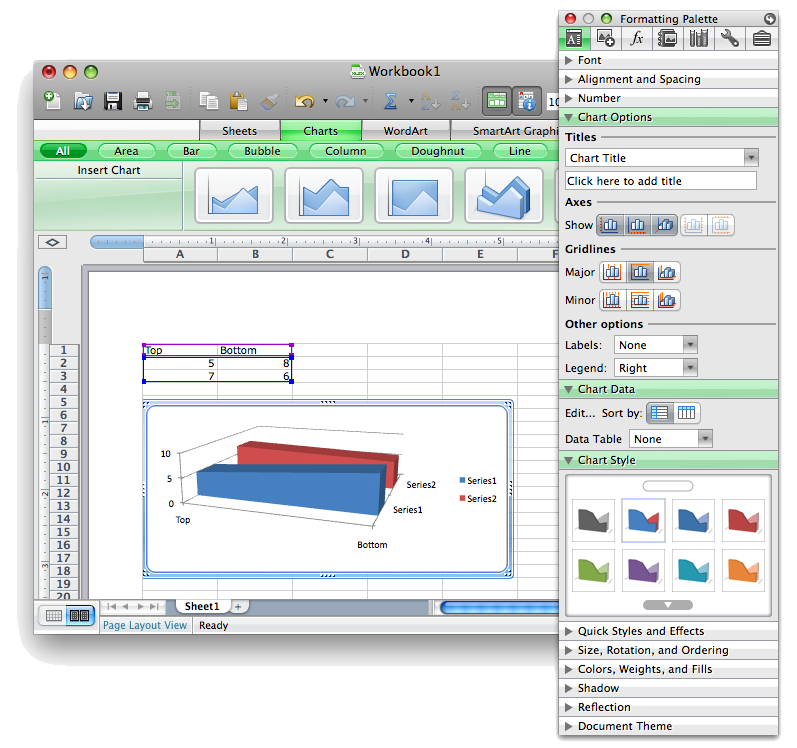
Excel offers more charting types than Numbers, including radar, surface, hi-low-close stock charting, and X-Y scatter charts, as well as more preset types of standard charts. Once you begin customizing a chart however, Numbers really shows off its presentation strengths. It borrows from the advanced, intuitive charting features of Keynote, extending them to draw upon its spreadsheet data. In Numbers, you pick a basic charting style and then adjust all the parameters yourself. The tools make it easy to generate attractive charts, but Numbers needs to expand upon the included set of charting options if it wants to appeal to the higher end Excel crowd.
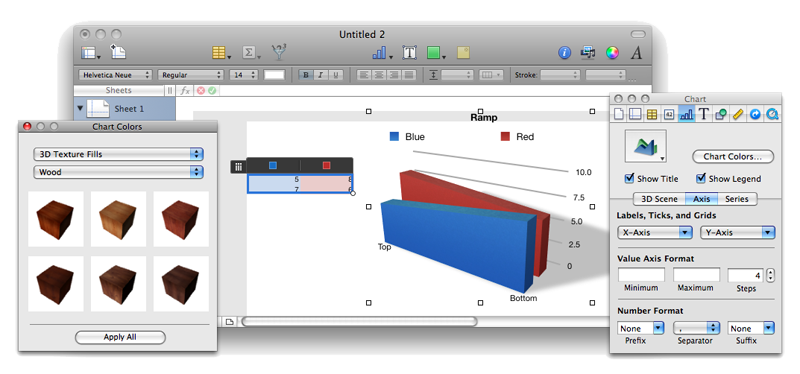
Like Pages, Numbers offers the same non-modal Inspector editing that makes it easy to try different settings with immediate feedback; Excel 2008 uses fully modal window controls apart from the simplistic Chart Style settings in the Formatting Palette. In Numbers, 3D charts can be tilted in space and rotated, given shadows, and chart elements can be colored or textured using a panel of drag and drop finishes (below).Â
Excel vs Numbers
While the two applications serve very different markets in general, Microsoft is targeting Excel for Mac 2008 toward the consumer market. Its glossy, animated candy interface suggests that Excel is designed for everyone from your little sister to your financial adviser, but it really should be focused at the serious market that needs the full range of features in Excel. The MacBU's efforts to target consumers with simplistic templates and weak presentation tools that focus on WordArt and the bubbly aquamarine interface controls seem to cheapen Excel without really making it more attractive to a wider audience.
Business users might likely be put off with all the Office 2008 interface gimmickry, which seems to introduce a lot of stability problems, particularly for Excel. Unlike Word 2008, Excel does not yet feature live window resizing. It also frequently crashes and has the overall unfinished feel of an early beta rather than development build two months away from shipping.Â
A lot of Mac users rely on Excel for features that are missing from Numbers 1.0, including database integration, sophisticated formula functions, pivot tables, and specialized charting. The stability of the Office 2008 release will be very important for users who need those features. For consumers, Excel is a weak link in the Office suite. Attempts to build home and small business projects in Excel will be frustrating with the modal controls and busy Palette tools that lack the presentation functionality of Numbers.
Excel's faults happens to be the strong points of Numbers (and vice versa). Numbers makes it easy to create sharp looking presentations and reports that incorporate spreadsheet data, and it does a good job of importing most of the Excel documents consumers will run into outside of higher end financial and statistical workbooks or files that draw from external data sources. The included templates offer strong examples of practical uses for the program, and serve as functional starting points for a variety of projects common to home, education, and small business users.Â
The innovative rethinking of the old VisiCalc grid in Numbers makes it much more flexible and broadly useful for more purposes than the standard spreadsheet. Its tight integration with the tools from Keynote and Pages means users learning one app will find themselves immediately productive in the others. In contrast, the new Excel frequently diverts from many of the standard and expected user interface conventions, which will be both jarring and counterintuitive to users, whether they expect it to act like Office on windows, or like other Mac applications.
Numbers and Excel don't compete head to head across the very broad market for Excel, but for uses with less technical needs, Numbers 1.0 handily beats Excel 12 as a productivity tool. Outside of that market segment, Excel faces little competition on the Mac, as the available versions of OpenOffice have serious shortcomings on the Mac platform. That might change with work on IBM's Symphony suite for corporate users and with the continued progress on other OpenOffice distributions.Â
Until that happens, Excel is a critical product for a variety of Mac users, and its availability as a Universal Binary in Office 2008 will be welcomed by users with Intel Macs. For corporate users, downside to the new Excel is no more support for macros that use Visual Basic for Applications.Â
Apple's iWork '08 suite, which includes Numbers 1.0, is available from Amazon.com for $69.99, an 11 percent savings. Amazon is also offering instant savings on pre-orders of the various Office 2008 for Mac bundles.
Don't forget to check out our previous Road to Office 2008 installments:









 Malcolm Owen
 William Gallagher and Mike Wuerthele
 Christine McKee
 William Gallagher
 Marko Zivkovic