An Introductory Mac OS X Leopard Review: Core Graphics and the New UI
 Prince McLean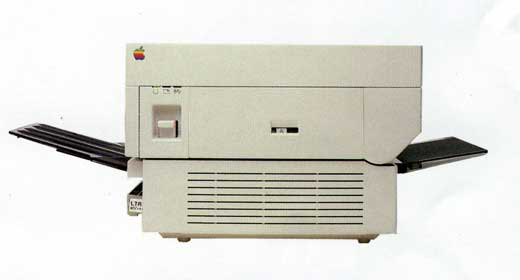
Mac OS X Leopard pairs together a number of technologies developed inside and outside of Apple. Here's where they came from and how Leopard is leveraging open standards to improve its performance in graphics and video.
In the beginning was QuickDraw
The original Macintosh used a procedural graphics programing interface called QuickDraw to paint everything on the screen. It mapped graphics into a rasterized grid of square pixels, with a set 72 pixels per inch density. That allowed applications to accurately represent how things would look on the printed page.
Bill Atkinson's QuickDraw also invented the concept of Regions, which among other things allowed drawn content to be clipped into a window and presented in the familiar and intuitive desktop environment of overlapping windows. Andy Hertzfeld described the importance of Regions in Folklore.org - I Still Remember Regions.
One of the most impressive aspects of QuickDraw was that it could run on the limited hardware commercially available in 1984. Systems like the Commodore Amiga and Atari computers used hardware-assisted graphics, while the Mac did everything in software. That gave an early performance edge to other systems, but allowed Apple to rapidly port its graphics technology to new hardware as it became available, rather than being tied directly to the hardware architectures of obsolete chips.
After developing the color-capable QuickDraw II to provide a windowing environment for the Apple IIGS, Apple introduced Color QuckDraw for the Mac, and later 32-bit QuickDraw. Those advancements cemented Apple's lead in the markets for graphics and print. QuickDraw also acted as the foundation of QuickTime, as noted in Road to Mac OS X Leopard: QuickTime, iTunes, and Media Features.
Adobe's PostScript
After researchers at Xerox PARC invented laser printing in mid 70s, they began work on a standardized page description language called InterPress. In 1982, John Warnock and Chuck Geschke left Xerox to form Adobe, and simplified the InterPress language into a commercial product called PostScript. Steve Jobs urged Adobe to adapt PostScript for use as the standard language for laser printing, and in 1985, Apple shipped the LaserWriter (below) as the first PostScript printer.
In order to print to the much higher resolution 300 dpi LaserWriter, QuickDraw drawing commands needed to be translated into the PostScript language, which was then sent to the printer for rasterizing at high resolution. Because Adobe's PostScript wasn't cheap to license, Apple later delivered some lower-end QuickDraw printers that used the Mac's internal drawing language to plot out a higher resolution version of the screen for printing.
However, PostScript became the professional standard for raster image processing, and a key cornerstone of Jobs' Macintosh Office plan described in Steve Jobs and 20 Years of Apple Servers, which initially launched the Mac and created the desktop publishing industry. At its launch, the LaserWriter was the most powerful computer Apple sold, because it required so much processing power to rasterize graphics at high resolution.
And at NeXT: Display PostScript
By the time Jobs left Apple and began putting together the NeXT platform in the late 80s, technology had increased dramatically. Sun had developed a windowing system called NeWS, the Network extensible Window System, that adapted PostScript to drive the entire graphical interface. While technically sophisticated, NeWS failed to gain much traction for a number of reasons, including its complexity for developers and performance issues.
NeXT began parallel efforts with Adobe to develop an alternative display system called Display PostScript. Rather than running the entire window system using PostScript as NeWS did, DPS only used it for drawing. NeXT and Adobe created a DPS specification that could be used by other vendors, who commonly paired it with MIT's bare bones X Window System.
For NeXTSTEP however, NeXT created its own window server that tied into the rest of the system's object oriented development frameworks and made application development much simpler. DPS never became popular on X11 because of the noxious fumes of the convoluted glue between it and the underlying windowing system.
On NeXT however, DPS was a key feature as it enabled the system to deliver more accurate printing, because there was no translation between QuickDraw and PostScript. In addition, the NeXT computer itself could render pages for the much simpler laser printer NeXT sold, saving the added expense of another entire computer built into the printer itself.
3D Drawing: IRIX GL and Pixar
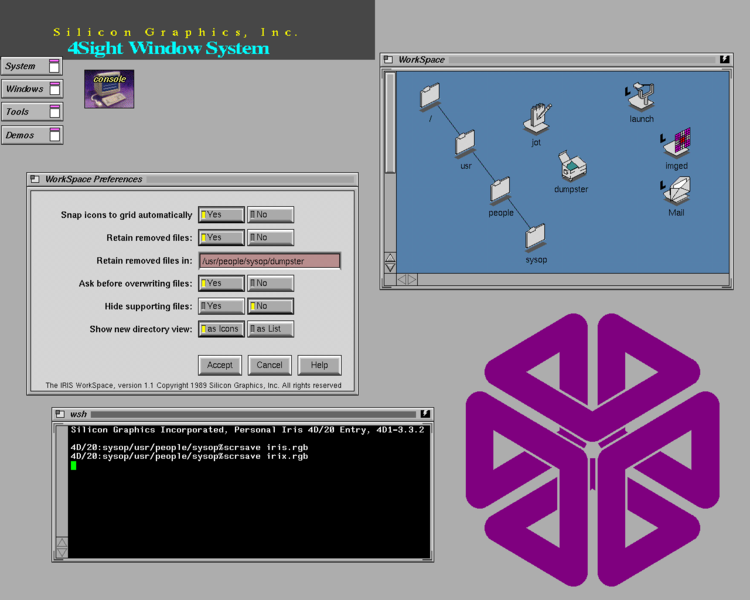
In parallel with the development of PostScript for use in 2D graphics, Unix workstation vendor Silicon Graphics, Inc. pioneered the development of high end graphics workstations used in computer animation and scientific visualization. In 1988, SGI introduced IRIX 3.0, which paired AT&T's Unix with SGI's 4Sight windowing system (below), based on Sun's NeWS and SGI's own IRIS Graphics Language for 3D graphics.
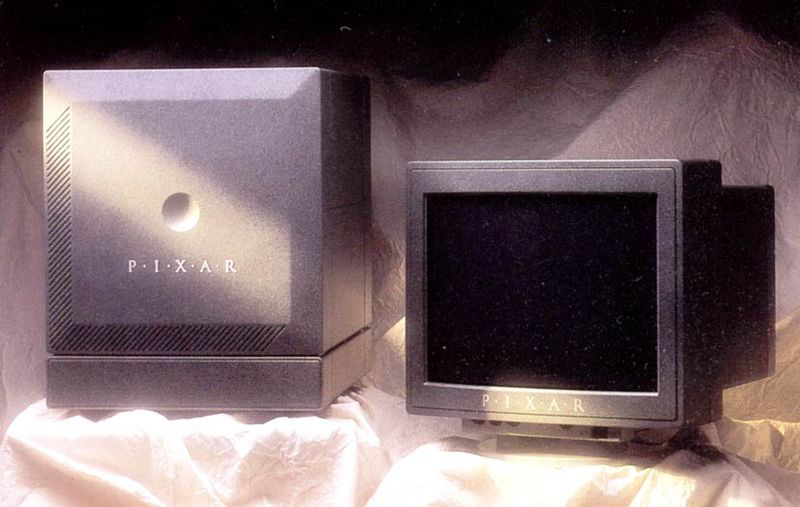
Prior to starting NeXT, Jobs also purchased the computer graphics division of George Lucas' LucasFilm in 1986 to form Pixar. That company pioneered the development of computer graphics, releasing the Pixar Image Computer (below) as a $135,000 state of the art graphics rendering system that was used alongside a $35 workstation from SGI or Sun. Pixar's system also used NeWS internally.
The extremely small market for such high end graphics processing resulted in Pixar selling off its hardware business in 1990 to move into software sales of its RenderMan product, along with CGI work for commercials. Pixar's biggest customer for its high end systems was Disney; in 1991, Pixar maintained its relationship with Disney in a deal to develop a series of computer generated feature films, resulting in Toy Story in 1995, followed by a series of pioneering CGI films that pushed the boundary of graphics technology.
That same year, SGI dropped support for NeWS and moved to X11, and by 1993 was hosting support for DPS on top of X11. The real value SGI offered, however, was in its IRIS GL. In 1992, SGI made a pioneering step to launch its graphics technology as an open, interoperable standard under the name OpenGL.
IRIS GL had included support for an entire windowing system developed prior to NeWS and X11; after removing this support, SGI released the new OpenGL specification under the OpenGL Architecture Review Board consortium, and it rapidly became the professional standard for 3D graphics.
NeXT and Apple: Quartz
After acquiring NeXT, Apple began work on merging its own graphics assets into the foundation of NeXT's DPS-based graphics system. A key problem was that DPS was expensive to license from Adobe. NeXT had sold its software for $700 per seat, while Apple's consumer-oriented installed base couldn't be expected to pay more than around $100 for an operating system, leaving little room for expensive licensed technologies.
Apple determined that the X11 system that most other Unix workstation vendors had settled on by the mid 90s would not supply enough of a foundation to cover the features it wanted in its new system. Adding those features to X11 would have resulted in a a non-standard version of X11 that would not be compatible with other system anyway, but which incorporated a lot of design tradeoffs that would needlessly complicate and slow its performance. Instead, Apple began work on what would be called Quartz.
Rather than using the PostScript language, Quartz used the drawing model of Adobe's Portable Document Format. PDF is a file format containing resolution independent drawing information that can be the interpreted results of a PostScript program. However, Quartz didn't just swap out PostScript for PDF to become Display PDF. Instead, Apple wrote an entirely new graphics engine using the mature and highly regarded PDF model.
On page 2 of 2: Mac OS X 10.0 Quartz; Mac OS X 10.2 Jaguar: Quartz Extreme; Mac OS X 10.4 Tiger: Quartz 2D Extreme; What's New in Mac OS X 10.5 Leopard; and Leopard User Interface.
In 1999, Apple demonstrated its new drawing system split into two segments: Core Graphics Rendering (Quartz 2D) for drawing, and Core Graphics Services (Quartz Compositor) for compositing together layers generated by both the new Quartz 2D and the existing QuickDraw and QuickTime. This allowed windows of existing Mac applications to seamlessly share the screen with new ones. In addition, Apple introduced support for OpenGL as its 3D interface.
Since Apple had already ported much of QuickDraw as part of its efforts to sell QuickTime on other platforms (including SGI's systems), some of the work to deliver backwards compatibility on the new system was already done. QuickDraw continued to outperform the new Quartz 2D for several years, because it was already highly optimized and had less work to do compared to the new Quartz 2D.
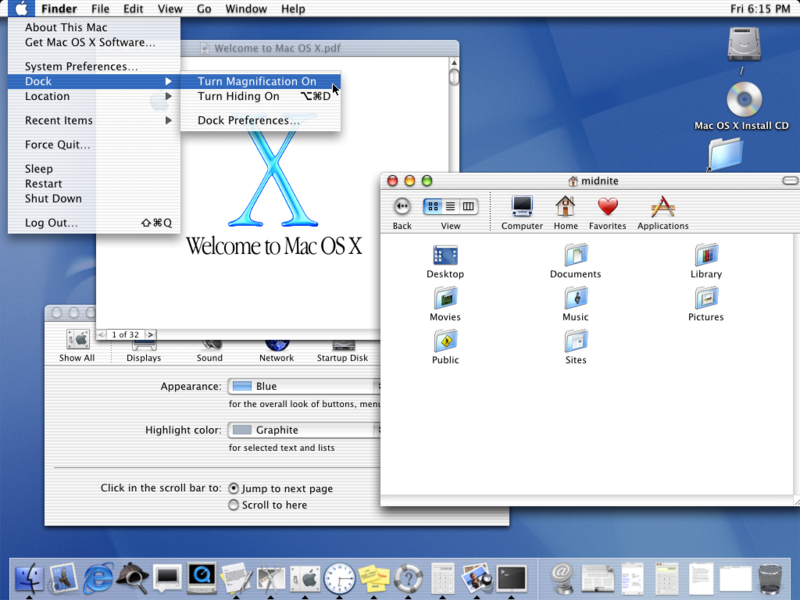
The innovative use of the Quartz Compositor engine to mix together images rendered by different technologies allowed all of the applications in Mac OS X to adopt the new Aqua appearance, with drop shadows and and translucency effects that were prominently exposed in early versions of Mac OS X (below).
Mac OS X 10.2 Jaguar: Quartz Extreme
In 2002, Apple released Jaguar with support for Quartz Extreme, which delegated the heavy lifting of compositing work to the graphics card. It describes the layers rendered by QuickDraw or Quartz 2D as texture maps spread across windows and, using OpenGL commands, has the video card itself render the desktop as if individual windows were 3D characters in a video game.
Because consumer video cards are designed for video gaming, this approach rapidly accelerated the graphics overall. However, Quartz Extreme didn't do anything to speed up actual graphics drawing within the context of a window. Apple continued to made incremental improvements to text, vector and bitmap drawing in Mac OS X 10.3 Panther, but it still remained as fast or faster to do drawing in the simpler, more mature QuickDraw.
Mac OS X 10.4 Tiger: Quartz 2D Extreme
In 2005, Apple released Tiger with major enhancements to Quartz 2D drawing. In addition, it introduced the beginnings of Quartz 2D Extreme, which similarly offered the potential to push drawing commands into the video card along with compositing work. However, this hardware acceleration wasn't yet ready for prime time, and graphics card requirements for supporting it were still too steep for many existing Macs. Even so, the new leap in Quartz 2D software performance allowed Apple to officially depreciate QuickDraw in Tiger, signaling that developers should begin their transition to using Quartz for drawing.
Along with improvements to drawing overall, Apple also released Core Image as a plugin architecture for accelerating specific effects to images using the OpenGL Shading Language. Core Image allows for specific hardware-accelerated functions called Image Units to apply stacks of filters and effects upon an image, and takes full advantage of video cards supporting GLSL to do this. A subset of the video hardware that can support Quartz Extreme can support Core Image.
Core Image can be used for color correction, applying color effects, to blur or sharpen, for create lighting effects such as highlight sheen, or to transform or warp images, among other applications.
Tiger also introduced Core Video, which serves as the new plumbing for QuickTime 7. Essentially, Core Video replaced much of the old QuickDraw in QuickTime, and provides a modern pipeline between video creation and video display, allowing for real time, hardware-accelerated transforms and effects. Like Quartz Extreme, Core Video similarly paints video onto an OpenGL surface, enabling the live window resizing during video playback demonstrated in QuickTime 7, as well as the application of live filters and effects on video, similar to Core Image.
Another major enhancement that resulted from the modernization in QuickTime 7 was support for out-of-order video frame compression. Earlier versions of QuickTime all assumed that frames would be delivered in the order they were to be displayed. However, MPEG-2 (used in DVDs) introduced the idea of sending "bidirectional predictive frames" that enabled greater compression at the expense of complexity.
QuickTime was never designed to handle such two-directional compression (described in greater detail in the article Apple TV: Using DVDs and other Video Sources), so QuickTime 7 incorporated new support using a wildly revamped architecture. In the process, Apple could deliver support for the new MPEG-4 H.264, which takes full advantage of bidirectional compression, while still maintaing QuickTime's characteristic frame-by-frame editing features.
Quicktime 7 also incorporated the use of Panther's Core Audio in place of the Classic Mac OS Sound Manager for audio within Quicktime, and introduced the QuickTime Kit (QTKit), an Objective-C Cocoa framework for developing QuickTime applications. Previously, the only interface for QuickTime was C.
What's New in Mac OS X 10.5 Leopard
Quartz 2D Extreme is now referred to in Apple's developer tools (specifically Quartz Debug) as Quartz GL (and sometimes QuartzGL). Applications can now activate hardware-acceleration as requested. This is important because some existing applications would actually be slowed down by Quartz GL if it were turned on system wide by default.
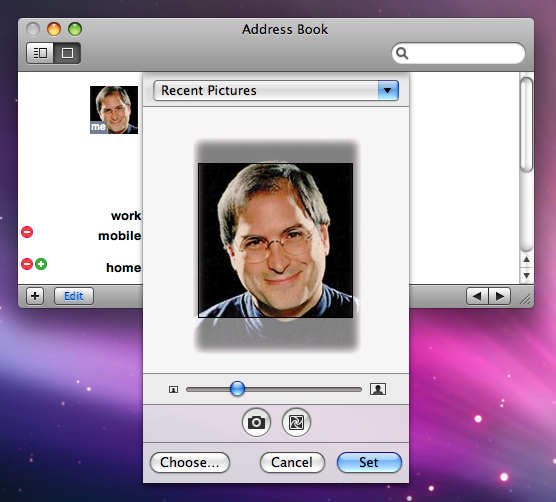
Leopard also introduces new Image Kit features for displaying, browsing, and editing collections of pictures, using the standard Picture Taker Panel (below), and applying Core Image filters. PDF Kit supplies similar tools for working with pages within PDF documents.
It also introduces Core Animation, originally called the Layer Kit on the iPhone as noted in iPhone OS X Architecture: Cocoa Frameworks and Mobile Mac Apps. Core Animation allows developers to map images or video from Quartz, OpenGL and QuickTime to OpenGL layers that can then be flipped, faded, resized, and otherwise animated around in space using OpenGL hardware acceleration, without requiring that developers be experts in low level graphics hardware. Core Animation is also Objective-C only, signaling a continued trend towards the use of Cocoa-based, object-oriented tools for high level development.
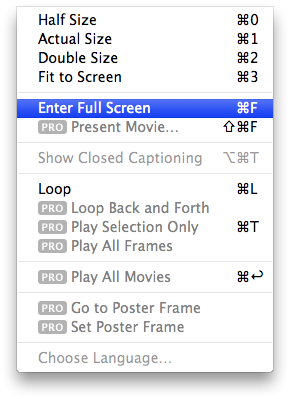
QuickTime now supplies full screen playback as a feature independent from the $30 QuickTime Pro upgrade (below), and QuickTime media playback is fully supported in both Cover Flow and Quick Look.
Leopard's OpenGL stack is updated to version 2.1 of the specification, and has been paired with LLVM to allow Apple to rapidly support new video hardware in addition to being optimized for "a dramatic increase in OpenGL performance by offloading CPU-based processing onto another thread which can then run on a separate CPU core feeding the GPU." New Core Image plugins, noted in An Introductory Mac OS X Leopard Review: Address Book and iChat, offer a starting point for taking advantage of the latest graphics hardware. Core Image, Core Animation, and OpenGL also all supply multicore support to take full advantage of new dual core processors.
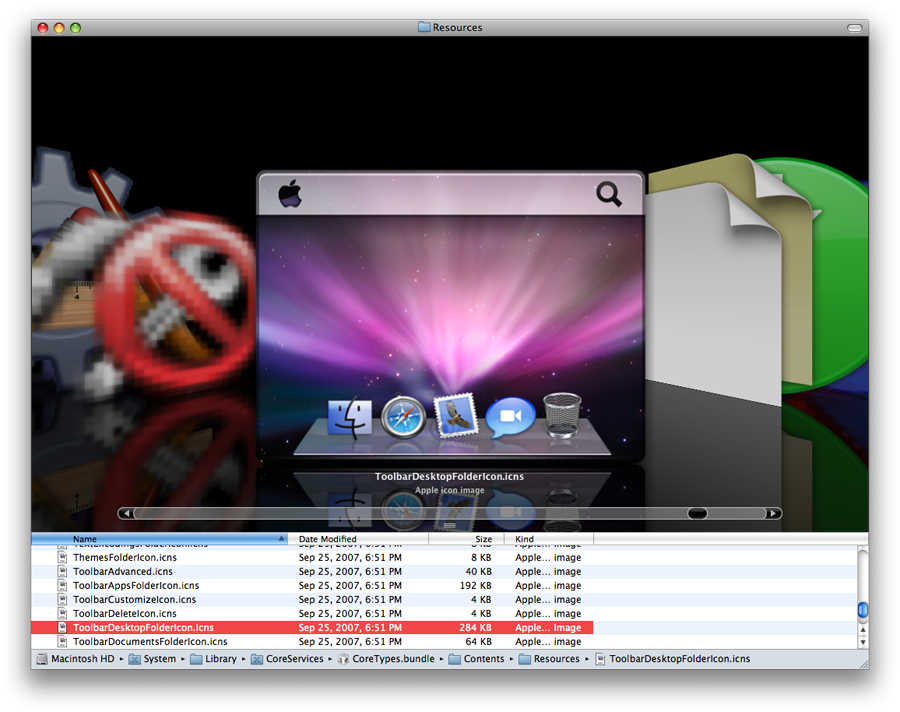
Resolution Independence was introduced in Tiger as a way for developers to begin moving their applications toward an inevitable future where higher resolution displays increasingly cram so many pixels into the screen that existing icons and widgets become too small to use. In Leopard, support continues with high resolution 512 pixel icons (the original Mac icons were 32 pixels). In Leopard, even the icons have nice looking icons, such as the new desktop icon (below), with its highly detailed Dock and a menu bar with an Apple logo that's larger than the real menu bar's. Compare the legacy icons to the left.
Resolution Independence is mainly held up by the bitmapped graphics commonly used to build interfaces in today's applications. On the iPhone, Apple was able to deliver resolution independence in web pages and documents, allowing users to scale them by any factor and still see sharp, readable text. On the Mac desktop, developers (including Apple) will need to revisit all of their existing controls to get them ready. Apple has announced that this would be important by "2008," without offering more specifics. A new high density sub-compact laptop may be the reason.
Along the lines of getting ready, Apple has included a private Core UI framework in Leopard that builds interface elements from recipes of high resolution bitmap images, as John Siracusa describes in Ars Technica review: Core UI.
Leopard User Interface
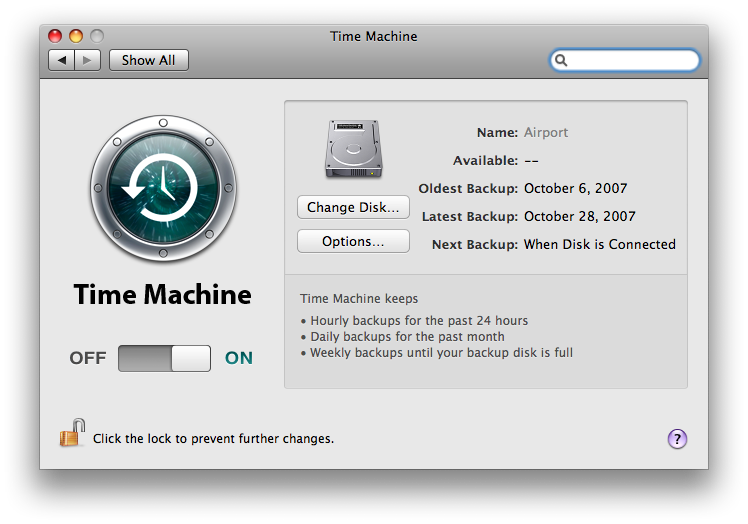
Leopard introduces a more cohesive overall appearance than Tiger, while also incorporating new ideas pioneered within consumer applications such as iTunes and concepts first used on the iPhone. The most obvious example is the oversized new flick switch (below), which appears in various places in Leopard after debuting on the iPhone. The Time Machine preferences pane also shows off a new two-toned, indented page effect that appears to be unique to Leopard.
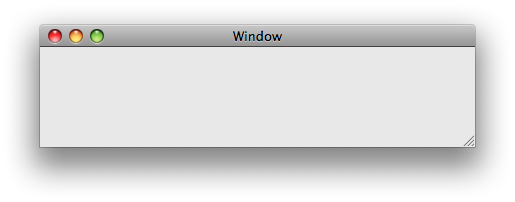
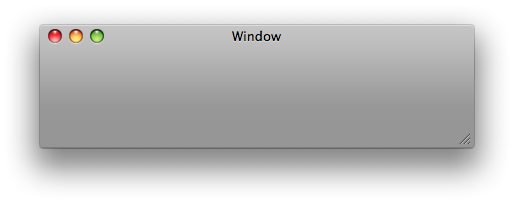
While brushed metal is now gone, there are still two window styles in Leopard: the standard window (below top) and the textured window (below bottom). Both cast a deeper, darker drop shadow when they are the frontmost window. This sets off the foreground window from inactive windows, and creates a more dimensional look to the desktop.
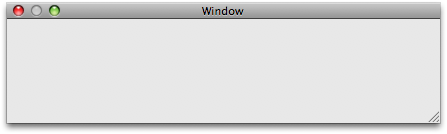
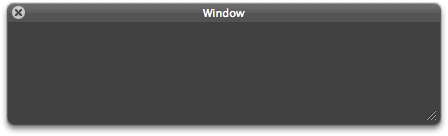
There are also two styles of panels: the standard mini-window panel (below top) and the translucent panel (below bottom) sometimes called a "heads up display." Apple's guidelines specify that developers use the standard panel for most normal applications, and reserve the translucent panel for use in applications that present editable documents in full screen mode, as iPhoto does. These panels also cast a much more limited shadow so they don't obscure the actual document you are working on.
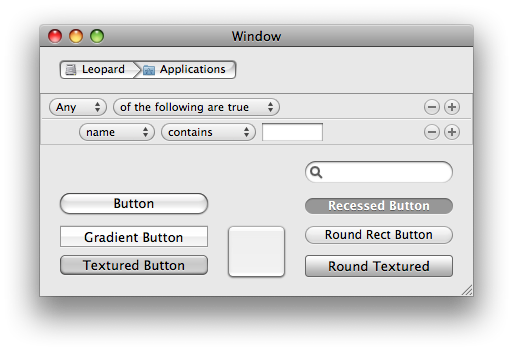
Interface Builder supplies a wider variety of controls, including those that first appeared as unique interface elements in iTunes, Safari, or other Apple applications. Among the examples in the busy window below are NSPathControls from the iTunes Store along the top, NSRuleEditor for defining the rules of Smart Groups in the middle, and various alternative button styles.
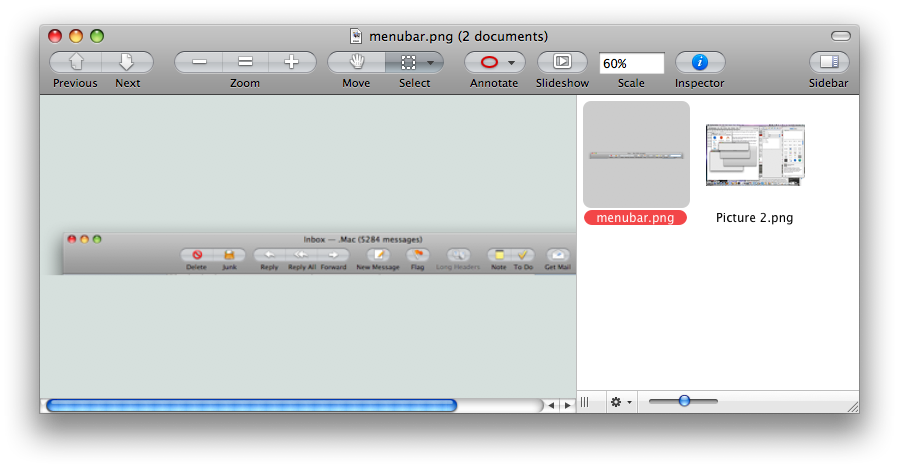
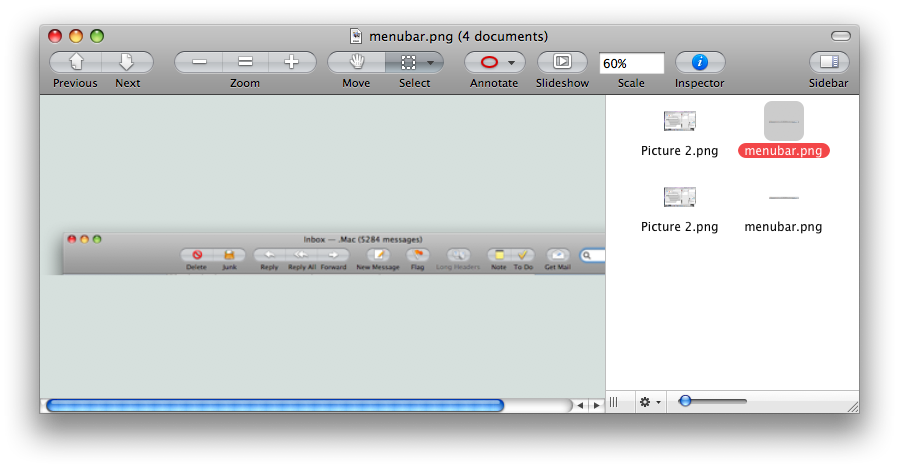
The new Preview shows off a variety of Leopard's improvements. It uses the same grouped oval buttons from Tiger Mail, but they've been toned down with a neutral background rather than being light blue. In addition, it uses a new sidebar rather than a drawer, and that sidebar uses the new Leopard Image Kit to draw its icons. The result is that you can resize the sidebar to show multiple columns of icons in wide display, or zoom the preview icons as desired using the slider control however you want (series, below). Icons also support drag and drop reordering (as in the case of PDF pages), and sorting by name, size, or meta data information.

The best news related to changes and enhancements in the Leopard user interface is that despite all the subtle eye candy and animated effects, it is actually faster overall than Tiger because so much hardware acceleration is in use and so many improvements have been made to the underlying system, as noted in Ten Myths of Leopard: 1 Graphics Must Be Slow!.
There are also things that are harder to like. Stacks icons in the Dock look like, well, messy stacks. As items inside change, the Stacks change, which highlights new downloads, but also means that sorting your items will constantly change the display. Other notes on the Leopard user interface were made in the Road to Leopard series:
Leopard delivers measurable and obvious advances throughout its graphics and video features that not only improve and consolidate the appearance of existing applications, but also enable the development of more powerful new applications with innovative, animated interfaces. If you haven't, also check out earlier installments of our Leopard review series that followed our Road to Leopard series:








 Marko Zivkovic
 David Schloss

 Malcolm Owen
 William Gallagher
 Mike Wuerthele
 Christine McKee