Many functions in Mac OS X are only exposed to the user via System Preferences, so as you might guess, a lot of new things in Leopard show up there. Among them are a few of the "secret new features" that have never been previously announced in demonstrations of Leopard, laying to rest the hopes of certain critics that Steve Jobs somehow failed to deliver upon his assurance that the new system would deliver a variety of other new features Apple was keeping under wraps so that competitors wouldn't copy them before they were released. Here's a look at where System Preferences came from, and what's new.
The Origins of System Preferences
As noted in Road to Mac OS X Leopard: Dashboard, Spotlight and the Desktop, the original Macintosh in 1984 could only run one main application at once, so the idea of desk accessories was designed to enable the system to present mini-apps that could be used at the same time.
In his Folklore.org article Desk Ornaments, Andy Hertzfeld noted that his group needed a way to present a variety of system settings, and decided that the task would be best handled as a desk accessory so that the settings would be available from within any application.
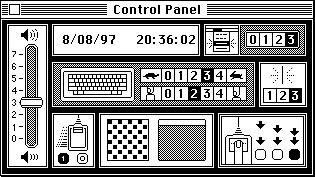
Apple artist Susan Kare designed the original Control Panel (above) as a compact display that was intuitive enough to not require any descriptive text. Kare's designs, including Mac system fonts and icons, gave the Mac a distinctive look and feel with a cohesive overall personality using just the two colors available. Among her other contributions was the choice of the propeller icon used on the Command Key (as described in How Apple Keyboards Lost a Logo and Windows PCs Gained One), the Happy Mac that displayed on startup, the Trash, the watch wait cursor, and Clarus the Dogcow, which appeared in print preferences. Kare's Chicago font not only served as the standard Mac font for a decade and a half, but was also resurrected to served as the system font on the early generations of iPods.
Kare later followed Steve Jobs to work at NeXT, and then worked for IBM and Microsoft, where she designed icons for OS/2, Windows 3.0's solitaire cards, and a variety of Windows system icons that mostly remained unchanged throughout the rest of the 90s. She subsequently designed the look of Eazel's Nautilus, the Linux file browser now used by GNOME.
Control Panel Evolution
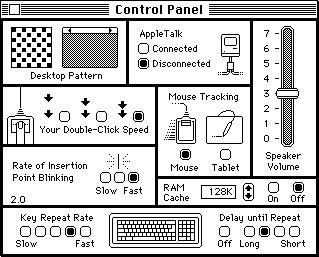
By System 3 (below) in 1986, text labels had snuck in to clarify functions as the system software grew increasingly sophisticated. The clock settings were spun off into its own desk accessory.
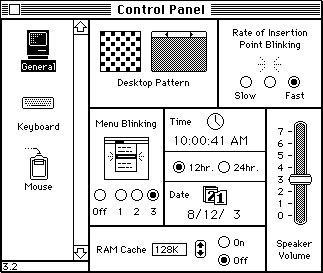
The following year, System 4 (below) began presenting settings divided up into sections to reduce the clutter of the interface, allowing room to return clock settings to the general section. The new modular interface was also expandable.
With System 6, Apple began shipping the MultiFinder, which enabled multiple applications to run at once. This appeared to terminate any need for Desk Accessories, but they continued on as supported components of the system.
Desk accessories were actually implemented as system drivers, rather than just being smaller versions of applications. Like other drivers, they were stored as system resources within the Mac System file. Adding or removing Desk Accessories, just as with Font resources, required a special utility called Font/DA Mover. Once removed from the System, these resources could be stored in container files called Suitcases.
Control Panel Items
In 1991's System 7, the Control Panel was revamped to act like a collection of small applications. Rather than using a utility to install them, they simply sat in a Control Panels directory inside the new System Folder, alongside folders of other system files, including Fonts and the new Extensions used to patch the system with extended features.
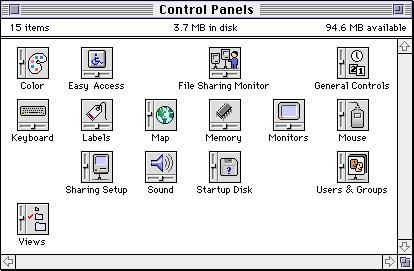
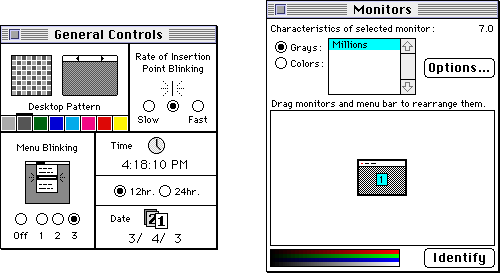
The Control Panels folder (above) contained the various controls; they could be launched by double clicking or could be selected from the Apple Menu. Once launched, they behaved like freestanding mini applications contained in their own window (below).
The Control Strip
In System 7.5.3, Apple released the Control Strip (below), designed primarily for laptop users as a shortcut to settings presented in the Control Panel. It used Control Strip Modules, a separate collection of miniature plugins that had their own repository in the System Folder. Each controlled a square of the strip, and typically popped up a control menu, such as the volume control below.
The Control Strip itself could be repositioned anywhere on the Desktop and floated on top of other windows. The tag control on the right end could be zipped back and forth to reveal all or just part of the entire strip, and arrows on each end could be used to cycle though the modules.

Control Panel Overload
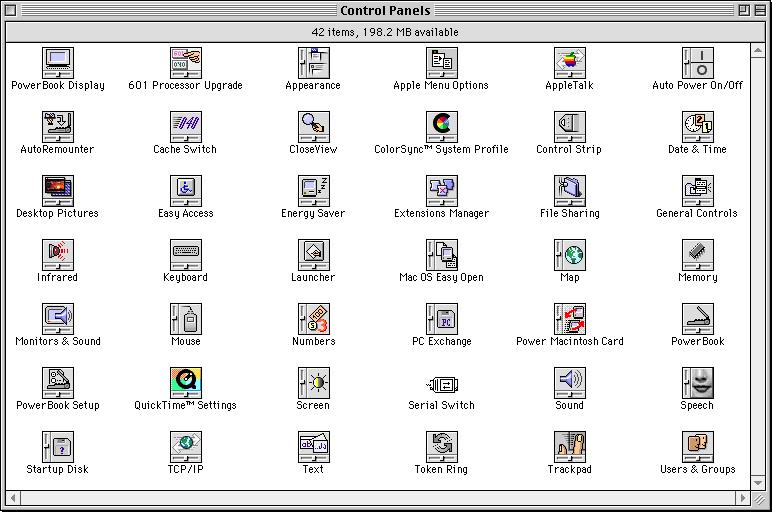
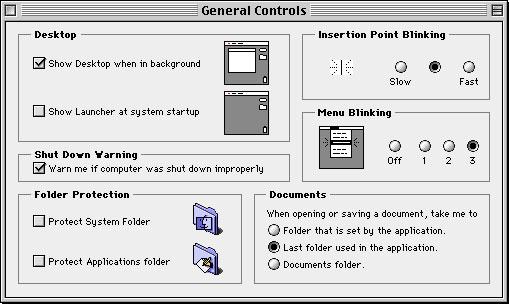
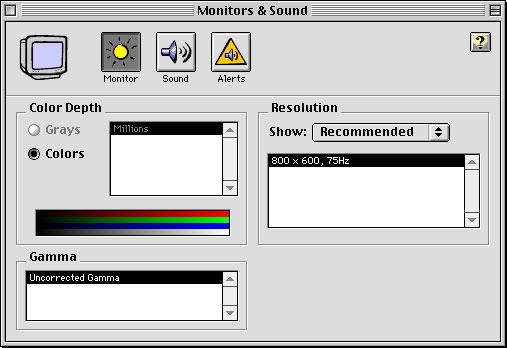
While Mac Control Panels proliferated (below), the interface didn't change much throughout the lifespan of System 7, even after Apple renamed later versions as Mac OS 8 and Mac OS 9. Those versions did use the new Copland-style appearance (below).
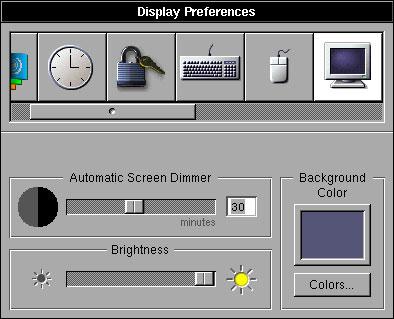
NeXTSTEP Preferences
Rather than breaking out each preference setting as a separate mini app, NeXT used a component interface in Preferences (below), which was closer to the original Mac design used prior to System 7. Individual sections were referred to as preference panels.
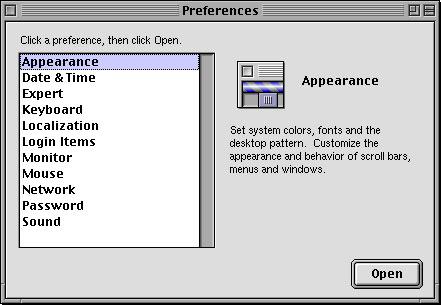
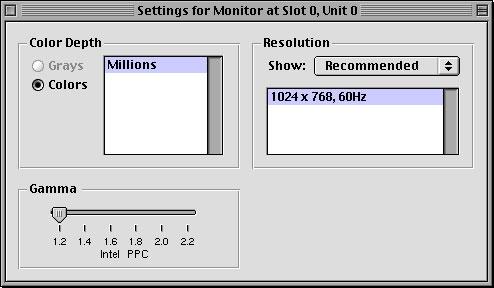
Apple originally intended to repackage NeXT's operating system with a Mac appearance under the name Rhapsody in 1997. To make it more familiar to Mac users, Apple presented individual Preferences as a list (below top), and once opened, the settings would be presented as a standalone Control Panel-style window (below bottom).
On page 2 of 3: Mac OS X System Preferences.
After being sent back to the drawing board, Apple decided to take the opportunity to radically rethink the entire Mac OS interface in its plans for Mac OS X. By Developer Preview 2 in 1999, Apple had returned System Preferences back to an arrangement closer to NeXT's (below).
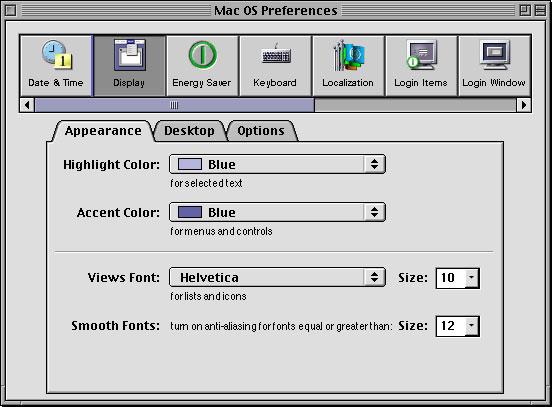
Developer Preview 3 (below) introduced the Aqua appearance as a work in progress in early 2000.
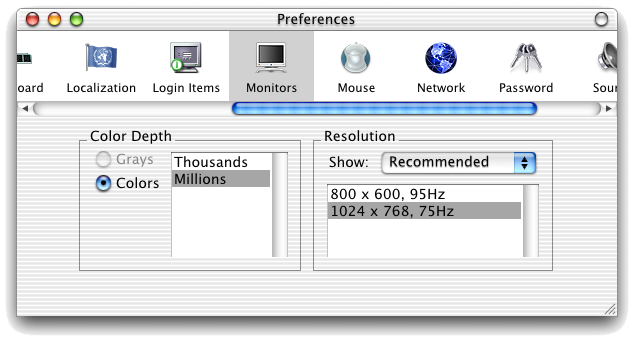
Developer Preview 4 (below) from May 2000 showed additional experimentation.
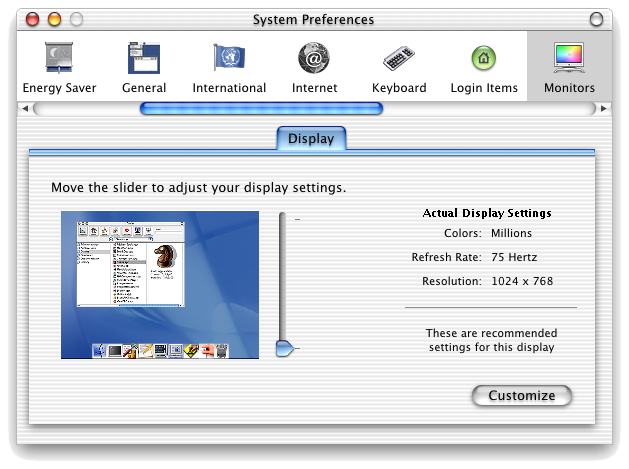
In the Mac OS X Public Beta offered in September 2000, Apple shipped System Preferences as a panel of "preference panes" (below top) that could be dragged up into a customizable quick access toolbar. Clicking on a preference would open it (below bottom).
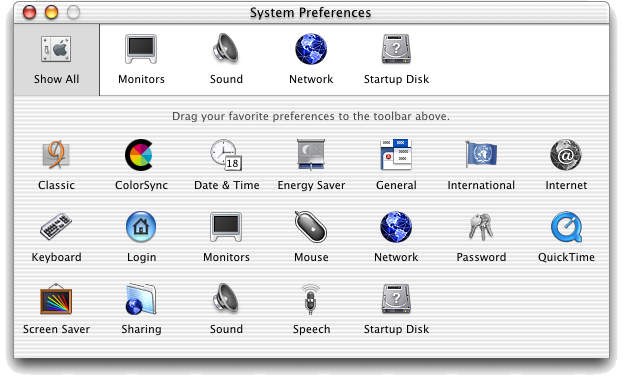
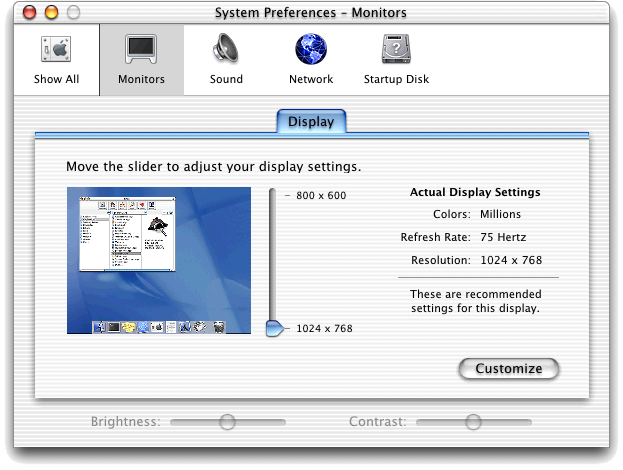
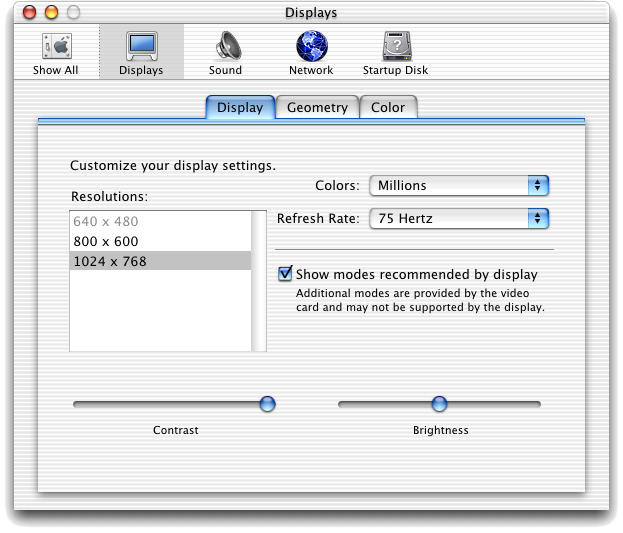
This same layout was retained in Mac OS X 10.0 in March of 2001 with a few revised icons that were increasingly colorful and distinctive (below top), but some of the experimental bits were tamed down, including the display preference (below bottom).
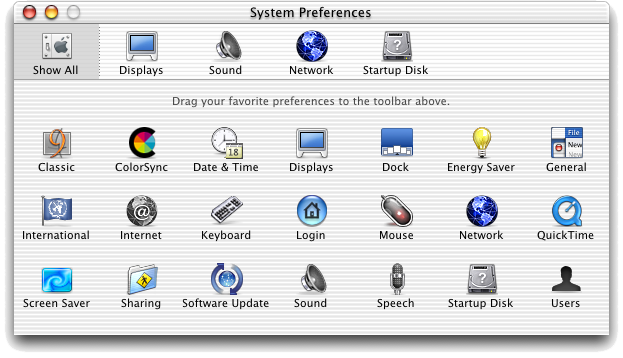
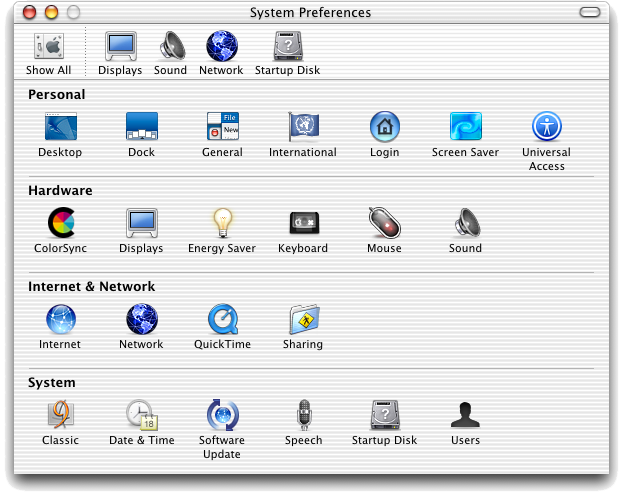
Six months later Apple shipped Mac OS X 10.1 as a free update. It introduced organized sections in the control panel (below) as well as a new pill control in the top right corner of windows. Clicking on the control simplified the window; in System Preferences, it would hide the toolbar.
August 2002's Mac OS X 10.2 Jaguar (below) moved icons around and added new features, but otherwise made few changes overall to System Preferences.
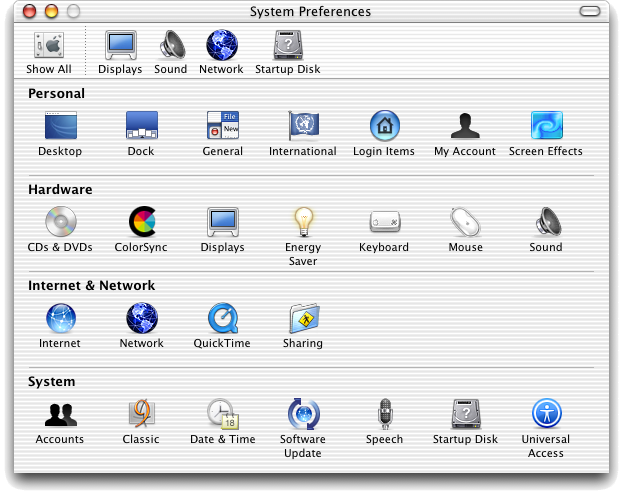
The following year, Mac OS X 10.3 Panther (below) dramatically toned down the white stripe appearance, replacing it with a neutral and more serious looking grey appearance.
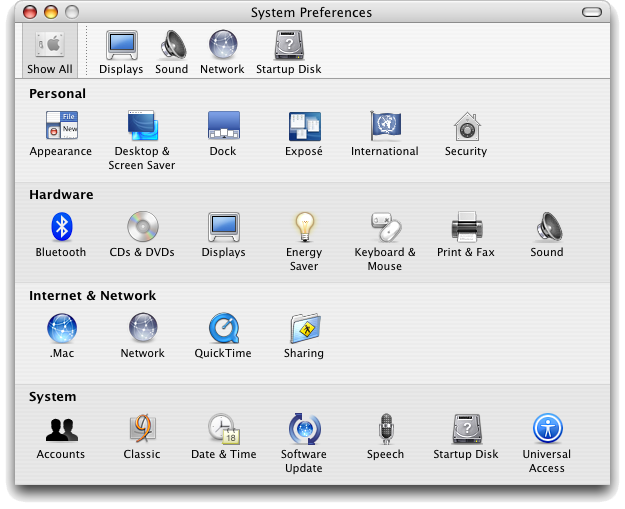
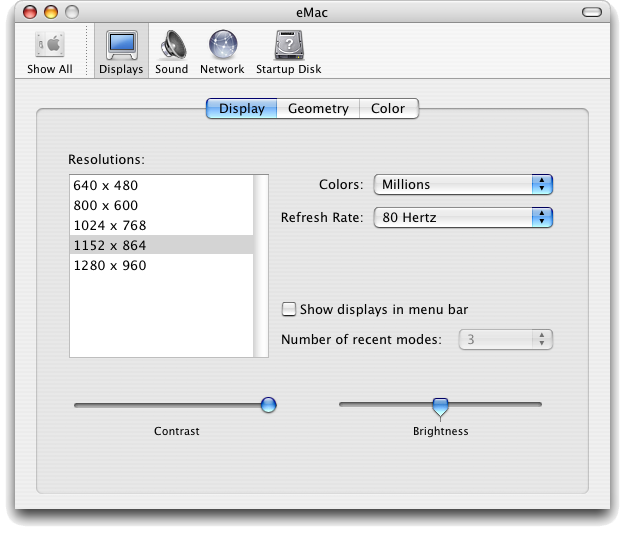
In addition, the bright blue Aqua tabs of earlier systems were replaced with a paper cutout style indentation, and the tabs that managed such views became more like selector buttons (below).
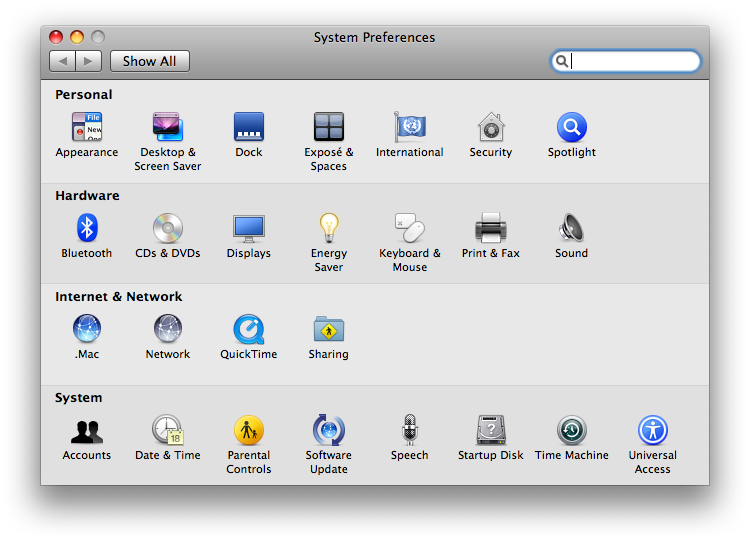
Tiger replaced the toolbar entirely, and instead presented a search feature for quickly looking up settings. This was designed to make the system easier for switchers, as they could type in terms used in Windows, such as "wallpaper," and quickly narrow down where to find the related settings on a Mac.
On page 3 of 3: New in Leopard: System Preferences; .Mac Settings; Accounts Settings; Parental Controls; Other New Settings; Bluetooth Controls; Sharing Controls; Desktop Controls; Network Controls; and System Cleanup.
The first new change is the gears Dock icon for System Preferences (first, below), which now matches identical one used on the iPhone. There are other new icons inside as well:
- Displays drops the icon of a clear plastic Cinema Display for a new Aluminum style one.
- Desktop & Screen Saver changes from two vague blue icons to instead reflect the predominantly purple, space desktop that appears by default. This same distinctively colored icon is also used for the Desktop folder in the Finder (second, below).
- Dock gets a new icon that removes the emphasis on magnification and instead highlights its new, more dimensional appearance. Additional information on the Dock was presented in Road to Mac OS X Leopard: Dock 1.6.
- There are also new icons for Parental Controls and Time Machine (third and fourth, below).

System Preferences controls for Appearance, CD/DVDs, Date/Time, Displays, Dock, Energy Saver, Ink, International, and Keyboard & Mouse are largely unchanged.
.Mac Settings
In .Mac, until you set up your account information the only option is to create one. Once signed in, Leopard provides four new sync options: Dashboard Widgets, Dock items, Notes, and System Preferences themselves. The Advanced tab in Tiger is now gone, and instead put inside Sync where it belongs. For iDisk, it now provides a URL link to your public folder, in case you forget how to advertise your shared files for others to access.
A new tab, Back to My Mac, allows you to register your system with Apple with a single push of a button. Once started, .Mac keeps track of your IP address even if it changes (such as with DHCP DSL or Cable modems). It also keeps track of the services you are sharing from your system. That allows .Mac to then relay that information to another system you log into, such as a remote laptop, letting you access your shared files and printers from home, and even set up screen sharing. This feature is a practical application of Apple's Wide-Area Bonjour technology.
Accounts Settings
Accounts now automatically sets up a guest account which is used for file sharing by default. If activated, it can also be used to allow friends to login to the system without needing a password, to browse the web. When they log off the home folder created for them is then deleted. Tiger's Parental Controls have been removed from Accounts and are now in their own section.
Parental Controls
Significantly updated to add time limitations and other features in a more accessible interface. Its features are detailed and explained in Road to Mac OS X Leopard: Parental Controls and Directory Services.
Other New Settings
Security is now reorganized with a General Tab and a new FileVault tab, as well as Firewall settings, which were previously hidden away under Sharing.
Speech controls are mostly unchanged, apart from the new Alex voice for Text to Speech, which is simply breathtaking; Alex actually stops to take a breath when reading. It is really, extremely good. This new voice actually makes Text to Speech really useful for everyone. Alex' natural speaking voice will also be an especially welcomed new tool for the visually impaired, particularly when combined with the greatly improved VoiceOver screen reader and extensive new Braille support.
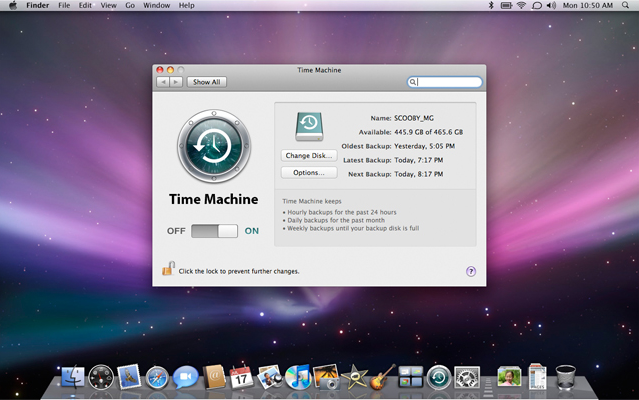
Time Machine (below) was profiled separately in Road to Mac OS X Leopard: Time Machine. The screenshots shows the mostly automated settings, and the simple scheduling interface presented. If you miss a scheduled backup (because you've unplugged your drive or are working remotely), it simply picks up from where it left off when you plug it in again.
Bluetooth Controls
Leopard uses a completely revamped and greatly simplified interface. Tiger's clumsy Settings/Devices/Sharing tabs are replaced with a simple single window that lists paired Bluetooth devices alongside their current status, similar to Tiger's Printer settings.
Sharing Controls
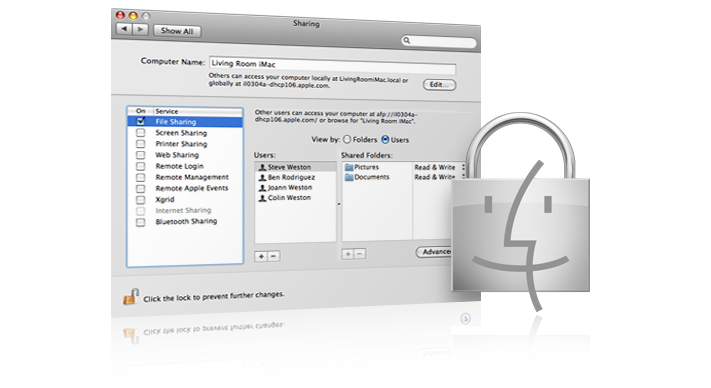
Bluetooth-related sharing services have moved into the more appropriate Sharing controls, which now handles settings for everything related to network connections between systems in a single-paged, tightly organized, and consistent interface:
- Screen Sharing (VNC-based remote desktop) for turning the option on and setting up passwords and allowed users.
- File Sharing, which can now set up arbitrary share points (share any folder) and define the sharing permissions for each (below). Sharing now covers all protocols, including AFP (AppleShare), FTP (Unix file transfer; not encrypted), and SMB (Windows File Sharing) in a single interface, rather than breaking each out as a separate sharing service.
- Printer Sharing for configured printers and fax machines.
- Web Sharing for serving up a website based on Apache with one button configuration.
- Remote Login, to connect via ssh as a remote terminal user from the command line.
- Remote Management, an administrative feature of Apple Remote Desktop for institutional users.
- Remote Apple Events, used to remotely perform actions over the network using AppleScript.
- Xgrid Sharing, used to set up distributed processing to share the idle processors of networked systems.
- Internet Sharing, which allows you to share (relay) your Internet connection with users connected via a second network interface, such as Firewire, wireless or Ethernet.
Desktop Controls
Desktop & Screen Saver offers four new screen savers. Notably, it also offers two new "display styles" for slideshow screensavers built from your own photos. In addition to the existing 'Ken Burns Effect' Slideshow, it also offers Collage, which shows your pictures falling onto your desktop as framed photographs, and Mosaic, which uses Core Animation to create mosaics from your pictures. Each photo shrinks down reveal itself— and a bunch of the rest of your pictures— as the mere pixels of another photo, which then does the same.
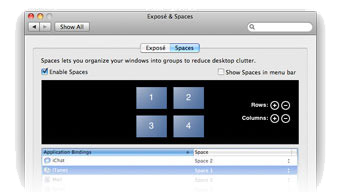
Dashboard & Exposé is now Exposé & Spaces, using the four windows Spaces icon. Up to 16 Spaces can be defined (below). More details on Spaces were presented in Road to Mac OS X Leopard: Spaces. Dashboard is still there for setting its hotkey, but most of its configuration is actually done within Dashboard, so its role is minimized.
Network Controls
Network gets a significant overhaul, adopting a device listing style patterned after Tiger's Printers settings, and which also appear in Bluetooth setup. In addition to physical network adapters such as Ethernet, AirPort, Bluetooth, Modem, and Firewire, the new Network System Preferences also sets up VPN (secure networking over the Internet), PPPoE (required for connection by some ISPs) and 6to4 (a gateway for sending IPv6 traffic over the IPv4 Internet) from the same interface.
Tiger and earlier systems oddly relegated some connection-oriented networking services into a separate application called Internet Connect, which is now gone in Leopard. The new Network layout makes much more sense. The last remaining use for Internet Connect was in setting up 802.1x, a protocol used to secure connections, typically used on WiFi in corporate settings. That too is now incorporated into device settings right in the Network controls, and now supports EAP for networks requiring certificate, token, or smart card security.
Leopard client can also now set up 802.3ad link aggregation for combining multiple network ports together to act as a bonded pair. This applies their bandwidth together, and also allows a link to act as a failover if one goes down. Network can also configure VLANs for working on networks partitioned as such.
Print & Fax now incorporates the Printer Setup Utility, which is now gone. That leaves all printer and fax device configuration (which are both combined in a single page listing, similar to the new Network settings) in one place, rather than dribbled along between system Preferences and the formerly separate configuration setup app. Setting the print driver, the printer name, and checking supply levels are all now in the same place.
Print jobs are still listed in individual print queues, which allow you to monitor, pause, and cancel jobs for each printer, and the configuration set in System Preferences can also be bought up as a sheet within the print queues.
System Cleanup
The new setting layouts in System Preferences demonstrate a lot of work being put into polishing the Mac OS X interface to make everything more consistent and intuitive. The bizarre drop down menus formerly used in configuring Network are gone, as are a selection of odd programs including Internet Connect and Printer Setup Utility.
Some remaining apps seem like they could follow; it's hard to see why Directory Utility (formerly Directory Access in Tiger) and ColorSync Utility are still around; seems like both should be incorporated into System Preferences. Up until Panther, ColorSync was.
The new System Preferences is unlikely to be the main reason for people to upgrade to Leopard, but it does offer a lot of welcomed improvements and alludes to many of the other new features under the hood, which do offer compelling reasons for users to choose to make the new Leopard their system of preference.
Check out earlier installments from AppleInsider's ongoing Road to Leopard Series: Parental Controls and Directory Services, What's new in Mac OS X Leopard Server, Dashboard, Spotlight and the Desktop, Safari 3.0, iCal 3.0, iChat 4.0, Mail 3.0, Time Machine; Spaces, Dock 1.6, Finder 10.5, Dictionary 2.0, and Preview 4.0.