Road to Mac OS X Leopard: Parental Controls and Directory Services
 Prince McLean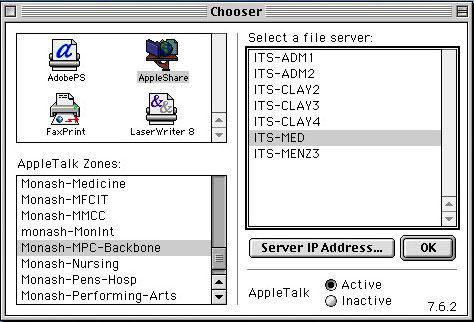
Mac OS X Leopard not only makes it easy to do new things, it also allows you to restrict functions based on permissions. In home settings, this feature is presented as Parental Controls. In business settings, the same technology is used to provide Managed Preferences, essentially setting up controls and guidelines for employees rather than children. This is another example of applying technologies in both the client and server side of the product, and how Apple is leveraging its strength in its core markets to expand into new areas. Here's how the features work in Leopard and Leopard Server, what you can do with them, and where the ideas behind managed preferences — and the underlying directory services supporting them — came from.
The Origins of Network Directory Services
In the early days of computing, client users worked on terminals attached to a central computing system. This made it easy to control what logged-in users could do, because updated changes to the central computer could immediately restrict access or simply boot connected users off the system.
The development of Unix for minicomputers, described in the previous article Road to Mac OS X Leopard Server: Collaborative Info Sharing Services, followed many of the conventions of existing systems to build a portable operating system that supported multiple users with centralized permissions.
The arrival of the personal computer in the 80s shifted computing resources from a centralized model to a distributed one, where simple terminals were replaced by more powerful PC and workstation systems running their own complete computing environment. That also distributed the work of managing access permissions — as well as device and application configuration settings — across large numbers of independent client systems, rather than managing all of that work in one place.
Distributed Config File Management: NIS
As Unix-based workstations replaced simple terminals, the effort of managing complex software installations mushroomed. User and application settings, account passwords, and the addresses of other hosts on the network were all configured in text files on the system. Making a system-wide change to any of those settings therefore required administrators to run around updating every system manually.
Simply adding a new client system to the network required not only configuration of that new system, but also updating the settings of every other system on the network to make them aware of the new machine's presence and its network address.
To automate the updating of information between client systems, Sun developed a network service called Yellow Pages to push text configuration file updates out to all of the workstations installed at a site. Sun later renamed the service NIS, for Network Information Service. Sun's NIS greatly simplified network administration and was rapidly adopted by other Unix vendors, but it offered limited security features because it was built primarily for use on internal networks that were assumed to be trustworthy and secure.
Distributed Name Management: DNS
The arrival of the Internet changed all that because computer systems were now exposed to untrusted hosts. The implications for security breaches became obvious in an wide open environment where individual systems could be passed maliciously designed settings files on the sly. The Internet also dramatically increased the work needed to manage network settings, because rather than just accounting for the needs of perhaps hundreds of systems within a company, the thousands of companies attaching to the Internet now needed a system for managing traffic between all of their many thousands of client computers.
Prior to the development of the Domain Name System by Paul Mockapetris in 1983, computers connecting to the Internet had to maintain local "Host files" that listed names and network addresses of all the systems they knew about. Just as with password, application, and device settings, these text files had to be manually updated whenever changes were made to the network. DNS solved the addressing problem for Internet users by setting up a hierarchy of servers that centrally manage computer naming records.
Client systems can then ask the DNS server for addressing information when they need it. The only problem with DNS is that the server had to be reachable; if it was not, a computer could not resolve addresses and had to fall back to consulting its local Host file.
Automatic Configuration and Addressing: AppleTalk
In 1984, Apple introduced an automated networking system for the original Macintosh called AppleTalk. When plugged into a network, each system would make up its own address, then confirm that it was unique. It would also automatically discover other systems on the network, and adapt to changes as they occurred. This meant that Mac administrators didn't need to manage services like NIS or DNS on a local network to allow users to find file and print servers.
PC users connecting to local area networks commonly used Banyan Vines, Novell NetWare, or Microsoft's LANManager, but unlike AppleTalk, all of these required a centralized server to manage names on the network, similar to DNS. Neither AppleTalk nor any of the DOS PC "Network Operating Systems" were designed to manage user, application, or configuration settings outside of basic file sharing between local systems, and all of them used proprietary network protocols that prevented them from interoperating with the open Internet Protocol rapidly deploying among Unix systems in the 80s.
All of these other networking protocols were rapidly replaced by IP starting around 1996. Apple moved its AppleShare server to use IP as its network protocol, but continued to also use AppleTalk for automatic discovery. In Mac OS X, AppleTalk was only used for browsing the network; actual server connections were performed over IP.
In 1997, Apple implemented the automatic networking configuration and name resolution features of AppleTalk to work over standard IP using Multicast DNS and DNS-Service Discovery, and began offering the technology as an open standard called Zeroconfig. In Mac OS X 10.2 Jaguar, these features were collectively marketed under the name Rendezvous, later changed to Bonjour. Apple has also ported Bonjour to Windows and offers an open specification and open source code for other Linux and other Unix-like operating systems to use, as is detailed in A Global Upgrade for Bonjour: AirPort, iPhone, Leopard, .Mac.
Distributed Directory Management: NetInfo
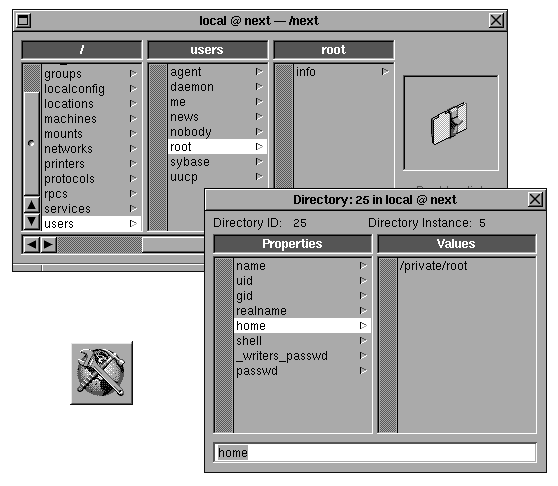
In the late 80s, NeXT took the concept of DNS and applied it to a new system called NetInfo (below, configured from NetInfo Manager) for distributing not only machine addressing, but other information as well, collectively referred to as directory services.
For example, directory services are used in a network environment to look up user accounts. While local user accounts can be created on a client system, managing account lists between systems is difficult because two systems may have accounts that overlap. For example, two independent systems may happen to have the same user name but refer to different people. A directory services system uses a centralized server that acts as a repository for network account information, similar to how a DNS server provides centralized name services.
Administrators then only need to manage account information in one place. When users with network accounts log into a client machine, they enter a user name and password that are checked against the directory server, rather than a local list of users. Directory services can also supply other network information, such as a listing of the printers or file servers available on the network, or a company directory of users, the groups they belong to, and their contact information.
NeXT's NetInfo replaced the text config files found in a typical Unix system with a local database that managed a directory of user and group accounts, machine configuration, and network services. Rather than consulting text files on the system to look up these settings, applications on NeXTSTEP consulted NetInfo. If the local database didn't have the requested information, it could forward the query to centralized NetInfo Directory Servers. NetInfo could also plug into Sun NIS servers to obtain information about the network.
On page 2 of 3: Problems for NetInfo; Standardized Directory Management: X.500; Standardized Directory Management: LDAP; LDAP in Mac OS X; and Origins of Managed Preferences.
NetInfo could potentially pose a problem, however. Because requests for DNS lookups were routed through NetInfo, if an external DNS server failed to reply the system could simply get stuck waiting for a response, as no other lookup information could take place. Also, because NetInfo also stored its user account information in a local database, any corruption of that database required the user to shut the system down and restore the database from a backup, or simply delete it and generate a new one, recreating all of the local accounts by hand. On Unix systems, a corrupted Users configuration text file might be easier to manually repair or rebuild, or replace on the fly with a known good version.
User documents were not affected by a NetInfo failure, nor were the user's application settings and preferences, because all of these were stored separately in the user's home directory. After rebuilding the NetInfo database, users simply logged in again and all of their settings and files appeared just as they had been.
NeXT made plans to sell NetInfo for other Unix-like systems, but little interest was expressed. Sun also found little enthusiasm for NIS+, its revised system that addressed security issues in the original NIS. Instead, the industry began looking for open, interoperable standards that weren't controlled by a single vendor.
Standardized Directory Management: X.500
International standards bodies, led by the ITU and later the ISO, began work in the 80s to create interoperability in networking. Existing network protocols in use among PC and workstation users were all proprietary to specific vendors, including Apple's AppleTalk, Novell's NetWare, Digital's DECnet, IBM's SNA, and Microsoft's LANmanager.
The ITU set up a series of networking standards called Open Systems Interconnection, which included the X.400 specification for email and X.500 for directory services. Major vendors announced support for the new standards, particularly in directory services; Apple incorporated support for a X.500 gateway in its PowerTalk email architecture, Novell released its Novell Directory Server based on X.500 in 1993, and Microsoft promised support for X.500 in its 1991 Cairo vision, which was eventually delivered as part of Exchange Server in 1996, as noted in Microsoft's Yellow Road to Cairo.
The development of OSI rapidly began to crumble with the emergence of the simpler and more effective standards forwarded by the Internet Society. Rather than representing the needs of companies making up the OSI, the open alternatives to network standards developed by the Internet community addressed the needs of actual users. By 1996, the failure of the OSI had ripped apart the strategies of big companies and forced them to rapidly retool to support Internet standards, as noted in Apple's Open Source Assault.
The OSI bureaucracy had resulted in specifications that were heavy, inefficient, and complex. In contrast, the process for submitting Internet protocols was more open and competitive, allowing the best proposals to advance through a peer-reviewed Request For Comment process managed by the Internet Engineering Task Force, which then adopted and implemented, proven RFC proposals as Internet standards. The OSI had largely drafted specifications that were only theoretical.
Standardized Directory Management: LDAP
In 1995, the University of Michigan began work to access X.500 directory data over the Internet. After determining that the X.500 Directory Access Protocol was unnecessarily complicated, the U of M developed a replacement called the Lightweight Directory Access Protocol. LDAP used a specifically tuned database to return directory information lookups over the Internet similar to NetInfo, but it was implemented as an interoperable open standard. LDAP also provided authentication and encryption services missing from Sun's NIS; that encouraged Unix directory services to rapidly migrate over to LDAP.
Novell and Microsoft also scrambled to offer LDAP support in their PC directory services products. Novell delivered an LDAP plugin for NDS in 1996, when Microsoft was rolling out its X.500 product. After announcing plans to support LDAP that year, Microsoft first delivered Active Directory 1.0 four years later in Windows 2000. Active Directory replaced both the X.500 directory services in Exchange Server as well as the proprietary NetBIOS and WINS systems used by Windows for its networking name services. Active Directory is an "embraced and extended" version of LDAP, but is similar enough to allow other vendors to develop support for it.
LDAP in Mac OS X
After Apple acquired NeXT in 1996, it adapted the NetInfo system to work with a new LDAP-based directory services architecture called Open Directory, starting in 2002 with the release of Mac OS X Jaguar 10.2. In Leopard, Open Directory has also replaced the last remnants of NetInfo on the local system.
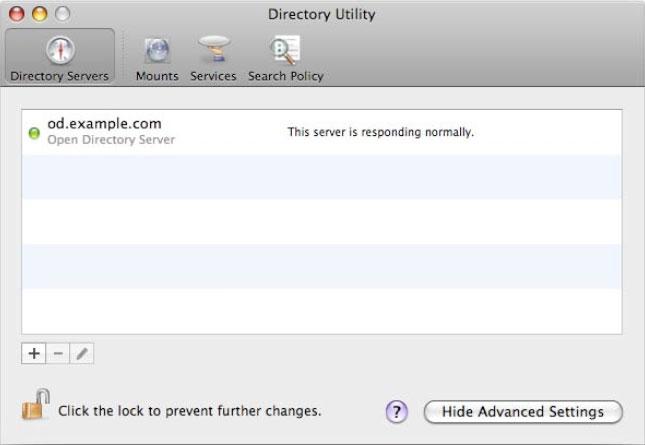
Apple's Open Directory can also plug into Microsoft's Active Directory and standard LDAP systems now in wide use in corporate environments, and can also fall back to reference the standard Unix files on the system, such as the local Host file; these are referred to as "BSD Flat Files." Once bound to a directory server (above), the system can then login with a given network account.
Open Directory supports MIT's Kerberos single sign on authentication. Users who log in as an Open Directory user have their credentials securely passed on to other services by Kerberos. That means a signed in user won't have to repeatedly provide their username and password to access file shares or other network resources that require authentication; their login does it for them.
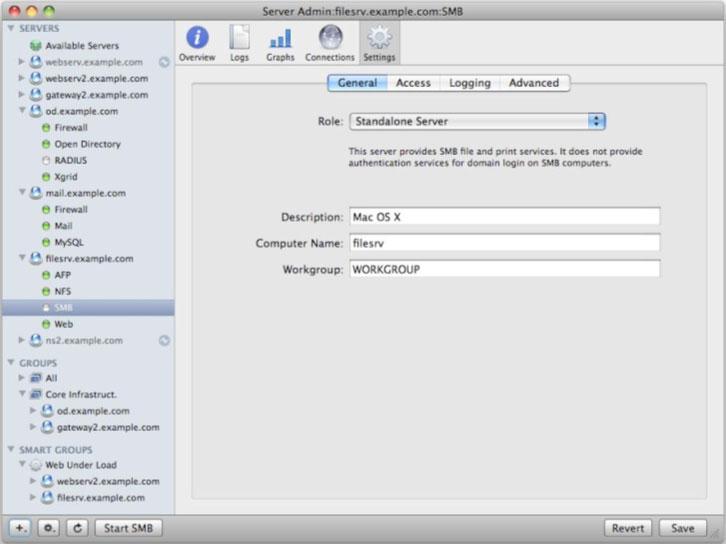
Open Directory can also act like a Domain Controller for Windows PCs, allowing them to login to roaming profiles and network home directories on the same server, using the same account as they would to login to a Mac. This is configured in Server Admin (below), and is based on features supplied by the Samba open source project.
Origins of Managed Preferences
While NetInfo addressed directory services, it did not manage user preference settings. These settings were all stored in regular preferences files separate from the NetInfo system. Like other other Unix systems, NeXT stored those config settings in text files.
NeXT introduced a structured file format for this called a property list. Because it was human readable text, it could be edited by hand, just like Unix config files. However, the graphical environment of NeXTSTEP typically updated these "plist" files itself, such as from the Preferences application (below). Because the files were organized using a specific structure, the system Defaults command could also be used to manage or update preference settings, even those not exposed anywhere in the graphical interface.
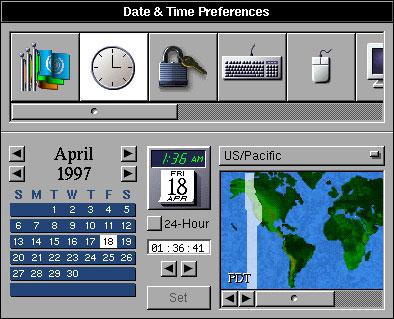
Apple's Macintosh stored its Preferences files in binary files, as they were not intended to be edited by hand or in a command line environment. If a preferences file became corrupt, the solution was to delete the file, and applications were designed to be resilient to this. If a launched application could not find its preferences file, it was supposed to create a new blank one. Deleting preferences was a handy troubleshooting step, because a corrupted file could commonly cause any number of problems. Once deleted, the application simply reverted to its default settings and the user was back in business.
On page 3 of 3: Microsoft's Windows Registry; Preferences in Mac OS X; Managed Preferences; New In Leopard: Parental Controls; and New In Leopard: Employee Policy and Organizational Directory.
DOS PCs had no standardized system for organizing configuration files, commonly called INI files. With the introduction of Windows 3.0, Microsoft introduced a simple registration database for cataloging these application details. In Windows 95, this expanded into the Registry, which served as a database for all user and system preferences, machine configuration, required installation information for all applications, and other details.
The Registry was intended to organize and manage all of the settings information in Windows. It was designed to separate user-related settings from machine-related configuration, limit access to settings with user permissions (starting in Windows NT), and allow network administrators to set Group Policy, which enforced certain settings based on the user's group membership. For example, administrators could use Group Policy to prevent certain users from changing desktop settings or installing applications apart from those provided, or to pre-configure their desktop environment to display file servers and set the printers they need to access, based on their group definitions set up on their NT Domain Controller.
The problem with the Registry is that it represents a single point of failure. If the database becomes corrupted, it wipes out the entire system. Unlike NetInfo, a Registry can't simply be rebuilt; a corrupt or damaged Registry typically requires the system to be reinstalled completely.
Its design also ties installed applications to a complex set of entries in the Registry, making it impossible to move applications between PCs; they have to be reinstalled. It also complicates removing an app, requiring an uninstallation process rather than just deleting the application. Many programs leave behind settings in the Registry anyway, and that can cause performance or reliability issues, because the entire Registry database is loaded into RAM while Windows is running.
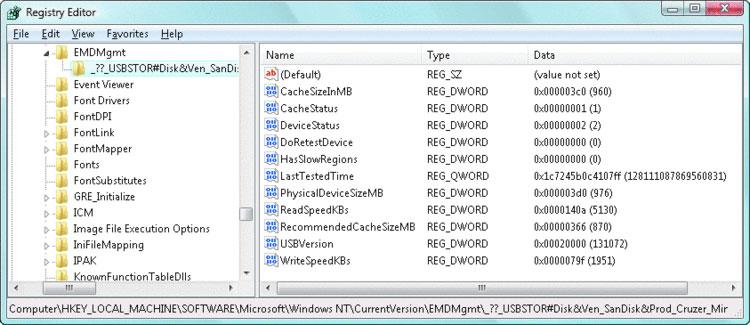
It is also difficult and dangerous to manually edit the Registry, as there is no provision for documentation within the system, unlike most Unix config files. Microsoft warns users that editing the Registry, even with its supplied tools (below, Microsoft's Registry Editor), is done at the user's own risk because it is very easy to create an unusable system.
Preferences in Mac OS X
Rather than delivering a similar database system for preferences in Mac OS X, Apple instead improved upon the system used by NeXT for storing preferences in human readable text documents by specifying XML as the new file format for plist documents. XML provides a standard, defined structure for a text file that can be checked for integrity and efficiently parsed by the system.
This allowed plist files to remain as machine edited, human readable files in the file system; a file corruption only effects one plist, not a broad swath of the entire machine's configuration. Apple also maintained the expectation of Mac users that preferences could be deleted and rebuilt without creating problems.
In Mac OS X 10.2 Jaguar, Apple began migrating XML plist files to use a compressed binary format to save space. Users can still edit the documents using a supplied Property List Editor, or unpack the files individually when editing them from the command line manually. The Defaults command also automates the process of updating plist preference files.
Managed Preferences
Apple previously offered a product called Macintosh Manager that shuffled around preferences files for classic Mac OS users, essentially copying set preference files over the top of those already installed when the user logged in. This reset their environment as desired by network administrators.
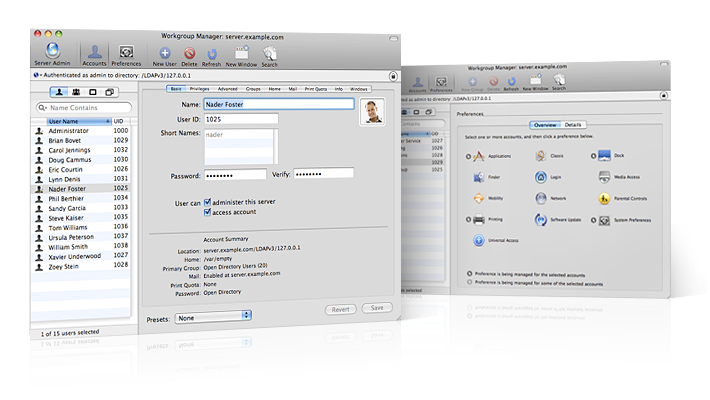
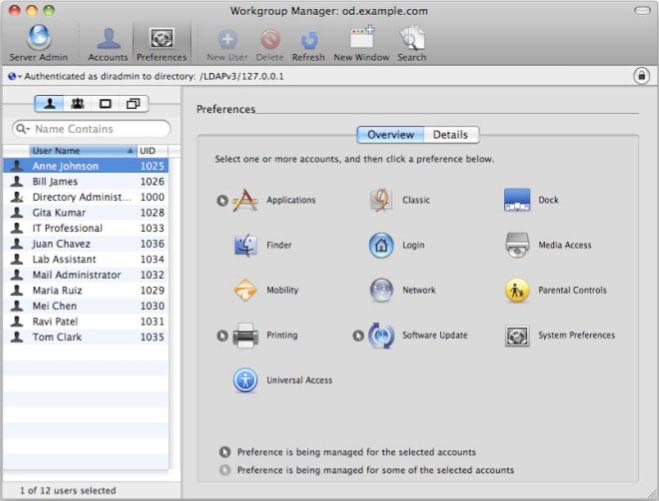
In Mac OS X Server, Apple introduced Managed Preferences (below, within Workgroup Manager), which allows administrators to control the environment of network users similar to Microsoft's Group Policy. For any user or group of users in Open Directory, an administrator can set managed preferences that specify what applications can be launched; what items are placed in the Dock at login; network, printer, and accessibility settings; limit hardware operations such as the use of external hard drives or CD burners; and configure automatic Software Updates.
New In Leopard: Parental Controls
Apple has applied the idea of managed preferences from the server world to provide parents with a way to control settings for their children in Mac OS X Leopard. Parental Controls makes it easy to set up a limited user account. Options include setting up the account to use a "Simple Finder," which reduces the complexity of the Mac desktop into a kiosk-like view and hides away system files from tampering.
Parents can also set system restrictions that allow their children to only launch specific applications, or limit them from changing printer settings or from burning CDs. Content limitations (below), allow users to block dictionary words or webpages that they find objectionable. The web can be left unrestricted, set to automatically limit sites based on content filtering (which can be adjusted by manually adding a list of allowed or denied web sites), or restricted only to a given set of websites. By default, the latter option offers to let kids explore a selection of sites including Discovery, PBS, National Geographic, Disney, the Smithsonian; other sites can be added to the list.
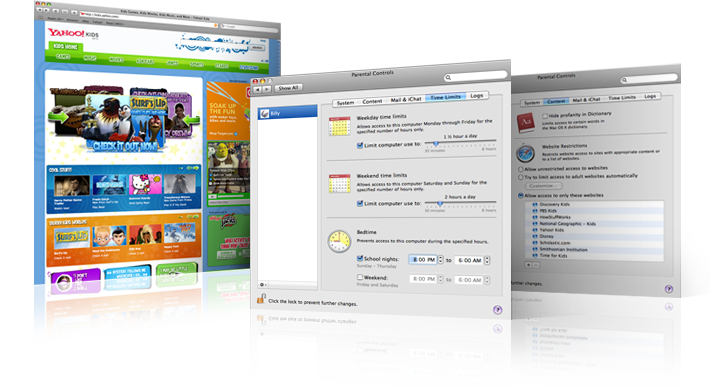
Mail and iChat conversations can be limited to specific addresses, and time limits (above) can be defined to only allow access for a set amount of time per day on weekdays and on weekends. Bedtime settings limit computer use to specific on and off times, set for school nights and weekend nights. Logs can even record when the user account tries to access blocked web sites or unknown IM users, so parents can review the sites they are trying to access and give them permission (or try to determine why their kids are looking up how to build homemade fireworks).
New In Leopard: Employee Policy and Organizational Directory
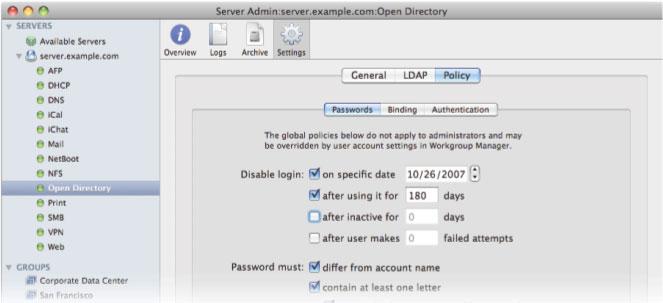
Similar restrictions can be set in place in business environments using Workgroup Manager's Managed Preferences. In addition, password policy can be set in Server Admin (below) to define expiration of user accounts or to set minimum standards for the passwords users choose.
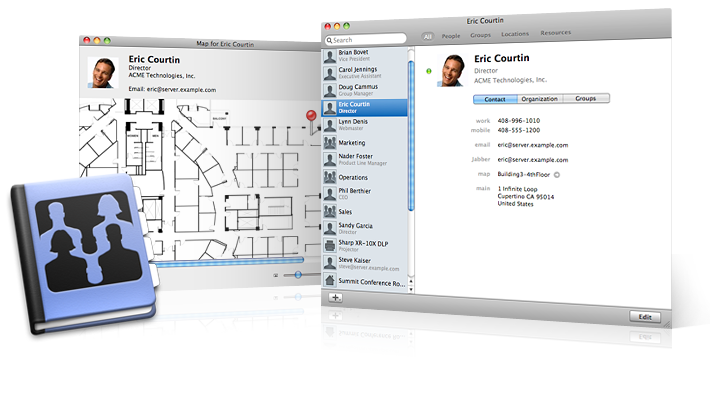
In addition, the accounts in Open Directory can also be fleshed out with full contact information, made available to organization users from the new Directory application (below). While Address Book can already plug into Directory Services to find contact information, Directory is designed specifically to browse users and groups within an organization. From Address Book, users can be allowed to share their local contacts with the organization, so that outside contacts can be listed in the company directory.
The new Directory app also provides a listing of company-defined locations or resources, such as meeting rooms or video projectors. These integrate with iCal to allow users to look up availability and schedule reservations, as described in Road to Mac OS X Leopard: iCal 3.0. Users and Locations can even be plotted on an organizational map.
Apple's Open Directory doesn't just apply to higher education and enterprise environments; Leopard Server is being targeted to small and medium sized businesses as an alternative to replacing an existing NT/2000 Domain with an expensive Active Directory infrastructure. Open Directory 4 also powers the user management behind major new Leopard features such as iCal Server, iChat Server, and Wiki Server, as noted in Road to Mac OS X Leopard Server: Collaborative Info Sharing Services. With Apple selling record numbers of new Macs, having a strong new server product will help continue its advance into new markets that the company hasn't really tried to compete in before.
Check out earlier installments from AppleInsider's ongoing Road to Leopard Series: What's new in Mac OS X Leopard Server, Dashboard, Spotlight and the Desktop, Safari 3.0, iCal 3.0, iChat 4.0, Mail 3.0, Time Machine; Spaces, Dock 1.6, Finder 10.5, Dictionary 2.0, and Preview 4.0.











 Mike Wuerthele
 Malcolm Owen
 Chip Loder

 William Gallagher
 Christine McKee
 Michael Stroup
 William Gallagher and Mike Wuerthele