Road to Mac OS X Leopard: Dashboard, Spotlight and the Desktop
 Prince McLean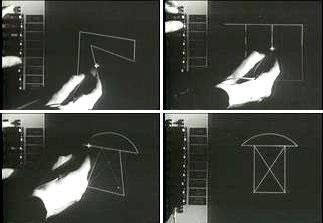
This report goes to great lengths to explore the origins, history, and maturity of the desktop. For those readers with limited time or who are only interested in what's due in Leopard, you can skip to page 4 of this report.
Graphical Desktop Origins
The first graphical desktop arrived in 1963, when Ivan Sutherland developed Sketchpad (below) for his Ph.D. thesis at MIT. The system demonstrated the potential for computer graphics for use in both artistic and technical purposes, and paved the way forward for the development of more human interfaces for computers.
Douglas Engelbart was inspired by Sketchpad in his work at the Stanford Research Institute's Augmentation Research Center. With funding from the ARPA, NASA, and the U.S. Air Force, Engelbart developed ideas related to computing collaboration in a project called the oNLine System.
In 1968, Engelbart demonstrated his work at the Fall Joint Computer Conference in San Francisco to an audience of around a thousand pioneering computer users, giving them an early look at such inventions as a rasterized, graphical computing interface controlled by a mouse.
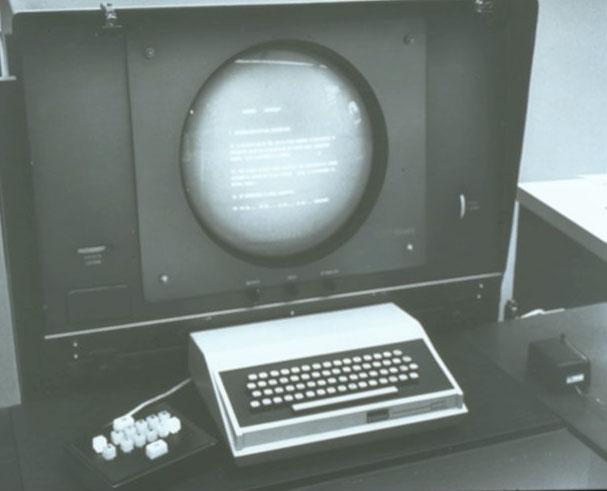
The demonstration projected video of high resolution CRT monitors generating text and graphics— including the "bug" dot of a mouse pointer— originating on computer systems forty miles away in Menlo Park. Engelbart could directly manipulate onscreen data using a combination of his mouse, keyboard, and a chording keyset (above), to click hyperlinks and enter gestures to move around text on the screen. Simultaneous users could even control the system at once.
Elgelbart's demonstration pushed the development of computer systems as tools to augment human intellect, rather than just machines used to perform calculations. He used "augmentation" to refer to the idea that computer assistance would accelerate the capacity for advancement. Elgelbart later illustrated the opposite, "de-augmentation," by taping a brick to a pencil. The result was slower writing with larger characters that consumed more paper.
Developments at Xerox PARC
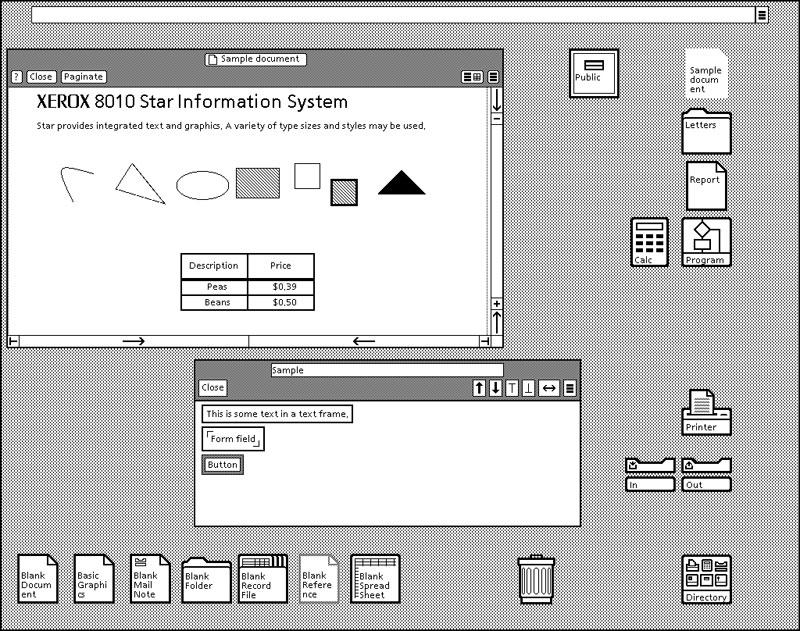
When funding for his lab at SRI began to dry up, many of his researchers went to Xerox's PARC, the Palo Alto Research Center, which continued to advance developments in graphical computing in the 70s with the Xerox Alto. The 1981 Star (below), pioneered the use of windowed work areas and icons representing manipulatable objects.
The Star wasn't a standalone system but rather intended to be part of a networked "office of the future." With a typical installation costing $50,000 - $100,000, Xerox had a hard time selling the Star systems. Attempts to sell a simplified system called Viewpoint in the mid 80s were similarly unsuccessful. Xerox later tried to sell its graphical operating environment for the PC under the name GlobalView.
Apple's Lisa and Macintosh.
Research related to a variety of computing technologies originating at Xerox spread to a number of other companies as developers left PARC. Xerox had also been liberal in demonstrating its technology to outside companies, although as it began to solidify plans to release the Star commercially, it stopped giving inside tours. In 1979, Xerox invested $1 million in Apple as part of a deal that demonstrated some of the work in progress on the Star to Apple's Steve Jobs and Bill Atkinson. When Apple went public a couple years later, Xerox' investment suddenly became worth over $17 million, far more than it made on the Star itself.
Without a clear understanding of how the Star actually worked, Atkinson began work on implementing features he though were part of the Xerox desktop, including the concept of overlapping windows. It turned out that the Star wasn't even designed do many of the things Atkinson assumed it could, as noted in the article SCO, Linux, and Microsoft in the History of OS: 1980s. Those assumptions pushed Apple developers to deliver aggressive products, and the company poured money into expensive research to pioneer the modern graphical desktop.
In addition to the Apple employees who were excited about what they saw at Xerox, many employees of Xerox got excited about Apple's interest in actually delivering the technology as a product. By the launch of the Lisa (below) in 1983, fifteen Xerox employees had started work at Apple.
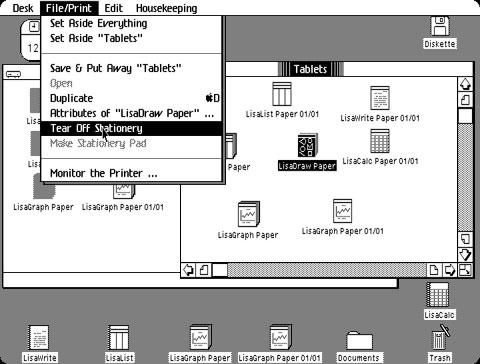
The parallel development of the Macintosh gave Apple a system to sell at a much lower cost than the Lisa, which was priced close to $10,000 because of its expensive allocation of RAM. However, the hardware budget for the $2500 Mac meant it lacked enough memory to run concurrent applications. The Lisa's multitasking system was also intended to differentiate it from the Mac and position it as a more powerful system targeted at the higher end of the market.
Accessorizing the Desktop
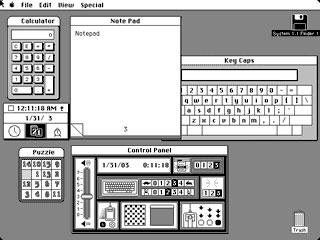
Despite being limited to having only one main application loaded at once, Bud Tribble suggested the idea of allowing the user to running mini-applications at the same time in a limited environment to perform simple tasks, such as an onscreen calculator, notepad, or a control panel for setting system preferences.
Apple called the idea "ornaments" and later "desk accessories," as Andy Hertzfeld described in his Folklore article Desk Ornaments. Desk accessories outside those included with the original Mac desktop (below) had to be installed by copying them into the system file using a special utility. Later versions made installing new desk accessories easier.
On page 2 of 4: From Multiprocessing Desktop to Simple Web Client; From Web Services to Multiprocessing Desktop; Apple's VTwin Desktop Search Technology; and Watson vs Sherlock.
After the Mac desktop gained the ability to run concurrent applications with System 6 and the MultiFinder in the late 80s, the role of desk accessories began to wane. More modern architectures, like the Unix-based NeXTSTEP, could run many applications at once using virtual memory allocation that intelligently managed RAM so that background applications could sit idle without using significant system resources.
With the arrival of the web, the concept of running small applications within the context of a web page again resurrected the idea of desk accessories. Rather than being ornamental or simple accessories to a system that could only do one thing at a time, web applets were conceived to perform tasks in a sandbox, in order to securely interact with a remote server from an environment designed to use minimal resources.
Sun's Java promised the potential for replacing complex and difficult to manage PCs with simple "thin clients" or "network computers" that could centralize computing infrastructure, particularly in corporate settings. That was an affront to Microsoft, which wanted to maintain a market for PCs running Windows. Microsoft partnered with Sun and then worked to tie Java development to Windows, removing any real value from it on the desktop.
From Web Services to Multiprocessing Desktop
As client-side Java died, Sun and other vendors focused on the server side and implemented standard methods of vending services to PC clients. Microsoft had similarly scuttled the market for alternative desktop operating systems on the PC, leaving NeXT to similarly migrate its development environment from the PC desktop into the realm of web services.
NeXT's WebObjects adapted the company's desktop application development tools to instead construct web server applications. Rather than interacting with application windows on a PC desktop, the WebObjects server created dynamic web pages for multiple remote users to interact with in their browser. When Apple acquired NeXT in 1997, it inherited WebObjects along with the NeXTSTEP operating system.
Rather than continue Apple's internal plans to deliver a thin client Mac as a network computer, the newly merged company delivered its NC "work in progress" as the iMac, an easy to use consumer system. That followed the trend toward powerful desktop-oriented machines advocated by Microsoft rather than the stripped down thin client machines that were the buzzword of the day. Like Microsoft, Apple had a desktop operating system to sell; the rest of the industry was competing against Microsoft's desktop. The combined forces of Apple and NeXT decided that if they couldn't beat Microsoft, it would join it.
Apple and NeXT merged their collective strengths to deliver a new computing desktop; NeXT supplied the Unix foundations of its operating system and its rapid applications development tools, while Apple supplied mature application level technologies such as QuickTime and ColorSync. Some technologies would end up as a mix of both legacies; for example, the desktop of Mac OS X based its file browser largely upon the existing Mac Finder, while incorporating the concept of the Dock from NeXTSTEP.
Apple's VTwin Desktop Search Technology
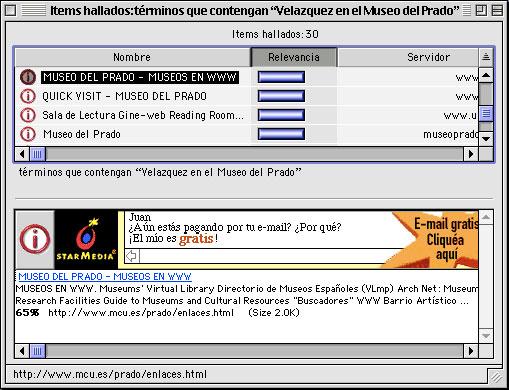
Among the other technologies Apple had in its portfolio to contribute were advanced data indexing and search tools called the Apple Information Access Toolkit or V-Twin. Third party developers had delivered Mac applications using V-Twin search technology as early as 1997. The next year, Apple shipped Mac OS 8.5 with Sherlock, a new application that used V-Twin indexing to deliver full context file search on the Mac desktop.
Sherlock also merged local file search and Internet search results in the same interface. Using plugins, users could query multiple search engines on the web at once. Apple allowed search engines to display their banner ads in the Sherlock application window, which looked particularly jarring in a desktop context (below).
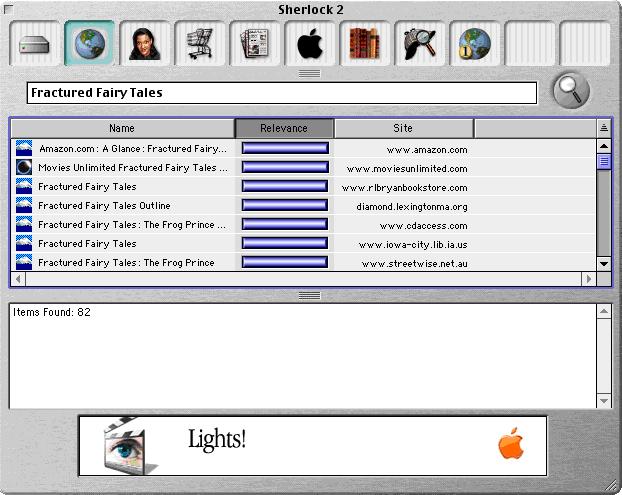
Sherlock 2 (below) followed in Mac OS 9, which introduced a channel bar for searching various websites. It also got the heavy brushed metal appearance that Apple liked at the time. Between searches, Apple even popped up its own ads.
Performing general web searches against multiple sites began to lose its value as Google rapidly replaced a variety of competing search engines by returning more effective results in a simple, uncluttered web page interface.
The evolving idea of accessing the web to quickly capture and distill information from a variety of sources— directly from the desktop without having to fire up a web browser— still made a lot of sense. Apple eventually learned it wasn't going to be funded by garish contextual advertising though.
Watson vs Sherlock
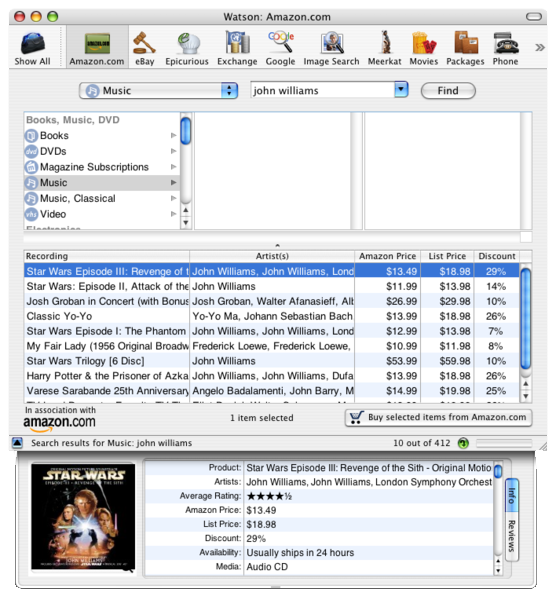
In 2001, Karelia released Watson (below) for early users of Mac OS X. Watson served as a companion tool to Sherlock; it used a similar plugin architecture to rapidly find information on the web without launching a regular browser. Watson's plugins were small Cocoa applets designed to query sites, return results, and display them in a specialized interface showing off the elegant new appearance of Mac OS X's Aqua desktop.
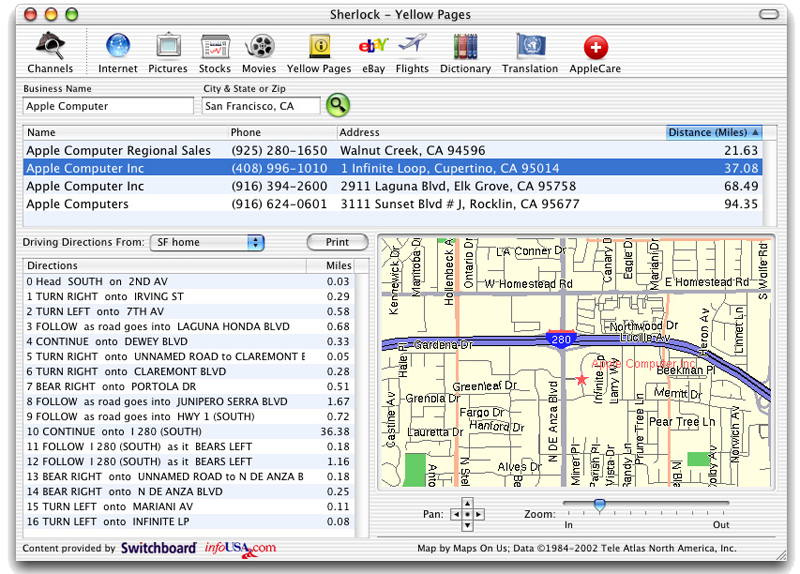
Karelia was outraged when Apple introduced Sherlock 3 (below) the following year as part of Mac OS X 10.2 Jaguar in 2002. The new Sherlock matched Watson in functionality, although it was implemented differently. The new Sherlock plugins were essentially small web pages rendered within the app's window in a structured format, rather than being a freeform page inside a browser, or a full development platform like Watson.
Like Watson, Sherlock's design allowed for custom controls and rapid updates without waiting for a regular web page to redraw, but its implementation gave Sherlock an edge over Watson in that its plugins were simpler to develop. Of course, that didn't help Karelia, which immediately lost its market for the shareware-priced Watson. Watson was later acquired by Sun.
On page 3 of 4:Desktop Exposé; Konfabulator vs Dashboard; and Searching for a Replacement.
In October 2003, Apple leveraged the graphics power behind its Quartz drawing engine to add Exposé features in the release of Mac OS X 10.3 Panther. Exposé animated all the open windows with a single click, either shoving them all out of the way to view the desktop, or shrinking them down to fit into the desktop view without overlapping. Another key press and the windows all resumed their former size and position. That made Exposé a complex combination of window management features that was easy to grasp and use.
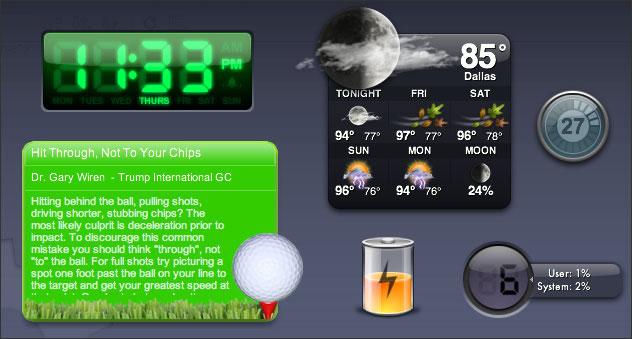
Designer Arlo Rose, who along with lead developer Gregory D. Landweber, created a Mac OS theme skinning utility called Kaleidoscope, had earlier come up with the idea of skinning any given bit of information in the same manner as was popular to do with MP3 players of the time. Rose started work with Perry Clarke to build a system called Konfabulator for developing artistically skinned widgets to display information such as battery level, a calendar, or system resources. Using the network and a scripting later, Konfabulator widgets could also look up weather reports or webcams, and even serve as mini applications such as a calculator.
Konfabulator widgets (below) typically acted like desk accessories, mingling with standard application windows. However, after the release of Panther, Konfabulator's developers borrowed a page from Exposé to create a new feature mode that would bring all the open widgets to the foreground and dim everything else into the background at the press of a defined hotkey. Konfabulator called it Konsposé.
Konfabulator vs Dashboard
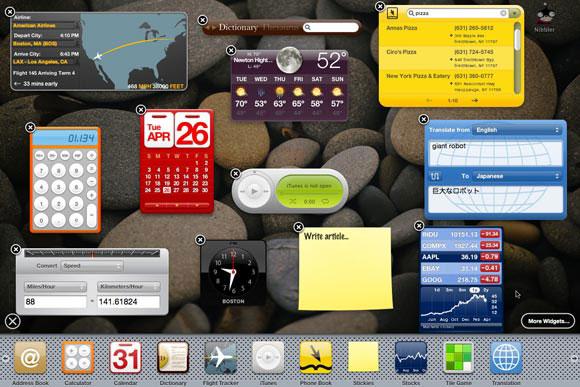
In the release of Mac OS X Tiger 10.4, Apple debuted a new feature called Dashboard (below) that did something very similar. Like the earlier scuffle between Watson and Sherlock, Dashboard overlapped in functionality with Konfabulator in a way that essentially rendered it obsolete, despite being implemented differently.
Konfabulator created its own runtime environment that launched widgets as JavaScript applications using an XML interface. That meant it was running in the background all the time to keep widgets updated. Konsposé was an optional feature for highlighting running widgets.
In contrast, Dashboard widgets were launched by the Dock. They were also normally sequestered to their own Dashboard environment, which worked very similar to Konsposé. That design limited the system resources Dashboard widgets would consume when they weren't in view.
Additionally, Apple's widgets were snippets of HTML styled with CSS and scripted with JavaScript. They are essentially just tiny web pages, making them easy to build and easy to test within a browser. The rendering of Dashboard widgets is performed by WebKit, the engine behind Safari. Because widgets are managed by the Dock, rendered by WebKit, and usually exiled away in the hidden Dashboard, there is little overhead imposed.
While Dashboard had the unfortunate effect of killing Konfabulator on the Mac, it was really the natural outgrowth of Apple's development of Exposé, the Dock, and WebKit. Konfabulator, while innovative and attractive, was a flawed design that hogged a lot of memory. Fortunately, Konfabulator found a buyer in Yahoo and went to work developing its widget engine for Windows users.
Searching for a Replacement
Dashboard didn't just kill Konfabulator. It also killed the web services end of Apple's own Sherlock. Rather than pulling up the Sherlock application to load a set of prebuilt web services channels, Dashboard allowed users a highly graphical way to lay out desk accessory style applets that did the same types of things. It could also call them up and dismiss them with an Exposé-style keystroke, rather than only run them within a Sherlock window.
Had Apple not "interfered" in the markets for Watson and Konfabulator, Mac users would be today stuck with two poorly implemented, competing systems with a lot of overlap. Back in the mid 80s, Apple had attempted to maintain its Mac platform without encroaching on third parties, and instead pushed its own apps off into the Claris subsidiary. After ten years of letting third parties fight over shareware implementations of features Apple should have addressed itself, the company nearly died. It now thinks about itself first.
Like Exposé, Dashboard also highlighted the animated, fluid potential in Mac OS X's Quartz graphics engine. Widgets dragged into the Dashboard sea ripple, and individual widgets are configured by touching an icon that flips them around to reveal configurable settings.
The other half of Sherlock, related to local file search and content indexing, remained as Sherlock's iconic magnifying glass under the name Spotlight. Apple's existing V-Twin search engine had shown up in Panther as the Search Kit, but it was further overhauled in Tiger to enhance its performance and add Google-like search syntax and phrase based searching. Back in March of 2002, Apple had hired Dominic Giampaolo, an architect of the advanced BeOS file system. Giampaolo worked to build similar metadata indexing features into the new Spotlight.
On page 4 of 4: New Desktop Features in Leopard: Spotlight; New Desktop Features in Leopard: Dashboard; and Other New Desktop Features in Leopard.
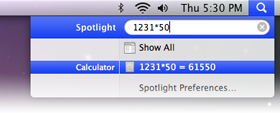
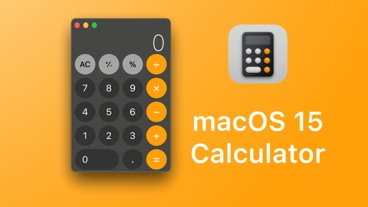
The pace of new development in Spotlight, Dashboard, and the Mac Desktop has continued in Leopard. Spotlight can now index and search network file server shares, and supports a richer query vocabulary. The menu bar Spotlight field will also calculate math equations as fast as you can type them, making it a quick alternative to launching the calculator (below).
If you type a few letters that match an application, Spotlight presents that app as the default highlighted result, so it can be launched with a tap of the spacebar. This makes Spotlight an alternative to standalone launchers. If you type a word that doesn't match an application, Spotlight assumes you want a definition and presents an instant result inline. Tap spacebar to open Dictionary and look up the topic in Wikipedia. The new Spotlight also indexes the text of web pages in your browser history, so it can find subjects you've recently researched. Spotlight finds everything, fast.
If you're looking for files instead of answers, Leopard's Spotlight menu bar search can also serve as a shortcut to the search field in Finder windows. File search results default to bring up phrases found in file content, but if you're searching for a file by name, Spotlight presents an option to rapidly narrow down results that way, too. Spotlight also searches your backups through integration with Time Machine. Perform a search, activate Time Machine, and select any point in time in the past to perform your search. You can also simply search your Time Machine drive directly.
The new reorganization of the Spotlight interface makes it far more useful because it's easier to find what you're looking for without having to think about how to do a search "properly." It simply searches correctly by default.
New Desktop Features in Leopard: Dashboard
The other side of Sherlock's ghost also gets some significant updates. Users who like widgets but don't know how to program now have two tools for building their own. The first is integrated into Safari; simply select a region of a web page with the Web Clip tool, and you get a functional Dashboard widget that updates as that page does. Apple also includes DashCode with the Xcode developer tools for building more involved widgets.
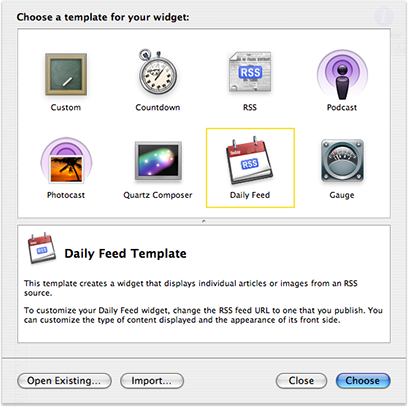
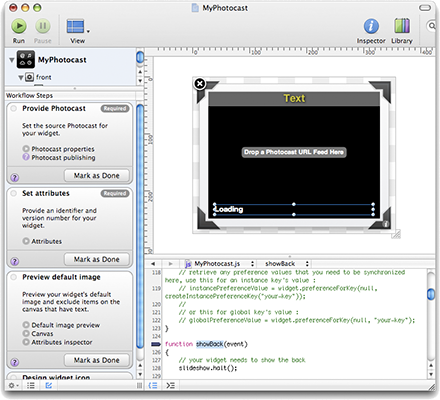
DashCode provides a series of widget templates (above) that make it easy to build a simple RSS feed widget, a countdown timer, or begin from another basic starting point. Fill in the blanks, select preferences, drag in graphics, and DashCode builds you a functional widget. You can also venture into adding your own code and make full use of its integrated development environment with a source code editor for HTML, CSS, and JavaScript (below), as well as a JavaScript debugger. A decade ago, NeXT was licensing the forerunner of these tools for $2790 per seat; they're now free with Leopard.
Apple has also thrown in some new widgets of its own, including a movie and theaters widget for looking up show times, viewing trailers, and buying tickets. Widgets can also now be synced between systems using .Mac. It can't be too far off before new widgets start sprouting on the iPhone as well. With the recent announcement of an official iPhone SDK, efforts invested into DashCode should port directly into new iPhone applications.
Other New Desktop Features in Leopard
Despite the placeholder icon that sits in the Dock, Dashboard is actually run by the Dock itself, which was profiled separately. The Dock, along with the Finder, combine with Spotlight and Dashboard to present a lot of new desktop functionality that is greater than the sum of its parts. To make room for all of that extra stuff, you can activate Spaces as the latest expansion of Exposé, and drag your windows off into their own virtual desktop regions.
A variety of new things in Leopard clearly go beyond just checking off marks on a list of required features. New graphical flourish, from the reflective Dock to the subtly translucent menu bar, frame the desktop background picture and add dimension to the desktop. The menu bar's drop down menus, along with other popup menus such as the Dock's, now sport aesthetically appealing rounded corners, and use translucency and blurring to create a look similar to vellum paper. The help menu is animated and alive, with a floating arrow that drifts around the features as it points them out.
Leopard's variety of enhancements, from the major new apps and functions to the ornamental eye candy and the thoughtful refinements, all add up to an experience that calls back to the first pioneering efforts to deliver a graphical desktop, and Engelbart's vision for augmenting human intellect using advanced computing interfaces. Leopard looks poised to push a lot of users to rip the brick off their pencil and investigate the Mac platform.
Check out earlier installments from AppleInsider's ongoing Road to Leopard Series: Safari 3.0, iCal 3.0, iChat 4.0, Mail 3.0, Time Machine; Spaces, Dock 1.6, Finder 10.5, Dictionary 2.0, and Preview 4.0.





 Charles Martin
 Malcolm Owen
 William Gallagher and Mike Wuerthele
 Christine McKee
 William Gallagher
 Marko Zivkovic