Time Machine is one of the most visually prominent new features demonstrated in Mac OS X Leopard, even if the core idea of backups is as old — or perhaps older — than the concept of having any data worthy of being restored. Here's a look at what's new and different about Apple's approach with Time Machine, why backups are a problem to be solved, and how well Leopard's new Time Machine actually works in practice.
Picking a specific origin of the legacy of Time Machine is more difficult than other new features in Leopard, because it is a combination of old and new technologies. The new Time Machine is a stack of three functional layers:
- The new technology behind visualizing backed up data and restoring files.
- Its standard and ordinary data backup management functions.
- The novel core technologies behind how it squirrels away its archives.
The technologies on the top and bottom of the stack are what is really new and interesting about Time Machine; there's certainly nothing new about performing backups. The problem for most users is that, while they know they should be backing things up, they don't do a very good job of it for a number of reasons. It just so happens that what Apple is adding in Time Machine addresses those reasons, shielding users from the complexity and the tedious backup maintenance that prevents most people from backing up their information properly.
Backup Against the Wall
Data backups, like security measures, are a trade off between safety and convenience. Backing up everything frequently and saving backups over long periods is safe, but it's not very convenient. Doing little or nothing — say, duplicating the project you're working on so you have another version in case it gets corrupted — is convenient but not very safe. The problem for most users is that an all-out data crisis doesn't happen frequently enough, so there isn't much motivation to set up a backup system that is robust enough to work correctly.
The flip side is that some users get a backup system set in place that appears to be working, and are lulled into a false sense of security, unaware that it isn't. The faults might lie with unreliable back backup media, procedures not being carried out correctly, or the system not capturing new data it was not originally designed to protect.
The third problem related to backups is that even when diligent IT professionals take it upon themselves to build systems to backup data securely — all the time, with multiple levels of protection — the result can be extremely expensive, disruptive, and laborious to operate. That's the classic problem of the engineering triangle: balancing the three constrained demands of time, quality, and expense to build something good enough to suit its intended purpose.
Targeting Time, Quality, and Expense
In order to perform effective backups and ensure they will get done, the backup system has to be fast enough, do a good enough job, and not cost too much. It has only been fairly recently that hard drives have become the best way to back up most data.
Tape Backup: In the 80s and 90s, computer users commonly relied on tape drives to supply a fast enough, somewhat reliable, and cheap medium to spool off all their data for backup. Tapes were far more economical than storing data on hard drives and could chug along in the background or at night using automated software. However, it could take a very long time to pull data back off the tape, and physical tape was notorious for wearing out, breaking, or getting too dirty to work.
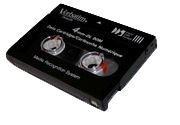
While tapes were commonly cheap enough, tape backup units are typically quite expensive, particularly among higher end formats that promised better reliability such as the "built like a tank" DLT format. Consumers and smaller businesses more commonly used the less reliable DDS tapes (above).
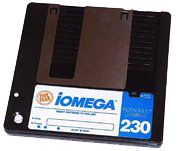
Diskette Backup: The cheaper alternative to tape was using floppy disks, but common floppies didn't hold much data. In 1983, Iomega introduced the Bernoulli Box, which was popular among Mac users for backing up a whopping 35 MB per disk over a fast SCSI cable. The storage capacity of Bernoulli disks — which were basically heavy duty floppy disks — steadily increased as technology allowed more data to be packed into the disk, peaking out around 230 MB (above). Iomega's arch rival was SyQuest, which sold hard drive platters packed into a removable cartridge. In addition to being used for backups, Bernoulli and SyQuest cartridges were also used for general storage.
Magneto Optical Drives: In the late 80s, magnetic floppies were quickly being outgrown by users, while the technology of mechanical hard drives seemed to be hitting a price-performance barrier. Steve Job's NeXT bet on Canon's new 256 MB Magneto-Optical drive technology for use its new line of computers, hoping that MO drives would be to the NeXT Cube what Sony's 3.5" floppy had been for the Macintosh back at Apple. It turned out that the first-generation of MO drives were unreliable, never dropped dramatically in price, and couldn't match hard drives in performance. The short lived Floptical format and Sony's MiniDisc also used MO technology, but neither took the world by storm and found only limited adoption.
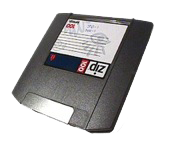
New Disks in the 90s: In 1994, Iomega replaced its Bernoulli Box with the cheap, 100 MB Zip drive (above). It became very popular, eventually being built into many PCs and Macs as a functional replacement for the floppy. SyQuest tried to release its own competitor with the "EZ 135," which offered more space, was significantly faster, and used a more reliable hard drive platter rather than the Zip's heavy duty floppy design, but Zip won out, and Iomega eventually bought up the remains of SyQuest a few years later.
Laser Optical Drives: The next backup medium that caught on among consumers was CD-R, which offered far more storage than the Zip on an extremely cheap medium that kept getting cheaper. CD and DVD media remains cost effective for storing backups of some content today, although modern 500 GB hard drives can quickly fill up 8 GB DVDs. Dual Layer DVD blanks are still fairly expensive, and successive versions of optical disc, including 50 GB recordable Blu-Ray BD-R, are even pricier.
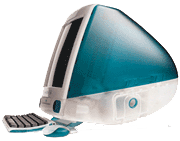
The Internet: By 1998, Job's Apple released the iMac without any floppy disk, a move that stunned the PC industry. How would users write their files? Even ten years later, most desktop PCs still throw in an ancient 3.5" floppy drive. In the decade since, the rewritable CD and DVD have become the new floppy, but the importance of dumping data on a removable disk rapidly waned in a world where nearly everyone was connected by ubiquitous networking. The "I" in iMac was for Internet, and users were supposed to use it to distribute their files.
State of the Backup
In 2007, the idea of backing up data to a tape drive is foreign to anyone outside of a server room, and even enterprise users are increasingly moving to hard drives for many backup purposes. Home users often make casual backups on DVD, or to a network file service, or dump data onto a removable hard drive. The general reliability of hard drives means that we don't face data loss as often as we used to in the days of having files strewn about on magnetically sensitive floppy drives.
Apple's current Backup application (below) is designed primarily to work with .Mac, and works a lot like most other existing backup programs. Users manually select files to be backed up and schedule times for when backups should occur. Backup was intended to copy data to a user's online .Mac account, but can also backup to an iPod or to CD or DVDs.
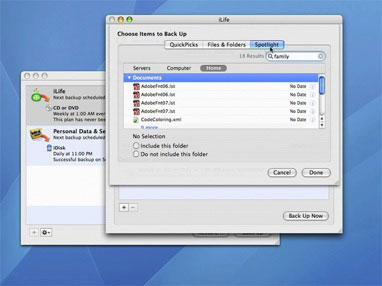
The problem is that the cheap storage space afforded by today's hard drives means we now have outrageously huge mountains of important data sitting on our disks, so that any failure or error can wipe out far more content than a bad floppy could have back in the 80s. The progress of technology in hard drives' size and economy is not only the problem, but also the solution: duplicate your important data on another hard drive.
On page 2: The Technology Behind Time Machine; The What; The Where; The When; and The How.
How to actually do this is addressed by the lowest layer of technology in Time Machine. There is still a conundrum to address: we don't need copies of things that don't change; we only need to frequently save things that do. However, saving differential backups (that only capture new changes) means that we have to stitch together the results of lots of backups over a long period of time in order to restore an entire disk.
Managing changes over a long period of time often means we will end up with a mess of files spanning lots of disks, and there's no easy way to clean that mess up without starting over from scratch periodically and doing another new massive backup. Who wants to manage boring infrastructure details like that?
At the same time, there is also the problem of knowing what to back up. Typical backup systems laboriously scan the disk for changes, requiring the system to either wake up at night to do backup housecleaning, or interrupt the user while they work. As more users move to laptops, getting backups scheduled and performed frequently enough to be useful becomes an additional challenge.
The What
Time Machine does a number of things to target these problems. First, it plugs directly into Mac OS X's FSEvents, the process that tracks file system events as they happen. This allows Time Machine to keep track of what needs to be backed up without having to do that work itself; the system already maintains those records, which are also shared among other applications (including Spotlight, which uses it to build instantaneous search results). When Time Machine begins a backup, it doesn't have to scrub the disk; it simply asks FSEvents for a list of what's changed and quickly hits just those files.
Time Machine does allow you to exclude specific items from being backed up, but it's not usually necessary to micromanage this list. That's because the system is already intelligently designed to avoid backing up temp files and other things that don't need to be backed up. Apple also gives third party developers outlines on how to avoid dumping unnecessary things into Time Machine's backups.
The Where
Time Machines makes setting up a backup target easy; users simply select a disk. The first time an external drive is plugged in, Time Machine offers to use it for backups. There's no complex configuration or management of backup media pools or any real device setup. It is possible to set up multiple disks for use with Time Machine, making it easy to create an offsite archive. It only backs up to one drive at a time however.
Apple recommends against using Time Machine on a disk used for other purposes. You can do this, but files copied to the time Machine disk are not backed up (because the system automatically excludes the Time Machine backup drive from backing itself up). Putting other files on the Time Machine drive also obviously eats into the space available for backups.
If you fill up your Time Machine drive, you can plug in a new drive and start over, leaving your old drive as an archive. You can also exclude folders of large content to avoid backing those items up, if you have lots of client data, photos, movies, or other items that are archived elsewhere and don't need to be included into Time Machine.
The When
After finding a source, Time Machine sets up a full backup. It then schedules a backup every hour. There's really no scheduling options to configure. Every day, it drops the previous day's hourly backups. Every week it drops the previous week's daily backups. That maintains a complete, extensive set of backups that balance out the demands for backup frequency versus disk space.
Other backup systems commonly force the user to manage these details; Time Machine supplies the professional expertise so you don't have to think about it, and can't inadvertently set up schedules that make no sense. At the same time, it's easy to manually turn Time Machine off so that its regular backups don't interfere with game playing or other activities that demand an undistracted processor. Once you turn Time Machine back on, it simply jumps back to its schedule and resumes backing things up.
The Time Machine settings in System Preferences show the time scheduled for the next backup. When that time arrives, it displays a progress thermometer during the backup, which typically only takes a few seconds, unless you've generated a huge amount of new content in the last hour. Again, that's because Time Machine doesn't scan through your entire drive looking for changes, but rather only consults FSEvents for a listing of what has changed recently.
This backup frequency makes Time Machine immediately useful the first day you enable it. Delete a file or folder unintentionally, and you can nearly always immediately undo it, although it's still possible to create and destroy something within an hour and be left up the creek without a paddle. Time Machine's frequent backups are far more useful and practical than the "undelete" systems once popular among system utilities like Norton Utilities, which replaced the Trash with a system that tried to retain everything that was thrown away for later possible retrieval. Time Machine focuses on protecting the stuff you need and use, not on questioning the wisdom of everything you delete.
The How
Backup systems typically make a full clone backup, and then copy only the differential or incremental changes. Differential backups capture everything that has changed since the last full backup, while incremental backups only copy what's changed since the last partial backup. Full backups obviously consume too much disk space to do every hour, but differential or incremental backups don't capture the whole picture in a single shot. Time Machine appears to do both: capture full backups every hour without taking up all the disk space this would require. How does it do this?
An intelligent backup system using differential backups would also have to parse all the various backups done in order to present a composite view of all the partial backups to present the user with the files that can be restored at any given time. The user might want the version of a file from two hours ago, or from two weeks ago. Accommodating this kind of flexibility typically requires managing a complex database of backup file transactions. If that metadata database is lost, restoring files from the backups becomes far more complex, and requires an arduous and lengthly rebuilding of the database.
To solve both problems, Time Machine does something new and different that actually required Apple to make changes to the underlying Mac file system, HFS+. The new change is referred to multi-links, which are similar to "hard links" common to Unix users and potentially available when using NTFS on Windows. Hard links differ from "soft links" (also known as symbolic links), which simply act as placeholders pointing to another file. The Mac OS has long used aliases as a way to create a soft link stand-in for another file or directory. Windows calls soft links "shortcuts."
On page 3: Hard and Soft Links; Time Machine's Multi-Links; and Snapshots and Windows' Shadow Copy.
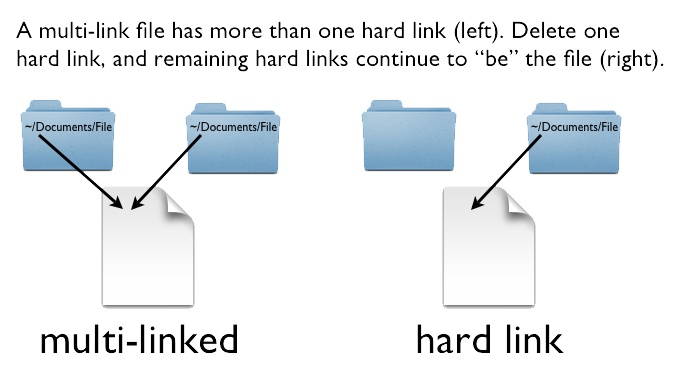
Soft links are easy to understand and simple for users to employ; make an alias of a file, and it does everything that its target would do, while saved in another location. Multi-link files are a more complex idea, because they don't really fit the overall desktop metaphor. A Mac multi-link is a second "hard link" record that points to data or a directory. It doesn't just point to another file like an alias does; it is the same instance of that file. Create a hard link to a file, make changes to it, and the "previous file" is changed as well, because they are the same file. Delete it, and the file doesn't go away; it remains until the last hard link is removed. This is confusing in a quantum physics sort of way because it doesn't line up with the convenient physical metaphors we commonly use to visualize files and folders.
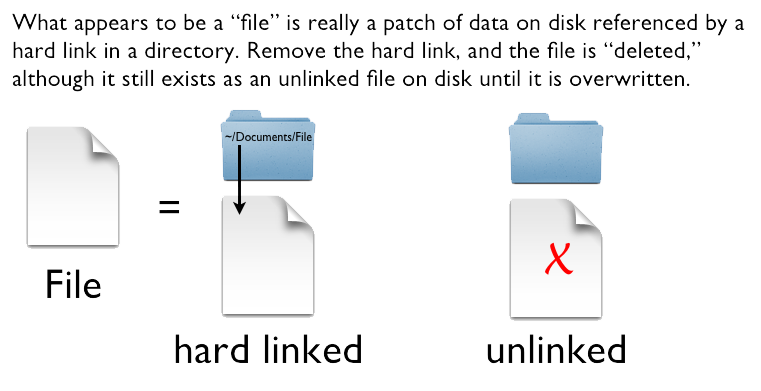
Regular files on any file system act as a single hard link. When you delete a file, you aren't really scrubbing the file off the disk, but rather only removing the hard link to it from its enclosing folder, banishing it to the unruly world of the unlinked wilderness of the drive. "Undelete" utilities attempt to search for unlinked files and restore them, but they can only work if the file system hasn't overwritten those unlinked files, which it will happily do without any concern, because the disk space consumed by unlinked files is fair game for recycling.
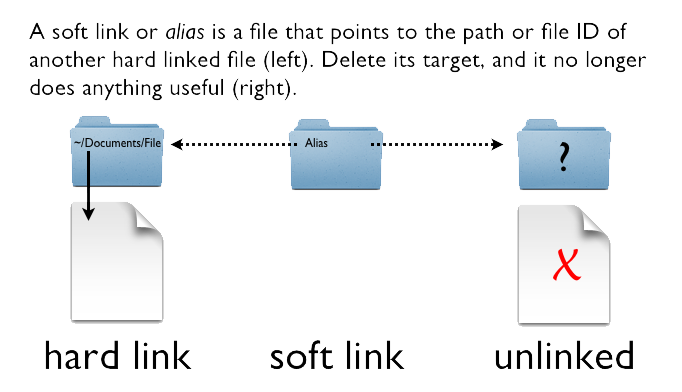
File systems that support multiple hard links to the same file keep a count of each hard link created. Each hard link to a data file acts like a parallel, shared instance of that file; if you delete a file with multiple hard links, it is not banished into the world of deletion. Instead, it remains in place until the very last hard link pointing to it is removed. In other words, if you create a hard link to a file and then delete the original, the new hard link and its file data remains unscathed. In contrast, if you make a soft link or alias of file and then delete the original, the alias only points to the former location of the deleted file, which no longer exists. The lone remaining alias can't function, and the data of the file it pointed to is no longer available.
Time Machine's Multi-Links
Hard links therefore act somewhat like a ghost, and somewhat like a clone. Like an alias, new hard links can reference an existing file without taking up additional space on disk. However, deleting one is like cutting off the head of a mythical hydra; it doesn't rid the world of its body and new hard links could pop up in its place, making it difficult to delete the beast entirely unless you can hunt down every hard link head and chop them all off. This complex idea doesn't fit well into the user space, but is very useful for certain purposes. One of them relates to Time Machine.
Apple actually designed the multi-links in HFS+ primarily to support Time Machine. Unlike other Unix or Linux distros, Mac OS X's multi-links support hard linking to both files and directories. Creating multiple hard links to directories is outlined in the official POSIX specification for Unix, but is rarely supported because the use of multiple hard links for directories is dangerously powerful. If a child directory linked to its own parent, it would create a directory cycle that could cause unbridled looping and file system corruption. File system utilities are also typically unprepared to handle multi-linked files. In Time Machine, multi-links are used in a specific, controlled context to avoid these types of problems.
Time Machine backs up its first full backup as regular files. You can mount the drive it uses and peruse it manually. It's simply all of your files stuffed in a time-stamped folder, stuffed in a folder named after your computer. Every hour, Time Machine makes what appears to be another full backup, but that new bunch of files doesn't take up twice the space. Instead, Time Machine dips into the abstract world of multi-links to create a parallel universe where most everything is a ghostly clone. Only the changed files are new; everything else is a secondary hard link to the data already backed up. The genius of multi-links means that the original files can be blown away, and yet still exist because new hard links are in place for those files.
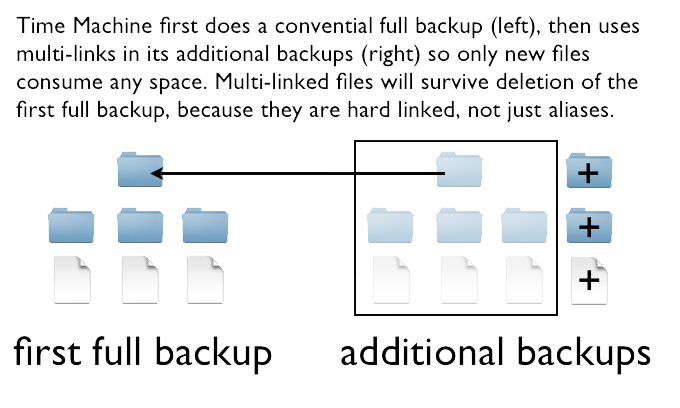
By using hard links, Time Machine can keep frequent backups without eating up much disk space at all. The other benefit is that the user can browse the files directly and see a full file system for each date and time encapsulated in a backup. Each folder appears to be a full backup of regular files, and in a sense it is. All of those complete backup files simply share the same space on disk, as if living in parallel universes while sharing the same body. Hard links are needlessly confusing and potentially dangerous to non-technical users, so Apple doesn't expose the inner workings of Time Machine and doesn't offer any way to create hard links in the Finder.
Snapshots and Windows' Shadow Copy
Time Machine has been frequently compared to Microsoft's Shadow Copy (or Volume Snapshot Service), because both systems involve file backup. In reality, they are not really very similar at all. Microsoft uses the background Shadow Copy service to duplicate files on the same disk. Those shadow copies record a "snapshot" of the file at a given moment in time, and can be accessed by the user using Previous Versions (which shows up in the file properties viewer), or tapped into by an external network backup system. Backing up these "shadow copies" simply prevents the external backup system from running into problems trying to back up live files that may be locked by the user working on them.
The data backup features related to Shadow Copy are only useful if a Windows machine is running in an environment with a server backing them up. Shadow Copy is not in itself a backup system, although it can present a listing of duplicated files that were captured by the shadow copy service. Without a dedicated backup system, Previous Versions only shows local shadows of a file. It does not copy files to an external disk for safekeeping, and its shadow copies can't be browsed through by the user in the file system by date or by query. Shadow Copy is certainly not an easy to use consumer backup solution (nor is intended to be), which is what Time Machine expressly is.
In Windows Vista, Microsoft also tied Shadow Copy into System Restore, which allows users to roll back their entire PC software install to a previous point in time. This is not a backup system either; it's a system wide undo. System Restore is oriented around undoing the problems caused by installing a software title, a Windows software update, an unsigned hardware driver, or some other event that causes problems that need to be rolled back. It doesn't go back and find something lost from the past; it reverts the clock to a previous checkpoint and throws away the future from that point forward. System Restore is not even loosely related to Time Machine in what it does, how it does it, or why it exists.
On page 4: The Pretty Layer of Time Machine and Back Up to the Future.
So far, only the technical underpinnings of Time Machine have been considered. The most obvious value in Time Machine is its user interface for restoring files, built to show off the features of Core Animation, another new Leopard feature.
In addition to manually walking through the backup disk within the Finder, or using Spotlight to pull up a lost file by name from Time Machine's drive, users can simply hit the Time Machine icon in the Dock to expose a visual representation of every iteration of their backups on record. The famous "black hole" view of Time Machine (below) provides an alternative way to search through the backup files Time Machine has recorded in a way that is both simple and sophisticated.
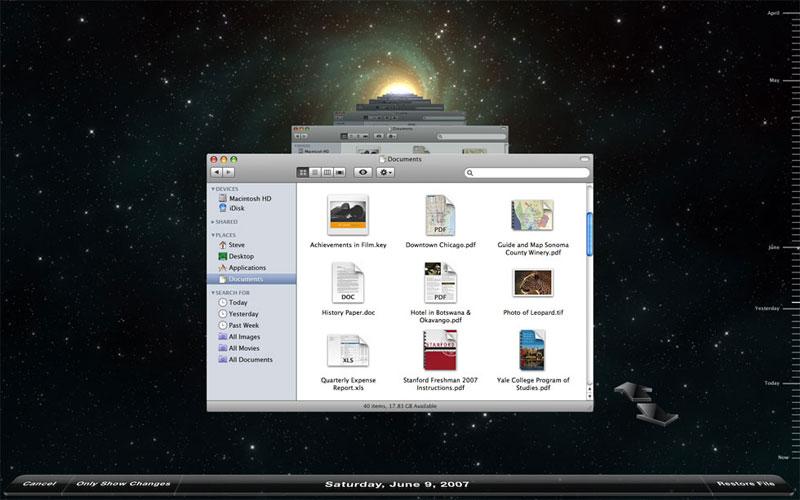
This visualization shows the contents of a single window of context back in time through all the backups captured. The most obvious example for using Time Machine would be from a Finder window where the lost file was thought to be. Click Time Machine, and the contents of that directory is shown back through time. Click on the back navigation arrow and Time Machine jumps back through its backup records to show you what that folder contained at the time every backup was taken. Each jump takes you back in time up to the point where the contents changed.
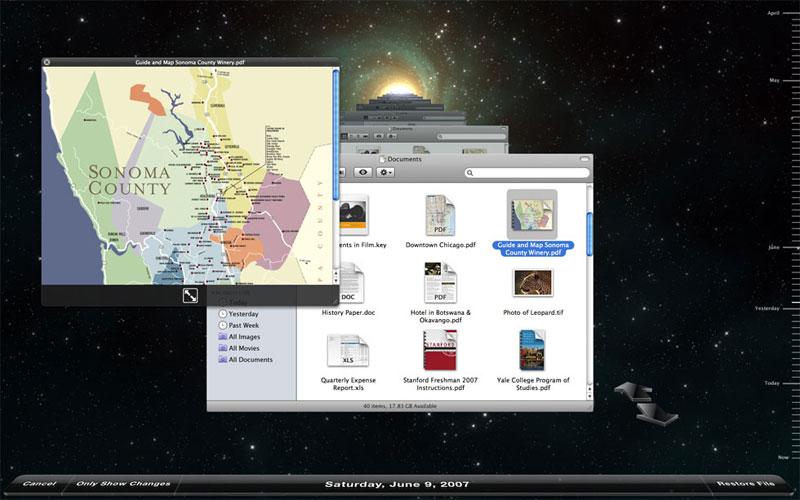
The Finder window is still functional, so you can Quick Look a document (below), or navigate to a different location in the file system to keep browsing backups, all within the Time Machine view. Once the selected file or folder is found, select it and click restore, and Time Machine drops you back into the desktop, and copies the files from its backup back to your main hard drive.
A more exciting example is a search query. Do a search for phrase in Spotlight; it might bring up Word documents, iChat transcripts, and emails related to your search. Now hit Time Machine, and you can step back through time doing that same query at every point where a Time Machine backup exists. This is an incredibly powerful and flexible way to search and find results. No other backup recovery system makes querying its archives remotely as simple and intuitive as this.
Back Up to the Future
Time Machine isn't just a visualization of your backed up files. It can also plug into collections. For example, Apple has demonstrated searching back through time in the Address Book. Pull it up, do a search for a name of a missing contact, hit Time Machine, and the system will find that contact from its backup records. You can do the same thing with your Mail; Time Machine shows your mailbox back through time with the emails you deleted and had left unread from a week ago, or a month ago, or two hours ago. It also works with iPhoto for flying back through time to find individual photos inadvertently deleted from your iPhoto library.
Third party developers will be able to add Time Machine integration to their own applications to provide similar functionality. This really adds up to demonstrate that Time Machine isn't just a backup system, but is really a combination of file system technology and data visualization that makes Apple's new implementation of file backup far more than just an upgrade to its more conventional Backup 3.0 program. Its genius comes from its simplicity, and makes Time Machine a very effective way to coax users into taking the minimal action required to safeguard their data.
Time Machine works with any standard external Firewire or USB drive, and is also designed to work with shared network drives, such as Apple's shared disks served up by the new Airport Extreme base station. Multiple Leopard users can backup to the same drive, as Time Machine stores each systems' backups separately by name. Time Machine is also designed to back up to an encrypted image for extra file security, allowing it to dump its backups on any file server.
Time Machine's interface also shows off how to create unique data visualizations with Core Animation, something that weaves throughout Leopard and will no doubt inspire lots of creative interfaces from third party Mac developers.