Road to Mac OS X Leopard: an extensive look at Preview 4.0
 Prince McLean
Apple in a matter of weeks will roll out Preview 4.0 as part of Mac OS X 10.5 Leopard, a significant update to its homebred media viewer that will see the application expand from a simple PDF reader into the beginnings of a full-fledged image editor. Here's an extensive look at what's new in Preview.
Hidden Tiger Preview Features
In the currently shipping versions of Mac OS X, Preview is primarily used to view PDF renderings of documents aimed at a printer, or as a way to view incoming Faxes or screenshots captured to the desktop using Apple+shift+control+4. However, Preview already does more than that. It also serves as a simple tool for cropping, rotating, and resizing graphics, as well as a graphic exchange tool that can convert between any of the variety of graphic file types supported by QuickTime codecs, including GIF, JPEG, PNG, PICT, Photoshop PSD, TGA, TIFF, and Windows BMP.
Because Preview launches almost instantaneously, it also works well as a general graphics viewer. It even offers some basic image correction tools, including saturation, contrast, exposure, and sharpness sliders. If you draw a blank about how to perform a full screen slideshow for a selection of photos or graphics, open Preview and select Slideshow from the View menu. If you find yourself unable to remember the magic key combinations used to trigger a screen capture, you can fire up Preview and select Grab from the File menu, which presents the options to grab a selection, a window, or a timed shot of the screen.
As Preview adds on features that expand beyond simply viewing print previews, it edges closer to becoming a full-fledged image editor. As is commonly the case with Apple products, as it gets closer to perfection it becomes easier to criticize for not fulfilling every imaginable desire.
New Preview Features in Leopard
As Preview's new graphics editing features fill out in Leopard, it almost becomes frustrating that the free little app isn't a full blown Photoshop. Preview also handles PDF editing features, which will no doubt irritate some for not matching every detail of Adobe's full price Acrobat Professional. As a free tool of Leopard however, Preview does a lot and suggests even more in its potential. Here's what's new:
Appearance
The first obvious new feature in Preview is its refined appearance. If you hated Tiger's Mail, get ready to be incensed over Preview. It uses similarly rounded buttons to link together Toolbar icons into groups, although it follows the unified window theme applied to all Leopard applications. The result is a more professional looking application that sheds the passé stripes and bright white appearance that debuted as part of Quartz's Aqua over five years ago.
Tiger's Preview on the left compares to Leopard's revised Toolbar layouts on the right, for graphics (above) and PDFs (below).
Window Layout
In Tiger, Preview displayed multiple-page PDFs (or multiple graphics documents open at once within a single window) in a slide out drawer (below left). It turned out that drawers aren't really that great of a user interface idea. Since the original release of Aqua, drawers have been turning into sidebars like those used in iTunes and Mail. Leopard's Preview (below right) similarly ditches its drawer for a sidebar that exists as part of the window rather than a drawer sliding out the side of the main window.
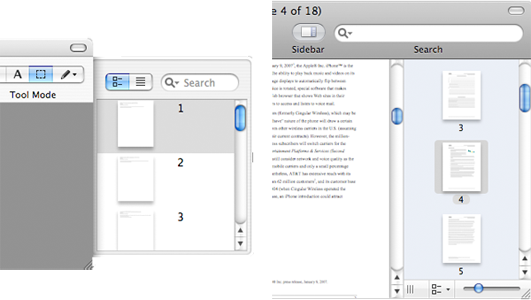
Tiger's Preview window layout on the left compares to Leopard's revised Window layout on the right.
Sidebar
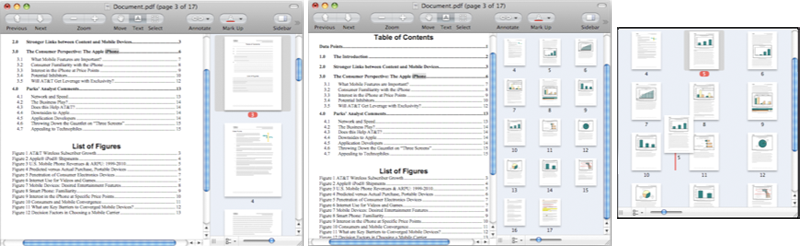
The new sidebar has so many new functions it needs its own bullet point. By default, it displays thumbnails of each page of the PDF, just as the old drawer did. However, the sidebar width can be manually set to any width, and as it get wider, it accommodates multiple rows of thumbnails. A zoom slider adjusts the size of the thumbnails, allowing infinite control of how the window displays the document you're viewing. Thumbnails also support drag and drop reordering of pages within a PDF, and you can delete pages or insert new blank pages.
Search
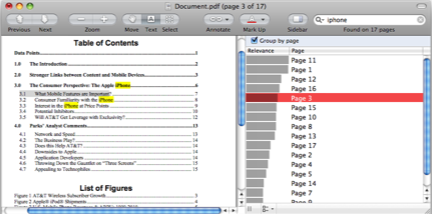
In addition, the sidebar can also be used to view a PDF's table of contents, or a listing of annotations and hyperlinks within the document, or a listing of search results. Perform a query from the Toolbar search field, and the sidebar presents search results; a checkbox allows you to group your results by page hits (relevancy), or as a simple list all the matches.
On page 2: Annotate Tools, Markup Tools, Graphics Tools, Adjust Size, and Extract Tools.
Preview has two standard Toolbars: one for graphics and a slightly different one for PDFs, which adds a text selection tool and a search bar. The simplified new PDF toolbar layout makes more sense than Tiger's PDF Preview tools, which grouped together a "Tool Mode" bar selecting between move, select text, select region, and annotate modes. In Leopard, you get Move, Text, and Select buttons that make more sense.
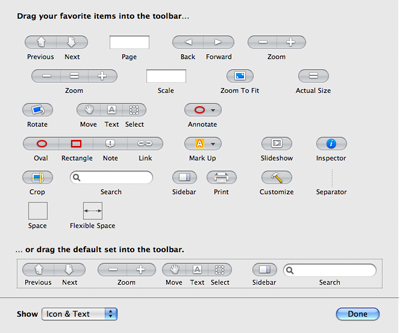
Apple hid all of the new annotation and markup features from the default Toolbar. You'll have to customize the Toolbar to add them. You can choose between adding a compact drop down Annotate button or a more sprawling four button bar that displays the drop down menu as a series of buttons: Oval, Rectangle, Note, Link.
Annotate Tools
In either case, you can annotate PDFs by drawing an oval or rectangle region, adding a Note comment, or by creating a Link region that can be set to hyperlink to another page inside the PDF, or to an external URL.
Markup Tools
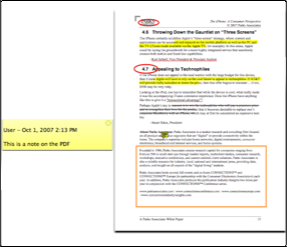
Underline, strikeout, or highlight a text selection within a PDF using standard markup that is compatible with Adobe Acrobat and other PDF editors.
Graphics Tools
Graphic files (as opposed to PDFs) can also be similarly annotated with boxes, ovals, note comments, and free-form arrows, although the tools are slightly different. This makes it easy to add simple modifications to graphics without moving to a more significant graphics tool. In effect, Preview is now like an ultra simple version of Keynote. However, as new features get added to Preview, it stops becoming a free "graphics viewer plus" and begins to look like a graphics tool that doesn't quite do everything one might imagine it should.
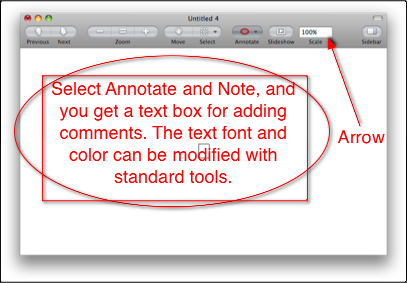
Rather than adding text with a standard insertion point, Preview has you select a region of where your text box will go. You can edit the box later, but it isn't quite as intuitive in how it works, and it's not consistent with other iLife and iWork apps. Preview seems to have a number of oddball edges, including its Inspector panel, which takes a step closer to matching the standard inspector found in the iLife apps, but doesn't quite make it there.
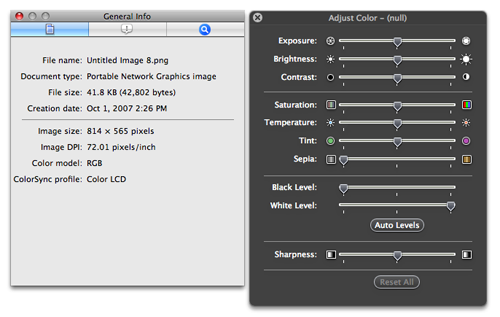
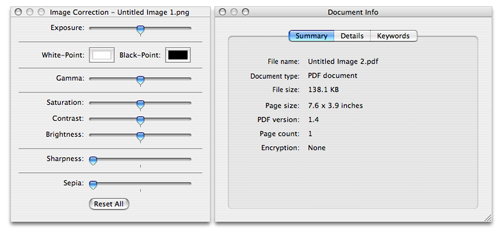
Preview's Image Correction panel does a bit better, making the jump from an old style white panel to the more inviting and sophisticated translucent panel of iPhoto. Compare the Leopard version of Preview's Inspector and Adjustment tools (below) with the Tiger version below them.
Adjust Size
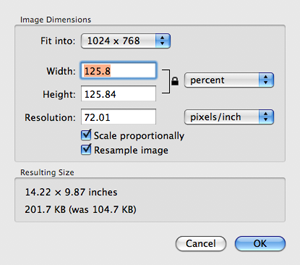
Another handy tool in Preview 4.0 is the adjust size sheet, which drops down to allow a resizing of width and height based on inches, pixels, or percent change. A "fit into" drop down allows you to select a common resolution, resizing a graphic or photo to fit as a standard desktop background, for example.
Extract Tools
Two new tools for extracting portions of a graphic in Preview are both powerful and unique. The first is familiar to anyone using iLife or iWork 08: Apple calls it "Instant Alpha," and it makes it easy to select and remove an object from its background. It works like a magic selection wand to select colors for deletion, but only requires clicking on the background and dragging to blow away the surrounding area. Once the selection matches the result you want, you hit return and your graphic is cleanly removed from its background.
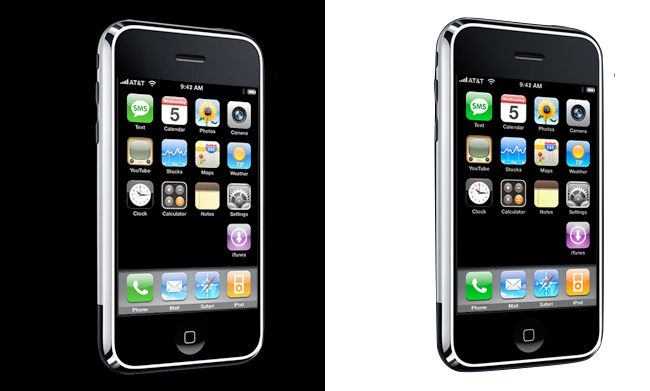
In the iPhone image below, the Instant Alpha tool was used to select a 4% range of blacks representing the background color. This automatically masked off the image, and set the surrounding black area to be transparent (using the alpha channel), all without messing with any of the blacks in the image. This is a very useful tool and extremely easy to use.
For images against a busy background, selecting the undesired background to remove by color ranges using Instant Alpha can be too difficult or too slow. Preview includes a new tool called Extract Shape that intelligently helps you cut out an image. Of course, there's also the lasso selection tool, but drawing a clean freehand selection isn't very easy. Professionals commonly create a detailed mask using Bézier curves to isolate images from their background, but that isn't very easy or intuitive either.
Extract Shape gives you a fat, translucent red marker outline to draw around the desired shape. Once finished doing a rough outline, the tool transforms it into a series of points outlining the area (below left), allowing you to delete extra points or move them around as desired. After doing any desired cleanup, hit return and the system analyzes the selection, then gives you an opportunity to use Instant Alpha to polish away any remaining rough bits to cleanly extract away the background (below right).
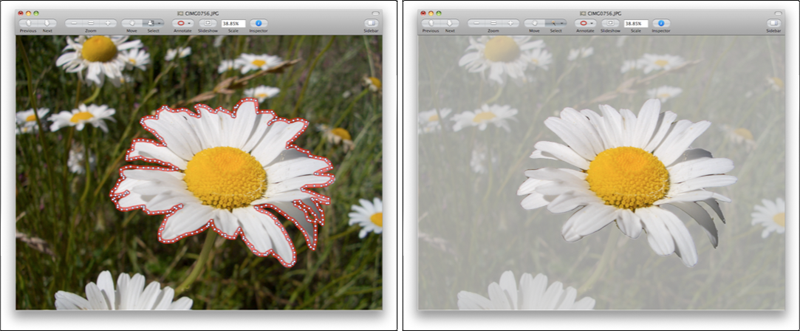
The resulting graphic (below left) has an alpha channel background that can be used in a composition created within Keynote, Pages, or iWeb (below right). With iPhoto's retouch brush and a smoothing/burning/dodging tool, Preview could be a great basic photo tool. Add some brushes and it could be the painting app missing from iLife. Not bad for one of the least exciting applications in Mac OS X.

And that's Preview 4.0.






 Malcolm Owen
 William Gallagher and Mike Wuerthele
 Christine McKee
 William Gallagher
 Marko Zivkovic