Physical Features
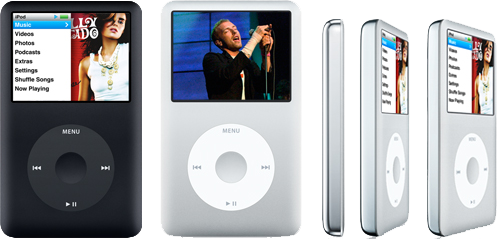
The sixth-generation (6G) of the iPod — now dubbed the "iPod Classic" — maintains the same form factor as the "5.5G" iPod announced last year, but gets rid of the clear plastic face that was so easy to scuff. Instead, the new model is constructed similar to the Nano, with an anodized aluminum metal face surrounding a glass screen.
That means the face — and more importantly the screen — is as difficult to scratch up as the iPhone or the new Nano, although like the new Nano, its polished stainless steel back still quickly shows fingerprints and scuff marks.
The new metal case of the 80GB 6G Classic is slightly thinner than the 30GB 5.5G iPod, though Apple also offers the Classic in a 160GB model, albeit slightly thicker. That leaves a wide gap in capacity between it and the other iPod models, which max out at 16GB for the iPhone-like iPod Touch, or at 8GB for the Nano and iPhone. The rest of Apple's entire iPod lineup has moved to using Flash RAM rather than a hard drive.
Flash RAM vs a Hard Drive
The allure of Flash RAM has many facets. For starters, reading from Flash is faster than from a hard drive. The Classic can occasionally be forced to stutter if you start playing music and then immediately zip through menus or quickly pan through album artwork in Coverflow. That's because the display and music playback are both scrambling to read from the hard drive at once. This is not really a serious performance problem on the Classic, because once a song has played for a few seconds, it will read ahead enough music to prevent skipping. However, it signals one reason why Apple is leaning toward Flash.
Second, Flash is much more energy efficient. To operate from a hard drive, iPods have always incorporated a small amount of RAM, 34MB to 64MB. This allows it to read a large chunk of music from the disk and copy it into RAM for playback. This not only makes for smooth, skip-free playback, but also allows it to turn the drive off and coast along in low power mode until it needs more music from the disk. Without this aggressive disk caching, the iPod's battery wouldn't last nearly as long. Playing video or games makes the iPod's disk work harder, and therefore helps to shorten battery life.
As Apple migrates the iPod line toward iPhone-like functions, using a hard drive for storage becomes unworkable due to its power draw. A hard drive based iPhone or iPod Touch would perform more like a laptop, requiring a much larger battery to deliver more than a couple hours of runtime. It would make it much larger and heavier.
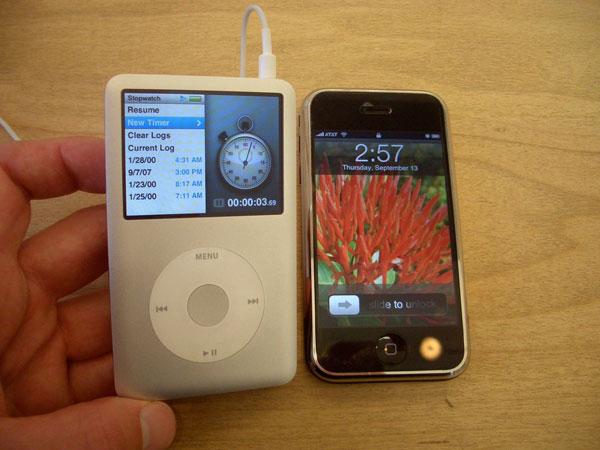
The obvious advantage of a hard drive is much more cost effective storage. One of the most expensive components in the iPhone is its 8GB of Flash, which is roughly the same price in quantity component orders as an 80GB 1.8-inch hard drive like the one in the iPod Classic. Combining the two for a pocket mobile device with ten times the storage sounds tantalizing until the reality of battery life, battery size, and additional hard drive volume all add up to create a box the size of a small book, or alternatively a mobile device that can't run for more than two hours without a recharge. Additionally, the hybrid device would be slower and hesitate every time it had to spin up the disk.
On top of all that, 2.5-inch laptop hard drives are already rated for lighter duty and have shorter lifespans than full size 3.5-inch hard drives in desktop computers. A micro-mobile iPod device constantly reading from an even smaller iPod sized 1.8-inch drive to run a full-blown operating system with complex applications like the OS X environment of the iPhone or the iPod Touch would be even more fragile and likely to fail at inopportune times.
That's why Apple doesn't recommend using the iPod Classic in disk mode as a boot device; it simply isn't rated for full-time use. Apple also pulled all references on its website about using hard drive-based iPods during exercise or running due to the risk of mechanical failure associated with operating hard drives in such extreme conditions. It only offers the Nike+ for use with the Flash-based Nano. The Classic is the most vulnerable of all iPods.
That means the hard drive-based iPod Classic is likely to soon be a dead end on the iPod road map. As the price of Flash RAM components rapidly fall as production technology increases, the entire line of iPods is likely to eventually move permanently to Flash. At some point, they will likely be followed by laptops, too. Depending on the demand that remains for large capacity iPods, the Classic line may retire as early as a year or two from now.
iPod Selector: Size Matters
Until then, the Classic is the only way to put more than a few thousand songs and a movie or two on an iPod. For anyone who wants more than 16GB of storage, the iPod Classic is the easy option because its the only option. Compared to the other iPod models, it's almost as if Apple is actively working to migrate users away from hard drive storage.
Apple's first step was making it easy to automate the syncing of fresh content in iTunes. Rather than having to carry around an iPod with a capacity equal to the entire music library, users can now easily set up sophisticated smart playlists that can keep a smaller capacity iPod full of fresh content. Podcast and TV syncing also makes it easy to cycle through new content. That all adds up to make iTunes a software solution to the hardware problem of practical capacity limitations of Flash based iPods.
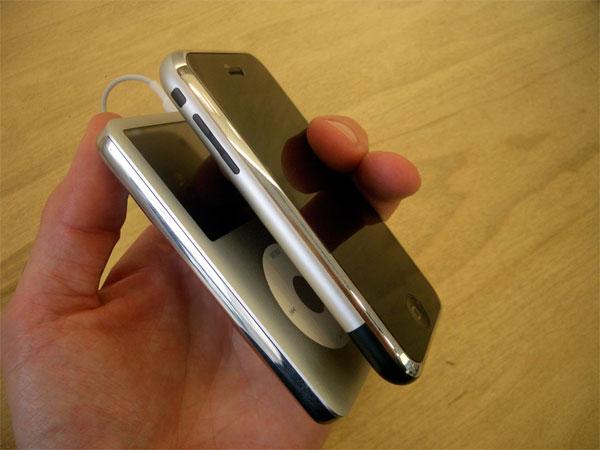
It's interesting that the new 3G Nano now delivers all of the features of the previous full-sized iPod. That signals that Apple isn't too worried about further differentiating the Classic as a model; it's only purpose is to deliver capacity. Its screen is only a half inch larger than the Nano, which doesn't make much of a noticeable difference when actually viewing video playback. The Nano is also $50 or $100 less than the iPod Classic.
The larger shell of the Classic does give it a slightly longer rated battery life. While the Nano is rated at 24 hours of audio or 5 hours of video, the Classic promises up to 30 hours of audio and five hours of video for the 10.5 mm thick 80GB model, or 40 hours of audio and 7 hours of video for the 13.5 mm thick 160GB version. Presumably, the larger capacity model also holds a larger battery.
According to iSuppli, the battery in the new 80GB classic is exactly the same as the older 30GB Video's. No word on the 160GB.
The new flagship iPod is the Touch, which for $50 more, and similarly trades off capacity for WiFi browsing features, YouTube and the coming WiFi Store music store. The 8mm thick Touch also has a larger, much higher resolution screen for video playback, touch=screen wizardry, and a 22-hour audio playback rating (or 5 hours of video). Throw down another $100 and you can get a full iPhone, with always-on mobile data service, a camera, Bluetooth, Mail, Google Maps and other related mobile features.
These differences between the iPod models will likely make the Classic most attractive to existing iPod users who can't give up the storage capacity they've grown accustomed to, and for users primarily interested in long playback of music, who are not tempted by the more gadgety features of the Touch or the very thin Nano with its limited storage.
New iPod Software Features
Apart from offering vastly larger capacity in a larger shell, the iPod Classic is very similar to the new Nano, offering the same new animated menus and enhanced mini-apps described in our 3G iPod nano review. Both appear to run on a significantly-refreshed operating environment, the main downside of which is that the new Classic and Nano aren't backwardly compatible with games designed for the 5G iPod.
Both the new Classic and Nano ship with three free games, and Apple says three more are on the way. Until they ship, there aren't any new games to buy, and of course any 5G games you already own won't sync over.
For a more extensive look at the new iPod software, including the animated menus and gaming support, see the 3G Nano review: Apple's new 3G iPod nano is a 5G video iPod in a nano-thin shell.
Video Output Changes
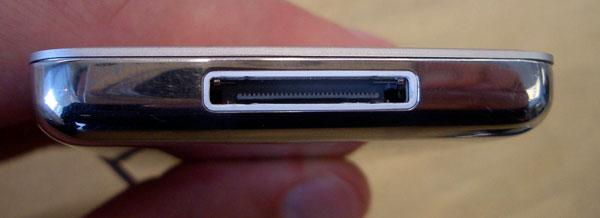
One last change on the iPod Classic over the previous 5.5G iPod model is that video output has changed. Previous video-enabled iPods offered composite video output from a video iPod Dock or via a cable that plugged into the headphone jack. The new Classic, Nano, and the Touch all offer both composite video and now higher quality component video for use with a HDTV or modern standard definition TV. Component video delivers a higher quality picture.
The new models now lack an option to output video from the headphone jack. Instead, Apple sells both composite cables for use with all video-capable iPods and component cables that only work with the new Classic, Nano, and Touch. Both cables plug into the iPods using a dock connector. They also come with a USB wall power adapter and cost $50. Apple also sells a $50 "Apple Universal Dock," which provides an IR remote control. It requires one of the above cables to plug into a TV or HDTV set.

The new iPod models may not work with some third party devices that extract video from the Dock connector, although the new iPods work with the previous "iPod Universal Dock connector" when used with Apple's composite cables designed for previous video-capable iPods.
Rating 4 of 5

Pros
- Much greater capacity than other iPods.
- Longer batter life than other iPod models.
- Scratch resistant metal face and glass screen.
- Enhanced animated menus and Coverflow.
- Three free games.
- Not compatible with 5G games.
- No games yet available apart from the three free games included.
- Polished metal back will scuff up quickly.
Where to Buy
Apple 160 GB iPod classic (Black) - Amazon
Apple 80 GB iPod classic (Black) - Amazon
Apple 160 GB iPod Classic (Silver) - Amazon
Apple 80 GB iPod Classic (Silver) - Amazon