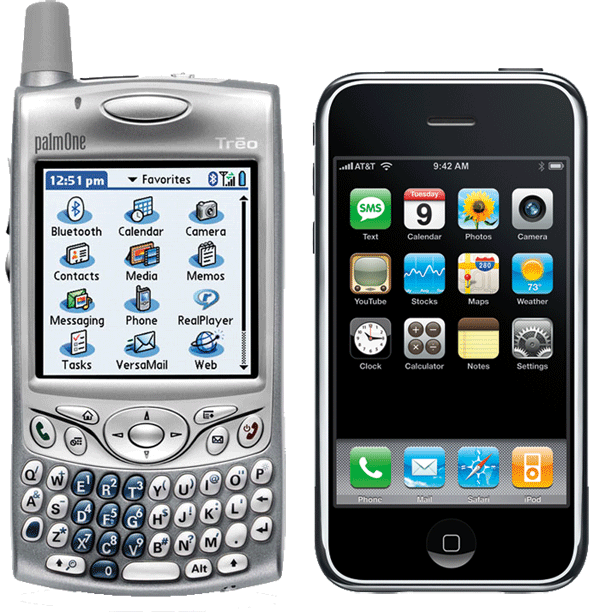
In this second installment of our iPhone Review Series, we compare the Apple iPhone to the Palm Treo 650 from the perspective of a former Treo 650 user, providing a look at how the two platforms compare, what the iPhone offers for current Treo users, and a few things it doesn't yet do.
The Mac-friendly phone torch passes from Palm to Apple.
The Palm Treo has long been a popular smartphone for Mac users because of its bundled Palm Desktop for Mac sync support and its simple Mac-like interface. However, Palm has delivered very little in terms of hardware or software innovation for its Treo line over the last several years, and has recently moved to adopt Windows Mobile as a replacement to its own Palm OS for the Treo.
Palm's support for Mac users hasn't improved in years, and its new Windows Mobile Treos aren't supported at all. It should come as no surprise that Apple's own iPhone provides better support for Mac users than Palm's Treo. Here's a look at how the two platforms compare, what the iPhone offers for Treo users, and a few things it doesn't yet do.
A previous and more general review of the iPhone's features and limitations was presented in the article "Apple's iPhone: an initial (but in-depth) review."
Physical design and usability
The Palm Treo line is now five years old. It originated at Palm spinoff Handspring as the pairing of the original Visor PDA with a GSM phone module. Palm actually acquired Handspring specifically to move into the smartphone area with the Treo.
Palm's Treo remained attractive enough to maintain as much smartphone market share as all of Microsoft's Windows Mobile phone licensees combined, despite delivering very little progress in either hardware or software since 2004.
The Palm OS has remained stagnant, and its hardware features have only seen minimal bumps. Palm has also done nearly nothing to improve its HotSync software on the Mac. Apart from the Treo however, there are very few phones that make any effort at all to sync with the Mac. That left the Treo as the lessor of several evils for Mac users in search of a smartphone.
Frozen in time, the Treo seems to beg for a worthy competitor to simply bury it. Palm's decision to begin offering a Windows Mobile version of the Treo phone hardware seemed to concede defeat to Microsoft. However, Apple's new iPhone offers more of the features that attracted many users to the Palm Treo in the first place, making it a more likely heir to the Treo throne, particularly for Mac users.
The iPhone does lack the Palm's official software platform and certain other features that third parties can deliver even if Palm never ever releases another update; more on that later.
Physically, the Treo hardware feels rugged enough to withstand a full lifetime of normal use. In two years, my Treo screen only has minor scratches that aren't even visible when the screen is on. The unit itself is worn but has survived several drops on concrete.
At the same time, the device itself feels creaky and cheap; it groans and flexes like a Dell laptop, as if built from plastic that was simply too thin. The unit itself is as thick as a full-sized laptop such as the Mac Book Pro. Its real size is disguised by rounded corners that make it fit comfortably in the hand but which don't make it any less bulky in the pocket.
The first day I saw the Treo 650, I was impressed with the quality of its camera and screen, satisfied with the familiar Palm OS, but somewhat disappointed with the rest of it. It's bulky, marginally integrated with desktop software, and generally felt stuck in the depressing post-dotcom rut that Palm never seemed to shake its way out of; the company has since layered into all of its products a burden of grief and despair that seems palpable. Palm simply exudes a desperation that reeks of death.
That morbid fog clouds the Palm experience for even the most optimistic of users. To get started, you push the red 'off' button. After more than a second of nothing happening, the screen lights up, but wait, it's not ready yet. The screen wakes and then locks, waiting for the user to push the center button to unlock it. If the two buttons aren't hit in sequence with enough of a pause before and after, the unit goes back to sleep.
That's the kind of poor experience that Windows users might tolerate, but which many Mac users would find infuriatingly inelegant and clumsy.
In contrast, the iPhone wakes with a press of either the top or front button, then invites the user to slide a lock across the screen with a finger swipe. This is quite impossible to do accidently, because the iPhone's screen only reacts to skin, and only reacts to a target that is finger sized.
The wake up sequence of each captures much of the overall difference between the Palm Treo and the iPhone: the former is a slow, quirky, and irritatingly frustrating, while the latter is elegantly thoughtful, responsive, and simply pleasant to use.
After replacing my Treo with the iPhone, I found myself double checking my pocket to make sure I had it with me. The iPhone has a similar weight, but consumes half the volume of the Treo. Its ultra thin design has an impressive and solid feel. The Treo is so bulky that it's an embarrassment to hold.
Both can be used with one hand, even to type out letters. The iPhone presents a much larger keyboard on the screen, and encourages the use of the pad of the thumb. The physical keys of the Treo are not only much smaller but also much closer together, forcing the user to type using the edge of a fingernail.
I assumed that the iPhone's touch screen would be harder to use, and simply be "better" only because it offered more screen real estate. I was wrong; its touch screen is far easier and more comfortable to type on than the tiny physical keys of the Treo. There is no numeric or special character mode invoked by typing modifier keys; the iPhone simply displays alternative keyboards with each of the characters you want to type.
With two hands, the typing experience on the Treo improves, but the iPhone's does as well. The Treo offers no corrections when typing, while the iPhone makes immediate error correction easy and natural.
While the Treo also has a touch screen, it reacts to everything, not just skin. That means it must be turned off before returning to a pocket, for fear that a brush might select and delete all the text on the screen. That can't happen on the iPhone.
At the same time, the Treo's screen does not react to finger touches as sensitively as the iPhone's. With the Treo, even trying to do basic number dialing via a finger on the touchscreen is unpleasant. It feels slow and inaccurate. The iPhone's screen also never requires the Palm's touch screen realignment; it just works.
Navigation through the Palm's main menu of applications also feels clumsy. I often subconsciously defaulted to using the physical buttons to launch apps rather than just tapping icons on the screen; it requires so much pressure to register a touch that it's simply clumsy to use the Palm's touchscreen for touch control. The iPhone rather dramatically gets rid of all physical buttons on the face of the device apart from the single home button, but the focus on the touchscreen is invisible because it actually works.
There is no little joystick to poke at and no menu buttons to press. Everything is controlled by touch. It isn't just buttons either; lists of contacts, CoverFlow albums, and photos react to a flick and stop with a touch. Scrolling, panning, and zooming respond intuitively and provide instant feedback that feels natural, not like an assembly of electronic hardware and computer software.
Neither the Palm nor the iPhone seems to favor the right or left hand, although the iPhone is ready to jump between a tall and horizontal aspect ratio whenever doing so makes more sense. The Treo can't really be held sideways at all, and makes no use of a landscape oriented display.
More information on the iPhone's input compared to the Palm and other smartphones was presented in the article "Using iPhone: Text and Data Entry vs T9, Graffiti, Thumb Keyboards."
On Page 2: Phone and Contact Management; and Internet, Maps, and Widgets.
It's certainly not hard to place calls on the Palm Treo, but it offers little in terms of innovation. Software that doesn't grow simply dies.
In Palm's case, nothing has been done to really improve the overall experience of the Palm since 2004, apart from deals to load third party ads and trialware and service plans such as Palm's deal with Verizon to force syncing of some data over the network rather than over a local desktop sync.
This stagnation in the Palm OS occurred as Palm thrashed about with plans to deliver a new Palm OS 6, then move its platform to Linux, then move it to Windows Mobile. It is strikingly similar Apple's directionless funk of the mid 90s, or Microsoft's nearly identical inability to deliver upon its Windows initiatives since 2001. Palm's plans are in such upheaval that it stopped caring about its customers.
Smartphones based on Windows Mobile and Symbian only seem interested in copying and replacing the Palm OS, and offer only incremental advances in technical superiority. It's therefore quite obvious to see how far Apple has leapt past the Palm OS when comparing the iPhone.
The ability and simplicity of answering a secondary call and then merging the two lines into a conference call is something that was obviously needed long ago. No mobile providers gave much thought to delivering it, however.
I never attempted to set up conference calling on my Treo; it was problematic enough to simply hang up on one line while maintaining a call on the other. Every time I tried, I'd end up hanging up on both. I ended up just leaving the secondary call running in the background until I finished both calls.
That was a problem for me as a consumer, but didn't matter to Palm nor Sprint, my service provider. If anything, my problem was simply making Sprint incrementally richer. Since my purchase of the Palm Treo was heavily subsidized by Sprint, why would it — as the real customer — seek to fix such an annoying problem for me, when it was in Sprint's best interests to leave me with a frustrating phone?
Sprint's solution, of course, was to offer me a new phone every two years to ensure I'd sign up for another contract extension. This pattern of "don't fix it, replace it" works well for service providers and for hardware makers, but leaves customers livid that nothing ever works, and that nobody involved in the mobile business has any reason to care about users.
Apart from Apple, that is. Since Apple has the brand power to sell hardware without a subsidy shell game illusion, it can market directly to the consumer, and offer us a phone that really solves problems.
Contacts sync properly on the Mac, including contact photos set on on either the desktop or the iPhone itself. Call management is as simple as hitting one of a few buttons with clear and obvious functions.
Spin through contacts rapidly, even when on a phone call. There's no search function in contacts to look up a specific caller by typing a few letters of their name. Instead, Apple has an alphabet listing that lets you jump to a specific starting letter. This takes some getting used to if you're used to searching for contacts.
For users familiar with looking up contacts by searches, the iPhone's lack of search is a puzzling omission. This is also complicated by its lack of a voice dialing feature. Making the best use of the iPhone requires adapting to what it does offer.
While I'd like to see both searching and voice dial features added, the iPhone does offer some alternative ways to use contacts that help make up for those missing bits. The first is a favorites list that serves as a quick lookup list; along with the recent list, these two offer a quick way to dial common numbers, although both lie hidden behind the Phone icon, making it a two page navigation to locate them.
The other contacts feature that's unique to the iPhone is that it syncs with Address Book's Groups. That makes it very compelling to organize contacts on the desktop, and benefit from a consistent system of organized contacts on the iPhone as well.
For example, I have Groups that include Health Care, Clients, Family, and Friends. When I think I need to call one of the health care professionals that helps keep me in one piece, I don't have to think about whether I've entered their names as "Dr." or not, or riddle my brain with a search for what name to search for. Instead, I can simply narrow down the hundreds of contacts on my phone with a tap on Groups and then Health Care, giving me a short list of contacts I can scan through by name.
It's almost as if the iPhone were designed with the needs of a busy person with a failing memory in mind. Steve Jobs, thank you for making a device that works for those of us with too much information locked up in our brain to be able to reliably pull any of it out without some help. Jobs must be well aware of what its like to have more information to manage than one person ought.
All of the smart software advantages of the iPhone are also advanced by its improvements in hardware. Its touch screen actually responds to light finger touches, unlike the Palm's pressure sensitive screen, which only works well when using a clumsy stylus.
Visual voicemail is another example of Apple solving one of those obvious problems that wasn't a problem for the service provider. Nothing is a more frustrating waste of time on a mobile phone than navigating through messages by listening to a series of saved voicemails to get to the call you're interested in hearing, then trying to step through it several times in order it to write down the details you were after.
This wasn't a problem for service providers, as my frustrating experience with voicemail only ensured I was spending more minutes of my plan trying to hear my messages. Apple solved this for consumers in order to have fancy features desirable to consumers to show off the iPhone. It's now just as easy to use voicemail as email.
Internet, Maps, and Widgets
Browsing the web on a Treo is painful to say the least. Its built in browser offers both a full-screen view that attempts to render webpages as intended, and an optimized version that tries to fit web pages to its smaller screen. Both are troublesome, as the web is largely still stuck in the clutches of full page screens optimized specifically for an Internet Explorer experience on a Windows PC.
The promise of the web to be a cross platform, open, accessible, and device neutral way to publish information was thwarted by efforts on the part of Netscape and later Microsoft to tie the web to their own proprietary platform. The result is that webpages simply don't translate well to mobile devices.
The iPhone gets around that problem by not being a mobile version of the web. Instead, it incorporates a full Safari Web Kit engine that renders web pages the same way as the desktop Safari browser. The only difference is in its navigation features, which allow the user to zoom in and out of webpages using the first mainstream release of a truly resolution independent display.
The iPhone's browser zooms into any webpage section with a double tap, and also allows the user to scale the display to any magnification desired with a finger pinch. The display instantaneously redraws text at the set scale in high resolution. It is a joy to use the iPhone's web browser.
There are many web plugin features missing on the iPhone, including Flash, Java, SVG, and any audio or video codecs not supported by the iPod. However, the failure of all these formats to gain any real traction make their omission less than problematic. Java rarely shows up in client side applets anymore, and the standard for audio playback on the web has gravitated towards MP3 and its MPEG-4 successor, AAC.
While web video has mostly standardized behind either Flash's proprietary On2 video codec delivered via a Flash applet (such as YouTube) or H.263/DivX video also commonly delivered via Flash (such as Google Video), Google partnered with Apple to deliver YouTube content via the new MPEG-4 H.264 codec. That new standard is supported in the iPod, iPhone, and Apple TV using hardware acceleration.
Adobe is also moving Flash to H.264 and away from its former On2 codec, in order to power a new generation of devices from Apple and others that can decode such video using specialized commodity video processing chips. That means that Flash support is not only unnecessary now, but will only become more compatible in the future as the industry unites behind common standards rather than those proprietary to a specific vendor, such as Microsoft's Windows Video codecs.
Palm certainly isn't leading the push toward standard video, and only offers the most basic support for standards based web browsing. That results in a painful web browsing experience common to most other smartphones.
In addition to the Safari web browser, Apple also includes specialized web data clients, including the Google YouTube viewer, a custom Google Maps client, and Weather and Stocks clients for viewing Yahoo's web services. All of these clients provide widget-like simplicity for looking up common information, and will likely be augmented by new services in the future. Apple has hinted at a Movies dashboard widget in Leopard based on Fandango services, which is likely to become the next widget for the iPhone as well.
Google Maps deserves its own article, but here, it simply offers another example of how the iPhone elegantly solves a problem that other mobiles didn't even recognize to be a problem. I downloaded a third party Google Maps client for the Treo, but found it impossible and clumsy to use. The iPhone's client not only looks great, but it actually works very well for looking up information.
It's a combination of a phonebook, a Google search, a direction mapping tool with step by step instructions, a freeway traffic indicator, and a street map and satellite images browser. It's a reason to buy an iPhone unto itself.
The main downside to the iPhone's rich Internet capabilities is its relatively slow EDGE data service, which is about twice as fast as ISDN. Wags like to describe it as "dial up speed," but that's only because too many technically incompetent fools seem able to maintain their jobs as journalists covering the tech world.
While EDGE is only about a quarter of the speed of an ideal 3G connection, it is very usable for maps and even, surprisingly, YouTube. That's because Apple has optimized its YouTube support (as well as its guidelines for mobile video) to support both EDGE style service and higher bandwidth service.
To really be blown away by the iPhone experience, you'll need a WiFi connection, something that relatively few other smartphones support. While a 3G iPhone would be nice to have, 3G service is currently a battery hog, even when only using it for voice calls. As is typically the case with Apple products, the iPhone makes use of the best options available, not the most attractive sounding technical bullet points.
Compared to the Treo, the iPhone makes ideal use of WiFi when available while also working acceptably when it has to fall back to EDGE service. The Treo struggles to work even with the fastest of data services, and simply can't do a fraction of what the iPhone can in terms of browsing the web, searching for maps, looking up common information, and, quite obviously, providing a rich experience for web audio and video.
One very clear missing feature of the iPhone is its inability to be used as a tethered Internet access point, also known as a Dial Up Networking service after Windows' DUN control panel. That means you can't connect an iPhone to your laptop and use its mobile data service to browse the web or check email. This appears to be a limitation imposed by AT&T, which doesn't seem to allow this for any of its phones.
While DUN features would come in very handy, the iPhone's own rich Internet service does help to offset this lacking feature somewhat. Users who need mobile data service on their laptop will have to obtain a wireless data card for it, because there's no included way to either tether the iPhone or configure it to share its EDGE connection via either Bluetooth or WiFi to a computer.
On Page 3: Email, Calendar, and Mac Friendly.
The Treo offers support for Microsoft's Exchange Server network client, which essentially checks email over the web using a specialized client that talks to Exchange's Outlook Web, its webmail gateway.
It also supports RIM's BlackBerry Enterprise Server and Motorola's Good Technology services for pushing email directly to mobile devices. All three are commonly used in business to deliver corporate email.
The iPhone currently has no client software to support any of the three proprietary systems; it only supports the open IMAP email protocol, using optional SSL encryption. This has caused ignorant wags to call the iPhone insecure, as many IT shops are afraid to expose their Windows Servers to the Internet for fear they would be immediately taken down by crackers looking for Windows Servers riddled with zero day vulnerabilities to exploit.
In reality, the iPhone does support secure email, just not the kind that ropes corporate customers into high priced client access licenses. The false information promulgated by Windows Enthusiasts makes it potentially difficult for iPhone users to convince their IT staff to support standard IMAP email.
I found Palm's own software support for Exchange mail to be problematic for a number of users I supported. If the client had a problem with a corrupt email, the Palm software would require the user to delete their messages and all calendar information from their mobile and resync from scratch.
This follows the same thinking among IT managers who erase and reinstall Windows PCs from images rather than troubleshooting, simply because Windows is nearly impossible to troubleshoot and that from a practical perspective, it makes no sense to waste time trying.
That means iPhone users will be second class citizens in many Windows-based corporate IT shops, and that users might likely have to forward their mail to a standard account to receive it, or bypass their corporate accounts and simply use the iPhone for personal email. The solution will be for Apple to include support for proprietary emails systems, which it has hinted at doing.
For users not beholden to corporate email, the iPhone offers a clearly superior email experience. It receives full HTML emails and can send out photos taken from the iPhone. It can also receive standard PDF, graphics, and Word and Excel files and display them. The integrated document viewing software handles email file attachments the same way as Safari handles linked files such as PDF or Word documents linked to a web page. In either case, the document is presented in a resolution independent, zoomable viewer similar to Safari web pages.
On the Palm Treo, attempts to download documents and view them requires third party support. One feature the Treo offers that the iPhone doesn't is the ability to edit Office documents. This is offset by the Treo's lack of enough Flash RAM and its clumsy, slow, archaic operating system.
Even when the Treo has a clear advantage, its general software and hardware problems combine to make those potential strengths rather impractical. Anyone who really needs to edit Word documents on a tiny screen will be flummoxed by the iPhone, which doesn't pretend to be a pocket sized laptop. In my case, the benefits of trying to use the Palm's Office editing features (provided by Documents to Go third party software) were simply not practical enough to miss on the iPhone.
More information on syncing and using data files on the iPhone are presented in "Using iPhone: File and iTunes Sync Via USB, Wireless, and Over the Air," "Using iPhone: Notes, ToDos, Attached Files, and Mac OS X Leopard" and "Using Apple's iPhone in the Enterprise."
Calendar
During the periods where I could get my Treo to reliably sync with my desktop, one of the primary useful features was its calendar, which was equal to contacts in terms of being powerfully useful on a mobile device. The Palm's sync problems, particularly on the Mac, greatly limited the potential of this feature. The two layer sync between Palm Sync and the Mac's built in Sync Services resulted in lots of my Palm data ending up duplicated, and basically kept my calendars and to-dos perpetually messed up.
The iPhone syncs beautifully with iCal and Sync Services, but only from the desktop. There's no support for over the air synchronization with web services such as Google or Yahoo, or even Apple's own .Mac. The iPhone even lacks any support at all for To Do items or Notes.
That leaves the iPhone's calendar firmly stuck as a consumer-only solution. That problem will be fixed in the move to Mac OS X Leopard, which includes support for new system wide calendar, notes, and to-do events much like the existing Mac Address Book handles system wide contact data today.
Until Apple solves that problem over the next two months, the iPhone's calendar is only serviceable, not impressive. Further outlook on Apple's future iPhone plans were noted in the article "Using iPhone: iCal, CalDAV Calendar Servers, and Mac OS X Leopard."
Mac Friendly
Compared to the Treo, the iPhone has a very different set of strengths and weaknesses in its support for email and calendar services. However, the advantage of the iPhone is its clear future of improvement; Palm quite obviously doesn't care about Mac users and will never improve upon its existing muddle of flaky syncing and sloppy, slow, and inelegant mobile software.
No other vendor can offer the level of integration between a mobile and a desktop because no other vendor makes mobiles, desktops and the software that powers each.
A vendor like Palm only makes a small subset of the software involved, and clearly doesn't care much about Mac users. It has been focusing its efforts on providing support for Windows and Office users. In doing so, it's captive to Microsoft's own proprietary standards and systems.
Palm had to jump when Microsoft announced its own ActiveSync built into Windows, which basically obsolesced Palm's own HotSync. That left Palm struggling to incorporate support for portions of ActiveSync to allow Palm OS devices to get data from Exchange Server, while also maintaining and supporting its own cross platform HotSync. On the Mac side, Apple developed its own Sync Services architecture and delivered support for integration with Palm devices, but Palm's lack of interest in Mac users squandered its opportunity to deliver a fine Mac product.
Apple's now going it alone, and the iPhone really shows up the core deficiencies of Palm's approach. Palm is essentially turing itself into a Windows Mobile vendor at a time when Windows Mobile isn't otherwise growing. Microsoft itself faces the problem of developing a software platform that isn't worth much.
While Microsoft makes lots of money from automatic sales of Windows on every PC sold, there is no volume market for PDAs running Windows Mobile, and Microsoft has done little to give consumers any reason to choose Windows Mobile for mobile phones. That leaves Microsoft to develop a complex, unique operating system and development environment for a platform that only sells a few million devices every year. Windows Mobile is much like Apple, if it were a software-only platform trying to make its money licensing its Mac software to hardware makers.
Just as Apple couldn't maintain a business selling unique OS software to Mac clone vendors, Microsoft can't maintain its Windows Mobile business selling software to Palm and other WinCE licensees, because hardware makers won't pay enough for the software to sustain the huge efforts Microsoft has to invest in it. That's why Microsoft has lost billions of dollars in its WinCE efforts over the last ten years.
Apple on the other hand makes its money selling iPhone hardware and earning service revenues shared with AT&T. Apple's iPhone hardware sales are already set to eclipse Microsoft's Windows Mobile sales as early as next year. Apple's sustainable hardware sales mean the iPhone platform features will develop as rapidly as the iPod's and the Mac's, which Apple has regularly advanced at a pace far faster than either Palm's own OS or Microsoft's Windows Mobile.
The iPhone is not only self-sustaining in a way that no other mobile OS vendor can match, it's also an advertisement for Apple's Mac and iPod lines, making it in Apple's favor to market each in integrated ways. That will give the iPhone strong integration with the Mac OS, but also allows it to borrow from the success of the iPod.
On Page 4: Video iPod, Bluetooth, Battery Life, Cases, and WiFi.
The iPhone's slick integration with iPod features has nothing to fear from the Palm Treo. While the Treo can play back MP3s, it uses clumsy software and its hardware is limited by the mobile-type audio jack that forces users to settle for the poor selection of audio headphones designed to work with phones.
There's no integration with iTunes nor any at all for Palm's own equivalent. Apple's strength in music and video really boosts the iPhone beyond anything Palm could hope to offer. It's clear Palm simply doesn't see any need to offer anything beyond the most minimal audio and video playback features.
Video playback is limited to the mostly unwatchable, postage stamp video that the Treo can capture. The iPhone can't yet record video at all, which is a black eye of its own. Outside of that, the iPhone does allow users to watch YouTube videos, standard video or audio delivered in podcast feeds directly from the web, embedded web videos delivered in H.264 format, and anything synced from iTunes. That includes the user's own home movies, free content previously downloaded from podcasts or the web, and paid TV or movie content purchased through iTunes. It can even play full length DVDs ripped using a product like the free Handbrake.
The Treo is not only hobbled with nearly worthless playback software and lacking any decent media file sync tool, but its hardware is simply not designed to handle media. It has to use SD cards to store any media files, which limits data to what can fit on 2 GB cards and forces users to manually manage files on all those cards themselves.
That's simply an unworkably bad solution. Since Palm doesn't recognize media playback as something its customers are interested in, things are unlikely to get better before Palm goes out of business trying to convert itself into a Windows Mobile vendor. Microsoft's mobile platform similarly lacks the strong media features of the iPhone.
Bluetooth
I never regularly used a wired or wireless headset with the Palm Treo. In part, this was because the Treo, like most mobile phones, uses that non-standard "standard" mobile audio jack that doesn't work with other audio equipment. Because the iPhone has an iPod heritage, it uses a standard mini-jack audio plug.
However, the plug is deeply recessed to put less strain on the cable. That means that many common headphones using a right angle jack won't fit in the iPhone's port without a clumsy adapter. Fortunately, the pair Apple provides are serviceable both for listening to music and making calls.
With a built-in mic, the earbud headphones transform from a standard set of iPod headphones into a wired headset. The mic also incorporates a button to allow the listener to pause music or jump ahead to the next song, or to accept or reject an incoming call.
Users who don't like either wired headsets or earbud headphones can use any standard Bluetooth headset. Apple's own is small and stylish, but has only fair audio quality in ideal conditions. The iPhone does not yet support the standard Bluetooth profile for stereo audio transmission.
Since I haven't regularly used wireless headsets with either the Palm or the iPhone, I can't compare the experience in useful detail. Currently, Bluetooth stereo headphones use lots of battery power and provide unremarkable audio quality. The next generation of Bluetooth codecs promises to solve this issue, and it appears Apple is waiting to implement this.
The iPhone isn't just waiting on Bluetooth for stereo audio playback; apart from simple headsets and certain auto hands-free kits, the iPhone won't pair with anything, not even the desktop. This too will be changing with the release of Mac OS X Leopard and new software support on the iPhone, but it's not here yet.
In contrast, one can set up the Treo to perform its sync over Bluetooth. On the Mac, this is problematic mainly because Palm Desktop software is so bad. The real advantage of wider Bluetooth support on the Treo is negated by the fact that Bluetooth is extremely slow for syncing and that Palm's desktop sync software is so problematic that I couldn't ever get it to reliably work.
Battery Life
I rarely gave much thought to the battery life of the Palm Treo, and simply plugged it in nearly every day. Unlike earlier Palm PDAs which could run for weeks between a charge, the Treo works like most modern smartphones and requires a regular charge.
The demands of Bluetooth and WiFi contribute toward the insistence that modern smartphones get their daily power feeding. The iPhone is no different, although it does feature impressive battery life.
Its battery life-span appears to take a week to fully develop. Once it has regularly charged several times, its ability to sustain a charge seems to climb. How long it lasts depends a great deal upon use patterns.
While I tend to get similar battery life use out of the iPhone and the Treo, I rarely used the Treo to do anything, while I regularly use the iPhone to check mail, look up things on the web, and do map searches. That means I get as good of power use from the iPhone while actually using it to do more than just place calls.
In addition to all the extra data functions, I also use the iPhone as an iPod and to watch videos, making its battery life even more impressive. There are several steps that can be taken to improve the iPhone's battery life, including turning off its WiFi network searching, so it won't constantly try to locate networks for you. Turning off Bluetooth can also help, as the iPhone's support for Bluetooth isn't necessary or really functional unless you use a headset.
Cases
I never used a case for my Treo, choosing instead to maintain a tradition of keeping it in an exclusively reserved pocket never shared with change, keys or other potential enemies of its large screen. That has kept my Treo in quite good shape over the last couple years.
For the iPhone, I've maintained the same pattern. The big difference is that the Treo consumed twice the volume of my pocket, while the iPhone is nearly invisible. I even use the iPhone in the gym, commonly in my pocket. i haven't yet found the need for strapping it to my arm with a specialized band.
I can't imagine trying to use the old Treo as an iPod, or buying it a special case that might put its embarrassing heft on public display. This is apparently a popular option for the iPhone, as I see plenty of gym members, Embarcadero waterfront joggers, and Muni transit riders with iPhones strapped to their bodies as fashion dongles.
Wi-Fi
Service providers were wary of allowing hardware makers to add WiFi to the mobiles they carried, resulting in many of the first mobile phones offering only a crippled version of wireless that didn't do much.
On the iPhone, WiFi can't do everything imaginable; it can't be used in place of SMS to do Jabber or AIM-style chat, it can't be used in place of the phone to make free Skype-style VoIP phone calls. WiFi is largely limited to data services: email, web, and online media. It augments EDGE service to provide data access much faster than any mobile data service — including the much praised 3G — can offer.
The iPhone's use of WiFi makes it odd to see that very few other mobiles provide similar WiFi features. Only the highest end phones offer anything, and those that do don't really provide any practical applications for it.
The Treo doesn't offer WiFi apart from a WiFi SD card that only works on some of the latest models. Even with the $100 extra card, WiFi doesn't do much because nothing on the Treo is designed to make good use of it.
On Page 5: Camera, Needs Attention, and Conclusion.
The iPhone's camera is not only able to take much better photos, but its software actually takes shots at the full resolution of its hardware. The Treo has a 1.3 megapixel camera compared to the iPhone's 2.0, but only takes 640 x 480 photos, which is only a 0.3 megapixel resolution. The iPhone takes full 2.0 megapixel resolution 1600 x 1200 photos.
As noted earlier, the Treo takes video, while the iPhone doesn't yet. While I think it is a critical missing feature for the iPhone, the video taken by the Treo is really unusable. Its captured audio is extremely poor, and the video captured is only 320 x 240, a 0.07 megapixel resolution.
Other camera phones similarly take extremely low resolution photos. The Samsung Blackjack, which has camera features among the best of any Window Mobile phone, similarly only takes 320 x 240 video.
The iPhone's display is 320 x 480, compared to the Palm OS Treo's 320 x 320; Treos running Windows Mobile only have a 240 x 240 screen resolution. That means the iPhone not only takes much better photos, but also allows you do upload your iPhoto library and carry around thousands of very high quality photos that look great on its screen.
The Treo not only balks at displaying photos taken on another camera (it crashes when I try to view photos taken on my camera and put on SD Flash RAM cards), but its lower quality display makes it pretty hard to view photos of any kind, even the poor quality shots taken with the device itself. It's limited RAM also helps to strangle its potential in taking or showing photos.
I presented some photo quality comparisons comparing the Treo, Blackjack and the iPhone in the article series "Using iPhone: Camera and Photo Comparisons."
Needs Attention
It's quite amazing that Apple's first attempt at delivering a mobile platform could so completely trounce everything in its class in terms of hardware and software. The only thing the iPhone can be realistically compared against are phones that cost several hundred dollars more, and even those phones — such as the Nokia N95 — are missing its Flash RAM and software polish.
That doesn't mean the iPhone lacks any flaws; its just that its compelling features outweigh them. There are also a series of things the iPhone does differently, which users more familiar with existing phones might not like. While some of these things might be addressed in the future, others might give users reasons to look elsewhere, as the iPhone isn't a one size fits all solution.
1) Until support is delivered for the proprietary corporate email systems in common use — or an open, alternative solution to them — the iPhone won't work for business users who work at the mercy of their IT group.
2) Until Apple delivers complete support for Bluetooth stereo audio profiles, it will trail other smartphones with comprehensive Bluetooth support.
3) The iPhone begs for greater integration with .Mac and other online services, simply because it offers so much potential. Support for Internet server-based calendaring and similar online sync services, and perhaps expanded file transfer services, would all make the iPhone more attractive.
4) Support for audio and video recording is a necessary feature. Beyond that, the ability to transmit audio and video would also be delicious, both for video conferencing as well as VoIP services. Even support for Jabber-style iChat services would be great. These features are all potential threats to AT&T, but it would be wise for the service provider to recognize the potential for market expansion in trade for the nickel and dime tunnel vision of lost data services.
5) Faster data services would be a boost, although 3G UMTS data services currently are major power drains for other smartphones that support them.
6) Other integration pathways for the iPhone beg for exploitation. When will it get iPod-like games, new applications, greater support for Bluetooth profiles? Wouldn't it be cool to use it like a standalone Bluetooth or USB touchpad input for a desktop? How about using it as an Apple TV remote for fine grained control of its interface?
There is so much potential for the iPhone, all created by the obvious jump it represents as a new hardware and software platform.
Conclusion
Shortly before the release of the iPhone, Jobs commented that there were several people testing it out, and that it would be difficult to pry them out of the hands of those users. After using the iPhone for a month and a half, I feel the same.
I can picture features I'd like to add and minor details I might like to be slightly different, but no other phone I've used comes even close to offering the kind of experience Apple assembled for the iPhone.
Like the iPod, the iPhone isn't just a laundry list of features dutifully checked off to assemble a product that can be sold to consumers. It's really a cohesive effort that blends innovative software with choice hardware to deliver an excellent 1.0 product.
Within two months, Apple has already released two easy to install bug fixes to address minor problems. It has promised significant, regular updates to applications. That makes it a very unique product. Combined with Apple's market power and its ability to delivered upon stated goals, that pushes the iPhone into a very unique position.
The iPhone is very much like the original Macintosh, which humiliated the simplistic DOS PCs surrounding it. It took ten years for the DOS PC world to offer a copy that approached the original; that ten years also involved DOS PCs occupying a monopoly position over the entire desktop computing market and the failure of Apple to capitalize on its unique product.
This time around, Apple is firing on all cylinders, and there's no monopoly to compete against. Its Windows Mobile competition has only earned a tiny 5% fraction of the smartphone world, even after a half decade of Microsoft's attempts to establish its Windows Smartphone product. That indicates that the iPhone will accomplish things the Mac didn't.
While that should be fun to watch as it plays out, I'm content simply having a iPhone to use. It feels like the future sitting in my hand. The Palm Treo has always felt like a lingering shadow of the past.
AppleInsider previously compared the Apple iPhone to the BlackBerry 8700 series.