Apple unveils near final version of Mac OS X Leopard
 AppleInsider Staff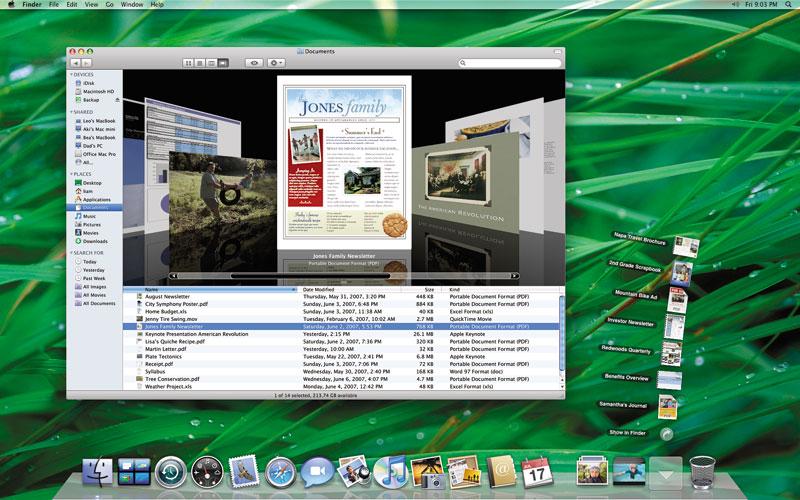
At its developers conference Monday, Apple unveiled a near final version of Mac OS X Leopard, the sixth major release of what the company calls the "world’s most advanced operating system."
"Leopard is the best release of Mac OS X to date, surpassing even Tiger, and will further extend Mac OS X’s leadership as the most advanced and innovative operating system in the world," said Apple chief executive Steve Jobs, Apple’s CEO. "We think current and prospective customers are going to love Leopard, and that it will help make the Mac even more popular."
The next-generation Apple OS includes a completely new Dock featuring Stacks, which can help manage a user’s desktop clutter caused by browser and email downloads. With the click of a mouse, users can instantly fan out the contents of a stack to easily see each item.
Leopard’s Finder has been completely redesigned, adding Cover Flow as an innovative way to quickly browse and locate files and applications. Finder’s new Sidebar simplifies the organization of files on a Mac, and adds easy access to shared Macs and PCs on a home network. Subscribers to .Mac can also use the new “Back to my Mac" feature to browse and access files on their remote Macs over the Internet. Also new in Leopard is Quick Look, a new way for users to instantly preview almost any file, and even play media files, without opening an application.
With its unique ability to let users travel back in time to find deleted files, applications, photos and other digital media, Time Machine offers a compelling new way to protect your digital life. With just a one-click setup, Time Machine automatically keeps an up-to-date copy of everything on the Mac. In the event a file is lost, users can use Mac OS X’s Spotlight to search back through time to find and then instantly restore the file. Time Machine can automatically back up a Mac to an external hard drive connected with a FireWire or USB cable, to a server, or wirelessly to an AirPort Extreme base station with an attached hard drive.
Leopard also includes three new technologies that take full advantage of the latest developments in processor hardware: full native 64-bit support to enable applications to take complete advantage of 64-bit processing while still running side by side with existing 32-bit Mac OS X applications and drivers; easy multi-core optimization and scheduling to take advantage of the latest Intel hardware; and Core Animation, helping developers easily create animated user experiences as amazing as Leopard’s Spaces and Time Machine in their own applications.
Other new features in Leopard include:
- Leopard Mail, offering more ways to customize and add personal style to email than ever before, with more than 30 beautiful stationery designs and layouts that look great on a Mac or Windows PC; Notes, making it as easy to take and organize notes as it is to compose and read emails; To Dos, for creating lists viewed directly in Mail and automatically sync them with iCal; and data detectors that automatically sense phone numbers, addresses and events so they can be easily added to Address Book or iCal;
- Leopard iChat with iChat Theater, letting users present photos, presentations, videos and files in a video conference; Photo Booth effects, enabling users to transform their iChat video in real time with fun distortion and color effects; and video backdrops that allow users to choose any photo or video that makes them appear to be anywhere in the world, or out of it;
- Leopard iCal, introducing powerful group calendaring features based on the open CalDAV standard that make it easy to organize and coordinate schedules with other people;
- Spaces, giving users a powerful new, clutter-free way to create customized spaces on the desktop with only the applications or files needed for each project, and the ability to quickly switch between them with one click of a mouse or keystroke;
- Web Clip, bringing anything that a user wants from a web page to Dashboard as a live widget;
- Boot Camp, making it possible to run Windows natively on Intel-based Macs*; and
- new development tools, including Xcode 3 with a next generation editor; an all new Interface Builder for easier integration of advanced animation effects into an application; simpler debugging; and support for Objective-C 2.0; DashCode, a better way to create new Dashboard widgets without writing a line of code; and Xray, a new application for optimizing application performance.
Pricing & Availability
Mac OS X version 10.5 Leopard is scheduled to ship in October and will be available through the Apple Store, Apple’s retail stores and Apple Authorized Resellers for a suggested retail price of $129 (US) for a single user license. The Mac OS X Leopard Family Pack is a single-residence, five-user license that will be available for a suggested retail price of $199 (US). Volume and maintenance pricing is available from Apple.








 Stephen Silver
 Charles Martin
 Christine McKee
 Malcolm Owen
 Mike Wuerthele









150 Comments
Wow, I am completely underwhelmed. Steve spent 10 minutes talking about freaking Widgets. I mean COME ON. And who is the real beneficiary of all this fluff (most of which was already seen before)? WINDOWS USERS. I'm sorry but where is the new stuff? Hardware wise we haven't gotten anything besides the AppleTV and the iPhone. Way to stay commited to Macs. I'm over it.
The thing that most excites me about today's revelations is the new Apple.com, funny that.
Two things: 1. Aqua still isn't dead. 2. I hope to God Apple has the sense to include iLife and iWork('07/'08) into Leopard.
Wow, I was looking forward to getting home and seeing what new presents were waiting for me. I was like, "That's it?"
Those were the top secret features we've waited so long for? Maybe Steve is training our minds not to expect so much from the keynotes anymore. Safari 3 for Windows. Hmmmffff.
Dear Apple,
You have 51 days to give me a reason to spend another $100 to renew my 5-year-old .Mac membership.
Why did they take the Apple Store down? No new products were offered.
The store has been redesigned. No new hardware surprises.
I like the new "floor" style dock with it's stacks, and the new Finder.
But I am disappointed the beta is not being made available to more developers. It is quite elitist. Not everyone can affort $5000 for a trip to SF, but we need to test our software too...
To be honest with you, I think functionality is once again taking a back seat to appearance. "Stacks" is one of the dumbest damn things they've come up with recently.